Do these 3 things before closing this tab:
1Clear out junk files and repair common Windows errors2Fix the driver behind crashes, sound loss and screen glitches3Repair Windows errors before they cause bigger problemsCash App labels its monthly records Account statements. In the U.S. app, open Profile → Documents & statements → Account statements, choose a year and month, then tap Open. Online, sign in at cash.app/account, open Documents → Account statements, select the year, and click Open beside the month. These paths reflect Cash App’s U.S. English interface retrieved in August 2026; menu names can vary slightly by account, market, or app version.
Find a Cash App statement in the mobile app
- Open Cash App and sign in.
- Tap the Profile icon.
- Select Documents & statements.
- Tap Account statements.
- Select the relevant year.
- Select the month and tap Open.
Cash App’s instructions for this route are published at cash.app/learn/getting-started/is-cash-app-a-bank.
Find a statement on the Cash App website
- Go to cash.app/account and sign in.
- Choose Documents from the left-hand menu.
- Select Account statements.
- Use the dropdown beside the year.
- Click Open next to the month you need.
The website is a useful alternative if the app menu is unavailable or difficult to use.
When does a Cash App statement become available?
Cash App says monthly statements become available during the last five business days of the month. Therefore, a statement for the current month may not appear while that month is still in progress. Cash App does not describe these instructions as an arbitrary custom-date-range export; the documented selector is organized by year and month.
Recommended Free Tools
#1 Best Overall

- [Bill Organizer Mastery]: Manage all your financials with Notewells' "Bill Organizer". This planner is essential for keeping track of subscriptions, invoices, and bill payments, ensuring timely payments every month.
- [All-in-One Financial Solution]: Notewells' planner is the perfect tool for organizing your bills, featuring sections for descriptions, due dates, and payment tracking. Streamline your financial management effortlessly and accurately.
- [Durable and Convenient]: Our "bill payment notebook" includes sturdy spiral binding and a back pocket, perfect for securing receipts and financial documents. Trust Notewells for organized and accessible financial records.
- [Premium Paper Quality]: Our "Financial Planner" features 100 gsm thick paper that prevents ink bleed and ghosting. Notewells guarantees that your financial records will stay clear and legible, preserving your data over time.
- [Stylish Financial Tracking]: Track your payments with style using our waterproof and elegantly designed planner. Notewells' "bill planner" combines practicality with a chic appearance, enhancing your daily finance management.
How to save or print the statement
Cash App’s official instructions confirm how to open a statement but do not establish a universal in-app PDF-download button or file format. After opening it:
- On the website: use your browser’s Print command. In the print dialog, choose Save as PDF when you need a digital file.
- On a phone: use the operating system’s share, print, or save option if Cash App presents one. The controls depend on the device and current app version.
- Before submitting: check that the account holder’s name, statement period, and required transactions are visible. Redact unnecessary sensitive information only when the receiving organization allows it, and never post a statement publicly.
Statement, activity, receipt, tax form, or account details?
| Record | Best use |
|---|---|
| Account statement | A formal record for a monthly or other statement period, such as one requested by a landlord, lender, or agency. |
| Activity or transaction history | Reviewing individual or recent payments, transfers, deposits, and other activity. Cash App’s terms refer to 12-month and 24-month history in the app or at cash.app/account. |
| Payment receipt | Evidence of one payment, transfer, or purchase. Cash App says receipts are available in the Activity section and through the account. |
| 1099-K or other tax document | Tax reporting. Eligible business-account users can find a Form 1099-K and transaction summary in Settings → Documents; see Cash App’s tax information. |
| Account and routing numbers | Providing direct-deposit or electronic-payment details, not proving a statement period. For eligible users, Cash App places them at Money tab → Cash balance → account and routing numbers. |
Cash App’s terms separately describe transaction receipts and account statements: Cash App U.S. Terms of Service.
Rank #2
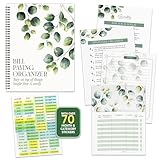
- STAY ON TOP OF EVERY BILL - Trade the pile of papers and missed due dates for calm, organized control. With this bill organizer with pockets, you are ready for every rent payment, utility bill, credit card due date, subscription, and monthly budget.
- NEVER MISS A DUE DATE AGAIN - With clear tables, a starter tips sheet, plus 70+ stickers, this budget planner and monthly bill organizer turns scattered bills into a plan, so payments, receipts, and deadlines stay sorted. Great for budgeting.
- BUILT TO HANDLE DAILY USE - Made with a durable laminated cover, double coil spring binding, and thick pocket pages, this bill paying organizer with pockets stays sturdy. The 14 pockets store receipts, statements, and notes without tearing.
- THE RIGHT SETUP FOR EVERY HOME - Sized at 9x12 inches, this home finance and bill organizer with pockets sits easily on a desk, counter, shelf, or drawer. This undated bill paying organizer is perfect for budgeting, receipts, and tracking expenses.
- WE JUST WANNA MAKE YOU SMILE - Your happiness is our priority. If this bill organizer with pockets ever falls short, we will make it right. Enjoy this undated budget planner and monthly bill organizer ready for every bill, receipt, and budget.
What an account statement may show
An account statement documents activity for a selected period. Depending on the account and document, it may show dates, descriptions, deposits, withdrawals, fees, or balances. Do not assume every statement contains each field; inspect the opened document and use the exact requirements of the organization requesting it.
If your statement is missing
- Confirm that you selected the correct year and month under Account statements, not merely the Activity feed or a tax-document area.
- If the period is the current month, wait until Cash App’s stated last-five-business-days availability window.
- Try cash.app/account in a current browser. Browser extensions, cookies, or compatibility problems can interfere with document pages.
- Sign out and back in, and verify that you are using the Cash App account associated with the activity.
- Update Cash App through your device’s official app store.
- Try the other route: the website if the app fails, or the app if the website fails.
- If the document remains unavailable, use the official Cash App Help Center. Cash App’s U.S. terms list 1-800-969-1940, but confirm the current contact options at the Help Center before calling.
Is a Cash App statement proof of income?
Not necessarily. A statement shows account activity; it does not automatically establish employment or income, and acceptance depends on the requesting organization. Ask whether it wants a monthly statement, pay stubs, tax forms, a bank-verification letter, transaction history, or direct-deposit confirmation. Account and routing numbers identify where deposits can be sent; they are not a statement.
Rank #3

- Effective Budget Plan Book – Take control of your finances with the SUNEE budget account book. This all-in-one budget planner allows you to plan and track your income, expenses, savings, and financial goals. Its intuitive layout and easy-to-use sections help you stay organized and make smart decisions to reach financial success. Our financial planner also included a comprehensive guidebook with valuable tips and instructions to help you get the most out of your budgeting planner.
- Full-Page Calendars – Each month’s full-page calendar provides plenty of space to track paydays, bills due dates, appointments, and important events. No more cramped boxes or tight writing areas, you can easily plan and organize your schedule at a glance.
- Colorful Pages Layout and Tabs – This vibrant budget planner features a user-friendly design for easy navigation and organization. Each month includes dedicated budget pages to set financial goals, track income, and plan expenses. Additional sections like debt trackers, savings goals, and bill payment trackers make managing your finances a breeze. The colorful backgrounds on each page offer clear, instant visibility.
- Bonus 4 Stickers and Convenient Design – This monthly budget planner is built for convenience and durability. Water-resistant cover protects against spills, while the elastic band keeps everything secure, and the dual-sided pocket offers extra storage. Plus, we’ve included 4 adorable sticker sheets to personalize your planner and make budgeting more enjoyable. Experience a budget planner that combines practicality with lasting quality.
- UNDATED DESIGN & 1 YEAR USE - Undated finance books start with 1 page-financial goals, 1 page-Mind Map, 1 page-Financial Strategy, 1 page-Tactics, 2 pages-Important Dates, 4 pages-Bill Tracker, 4 pages-Saving Tracker, 8 pages-Debt Tracker, followed by 12 Months(10 pages per month, 1 unique color for each month). 2 pages-Christmas Budgeting, 2 pages-Yearly Summary, 2 pages-Check Register and 12 pages-Notes(dotted). It is UNDATED, so you could start at any time, suitable for 1 year use.
Cash App is not a traditional bank
Cash App describes itself as a financial-services platform rather than a bank, with banking services supplied through partner banks. That is why the first place to look for a Cash App account statement is Cash App’s own app or website—not a physical branch or a partner bank’s ordinary online-banking portal. Availability can differ by account type, product, identity-verification status, market, and statement period.
Independent reader supportYour contribution helps us test, update, and keep practical guides available for everyone.Frequently asked questions
Can I get a statement for one specific month?
Yes. Select the year and open the desired month in Account statements on the app or website.
Rank #4

- EASY TO MANAGE - Use this bill payment tracker notebook for tracking your personal expenses. Never miss another payment again, keep track of all your bills and expenses in one place.
- BILL TRACKER NOTEBOOK FEATURES - Budget planner and monthly bill organizer include: Bill payments checklist, to be paid, payment, due date, paid date, amount due, amount paid, blance and notes. This bill payment organizer will help you to track your bill payments through last years.
- HIGH QUALITY - The bill payment tracker spiral notebook size of 5.8" x 8.5", just the perfectly size to fit in your backpack, purse or laptop case. Bill payment tracker monthly organizer is used to high quality 100gsm pure white paper, elastic band and a back pocket for extra space. it comes with 3680 entry lines (29 lines per page), make sure you have enough space to take control of your finances.
- MANAGE YOUR FINANCES & SUCCEED - Use this bill planner and organizer is perfect for your small business or your personal finance, You will be able to easily analyze your financial activities and quickly prepare accurate financial statements. Great for small business owners, personal use or for family expense tracking.
- THE PERFECT GIFT - Use monthly bill payment log book for your personal or business finances, give it to your friends, family as a gift for Birthday| Easter|Children's Day|Halloween|Thanksgiving|Christmas|Back to school and New Year's Day.
Why can’t I see the current month?
Cash App says monthly statements are available during the last five business days of the month, so an in-progress period may not yet be listed.
Is a Cash App receipt the same as a statement?
No. A receipt documents one transaction; an account statement covers a selected statement period.
Best Value

- MASTER YOUR FINANCES WITH EASE: Track your spending, manage your monthly bills, and budget effectively with Current’s bill paying organizer book, featuring 14 spacious pockets and 32 label stickers to keep every receipt and statement in its place
- DURABLE DESIGN FOR LONGTERM USE: Crafted with thick, high-quality paper stock, a coated cover, and a sturdy spiral bound spine, this organizer withstands daily use without tearing, making it a reliable companion for your financial journey year-round
- STAY ON TRACK WITH HELPFUL TIPS: Includes a personal finance tips section filled with practical suggestions to simplify budgeting and optimize your savings, plus large pockets to store tax documents and important bills for easy year-end reference
- CONVENIENT & FUNCTIONAL SIZE: Perfectly sized at 9" x 12", this organizer fits seamlessly into your home office setup while providing ample room for notes, receipts, and monthly tracking, making bill management both efficient and clutter free
- AMERICAN MADE EXCELLENCE: Carefully crafted in the USA, Current’s financial planners come in a variety of stunning patterns, colors, and styles to reflect your personal taste, turning a chore into an enjoyable part of your weekly routine
Where are Cash App tax documents?
Eligible business-account users can access a Form 1099-K and transaction summary through Settings → Documents. Tax rules and reporting thresholds can change, so consult the current Cash App information and IRS guidance for tax decisions.
What if the labels in my app look different?
Update the app, check the website route, and look for the equivalent Documents or Account statements area. Cash App can change navigation by version, account, or market.
Quick Recap
Product prices and availability are accurate as of the date/time indicated and are subject to change. Any price and availability information displayed on Amazon at the time of purchase will apply.




