Canceling Mweb is usually not immediate, and stopping use of the service does not stop billing. For active Mweb Fibre and LTE sign-ups, Mweb’s current help guidance generally requires one calendar month’s notice through the Mweb Online Account. Mweb also states that Fibre cancellations carry a standard R999 termination fee.
A refund is not automatic just because you did not use the service. Your strongest refund case is usually an overcharge after the confirmed termination date, a duplicate payment, an unactivated service, or a remaining account credit after valid final charges have been deducted.
Before canceling: identify exactly what you have with Mweb
“Cancel my Mweb account” may mean canceling one product rather than closing every Mweb service. Review the Online Account and list each active service, including:
- Fibre internet;
- LTE or another wireless service;
- Month-to-month or fixed-term connectivity;
- 30-day prepaid or recurring Vuma Reach Fibre;
- Mweb email or mailbox services;
- Domains and hosting;
- Security, streaming, VPN and other add-ons; and
- A rented or free-to-use router.
Check whether each item is fixed-term, month-to-month, prepaid or billed separately. The product terms and your application or contract can change the result.
Quick wins for a faster PC:
Repair Windows errors before they cause bigger problemsFix Now →Scan for outdated or missing drivers - takes under a minuteDriver Scan →Clear out junk files and repair common Windows errorsFree Scan →#1 Best Overall

- Automatic Router Rebooter / Reset - Stop manually restarting your router! Automate the process to ensure highly reliable internet connection uptime
- Constantly Monitors Router and/or Modem Internet Health. Keep Connect provides 24/7/365 protection to ensure that your smart home and connected devices are always online and available.
- Notifications - Free Texts or Emails from Keep Connect notifying you of detected eventsif you choose to enter your phone number/email. You may also choose No Notifications.
- Perfect for Smart Home Reliability - Schedule Periodic Resets to keep your connection fresh and fast.
- Premium Cloud Services App Available (iOS App Store and Google Play Store) - Our Premium Keep Connect Cloud Services platform allows using our Online/Mobile App to monitor many locations in one place as well. Cloud Services allows remote management of devices at all locations as well as heartbeat monitoring of your Keep Connects to notify you in the event of an ISP internet outage at one of your sites.
How to cancel Mweb online
- Sign in to your Mweb Online Account or use the Mweb App.
- Review your active services, contract status, invoices and payment details.
- Select the specific product you want to cancel and submit the cancellation notice.
- Save the confirmation screen, reference number and any email or SMS confirmation.
- Ask Mweb to confirm the effective cancellation date and final balance in writing.
If the portal does not work, contact Mweb Billing or use the Mweb App’s live chat. Mweb lists Billing at 087 700 2121. Published billing hours are Monday to Friday, 07:30–20:00; weekends and public holidays, 08:00–18:00. Do not rely only on a telephone conversation: obtain written confirmation and keep screenshots showing any failed cancellation attempt.
Information to include in a written request
- Account holder’s full name;
- Mweb customer or account number;
- Product to be canceled;
- Service address;
- Requested cancellation date;
- Registered email address and mobile number;
- The relevant contract or product type; and
- A request for the final invoice, termination charges, router-return instructions and any credit or refund.
How much notice does Mweb require?
Mweb’s current help guidance for active Fibre and LTE sign-ups describes a one-calendar-month cancellation policy. The service normally remains active and billable during the notice period unless Mweb confirms an earlier termination.
Mweb’s general terms separately say that ordinary month-to-month agreements are normally terminable on at least one calendar month’s notice, with termination taking effect under the applicable calendar-month rule. Product-specific terms can override the general position.
Do not calculate the date solely from the day you submit the request. The result may depend on the product, the recorded notice date, the billing arrangement and the applicable terms. A notice submitted late in a billing cycle may result in another month’s charge. Use Mweb’s written effective date as the controlling date.
What’s actually slowing this PC down?
Pick the symptom - the matching free tool is one click away.
Mweb cancellation fees in 2026
Fibre’s R999 termination fee
Mweb’s current cancellation and hardware-return guidance states that a R999 standard termination fee applies to Fibre cancellations, regardless of how long the Fibre service has been active. This is a published Mweb help-centre statement about Fibre; do not assume the same fee applies to LTE, email, domains, hosting or every other Mweb product.
Early cancellation of a fixed-term contract
Under Mweb’s general terms, a natural-person customer who ends an initial fixed-term agreement early can remain liable for amounts owed up to cancellation, together with a reasonable cancellation penalty connected with the remaining term.
The Fibre-specific terms give a Vumatel 12-month contract as an important example. Canceling within the first 12 months may leave the customer liable for outstanding pro-rata installation and connection amounts, as well as remaining monthly subscription amounts, subject to the applicable agreement and law.
Other possible final charges
Your final statement may include:
- Subscription charges for the notice period;
- Unpaid invoices and arrears;
- Installation, hardware or order-processing charges;
- Usage or out-of-bundle charges;
- Router replacement charges;
- Returned-debit-order fees; and
- Product-specific domain, hosting or add-on charges.
Mweb’s general terms state that a returned debit order attracts a R50 including VAT processing fee.
Rank #2

- Operation method:1.Connect your router/optical modem/other DC voltage product to this product, and then connect your device power adapter cable.2.The time to counting when power is on, the default is 24 hours, fully automatic cycle For example, if you need it to automatically restart at 00:00 every night, then turn it off and on again at 00:00. It power off/on every 24 hours.
- In , it supports all DC5V 9V 12V 24VDC devices, such as: network routers, Fiber Modem, optical cats, no restrictions on .
- Connector type: DC5.5 female, DC5.5 male
How to return your Mweb router
If Mweb supplied a free-to-use or rented router, return it within 20 days after service deactivation. Include the router, power supply, cables, manuals and any other supplied accessories. Add your customer or account number and other identifying information so Mweb can allocate the parcel correctly.
Courier costs are generally the customer’s responsibility. Mweb’s published hardware guidance says missing or late equipment can result in a charge for the router’s retail value; after the relevant charge, ownership may transfer to the customer. Missing cables or manuals can also trigger charges.
Keep the complete evidence trail:
- Courier receipt and tracking number;
- Photos of the router, serial number, accessories and parcel;
- Proof of delivery; and
- Mweb’s acknowledgment that the equipment was received and allocated to your account.
Use the return instructions in Mweb’s current hardware-return guidance. The Nology return locations are for hardware only, not for billing or cancellation support.
Can you get a refund from Mweb?
Mweb’s general terms do not promise a general pro-rata refund of unused monthly internet service. Unplugging the router or stopping use during a notice month does not, by itself, create a refund entitlement.
Free tools Windows power users keep installed
One-click scans. No signup required.
Cases with a stronger refund argument
- Mweb debited you after the confirmed effective termination date.
- The same invoice or amount was paid twice.
- You were charged for a service that never activated.
- A credit remains after all valid final charges are deducted.
- A qualifying hardware or software purchase was returned under Mweb’s online-store terms.
- Mweb acknowledged a billing error or service credit.
Cases where a refund is less likely
- You simply stopped using the service before formal cancellation.
- You canceled a fixed-term agreement early.
- You forgot to submit cancellation notice.
- You returned the router but still owed notice-period or termination charges.
- You canceled the bank debit order without canceling the Mweb agreement.
Request an itemized final statement. Reconcile the debit date, invoice period, notice charges, Fibre termination fee, router charge, arrears and any duplicate payment before disputing an amount.
How to request a refund or billing correction
Make the request in writing and identify the exact disputed amount rather than describing every debit as unauthorized.
Subject: Mweb cancellation confirmation and refund request — account [number]
I requested cancellation of [product] on [date]. Please confirm the effective termination date and provide the final account statement. I dispute the debit of R[amount] dated [date] because [specific reason]. Please apply any valid credit and refund the remaining balance to my original payment method, or explain why it will be retained as account credit.
Outdated Drivers Are Slowing You Down
One free scan finds every outdated or missing driver and matches the right update for your exact hardware.Free scan · exact hardware matchPC Slower Than It Used to Be?
A free scan shows the junk files, broken settings and background clutter dragging Windows down - then fixes them in one click.Free scan · Windows 10 & 11Special offer. See more information about Outbyte and uninstall instructions. Please review EULA and Privacy policy.Rank #3
 ESTODAL Router Rebooter for Automatic, Cycle Timer with 12h 24h 72h Adjustable Intervals, Maintenance Tool to Overheating & Clear Cache, for Router & Modem, 1pc
- 【Automatic Maintenance】 seamless connectivity with our smart router rebooter This device automates the power cycling process, regularly clearing your router ' s cache to congestion and maximize bandwidth efficiency It ’ s the essential for maintaining a stable, high-speed internet connection without manual intervention
- 【Three Adjustable Timing Intervals】 Tailor your maintenance to your specific needs with our 12H, 24H, and 72H adjustable cycles Whether you require a daily or a bi-weekly reset, the simple toggle allows you to choose the frequency that maintains your device ' s performance while freezes
- 【Prevent Overheating & Hardware Fatigue】 Constant can lead to router overheating and hardware degradation Our automatic restarter provides a scheduled " rest " for your equipment, effectively reducing thermal buildup and extending the of your modem or router, ensuring consistent reliability for
- 【Ideal for Heavy Users & Remote Work】 Specifically designed for remote workers, professional gamers, and smart homes with multiple connected devices This rebooter ensures that your critical online activities, such as video conferences or competitive gaming, are never interrupted by preventable lag or hardware crashes
- 【Simple Plug-and-Play Setup】 No complex software or configuration required Simply connect the 12cm cord between your power adapter and the router The integrated light provides real-time updates, allowing you to enjoy automated power cycling and a smoother within seconds of installation
Please also confirm every final charge, the router-return status, any refund reference and the expected processing date. Attached are my cancellation confirmation, invoice, bank statement and supporting correspondence.
Attach the cancellation confirmation, relevant invoices, bank statement, payment receipts, router tracking information and prior correspondence. Ask Mweb to confirm whether any credit will be refunded or retained on the account. Do not assume a connectivity refund will follow the online-store timetable or be paid to a particular bank account.
What if Mweb keeps charging you?
- Compare each debit with Mweb’s written termination date.
- Request an itemized explanation of any debit after that date.
- Dispute only the incorrect amount and ask for a correction or refund.
- If unresolved, email [email protected].
- Keep the complete evidence trail and wait for Mweb’s stated complaint-handling period before escalating further.
Mweb’s general terms say a complaint should include your name, account number, date of the problem and a description. A billing complaint should also identify the disputed bill, amount, reason for dispute and supporting documents.
Mweb says it will acknowledge receipt within three working days and provide a written response aimed at resolution within 14 working days, or a longer reasonable period where a supplier or third party is involved.
Do not cancel the debit order first
Canceling a bank debit order stops or changes a payment mechanism; it does not necessarily cancel the underlying Mweb agreement. You may still owe notice-period charges, a termination fee, arrears or equipment costs. A returned debit can also trigger the R50 fee and collection activity.
Submit the formal Mweb cancellation first, obtain the effective date and final statement, then ask Mweb when the debit order should be amended or stopped. Mweb’s terms state that debit-order authorization continues until termination or until amounts owed have been discharged.
Independent reader supportYour contribution helps us test, update, and keep practical guides available for everyone.Special Mweb cancellation cases
Vuma Reach recurring Fibre
Mweb’s Fibre terms distinguish between prepaid and recurring Vuma Reach:
- A 30-day prepaid service expires automatically after 30 consecutive days.
- A monthly recurring service continues until Mweb receives cancellation instructions.
- Recurring Vuma Reach cancellation requires 15 days’ notice before the next payment or debit date, according to the Fibre terms.
This is a product-specific exception to the broader one-calendar-month guidance. Vuma Reach service-level issues also do not necessarily result in downtime credits under those terms.
The Tool Desk
Outbyte Driver Updater FREEScan for outdated or missing drivers - takes under a minuteDriver Scan →Outbyte PC Repair FREEClear out junk files and repair common Windows errorsFree Scan →Rank #4
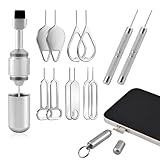
- Dual Head Design: Not only a SIM card tray removal tool, but also a cleaning brush. The dual-head design can be freely switched for use
- High-density Brush: High-density soft bristles are closely arranged, easily sweeping away dust, and are soft and clean without damaging the device. Easily clean the dirt on the output port of the earphone and sound output port, charging port of the mobile phone
- Practical and Multi-function Tool: SIM card removal tool is suitable for all phone models and good SIM card eject tools that allow you to easily open, remove and eject the SIM card tray. It can also reset devices such as routers with one click
- Portable Keychain: Lightweight, compact and portable, it can be hung on a keychain orAirpods case or stored in a pocket or wallet, making it a very convenient EDC small item tool with multifunctional uses to meet your all needs
- Precision Alloy Casting: SIM card removal tool is made of high-quality alloy metal steel, which is lightweight and difficult to bend. (Note: The SIM card removal tool is small in size and has a pointed bottom; Keep them away from to avoid accidental swallowing or accidental injury.) Threaded locking, sturdy and durable, with pressure-resistant protection guarantee
LTE and wireless
Mweb’s current help guidance includes active LTE sign-ups in its calendar-month cancellation guidance, but review your LTE agreement and obtain Mweb’s written effective date. Do not automatically apply Fibre’s R999 fee to LTE.
Online-store hardware and software
Connectivity cancellation and an online-store return are governed by different terms. Mweb’s online-store terms describe a seven-day ECTA cooling-off period for some electronic transactions, subject to conditions such as product use and original packaging. They state that qualifying software and hardware refunds are generally made within seven days as Mweb account credit unless otherwise requested.
Mweb’s general terms separately describe a five-business-day written cancellation right without reason or penalty for certain agreements resulting from a direct approach or electronic transaction. Whether either provision applies depends on the transaction type, how it was concluded and whether the product was used. Quote the product and transaction date when asking Mweb to apply a cooling-off right.
Domains, hosting and email
Domain and hosting services can have separate renewal dates, charges and cancellation rules. Mweb’s domain terms indicate that annual registrar or upstream-provider fees paid in advance may not be refundable on termination.
Do these 3 things before closing this tab:
1Clear out junk files and repair common Windows errors2Fix the driver behind crashes, sound loss and screen glitches3Repair Windows errors before they cause bigger problemsBefore canceling:
- Check domain renewal dates and transfer the domain if you want to keep it.
- Export website files, databases and important email.
- Confirm whether email, hosting and Fibre are separate products.
- Disable auto-renewal in writing.
- Change banking, government and other account recovery addresses that use an Mweb mailbox.
Mweb’s general terms say it may delete customer data from its servers after termination, subject to legal requirements. Do not wait until after closure to retrieve information you need.
Business accounts
Business and other juristic-person agreements can be treated differently from consumer agreements. Mweb’s general terms state that a business generally cannot cancel during the initial fixed term except in specified circumstances, such as a material unremedied Mweb breach, and may terminate during a renewal period on the stated notice. Check the signed business agreement before sending notice.
Moving house or suspended service
Moving or requesting a Fibre transfer is not automatically the same as cancellation. Check whether you remain in a fixed term and whether a new installation or line-provider charge applies.
If an account is suspended for non-payment, Mweb says the customer has 30 days to pay and restore service. If it remains unsettled, Mweb may cancel it and apply the standard cancellation rules and charges.
Quick Recap
Final cancellation checklist
- Review every active Mweb product.
- Check fixed-term, month-to-month, prepaid and recurring status.
- Submit cancellation through the Online Account or obtain written assistance from Billing.
- Save the confirmation, reference number and effective date.
- Budget for notice charges and any applicable Fibre termination fee.
- Return the router and accessories within 20 days of deactivation.
- Keep tracking, photos and proof of delivery.
- Download invoices, email and website data before access ends.
- Audit the final statement and each debit.
- Request any legitimate credit or billing correction in writing.
- Escalate unresolved complaints to [email protected] with evidence.
Product prices and availability are accurate as of the date/time indicated and are subject to change. Any price and availability information displayed on Amazon at the time of purchase will apply.




