The Tool Desk
Outbyte PC Repair FREEClear out junk files and repair common Windows errorsFree Scan →Outbyte Driver Updater FREEScan for outdated or missing drivers - takes under a minuteDriver Scan →Most current MacBooks do not have a built-in Kensington, Noble or Nano security slot. To tether one to a desk, you normally need two matched parts: a MacBook-specific adapter that creates a lock slot and a cable lock whose head fits that adapter. For most offices, classrooms, libraries and shared desks, the strongest general-purpose choice is a model-specific Ledge-style adapter paired with a compatible T-Bar cable lock.
Choose the adapter by exact model, screen size, generation and chassis—not just by “M-series” processor. Apple’s current specifications list USB-C/Thunderbolt, MagSafe, HDMI, SDXC and other working ports, but not a security slot on current Air or Pro models (13-inch MacBook Air, 15-inch MacBook Air, 14-inch MacBook Pro). A lock is a deterrent and delay mechanism, not a guarantee against determined theft.
Quick recommendations
The table uses U.S. vendor price signals observed on August 16, 2026. Prices can change, and some listings are for an adapter only rather than a complete adapter-and-cable kit.
| System | Best for | Compatibility to verify | Attachment | Interface | Operation | Observed price | Main drawback |
|---|---|---|---|---|---|---|---|
| Model-specific Ledge adapter plus cable | Most individual owners and shared desks | Exact Air or Pro size and generation | Mechanical, model-specific | Standard T-Bar | Keyed or combination cable | About $70 for some M3/M4/M5 listings | Requires precise model selection |
| MacBook Air Ledge | 13-inch or 15-inch Air | M2–M5 versions listed by the manufacturer | Mechanical | T-Bar | Keyed or combination | Varies by configuration | May not fit a case, sleeve or stand |
| Universal adapter | Mixed-device fleets or unusual models | Surface, case and placement | Universal mechanical design | Explicitly supported T-Bar models | Keyed or combination | About $35–$40 for the adapter | Less tailored fit |
| Adhesive security plate | Occasional, lower-risk use | Adhesive compatibility and surface condition | Adhesive | Product-specific | Keyed or combination | From about $17; some plate-plus-lock setups about $45 | Residue, aging and peel-off risk |
| Locking enclosure or mount | Kiosks, counters and permanent stations | Device dimensions and ventilation | Rigid enclosure or desk mount | Enclosure-specific | Usually keyed or controlled access | Not stated | Costly and less portable |
See the Maclocks MacBook directory, MacBook lock directory and the MacBook Air Ledge listing for current model and configuration details.
Do these 3 things before closing this tab:
1Clear out junk files and repair common Windows errors2Scan for outdated or missing drivers - takes under a minute3Repair Windows errors before they cause bigger problems#1 Best Overall
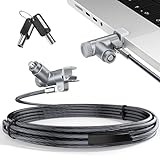
- MADE FOR MACBOOK PRO (2021–2024 14"/16") — Locks to the MacBook Pro bottom-side vent slot without blocking ports or speakers. The rotatable lock housing and flexible 6.56 ft cable make it easy to secure your Mac in offices, cafés, classrooms, and shared workspaces.
- RELIABLE ANTI-THEFT PROTECTION: This laptop locking cable uses a secure keyed lock system to deter grab-and-go thefts in offices, schools, cafés and libraries. Secure your MacBook Pro with a simple turn of the key — no codes to forget. Includes two keys for backup.
- CUT-RESISTANT STEEL STRENGTH: The durable cut-resistant steel cable helps resist cutting and prying, giving you everyday peace of mind in the office or at home. A soft silicone contact point protects your MacBook Pro’s aluminum finish from scratches while you attach, lock and unlock.
- EASY, FLEXIBLE SETUP: The rotatable head and cable make it easy to secure a MacBook Pro even in tight desk spaces, while the keyed laptop lock means no combination to forget. Designed for public spaces, labs and hot desks, this tool-free setup keeps daily use simple for shared devices.
- LIGHTWEIGHT & PORTABLE: Packs small in a bag for hybrid work, travel and temporary workstations. Use this laptop security cable to secure your MacBook Pro in cafés, classrooms, coworking spaces or hotel rooms; the laptop lock cable offers versatile reach and tidy routing in shared spaces.
Why a MacBook needs an adapter
A conventional business laptop may have a factory security slot. Current MacBook specifications do not list one. MagSafe is designed to release for charging safety; USB-C, Thunderbolt, HDMI, SDXC and the headphone jack are functional ports, not attachment points. Never force a lock into a port or loop a cable through a connector.
An adapter creates a slot without asking you to modify the aluminum chassis. The Ledge product pages describe model-specific versions that use supplied hardware and accept standard T-Bar cable locks (adapter details). The manufacturer’s installation and security statements are product claims, not independent durability tests.
Pick the right lock type
Model-specific mechanical adapter
This is the best default for repeated use. It is shaped for a particular chassis, generally looks cleaner than a plate and can remain installed while a compatible keyed or combination cable is attached. Confirm whether your sleeve, protective case, dock or stand still fits.
Universal or adhesive plate
A universal adapter or adhesive plate can cover mixed fleets and older designs at lower cost. The bond becomes part of the security chain: heat, dust, age and peeling force can weaken it. A plate attached to a removable case protects the case, not necessarily the MacBook. Keep plates clear of vents, feet and ports.
Rank #2

- Protect laptops from theft. Designed for laptops with no dedicated lock slot. Alternative to Kensington Locks.
- Works with Macbooks, Surface, Dell, Lenevo and all other major laptops, tablets and notebooks that have a 3.5mm audio port (headphone / AUX port)
- Extremely durable cut resistant steel cable to tether to to desks, tables, or any fixed structure
- 1.7 metre cable length providing both flexibility and convenience in cable management
- Resettable 4-digit combination lock with 10,000 possible combinations. Easy flick switch to lock and unlock for fast setup.
Enclosure or locking mount
For a retail counter, kiosk, reception desk, classroom station or unattended presentation computer, a rigid enclosure or desk mount controls the whole device and can provide cable management and tamper resistance. It costs more, limits portability and requires checks for ventilation, ergonomics, service access and warranty implications.
Understand the lock-head standards
“Laptop lock” is not one universal interface. A Ledge adapter is described as compatible with standard T-Bar cable locks. Kensington also sells products for different slot geometries, including standard K-Slot and Nano designs, while Noble Wedge is another physical standard (Kensington security categories). A NanoSaver, Wedge or other cable will not fit merely because its packaging says Kensington-compatible.
Read the adapter instructions for the exact interface before buying the cable. The complete chain is adapter, lock head, cable, anchor and furniture; the strongest branded cable is useless if its head does not seat in the adapter.
Recommendations by use case
Best overall for most MacBook owners
Buy the Ledge-style adapter made for your exact model and pair it with a T-Bar cable of suitable length. This balances fit, repeated use and portability better than a generic plate. The M4 lock listing and related Maclocks pages show model-specific configurations; verify what the displayed price includes.
Recommended Free Tools
Rank #3

- Computer lock for HP, Lenovo, Acer, Asus and other brands; not compatible with Dell or Alienware (see part # K68008WW)
- Resettable 4-wheel Number code with 10, 000 possible combinations. Push-button design for one-handed engagement to easily attach lock
- 6’ long carbon steel cable is cut-resistant and anchors to desks, tables, or any fixed structure
- Attaches to laptops, desktops, TVs, monitors, hard drives, docking stations, projectors or any other device featuring a Kensington standard size security slot
- Independently verified and tested for industry-leading standards in torque/pull, foreign implements, lock lifecycle, corrosion, key strength and other environmental condition
Best for MacBook Air
Use the Air-specific Ledge version and distinguish 13-inch from 15-inch chassis. The manufacturer lists M2, M3, M4 and M5 Air variants (Air compatibility). Processor branding alone is not enough.
Best for MacBook Pro
Choose the Pro adapter for the exact 14-inch or 16-inch chassis and generation. A 13-inch Pro, where supported, uses an older chassis-specific fit; do not assume it shares an adapter with a 14-inch model. Product listings include several Apple silicon generations and M5 families (Pro and adapter range).
Best for organizations and fleets
Keyed-alike cables let an administrator operate several devices with one key system. Record key assignments, retain spares and establish a replacement process. Combination locks avoid key distribution but require controlled code handling.
Best budget option
A universal adapter or adhesive plate can be sensible for occasional, lower-risk use when a model-specific part is unavailable. Treat the attachment surface, case compatibility and adhesive age as explicit risks rather than assuming the lower price provides equivalent protection.
What’s actually slowing this PC down?
Pick the symptom - the matching free tool is one click away.
Rank #4

- The Anchor Adapter adds a Security Lock Slot to your laptop. It's designed for laptops that don't already have a built-in security slot.
- Works with Macbooks, Surface, Dell, Lenovo and all other major laptop brands
- Simply plug the Anchor Adapter into the 3.5mm Audio Port (Headphone Jack) and turn the screw to install. Then attach your laptop lock to protect your device
- The lock slot is 7mm x 3mm and is compatible with Standard Size T-shaped Bar cable locks. Multplx compatible lock sold separately
- Patented design, it doesn't damage or alter the laptop's body unlike adhesive alternatives
Best for permanent installations
Use a locking enclosure, desk mount or kiosk system when the Mac remains in one place for long periods. A portable cable is usually the wrong tool for a high-value, unattended station with no trustworthy anchor.
MacBook compatibility checklist
| MacBook | What to verify before ordering |
|---|---|
| MacBook Air 13-inch | Year or M-series generation and exact chassis; current Air Ledge listings cover selected M2–M5 versions. |
| MacBook Air 15-inch | 15-inch chassis and generation; do not use the 13-inch adapter. |
| MacBook Pro 13-inch | Older chassis-specific compatibility; never infer fit from the Pro name alone. |
| MacBook Pro 14-inch | Exact generation and adapter version. Apple lists the 14-inch M5 as introduced in 2025 (Apple specifications). |
| MacBook Pro 16-inch | Exact generation and adapter version. Apple lists M5 Pro and M5 Max 16-inch models as 2026 products (Apple specifications). |
| Intel MacBook | Product-specific fit; older designs may need a different adapter. |
| MacBook Neo or another 2026 model | Verify separately; do not infer compatibility from the MacBook branding. |
Apple’s model documentation remains the authoritative starting point for identifying the computer: Mac specifications.
Keyed or combination?
| Type | Best fit | Advantages | Trade-offs |
|---|---|---|---|
| Keyed | Schools, offices, libraries and managed fleets | No code to remember; keyed-alike options can simplify administration | Lost keys, replacement logistics and possible master-key costs |
| Combination | Individuals, conferences and temporary shared spaces | No physical key; easy to hand to authorized users | Codes can be observed or shared; reset and recovery procedures vary |
Maclocks lists universal keyed and combination cables around $30 and some model-specific lock packages around $60–$70 in the observed U.S. listings (device listings). Treat these as dated list-price signals, not guaranteed checkout prices.
Install and anchor the lock correctly
- Identify the exact MacBook model, screen size and generation.
- Check whether the adapter is designed for a bare MacBook or a particular case.
- Shut down or close the computer and place it on a stable, protected surface.
- Position the adapter exactly as shown in the manufacturer’s instructions.
- Install the supplied hardware with the supplied tool or specified screwdriver.
- Tighten only to the stated specification. Overtightening can damage finishes or thin chassis hardware.
- Insert the compatible T-Bar lock head and confirm it is fully seated in the locked position.
- Loop the cable around an anchor that is genuinely fixed to the building or heavy furniture.
- Open and close the lid, connect power and check ports, vents, feet and trackpad clearance.
- Test locking and removal before leaving the Mac unattended.
What counts as a useful anchor?
- It is permanently attached to the building or heavy furniture.
- The laptop cannot simply be lifted over or slid around it.
- It cannot be removed as a monitor arm, accessory, chair part or loose table fitting.
- The cable route does not create a trip hazard or pull the laptop off the desk.
Warranty and installation caution
The adapter manufacturer says its design does not require adhesive or alteration to the MacBook and provides warranty-related guidance (manufacturer FAQ). That is not a binding Apple warranty determination. Review Apple’s current warranty terms and ask Apple or an authorized service provider if the issue matters. Damage caused by incorrect installation or an incompatible accessory may be treated differently from a manufacturing defect.
Crashes, No Sound, or Screen Glitches?
Random freezes, missing sound and display glitches usually trace back to one bad driver. Find and replace yours safely.Free scan · under a minuteWindows Errors? Fix Them Before They Spread
Repair common Windows errors and clear accumulated junk for a smoother, more stable PC - no reinstall needed.Free scan · no reinstallBest Value

- KEYLESS CIPHER LOCK: The resettable 4-number combination lock offers 10,000 possible codes. An individual can select their own code--easy to remember and no lost keys
- 6 FOOT COMPUTER LOCK: Galvanized wire rope and hardened stainless steel, so this laptop security lock cable is anti-cut and high security. Suitable for 3*7mm keyholes
- COMPATIBILITY NOTICE: The following models cannot be used: Lenovo U41 / U31 / M41 / S41 / K41 / Ideapad series / Flex3 series; Acer Aspire V Nitro/Chromebook R13; Dell XPS13/SPX13 / 7000 / M3800 / Alienware / Insprion 7000/Inspiron 7779 with square keyhole; Apple Macbook Pro models released after 2014 (newer Macbooks are not compatible)
- CHANGE PASSWORD INSTRUCTIONS: The preset combination is 0-0-0-0. To set your own combination, use a small flat-head screwdriver or similar object to push in screw (Bottom of password lock) and rotate clockwise to vertical position. Set your new combination, then rotate the screw counter-clockwise back to its original horizontal position. The new combination has now been saved. Make note of the new combination as it cannot be reset
- TESTING PROCEDURE: Test the combination before attaching the lock to your Notebook by scrambling the combination and pushing in turn, then return to the newly set combination and check that locking button depresses completely
What a laptop lock can—and cannot—stop
A tether can deter a grab-and-run theft and add delay in a shared workspace. It cannot guarantee protection if someone cuts the cable, defeats the adapter, removes the anchor or carries away the desk. Do not rely on claims such as “tamper-proof” or “extremely secure” without independent testing; current product evidence is primarily manufacturer-provided.
A lock also does not protect data after someone gains possession of an unlocked Mac. Enable FileVault, use a strong login password, set automatic screen locking, turn on Find My, maintain backups and use mobile-device management (MDM) for organizational fleets.
When a cable lock is the wrong solution
- You have no fixed, trustworthy anchor.
- The Mac must travel constantly and the adapter interferes with bags or sleeves.
- The device is outdoors or in a setting where a cable can be cut unnoticed.
- A thick case prevents the adapter from seating correctly.
- You need protection for a permanently installed, high-value computer; use an enclosure or supervised station.
- Your main concern is confidential data rather than physical removal; prioritize encryption, access control and device management.
Common buying mistakes
- Ordering a Kensington cable without confirming the adapter and lock-head geometry.
- Confusing 13-inch and 15-inch MacBook Air models.
- Assuming every M-series MacBook shares one chassis.
- Buying an adapter without a cable, or a cable without an adapter.
- Anchoring to a movable chair leg or loose desk accessory.
- Using MagSafe, USB-C, HDMI or the headphone jack as a security attachment.
- Putting an adhesive plate on a removable case and assuming the MacBook itself is restrained.
- Failing to check lid movement, ventilation, feet and port access.
- Sharing a combination publicly or leaving a key in the lock.
Alternatives and supporting controls
For kiosks, retail counters and reception areas, compare a rigid mount or enclosure from vendors such as Compulocks rather than a portable cable. For mixed fleets, universal plates may simplify inventory but require stricter adhesive inspection. Asset tags, locked storage when devices are not in use, insurance, inventory audits and supervised work areas reduce exposure alongside a physical lock.
Find My helps locate a missing Mac, while FileVault and automatic locking reduce data exposure; neither substitutes for a sound physical anchor. Organizations should combine the hardware with MDM policies, rapid account disablement and documented key or combination control.
Buying rule
Buy the adapter first by exact MacBook model, screen size, generation and chassis. Then buy only the cable whose lock head the adapter explicitly supports. Select keyed or combination operation based on who manages the device, and spend more on an enclosure or supervised installation when the anchor or threat environment makes a portable cable inadequate.
Quick Recap
Product prices and availability are accurate as of the date/time indicated and are subject to change. Any price and availability information displayed on Amazon at the time of purchase will apply.




