Do these 3 things before closing this tab:
1Clear out junk files and repair common Windows errors2Fix the driver behind crashes, sound loss and screen glitches3Repair Windows errors before they cause bigger problemsShort answer: 256GB is the safer choice for most people buying a new smartphone in 2026, particularly if they plan to keep it for four or five years. It gives you twice the advertised capacity, more room for camera files, games, offline downloads and message attachments, and less need to constantly manage storage.
But 128GB is not obsolete. It remains a sensible money-saving choice if your current phone uses less than roughly 60–70GB, you stream most content, automatically optimize or offload photos, install few large games and expect to replace the phone within two or three years. Heavy video creators, RAW photographers and offline-media collectors may need 512GB or an external-storage workflow rather than simply choosing 256GB.
The quick decision
| Choose | It is probably right for you if… | Main trade-off |
|---|---|---|
| 128GB | Your current phone uses well under 70GB; you stream music and video; photos are backed up and optimized; you play few large games; and you will upgrade in two or three years. | Less room for offline media, 4K video and long-term accumulation. You will need more storage discipline. |
| 256GB | You want a low-maintenance phone, plan to keep it four years or longer, take frequent photos or 4K video, download content, play large games or have no microSD slot. | A higher upfront price, although it may cost less than years of cloud subscriptions and storage management. |
| 512GB or more | You regularly record ProRes or other high-bitrate video, shoot RAW, keep extensive offline libraries or expect five-plus years of ownership. | It is expensive, and even 512GB is not a replacement for a computer, external SSD or proper video-backup workflow. |
The most reliable rule is not to guess from the phone’s price or your app count. Open your current phone’s storage screen, identify what is using space and buy the smallest capacity that will leave a meaningful free-space margin throughout your planned ownership period.
Why 256GB feels more valuable now
Storage pressure has increased from several directions at once. Modern phones produce larger photos and higher-bitrate video, games download substantial optional assets, messaging apps quietly accumulate media, and people are keeping phones longer. Offline maps, downloaded shows, podcasts, music, editing projects and AI-related resources can all compete for the same internal space.
#1 Best Overall

- Capacity Display Variance: 250GB external ssd often appears as around 232GB on Windows. MacOS can show full 250 GB capacity. This is binary calculation difference and doesn’t affect SSD hard drive actual physical storage
- 1050 MB/s Speed: Instantly access to your files with blazing-fast 10Gbps external SSD read up to 1050MB/s and write up to 1000MB/s. LED Light indicates USB SSD instant activity
- Data Security: Solid state drives S.M.A.R.T. health diagnostics and adaptive TRIM optimizing data block management ensures consistent write speeds and extends the longevity of the portable SSD
- USB-C & USB-A Cable: Both cables featuring rapid USB 3.2 Gen2, this USB SSD effortlessly bridges devices, enabling seamless cross-platform file transfers and backup between computers, smartphones, tablets and iPhone
- Always Fast: No slowdowns for large file transfers. With SLC caching (25% of current available capacity allocated as high-speed cache), this external SSD delivers steady 10Gbps for transfers within the cache capacity
The smartphone market is also moving toward 256GB as a premium-phone baseline, although this is not universal. In the United States, Apple’s iPhone 17 shop page lists the base iPhone 17 with 256GB, Google’s Pixel 10 specifications list both 128GB and 256GB versions, and Samsung’s Galaxy S26 and S26+ list 256GB and 512GB configurations. These are United States examples checked on August 9, 2026; storage choices and prices vary by model and country.
That market shift is a useful signal, not proof that everyone needs 256GB. A light user can still overpay for it, while a content creator may underestimate the need for 512GB or external storage. The financial question is whether the extra capacity prevents recurring cloud costs, external-drive purchases, premature replacement or hours spent deleting files.
What 128GB and 256GB actually mean
The number on the box is not the amount of empty space you see after setup. Four different figures matter:
- Advertised capacity: the storage tier chosen by the manufacturer.
- Formatted capacity: the space remaining after the storage is prepared for the phone’s file system.
- Available capacity at setup: what remains after the operating system, system partitions and preinstalled software are present.
- Free space over time: what remains after your apps, photos, videos, downloads, caches, messages and app data accumulate.
Manufacturers use decimal capacity: 1GB means 1 billion bytes. In binary units, 128GB is approximately 119.2GiB and 256GB is approximately 238.4GiB before formatting and system use. The exact user-available amount varies by phone model, operating-system version, preinstalled software and system data. Apple explains the distinction in its capacity and storage documentation.
Free tools Windows power users keep installed
One-click scans. No signup required.
Do not rely on a universal claim such as an operating system always consuming 20GB, 30GB or 40GB. Inspect the exact model’s storage screen after setup, or look for a manufacturer specification that explicitly states available capacity. The practical advantage of 256GB is still substantial: before the same system overhead is deducted, it provides roughly twice the room for personal files. It is not literally twice as much free space at every stage of ownership.
The current-phone test: the best way to decide
Your present storage use is more useful than a generic definition of a light or heavy user. A person with 40GB of photos and no games may need less capacity than someone with 15GB of photos and several downloaded games.
- Check total used space. On an iPhone, go to
Settings → General → iPhone Storage. On Android, go toSettings → Storage, though the wording can differ by manufacturer. - Record the largest five categories. Look for photos and video, apps, games, messages, downloads, music, podcasts, maps and system data.
- Separate permanent content from temporary content. A downloaded movie, offline map or installation cache may not need to follow you to the new phone. A family photo library probably does.
- Add the new phone’s likely storage-heavy habits. Consider whether you will record more 4K video, keep more games, download travel media or preserve full-resolution originals.
- Leave working room. Do not plan to fill the phone to its advertised limit. A practical 10–15% cushion is sensible guidance, not a universal technical requirement.
- Compare with the new model’s actual available capacity and expansion options. A 128GB phone with a microSD slot is a different proposition from a 128GB phone with sealed internal storage, although a card does not solve every type of storage need.
A useful interpretation of current usage
- Under 50GB currently used: 128GB is likely comfortable for a light user, especially with cloud photo optimization.
- 50–75GB: either capacity can work. Ownership length, games, camera use and the price premium should decide it.
- 75–100GB: 256GB is usually the safer choice because a 128GB phone leaves less room for growth and free-space reserve.
- Over 100GB: 256GB should generally be the minimum unless you have a reliable routine for offloading content.
- Over 180GB or heavy video use: investigate 512GB and a computer or external-drive workflow.
These are decision heuristics rather than manufacturer limits. A cloud-first user may be comfortable below a lower local figure, while an offline-first traveler may need more space despite using relatively few apps.
Where the storage goes
Think of capacity as a household budget. The phone’s system is a fixed starting cost; your personal content is the variable spending; and free space is an emergency fund needed for updates, temporary files and media processing.
| Category | Why it matters | What changes the calculation |
|---|---|---|
| System and preinstalled software | Consumes space before you install anything. | Model, operating-system version, updates and manufacturer software. |
| Apps and games | A few large games can exceed dozens of ordinary apps. | Optional game assets, caches, updates, maps and user data. |
| Photos and video | Usually the largest personal category for camera-heavy users. | Resolution, codec, frame rate, HDR, RAW and ProRes settings. |
| Downloads | Streaming services, podcasts, maps and documents can remain unnoticed. | Travel habits, offline viewing and automatic downloads. |
| Messages and attachments | Group chats can accumulate years of photos, videos and voice messages. | Number of conversations, retention settings and media-sharing habits. |
| Free-space reserve | Protects against failed updates, temporary-file problems and recording interruptions. | Operating system, workload and how close the phone is to full. |
Photos and video can change the answer quickly
There is no universal file size for a smartphone photo or a minute of video. File size depends on resolution, scene complexity, HDR, motion-photo data, codec, frame rate, bitrate and whether you use JPEG/HEIF, RAW or a professional video format.
Apple provides useful format-specific examples. Its ProRAW documentation says a 12-megapixel ProRAW image is approximately 25MB and a 48-megapixel ProRAW image approximately 75MB. Apple also says ProRAW files are 10–12 times larger than HEIF or JPEG files. Those figures apply to the specified Apple formats; they are not a universal rule for every phone.
| Capture type | Approximate demand | Why it matters |
|---|---|---|
| 12MP ProRAW photo | About 25MB | Four thousand such photos would be roughly 100GB before other phone data. |
| 48MP ProRAW photo | About 75MB | High-resolution RAW libraries consume capacity rapidly. |
| 4K/30 HEVC video | More than 175MB per minute in Apple’s Final Cut Camera example | One hour would exceed 10GB in that specified format and setting. |
| 4K/30 ProRes 422 LT | More than 3.1GB per minute | Professional recording can consume 100GB in well under an hour. |
| 4K/30 ProRes 422 | More than 4.4GB per minute | Even 256GB is not a large production archive. |
| 4K/30 ProRes 422 HQ | More than 6.6GB per minute | External storage and a transfer plan become essential. |
These video figures come from Apple’s Final Cut Camera format guidance and are examples for specified Apple codecs and settings, not universal smartphone recording rates. Ordinary compressed 4K video is far less demanding than ProRes, but frequent recording can still overwhelm 128GB over several years.
For supported iPhones, Apple requires at least 10% of the device’s storage to remain free for ProRes recording. iPhone 15 Pro, 16 Pro and 17 Pro models can record ProRes directly to compatible external storage, but Apple specifies an exFAT drive, a USB 3 cable rated for at least 10Gbps and minimum sustained write speeds of 220MB/s for 4K60 ProRes and 440MB/s for 4K120 ProRes. Password-encrypted drives are not supported for that direct-recording workflow. See Apple’s ProRes and external-storage requirements before treating an external drive as a solution.
Apps and games are less predictable than their download size
An app-store listing may show the initial download, not the total storage footprint after installation, updates, optional assets, caches and user data. This is particularly important for games.
For example, the current United States App Store listing for Genshin Impact shows a 3.5GB app size but says the device should have at least 40GB available, with 60GB recommended. The listing for Call of Duty: Mobile shows a 2.8GB app size and explains that maps, weapons, operators and HD resources can be downloaded optionally. Listings and requirements can change with updates, but the lesson is durable: the visible download number is not always the capacity you should budget.
A peer-reviewed ACM study of millions of Android apps, using data collected through 2020, also found that storage consumption involved more than the app package itself, including caches, logs, analytics, advertising and other persistent data. The study is evidence of the underlying trend rather than a current average-app-size measurement; it is summarized in the ACM study record.
This is why counting apps is a poor capacity method. Forty lightweight utilities may take less room than three large games, a downloaded season of television and a few years of message attachments.
What’s actually slowing this PC down?
Pick the symptom - the matching free tool is one click away.
Cloud storage can make 128GB practical—but it changes the economics
Cloud services can reduce local storage pressure, but cloud backup does not automatically remove local originals. It also introduces recurring costs, dependence on an account and less reliable offline access.
iPhone: iCloud Photos and Optimize iPhone Storage
With iCloud Photos and Optimize iPhone Storage enabled, full-resolution originals are stored in iCloud while the iPhone can retain smaller space-saving copies. The phone still needs local room for recent captures, frequently accessed originals, edits, downloads and system operations. Apple explains the feature in its photo-storage guidance.
Rank #2

- Fast Data Transfer. Boosting read/write speed up to 500MB/s, this 256GB external SSD optimizes USB 3.1 standard to offer fast performance for your working, creating, playing, and watching
- Wide Use. Coming with a USB-C to USB-A cable and a USB-A to USB-C adapter, this USB-C 256GB portable SSD works across your USB-C laptop, Mac, XBox,PS4, tablets, Android phones, game consoles, USB-A devices, and more
- Premium Quality. Aluminum housing provides maximum shock and dust resistance for extended data safety and durability. Each 256GB external SSD is rigorously tested to ensure reliable performance, taking your productivity to new heights
- Compact and Portable. Designed in a mini size of 85.9x41x10mm/3.38x1.61x0.39inch with 52g/1.83oz weight, this mini external solid state drive 256GB could fit right in your pocket or bag, keeping your important data at hand wherever you go
- What You Get. 1 x 256GB external SSD, 1 x Silicone shell, 1 x USB-C to USB-A cable, 1 x USB-A to USB-C adapter, 1 x pouch, 1 x User Manual, and our friendly customer service. Please feel free to contact us if you have any questions about the KEXIN PSSD
iCloud Photos is synchronization, not a completely separate archival vault. If you delete a photo from a synchronized device, it can be deleted from other synchronized devices as well, subject to the Recently Deleted period. Confirm that you have an independent copy before treating cloud optimization as your only backup.
Apple’s United States iCloud+ page currently lists 50GB for $0.99 per month, 200GB for $2.99 per month and 2TB for $9.99 per month, with larger 6TB and 12TB tiers also available. At $2.99 per month, four years of 200GB storage totals $143.52 before tax; at $9.99 per month, four years totals $479.52. Prices and plan availability are country-specific and can change.
Android: Google Photos and Free up space
Google Photos can remove local copies after you have confirmed that photos and videos are backed up. In the app, open your profile picture and choose Free up space on this device. Google’s instructions warn that once local copies are removed, the files may no longer appear in the phone’s built-in gallery or be available offline. Verify the backup account and quality before deleting anything.
Google distinguishes between Original quality, which preserves captured resolution and counts toward account storage, and Storage saver, which compresses photos and resizes videos above 1080p to 1080p, with some exceptions. The options are described in Google’s Google Photos quality guidance.
Every Google Account includes up to 15GB of storage. The United States Google One page currently lists a 100GB plan at $1.99 per month and a 2TB AI Plus plan at $9.99 per month. That 15GB and any paid quota may be shared across services such as Photos, Drive and Gmail. Plan names, prices and features are volatile, so check the current Google One plans before using them in a purchase comparison.
When cloud-first storage is a bad fit
Cloud optimization is less attractive if you travel internationally, work where internet access is unreliable, regularly record large amounts of video, need full-resolution originals immediately, share a cloud quota with family members or may cancel the subscription. Streaming and cloud access also consume data and battery, and restoring a large library to a replacement phone takes time.
Recommended Free Tools
Cloud storage is therefore a reason 128GB can work, not a reason local storage no longer matters.
Ways to reclaim space before buying a larger phone
On iPhone
- Open
Settings → General → iPhone Storageand review Apple’s recommendations. - Tap a large app to choose Offload App, which removes the app while retaining its documents and data, or choose Delete App when you no longer need the data.
- For automatic offloading, use
Settings → Apps → App Store → Offload Unused Apps. - For cloud photo optimization, use
Settings → [your name] → iCloud → Photos → Sync this iPhone → Optimize iPhone Storage. - Remove downloaded shows, music, podcasts, maps and documents.
- Review large message attachments and empty Recently Deleted if immediate space is needed.
- Transfer important originals to a computer or external drive before deleting them.
Apple notes in its iPhone storage-management documentation that cached and temporary files may not be reported identically across the phone and desktop management tools. Do not assume that every unexplained number represents permanent personal files.
On Android
- Open
Settings → Storageand inspect large files, apps, downloads and media. - In Google Photos, verify backup and use
Profile picture → Free up space on this devicewhen appropriate. - Enable automatic app archiving through
Play Store → profile picture → Settings → General → Automatically archive apps. - Manually archive supported apps through
Settings → Apps → [app] → Archive. - Remove offline video, music, maps, podcasts and downloaded documents.
- Clear an app’s cache when appropriate. Do not select Clear storage or Clear data unless you understand that it can remove local app data and log you out.
- Copy irreplaceable files to a computer or external drive before deleting them.
Google says Android app archiving removes the app software and temporary files while retaining the icon and app data. The app must still be available from the app store to restore it, and some archiving features require Android 15 or supported hardware. See Google’s Android archiving guidance.
Can microSD or USB-C storage replace 256GB?
microSD cards
A microSD card can make a lower-capacity phone more practical for photos, videos, music, documents and other portable media. It generally cannot be treated as a universal replacement for internal storage.
Crashes, No Sound, or Screen Glitches?
Random freezes, missing sound and display glitches usually trace back to one bad driver. Find and replace yours safely.Free scan · under a minuteWindows Errors? Fix Them Before They Spread
Repair common Windows errors and clear accumulated junk for a smoother, more stable PC - no reinstall needed.Free scan · no reinstallIt may not solve the problem if:
- the phone lacks a card slot;
- a game insists on internal storage;
- the camera cannot record a particular mode to the card;
- system updates need internal free space;
- you edit high-bitrate video directly from fast internal storage; or
- the phone manufacturer restricts how the card can be used.
Do not assume that every Android phone is expandable. Samsung’s support guidance says not all Galaxy phones and tablets support microSD or external storage, and Samsung devices do not support Android’s Adoptable Storage feature. Google explains that supported devices may offer portable or adoptable storage in its SD-card guidance. Check the exact model and regional version before buying a card or choosing a 128GB phone on the assumption that you can expand it later.
USB-C flash drives and SSDs
A USB-C drive or SSD can make 128GB more viable for someone who regularly transfers photos and videos to a computer or external drive. It is an active workflow, not a permanent capacity upgrade: you must carry the drive, use a compatible cable or adapter, transfer files safely and maintain a second backup for important material.
For direct ProRes recording on supported iPhones, Apple’s requirements are unusually specific: exFAT formatting, a USB 3 cable rated at least 10Gbps and sufficient sustained write speed. A random USB-C thumb drive may not meet those requirements. For ordinary file transfers, compatibility is broader, but the exact phone, drive format and file-management app still matter.
Independent reader supportYour contribution helps us test, update, and keep practical guides available for everyone.Does 256GB make the phone faster?
Capacity alone does not make a phone faster. Storage capacity is separate from RAM, processor performance, camera hardware, battery capacity and the length of software support.
The Tool Desk
Outbyte PC Repair FREERepair Windows errors before they cause bigger problemsFix Now →Outbyte Driver Updater FREEFix the driver behind crashes, sound loss and screen glitchesFind Drivers →However, manufacturers sometimes pair different capacity tiers with different flash-storage technologies. This must be checked model by model. Independent testing of the Pixel 10 family reports that 128GB models use UFS 3.1 while 256GB-and-up models use UFS 4.0. The testing found better sequential transfer performance on the higher-capacity version, while random-storage performance and ordinary app responsiveness changed much less. The practical conclusion is that the larger version may have a model-specific storage advantage, but you should not generalize it to every iPhone, Samsung phone or other 128GB/256GB pairing. See Android Authority’s Pixel 10 storage testing.
Samsung’s current Galaxy S26 and S26+ specifications also show why storage and memory should not be confused: both 256GB and 512GB options are listed with 12GB of RAM. A bigger storage tier does not automatically mean more memory or a faster processor.
Can nearly full storage cause problems?
A phone with very little free space may have trouble installing updates, recording video, downloading attachments, creating temporary files or restoring a backup. Google says Android devices can begin experiencing issues when less than 10% of storage is free. Apple recommends keeping at least 1GB free on an iPhone or iPad to avoid slowdowns. Neither statement creates a universal threshold at which every phone becomes slow.
Use a 10–15% free-space cushion as practical editorial guidance rather than a hard engineering rule. The phone, operating system, workload and type of storage pressure all matter. The point of 256GB is often not higher speed; it is that you are less likely to operate at the edge of the phone’s capacity.
Quick wins for a faster PC:
Clear out junk files and repair common Windows errorsFree Scan →Scan for outdated or missing drivers - takes under a minuteDriver Scan →Rank #3
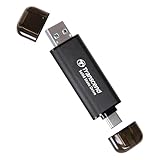
- Blazing Fast 1050MB/s Speed : Experience ultra-fast 10Gbps transfer speeds with cutting-edge SLC Cache technology, delivering up to 1050MB/s read and 950MB/s write speeds. Ideal for quickly transferring large files, gaming data, and high-resolution photos or 4K videos.
- Universal Compatibility : Compatible with Steam Deck, ROG Ally, MSI Claw, Windows, Mac, iPhone, iPad, Android, PS5, Xbox, laptops, and more. Works with USB 3.2, USB 3.0, and USB 2.0. Pre-formatted as exFAT for seamless plug-and-play across multiple operating systems (Windows, Linux, macOS, and Android). (Not compatible with iPhone's Lightning port.)
- 2-in-1 Dual USB-C & USB-A Design : Equipped with both USB-C and USB-A 3.2 ports, this dual-interface SSD makes data transfer effortless across smartphones, tablets, MacBooks, Windows PCs, and more. Instantly free up space or transfer files between Android Type-C phones, Tesla dashcams, smart TVs, and car audio systems.
- Ultra-Portable & Lightweight : Weighing just 0.02 lb with a tiny 2.81 × 0.79 × 0.31-inch form factor, this compact SSD is the perfect travel companion. No more bulky external drives—take your high-speed storage anywhere, whether you're a professional on the go or a gamer needing extra space.
- Secure One-Time Password (OTP) Protection : Forgot your password? No worries! The OTP function via Transcend Elite software allows you to receive a one-time password via email, ensuring you always have access to your data.
The financial calculation: is the upgrade premium worth it?
Compare the upgrade in three ways:
- Absolute premium: how many dollars more does the larger tier cost?
- Premium as a percentage of the phone price: a $100 increase feels different on a $400 phone than on a $1,200 phone.
- Cost of the alternative: include cloud subscriptions, external storage, data usage, time spent cleaning up and the possibility of replacing the phone early because it has become difficult to manage.
As one current United States example, Apple’s iPhone 17 shop page lists 256GB at $829 and 512GB at $1,029, a $200 difference before tax. Spread over four years, that is $50 per year. This does not prove that every 256GB upgrade is worth $200, and it is not a 128GB-versus-256GB comparison because the base iPhone 17 configuration is 256GB. Carrier promotions, trade-in credits, regional pricing and temporary discounts can change the calculation.
Cloud storage can be cheaper, more expensive or simply different depending on what you need. A $2.99-per-month plan costs $143.52 over four years; a $9.99-per-month plan costs $479.52 over the same period. But a cloud plan may also cover computer backups, files and family sharing, while a larger phone provides offline local capacity without a monthly bill. Compare like with like rather than declaring one option universally cheaper.
Recommendations by user type
Light everyday user
For calls, messaging, browsing, email, social media, streaming and a modest app library, 128GB is usually sufficient. It is especially reasonable if your current device uses under 50GB and you do not preserve every downloaded file. Do not pay for 256GB merely because the larger number sounds more responsible.
Social-media and family photographer
Choose 256GB if you take frequent photos, preserve years of family media or record regular video. Choose 128GB only if cloud optimization or a regular computer-backup routine is already part of your habits. Parents often underestimate messaging attachments and short videos because those files accumulate across group chats.
Traveler or offline-first user
256GB is the better default for downloaded shows, music, podcasts, maps, translation files and camera footage, particularly when cellular data is expensive or internet access is unreliable. A cloud-first 128GB plan is less useful when the point of the phone is access without a connection.
Mobile gamer
Choose 256GB if you keep several large games installed or want optional high-resolution assets. One large game may fit on 128GB, but several games plus updates and ordinary phone content can consume the margin quickly. Check the current listings for your specific games rather than relying on initial download sizes.
Long-term owner
If you intend to keep the phone for four or five years, 256GB is usually the safer purchase. It gives app updates, camera improvements and accumulated media more room to coexist. It is more future-resistant, not future-proof.
Content creator or RAW photographer
256GB may be a useful minimum for occasional high-quality capture, but it is not automatically enough. If RAW, ProRAW, ProRes or high-bitrate 4K video is central to your work, budget for 512GB or more and a reliable external-storage and backup workflow.
The Tool Desk
Outbyte Driver Updater FREEFix the driver behind crashes, sound loss and screen glitchesFind Drivers →Outbyte PC Repair FREEClear out junk files and repair common Windows errorsFree Scan →Common mistakes to avoid
- Assuming 128GB means 128GB free: formatting, system partitions and preinstalled software reduce available space.
- Assuming cloud backup removes local files: iCloud Photos requires Optimize iPhone Storage, while Google Photos requires backup verification followed by Free up space.
- Deleting synchronized photos casually: deletion can propagate across iCloud-synchronized devices.
- Assuming microSD is guaranteed: verify the exact model and region, and check whether apps can use the card.
- Using app-store download size as the total budget: optional assets, caches, updates and user data can be much larger.
- Assuming 256GB is always faster: flash-storage technology is model-specific.
- Planning to use every last gigabyte: updates and temporary operations need working room.
- Calling 256GB future-proof: larger camera files, games and longer ownership can eventually consume the extra capacity.
The final buying rule
Buy 128GB if your current phone uses less than about 60–70GB, you stream most content, use cloud photo optimization, install few large games and expect to upgrade within two or three years.
Buy 256GB if you want a low-maintenance phone, plan to keep it four years or longer, take frequent photos or 4K video, download media, play large games, use messaging heavily or lack expandable storage.
Buy 512GB or more if video production, RAW capture, extensive offline media or five-plus-year ownership is central to the purchase. If the phone is a professional camera, storage capacity should be planned as part of a broader workflow rather than treated as a standalone solution.
Frequently Asked Questions
Is 256GB twice as much usable storage as 128GB?
It provides roughly twice the advertised capacity, but not exactly twice the free space you see after setup. Formatting, system partitions and preinstalled software consume space, and the exact available amount varies by phone and operating-system version.
Can cloud storage make a 128GB phone enough?
Yes, for many cloud-first users. You must enable the relevant optimization or free-space feature, verify that originals are backed up and accept that deleting local copies reduces offline access. Cloud storage also has recurring costs and may synchronize deletions across devices.
Should I choose 256GB if I play only one large game?
Not automatically. Check the game’s current installed and recommended storage requirements, then add your photos, video, downloads and free-space reserve. One large game can fit on 128GB if your other usage is low, but 256GB gives more room for future updates and additional games.
Does a 256GB phone run faster than a 128GB phone?
Not because of capacity alone. Some specific models pair larger capacities with faster flash storage, but the difference must be verified for that exact phone. A larger capacity is normally a storage-headroom upgrade, not a guaranteed performance upgrade.
Is 128GB enough for five years?
It can be, but it is riskier. It is most reasonable when you stream content, optimize cloud photos, install few large games and routinely offload files. For most buyers seeking a low-maintenance five-year phone, 256GB is the safer choice.
The Bottom Line
256GB is better for most buyers because it buys flexibility and fewer storage-management chores—not because the phone automatically performs better. Choose 128GB when your actual current usage is low and your cloud or offloading routine is reliable. Choose 512GB or more when high-quality video, RAW photography or extensive offline storage is central to the purchase. The right capacity is the smallest one that leaves meaningful free space throughout the phone’s expected life.
Quick Recap
Product prices and availability are accurate as of the date/time indicated and are subject to change. Any price and availability information displayed on Amazon at the time of purchase will apply.




