Quick wins for a faster PC:
Repair Windows errors before they cause bigger problemsFix Now →Scan for outdated or missing drivers - takes under a minuteDriver Scan →Clear out junk files and repair common Windows errorsFree Scan →CryptoCompare is a cryptocurrency market-data service, not an exchange, broker, or investment-advice provider. Its data and API products now sit within CoinDesk Data: the current Data API is recommended for new integrations, while the older CryptoCompare Min API is deprecated. CryptoCompare describes its pricing benchmarks and data coverage, but those company claims are not independent proof of price accuracy or executable trading prices.
What is CryptoCompare?
CryptoCompare is a market-data brand and service founded in 2014. It says it supplies market and pricing data to retail and institutional users, aggregating and analyzing exchange tick data alongside other data products. Its stated categories include trade and order-book data, blockchain and historical data, social data, reports, and cryptocurrency indices. These are descriptions from the provider, not an independent audit of coverage or data quality. CryptoCompare’s About page lists coverage of 5,300+ coins and 240,000+ currency pairs; those are undated claims on the page accessed in 2026, not independently verified live counts.
CryptoCompare describes its CCCAGG benchmarks as covering 500+ liquid asset pairs. That, too, is an undated provider claim accessed in 2026. Coverage totals do not mean that every asset has equally deep liquidity, complete history, or equivalent data quality.
Is CryptoCompare still available, and is it part of CoinDesk?
Yes, CryptoCompare remains a recognizable brand in CoinDesk Data’s products and legacy documentation. CoinDesk reported acquiring CCData and CryptoCompare in November 2024; CoinDesk Data announced in February 2025 that CCData had become CoinDesk Data. The acquisition report said CoinDesk planned to integrate CCData’s platform into its products. CoinDesk’s acquisition report and the CoinDesk Data rebrand announcement describe those changes.
Do these 3 things before closing this tab:
1Scan for outdated or missing drivers - takes under a minute2Clear out junk files and repair common Windows errors3Fix the driver behind crashes, sound loss and screen glitches#1 Best Overall

- Supports 300 Mainstream Cryptocurrencies — Easily switch between 300 popular coins including Bitcoin, Ethereum and others for flexible real-time monitoring on this compact crypto price display.
- WiFi Connectivity for Fast Updates — Connects to 2.4GHz WiFi networks to refresh cryptocurrency prices quickly and display live data without missing market changes.
- No App or Account Required — Operates independently without any mobile app, login, or personal account to maintain privacy during use as a desktop crypto ticker.
- Real-Time Information Display — Shows coin name, current time, 24-hour percentage change, live price in USD, and 7-day trend line graph on the 1.37-inch screen for clear cryptocurrency tracking.
- Simple Plug-and-Play Setup — Powered via included USB data cable (no built-in battery), features a clean interface for easy operation; English language only, compact size ideal for desk or nightstand placement.
The practical distinction for developers is API lifecycle. CoinDesk Data’s current API introduction identifies its Data API as the supported platform and recommends it for new users. It says the CryptoCompare Min API is deprecated and has received no new updates since November 2023. If you maintain an older integration, its legacy documentation may still be relevant; for a new build, start with the current Data API introduction and verify that it includes the endpoints and datasets you need.
What does CryptoCompare provide?
The service is aimed at people and organizations that need market information for analysis, applications, or research. Depending on the product and access plan, the provider describes data such as:
Rank #2

- Supports 300 Mainstream Cryptocurrencies — Easily switch between 300 popular coins including Bitcoin, Ethereum and others for flexible real-time monitoring on this compact crypto price display.
- WiFi Connectivity for Fast Updates — Connects to 2.4GHz WiFi networks to refresh cryptocurrency prices quickly and display live data without missing market changes.
- No App or Account Required — Operates independently without any mobile app, login, or personal account to maintain privacy during use as a desktop crypto ticker.
- Real-Time Information Display — Shows coin name, current time, 24-hour percentage change, live price in USD, and 7-day trend line graph on the 1.37-inch screen for clear cryptocurrency tracking.
- Simple Plug-and-Play Setup — Powered via included USB data cable (no built-in battery), features a clean interface for easy operation; English language only, compact size ideal for desk or nightstand placement.
- Prices and trades: market prices and trade data assembled from exchange sources.
- Order books: exchange order-book information, useful for examining quoted buy and sell interest rather than only a summary price.
- Historical and blockchain data: information for looking back at markets and examining blockchain activity.
- Social data, reports, and indices: additional material for market monitoring and analysis.
These categories do not guarantee that every endpoint or asset is available on every plan. Check the current documentation and plan details for dataset coverage, delivery method, history, and limits.
How does CryptoCompare calculate prices?
CryptoCompare describes CCCAGG as a proprietary family of digital-asset pricing benchmarks based on 24-hour volume-weighted averages, with a time-penalty factor and outlier methodology. It also says its exchange review process monitors for market abuse and considers regional anomalies and geographic movements. These are the provider’s descriptions of its methodology; the materials cited here do not establish an independent current test of accuracy, uptime, or performance against other data providers. CryptoCompare’s About page explains its stated approach.
The Tool Desk
Outbyte Driver Updater FREEFix the driver behind crashes, sound loss and screen glitchesFind Drivers →Outbyte PC Repair FREERepair Windows errors before they cause bigger problemsFix Now →Rank #3

- 300 mainstream cryptocurrencies can be switched at . Quickly refresh data, no more missed trading . No annoying APP, no account login, no privacy disclosure. Description:
- Product features:
- The product does not come with a battery, and needs to be used with a data cable. It can only connect to 2.4G WiFi, and cannot be used in public networks that require secondary authentication (campus network, shopping malls, supermarkets, etc.). Currently only available in English
An aggregate reference price can help summarize inputs from multiple sources, but it is not necessarily the price at which a particular person can buy or sell. An individual venue’s quote may differ because of liquidity, fees, quote currency, and execution conditions. CryptoCompare’s documented legacy single-symbol endpoint says it may convert through BTC when a requested pair is not directly traded and may invert an opposite pair. That endpoint documentation also specifies a ten-second cache. These details apply to that documented endpoint, not automatically to every CryptoCompare or CoinDesk Data product. See the legacy single-symbol endpoint documentation.
What is the CryptoCompare API used for?
A market-data API lets a developer request data for use in software, analysis, or internal workflows. The appropriate API depends on the data needed and the intended use, not just the brand name. For a new integration, CoinDesk Data directs users to its supported Data API rather than the deprecated Min API. Its API guide describes creating an API key, including it in requests, and monitoring usage in an account dashboard. The guide also says free-account use requires attribution in the application; because product terms can change, confirm the live documentation and selected plan before relying on that permission. CryptoCompare’s API guide covers the key workflow.
Rank #4

- Multi-Market Coverage Supports cryptocurrencies, spot gold, spot silver, forex, US stocks, Hong Kong stocks, and A-shares. Cryptocurrency data is sourced from Binance, OKX, Bybit, and Gate.
- Large LED Display with Adjustable Brightness Features high-definition LED beads for sharp, clear fonts. Brightness can be manually adjusted—bright enough for daytime use and gentle on the eyes at night.
- Price Alerts with Audible Notifications Set target prices for your preferred assets. When the market price reaches the set level, the device automatically sounds an alert.
- WiFi Connectivity with Easy Setup After connecting to WiFi, configure the device via a mobile or computer web interface. Price icons are customizable, making different asset types easy to identify at a glance.
- Compact Size for Flexible Placement Measures approximately 6.3 × 1.9 × 1.9 inches, taking up minimal desk space. Supports either fixed display of a single price or rotating carousel of multiple assets.
When evaluating an API, compare the supported endpoint set, required assets and markets, REST or WebSocket access, history available, authentication, call limits, delivery options, and support. The current sources do not establish a head-to-head performance ranking against other providers.
Independent reader supportYour contribution helps us test, update, and keep practical guides available for everyone.Is the CryptoCompare API free?
CoinDesk Data’s pricing page lists a Personal tier for non-commercial projects with aggregate data, REST access, limited historical windows, and a free attribution/non-commercial/share-alike license. It also lists Start-Up and Enterprise options with contact-based pricing; the page does not state their current numeric fees. Plan features and terms are those listed on the provider’s current pricing page and may change. Check CoinDesk Data pricing for current plan information.
Best Value
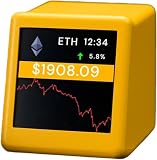
- Supports 300 Mainstream Cryptocurrencies — Easily switch between 300 popular coins including Bitcoin, Ethereum and others for flexible real-time monitoring on this compact crypto price display.
- WiFi Connectivity for Fast Updates — Connects to 2.4GHz WiFi networks to refresh cryptocurrency prices quickly and display live data without missing market changes.
- No App or Account Required — Operates independently without any mobile app, login, or personal account to maintain privacy during use as a desktop crypto ticker.
- Real-Time Information Display — Shows coin name, current time, 24-hour percentage change, live price in USD, and 7-day trend line graph on the 1.37-inch screen for clear cryptocurrency tracking.
- Simple Plug-and-Play Setup — Powered via included USB data cable (no built-in battery), features a clean interface for easy operation; English language only, compact size ideal for desk or nightstand placement.
| Plan | Stated use and license | Access and scope listed | Price information |
|---|---|---|---|
| Personal | Non-commercial projects; free attribution/non-commercial/share-alike license | Aggregate data, REST access, limited historical windows | Listed as free on the pricing page |
| Start-Up | Predefined commercial license; internal-only use | REST and WebSocket access | Contact-based; current numeric fee not stated on the pricing page |
| Enterprise | Bespoke license terms | Broader datasets and delivery choices, with support options | Contact-based; current numeric fee not stated on the pricing page |
Can you use CryptoCompare data in a commercial product?
Possibly, but access to an API does not by itself grant every commercial or redistribution right. The plan, selected data, subscription period, and applicable limits govern permitted use. CoinDesk Data’s plan page describes the Start-Up license as commercial but internal-only, while Enterprise has bespoke terms; a Personal tier is explicitly non-commercial. Those labels are not a substitute for checking the exact license against your use case.
Before incorporating data into a paid product or showing it to customers, check the current plan and API license agreement for display, redistribution, and financial-product use. The agreement summarizes restrictions on sharing data and using it in commercial products. This is a practical licensing pointer, not legal advice.
How to decide whether it fits your needs
Before choosing CryptoCompare or another market-data service, match the product to the work you need it to do:
- API lifecycle: confirm whether the endpoint is supported or legacy and whether it is suitable for a new implementation.
- Data scope: check the required assets, venues, spot prices, history, order books, on-chain or social data, indices, or other datasets.
- Price construction: understand which sources contribute, how aggregate values are formed, and whether conversions, caching, or outlier handling matter to your use.
- Integration: verify REST or WebSocket availability, authentication, call limits, delivery formats, and support.
- License and cost: confirm non-commercial or commercial eligibility, internal versus customer-facing use, redistribution rights, history limits, and quoted fees.
CryptoCompare’s 2018 commercial API announcement quoted CEO and founder Charles Hayter saying, “We adhere to rigorous standards to safeguard data integrity, normalising global data sources to ensure consistency and confidence in the market.” That is a historical company statement, not a current independent performance result. The 2018 announcement provides its context.
Quick Recap
Product prices and availability are accurate as of the date/time indicated and are subject to change. Any price and availability information displayed on Amazon at the time of purchase will apply.




