What’s actually slowing this PC down?
Pick the symptom - the matching free tool is one click away.
California’s FEHA employment regulations on automated decision systems took effect October 1, 2025. They do not ban AI in hiring or other employment decisions; they clarify how existing anti-discrimination protections apply when computational tools make or help make those decisions. Employers should identify relevant systems—including vendor tools—review their criteria and effects, consider disability-related access and inquiry issues, and retain covered employment records, including automated-decision data, for at least four years.
Which California rules apply, and when?
The Civil Rights Council’s final employment regulations were approved by the Office of Administrative Law and filed with the Secretary of State on June 27, 2025, according to the California Civil Rights Department (CRD). They became effective October 1, 2025. The amended regulations sit within California’s Fair Employment and Housing Act (FEHA) framework and address automated decision systems and related selection criteria in employment.

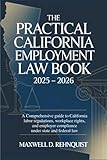


The regulations apply existing employment civil-rights protections to decisions involving technology. The presence of AI or another automated tool is not, by itself, unlawful. The legal concern is whether a system or its use results in prohibited discrimination or otherwise violates FEHA.
What counts as an automated decision system?
The final regulations define an automated decision system as a computational process that makes a decision or facilitates human decision-making about an employment benefit. The definition encompasses machine learning, statistical modeling, data analytics, and artificial intelligence. The relevant question is how a tool is used—not whether its supplier markets it as “AI.”
Free tools Windows power users keep installed
One-click scans. No signup required.
#1 Best Overall
Relevant decisions can arise in recruitment, screening, hiring, promotion, and decisions about pay, benefits, or leave. The regulations also exclude specified routine technologies—such as word processing, spreadsheets, navigation, web hosting, data storage, firewalls, antivirus software, and spellchecking—when those tools do not make an employment-benefit decision. Ordinary workplace software is therefore not automatically covered simply because an employer uses it.
Where does discrimination risk arise?
CRD explains that an automated system may violate California law if it harms applicants or employees based on a protected characteristic, including race, gender, or disability. The review should account for the system’s selection criteria and proxies, its outputs, the data or customization behind it, and how a human decision-maker uses its recommendations. Having a person in the process does not, by itself, answer whether the resulting decision complies with FEHA.
California Government Code section 12920 describes the state’s policy of protecting the opportunity to seek, obtain, and hold employment without discrimination on enumerated grounds. Those grounds include race, disability, sex, gender identity, age, sexual orientation, and military or veteran status, among others.
CRD has offered illustrative examples: a hiring tool could reproduce features of a historically male-dominated workforce and reject women; an ad-delivery system could direct cashier advertisements to women or taxi-job advertisements to Black workers. These examples explain possible risks; they are not findings about any particular employer or system.
Do these 3 things before closing this tab:
1Repair Windows errors before they cause bigger problems2Fix the driver behind crashes, sound loss and screen glitches3Clear out junk files and repair common Windows errorsHow should employers review vendors and human oversight?
The regulations define an employer’s agent to include a person acting directly or indirectly on the employer’s behalf to perform a function traditionally exercised by the employer or another FEHA-regulated activity. A vendor’s role therefore belongs in the employer’s review when its service makes or facilitates an employment decision. Outsourcing a tool does not remove the need to understand the employer’s use of it.
For each relevant vendor product or custom configuration, establish enough information to identify its purpose, the decisions it influences, the criteria and data involved, and any configuration changes. Also determine how managers or recruiters receive and rely on its output. These details help the employer assess selection criteria and effects and maintain records that explain how decisions were made.
Can an employment assessment ask questions that reveal a disability?
CRD warns that assessments using tests, questions, or puzzle games to elicit disability-related information may constitute unlawful medical inquiries. Employers should examine what an assessment asks or infers, whether applicants and employees can access it, and how the process handles accessibility needs. Where applicable disability law requires accommodation, the employer should have a way to address accommodation requests in the assessment process.
What records must employers keep?
CRD states that covered employers and entities must retain employment records, including automated-decision data, for at least four years. As a practical recordkeeping approach, preserve the system and vendor identity, versions and configuration changes, relevant criteria and data, assessments, outputs, outcomes, and information needed to explain the decision. That is a useful working inventory, not an exhaustive list quoted from the regulation.
Best Value
How are the FEHA rules different from California’s CCPA ADMT rules?
California has a separate set of regulations under the California Consumer Privacy Act (CCPA) addressing certain uses of automated decisionmaking technology (ADMT). The California Privacy Protection Agency reports that its Board adopted the regulations on July 24, 2025; they were approved and filed on September 22, 2025, and took effect January 1, 2026. The consumer privacy provisions should not be mistaken for duties created by the FEHA employment regulations.
| Topic | FEHA employment regulations | CCPA ADMT regulations |
|---|---|---|
| Regulatory framework | California employment civil-rights rules; Civil Rights Council and CRD | California consumer privacy rules; California Privacy Protection Agency |
| Main subject | Discrimination in employment decisions and related employment records | Consumer privacy rights concerning certain ADMT uses, including access and opt-out rights |
| Effective date | October 1, 2025 | January 1, 2026 |
A particular business or tool may require analysis under both frameworks, depending on the facts. Determine separately whether the business and its use fall within the CCPA ADMT rules; do not assume that the FEHA analysis resolves the privacy question.
Quick Recap
What should an employer do first?
- Map decision uses. Identify systems that rank, screen, score, recommend, or otherwise make or facilitate employment decisions, including ad delivery, assessments, custom configurations, and downstream human review. Use the final regulation’s definitions and exclusions rather than vendor labels alone.
- Trace who and what is affected. Record the roles, applicant or employee groups, and employment decisions involved, including recruitment, screening, hiring, promotion, pay, benefits, and leave.
- Examine criteria and outcomes. Review selection criteria, potential proxies, system outputs, and the way decision-makers rely on them for possible discriminatory treatment or effects tied to protected characteristics.
- Address assessment access and inquiries. Check whether tests, questions, games, or other assessments could elicit disability information and whether the process can address accessibility and applicable accommodation issues.
- Set vendor and retention controls. Obtain information needed to understand vendor systems and decisions, and make sure covered employment records that include automated-decision data are retained for the required period.
- Run a separate privacy check. Analyze independently whether the business or tool is subject to the CCPA ADMT rules.
Product prices and availability are accurate as of the date/time indicated and are subject to change. Any price and availability information displayed on Amazon at the time of purchase will apply.




