For a small service business, the strongest alternatives are field service platforms that connect customer messages with scheduling, job records, estimates, invoices, and technicians’ mobile workflows. Jobber, Housecall Pro, and ServiceTitan are options to compare, but their published feature lists do not establish which is easiest to use or best for a particular business. Compare the plans you would actually buy, then test your everyday jobs in a trial or demo.
What field service communication software should do
Communication tools are most useful when they are tied to the work itself. Housecall Pro describes field service management software as bringing scheduling, dispatching, invoicing, and customer communication into one system. That connection can help a small team keep customer conversations alongside appointments and job information rather than treating messages as a separate workflow. Housecall Pro’s overview also describes job records, mobile access, integrations, and support for trades such as plumbing, HVAC, electrical, cleaning, landscaping, and repair.
When comparing products, distinguish between a platform that merely stores customer details and one that supports the communication steps your business actually uses. ServiceTitan’s feature page lists online booking, two-way SMS, automated alerts, a customer portal, real-time technician tracking, a mobile app, and partner integrations. Jobber describes client and job workflows that include customer communication, scheduling, dispatching, quoting, invoicing, payments, reporting, marketing, and mobile tools.
Alternatives to compare
| Option | Published capabilities to investigate | What to verify |
|---|---|---|
| Jobber | Jobber describes client management, quoting, scheduling, dispatching, invoicing, payments, reporting, customer communication, marketing, and mobile tools. Its comparison page describes a client hub for quote review, work approval, invoice payment, and appointment management. Jobber’s comparison page advertises a free trial. | Check which communication and team workflows are included in the plan and whether any needed functions require add-ons. The reviewed page does not state a standard price. |
| Housecall Pro | The company describes scheduling, dispatching, invoicing, customer communication, job records, mobile access, and integrations, with industry examples including plumbing, HVAC, electrical, cleaning, landscaping, and repair. Its official overview publishes plan prices and user caps. | Compare prices using the same billing cadence and account for the published user limit. Confirm that the features your team needs are available in the plan you choose. |
| ServiceTitan | ServiceTitan’s feature page lists online booking, two-way SMS, automated alerts, a customer portal, real-time technician tracking, a mobile app, and partner integrations. | The feature page invites buyers to request a demo and does not state a standard price. Jobber’s vendor-authored comparison positions ServiceTitan as an option for larger contracting businesses with more budget, staff, and time for complexity; treat that as Jobber’s characterization, not independent evaluation. ServiceTitan’s comparison page is also vendor-authored. |
Housecall Pro’s published prices and user limits
Housecall Pro’s official page marks these prices as current as of July 2026. They are vendor-published figures, not a guarantee of a quote at another date. Billing cadence changes the monthly amount, and the tiers have different user caps. Check the official pricing page before budgeting or subscribing.
Recommended Free Tools
#1 Best Overall
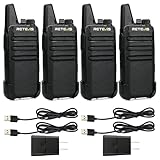
- Compared to walkie-talkies with sharp and long antennas; the RT22 has a thumb-length antenna and a blunted antenna angle; which improves the safety of family members during use
- Compact and lightweight walkie-talkie; you can slip it into your pocket or clip it to your belt
- USB-C charging port; allows you to charge it at any time; lasts about 10 hours
- Separate clip design; when you wear the walkie-talkie around your waist; you only need to take out the walkie-talkie without removing the clip when talking
- Built-in 300 mW speaker; squelch function; enhances clear and loud audio
| Plan | Annual billing price | Monthly billing price | Published user limit |
|---|---|---|---|
| Basic | $59/month, billed annually | $79/month | 1 user |
| Essentials | $149/month, billed annually | $189/month | Up to 5 users |
| MAX | $299/month, billed annually | $329/month | Up to 8 users |
Housecall Pro says all three plans include scheduling, dispatching, invoicing, and mobile access. Its page also advertises a 14-day trial with no credit card required. The reviewed Jobber comparison page advertises a free trial but gives no standard price; ServiceTitan’s feature page directs prospective buyers to request a demo and likewise gives no standard price in the reviewed material.
How to compare the real cost and workflow
A low starting price is not enough to determine affordability. Compare the monthly total for the number of people who need access, the billing cadence, and whether essential communication tools are included in the plan. A published starting price or feature list does not establish that every capability is included at every tier.
Rank #2

- Diversified functions : FCC ID: 2AX68PX-888S, 16 preset channels can be selected by rotating the knob on the 2 Way Radios to select any channel within the frequency range; walkie-talkie has 165 privacy codes to protect your privacy, The Two-Way Radios has the functions of VOX voice control, scanning, low battery alarm and night flashlight, etc
- Long-Range communication: Walkie Talkies offer the greatest range in open, unobstructed areas, such as rural areas, suburbs, and the seaside. In towns and cities, range may be limited by obstacles. Actual range depends on the current obstruction level.
- Durable battery: Under normal circumstances,walkie talkie can be used for 8-96 hours with a full charge, and up to 8-12 hours with continuous use. The actual time depends on the frequency of use;3-4 hours to fully charge a battery with 0 capacity, long battery life.
- Lightweight and compact, suitable for multiple scenes: Small size and light weight, Hard and durable shell, drop-proof, Rainproof, this Handheld two way radio transmitters are suitable for hotel management, villas, restaurant kitchens, outings, Outdoor mountain climbing, construction sites, factory warehouses, car driving, cruise ships, school, churches, retail stores and supermarkets, security personnel, construction personnel, safety maintenance personnel
- What you get : pxton walkie talkies provide interphone x 4, 1500 mAh lithium battery x 4, Charging station x 4, belt clip x 4, Earpieces x 4, hand strap x 4, and user manual x 2
- Team size and account limits: Count the people who need to schedule, dispatch, communicate with customers, or use the field app. Check what happens if the team exceeds the listed cap.
- Customer communication: Confirm whether the workflow includes the channels you need, such as two-way texting, appointment updates, online booking, or a customer portal.
- Scheduling and dispatch: Test how staff create appointments, assign technicians, and handle a job change or reassignment.
- Mobile field workflow: Have a technician review the job, update its status, and access the customer or job history from the mobile app.
- Estimates and invoices: Check how a quote is sent and approved, and how the business creates and delivers an invoice.
- Integrations and reporting: Identify the systems the business already depends on and verify the connections and reports available in the plan under consideration.
Test the tasks your business repeats
Vendor pages describe capabilities, but they do not by themselves show how well a product fits your processes or how easy it is for your staff to use. Use a trial or demo to walk through a typical job from initial request to payment. Ask the vendor to show the specific plan and account setup you are considering, not just a general product tour.
- Enter or receive a customer request and locate the resulting customer and job record.
- Schedule the work, assign it to a technician, and change the assignment or appointment.
- Send the customer a message or appointment update using the communication method your business expects to use.
- Create and send an estimate, then follow the workflow for approval and invoicing.
- Review what the technician can see and update on mobile, including relevant customer and job history.
- Check the integrations and reports your business requires, and confirm which plan includes them.
Choose the option that completes those recurring tasks within your budget and team limits. There is no universal winner established by the vendor feature descriptions: fit depends on the business’s communication habits, field workflow, and the plan’s actual inclusions.
Free tools Windows power users keep installed
One-click scans. No signup required.
Quick Recap
Best Value

- FRS license free two way radio; extremely compact and slim for business use; featured with 16 channel; work right out of box; you don't need a license for RT22 walkie talkie
- Includes six way multi gang charger; with multiple charging protections; overcharge; over voltage and short circuit protection; more safer for charging the 6 pack 2 way radios at the same time
- Fits in your palm; handheld radios walkie talkie; easy to carry around and simple to operate; save space; antenna length 7 inches; 3.78*2.17*0.87 in; weight 108g
- USB charging allows you to charge it at any time; 1000 mAh battery supports 10 hours of battery life; 5% reception; 5% transmission; 90% standby
- Key lock; use this function to save the current settings; reducing work insecurity caused by frequent operations and mistakes caused by accidentally touching other buttons when busy
Rank #4
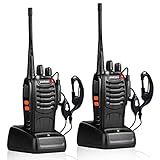
- After-sales service : pxton walkie talkies, provide lifetime customer service. If you have any problems, please tell us through the Amazon platform,our professional team will solve your after-sales problems as soon as possible.
- Diversified functions : FCC ID: 2AX68PX-888S, 16 preset channels can be selected by rotating the knob on the 2 Way Radios to select any channel within the frequency range; you can program 50 CTCSS audio and 105 CDCSS audio on each programmed channel, The Two-Way Radios has the functions of VOX voice control, scanning, low battery alarm and night flashlight,etc;package contains (walkie talkie, battery pack, Charger, belt clip, hand strap, Earpieces) X 2 and user manual.
- Long-Range communication : Walkie Talkies offer the greatest range in open, unobstructed areas, such as rural areas, suburbs, and the seaside. In towns and cities, range may be limited by obstacles. Actual range depends on the current obstruction level.
- Durable battery :Under normal circumstances,walkie talkie can be used for 8-96 hours with a full charge, and up to 8-12 hours with continuous use. The actual time depends on the frequency of use;3-4 hours to fully charge a battery with 0 capacity,long battery life.
- suitable for multiple scenes :Hard and durable shell, drop-proof, Rainproof, this Handheld two way radio transmitters are suitable for hotel management, villas, restaurant kitchens,outings,Outdoor mountain climbing, construction sites, factory warehouses, car driving, cruise ships, school,churches, retail stores and supermarkets, security personnel, construction personnel, safety maintenance personnel.
Rank #3

- Efficient and Rapid Charging; walkie talkie with 6 way multi unit charger station; charge up to 6 pcs two-way radios or batteries at the same time; help you save more space and time
- Safe Charging; with multiple safety charging protection; overcharge protection; over voltage protection and short circuit protection; provides safe support even in crowded restaurants or warehouses
- Walkie Talkie with Ear Hook Earpiece; fit to your ear; soft and comfortable; rotate to fit in with left and right ears; provides you with clearer and safer communication
- Rugged 2 Way Radios; the body is made of durable and sturdy materials; can withstand shock and vibration in harsh environments; can be used for a long time to save corporate communication costs
- Long Range Walkie Talkies with Clear Sound; the antenna is protected by a sealed enclosure and it is non-removable and sturdy; the transmission is more stable; providing you with crystal clear sound
Product prices and availability are accurate as of the date/time indicated and are subject to change. Any price and availability information displayed on Amazon at the time of purchase will apply.




