Free tools Windows power users keep installed
One-click scans. No signup required.
Correction: FXCM did not announce a new TradingView partnership recently. FXCM and TradingView announced their API-powered integration on February 18, 2020. The connection remains available as an existing broker integration, allowing eligible FXCM customers to view charts and place or manage FXCM trades through TradingView.
That distinction matters. TradingView is the charting and trading interface; FXCM remains the brokerage account holding the funds and handling execution. Connecting the two does not turn every TradingView symbol into a tradable FXCM product, and the price shown on a TradingView chart is not guaranteed to be the price at which FXCM fills an order.
What the FXCM–TradingView integration does
The integration links an FXCM demo or live account to TradingView. Once connected, a trader can use TradingView’s charts, order panel and position-management tools instead of switching to a separate FXCM interface for every order.
The original announcement described the arrangement as an API-powered integration supporting direct order execution from TradingView. TradingView itself is not the executing broker. It provides the interface through which instructions are sent to the connected FXCM account, while FXCM remains responsible for the brokerage relationship, account balance, margin and execution.
#1 Best Overall

- Universal Pole Mount Keyboard Tray - This sturdy steel keyboard tray arm fits any pole from 1.1” to 2.4” in diameter for ergonomic typing angles and customized placement. The tray extends a total of 17” from the wall, creating an easily accessible platform for your mouse and keyboard.
- Adjustable Tilt & Rotation - Enjoy comfortable typing angles with +90° to -90° tilt and alleviate wrist soreness and tension. The pole mount features full 360° rotation for easily moving the tray out of the way when not in use or routinely switching up typing positions.
- Versatile Placement - This sturdy mount adds a keyboard and mouse tray to your monitor stand, wall mount, or any pole within the diameter range. The cable management clip routes cords along the arm for a clean and organized appearance.
- Large Keyboard Surface - The spacious 25.7” x 9.8” platform fits most standard and oversized keyboards on the market with ample space for your mouse. Raised edges prevent accidental drops, keeping your keyboard securely in place. Added wrist padding provides a comfortable typing experience.
- We’ve Got You Covered - Sturdy steel design is backed with a 3-Year Manufacturer Warranty and friendly tech support to help with any questions or concerns.
TradingView later included FXCM among the brokers added to its platform during the first half of 2020. It is therefore inaccurate to describe the arrangement as a newly announced partnership, although the integration may still be new to an individual FXCM customer.
How to connect FXCM to TradingView
The exact labels can vary because TradingView has been changing its interface. FXCM’s broker-specific instructions refer to a Trading Panel and an FXCM card. TradingView’s newer general instructions refer to a Trade button in Supercharts.
Desktop and web connection
- Sign in to your TradingView account.
- Open TradingView charts or open Supercharts.
- Look for Trading Panel at the bottom of the chart, or click Trade in the upper-right corner if that is the layout shown to you.
- Select the FXCM broker connection.
- Click Continue, if prompted.
- Choose the relevant connection type and enter your FXCM username and password.
- Review the authorization request and select Approve to connect, or Deny to cancel.
FXCM’s regional instructions also describe a token-authorization process. If your account requires it, sign in to Trading Station Web, open the avatar menu in the upper-right corner, choose Token Management, authorize the token and then return to TradingView to complete the broker login.
Do not confuse Token Management with FXCM’s Multiple Session Request. FXCM’s UK and EU help pages say live-account customers may need to sign in to MyFXCM, select Account Settings, choose Multiple Session Request and submit the request. Which step applies depends on the FXCM entity, account and region.
What’s actually slowing this PC down?
Pick the symptom - the matching free tool is one click away.
Do you need TradingView Premium?
No. FXCM says customers on all TradingView subscription tiers can connect an FXCM account. A paid TradingView plan is not a prerequisite for the broker connection.
Rank #2
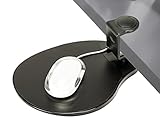
- [CHECK COMPATIBILITY] Universal Clamp-on Design: Fits flat desk edges from 0.5" to 1.5" (38mm) thick. This heavy-duty clamp-on mechanism requires at least 2.4 inches of flat surface depth to grip securely. IMPORTANT: Not compatible with desks that have support beams, drawers, or curved edges near the rim. Please verify your desk's edge profile before ordering.
- [360° SWIVEL] Space-Saving Under-desk Mouse Pad: This 8" x 10" mouse tray swivels 360° to hide away when not in use, instantly decluttering your workspace. SPACE REQUIREMENT: Ensure your under-desk mouse pad area is clear of obstructions (like desk legs or crossbars) within a 10-inch radius to allow for full, smooth rotation.
- [ERGONOMIC HEIGHT] Clip-on Mouse Pad for Wrist Relief Designed as a professional clip-on mouse pad that sits approximately 3 inches below your desktop, positioning your arm at a natural angle to reduce shoulder strain. NOTE: Please check your chair's armrest height and legroom to ensure this mouse tray won't interfere with your sitting position.
- [TOOL-FREE 10-SECOND INSTALL] Secure Clamp-on Attachment: Installs in seconds via a simple clamp-on design. This clip-on mouse pad requires no drilling, no tools, and causes zero damage to your furniture. It’s the perfect under-desk mouse pad solution for both right and left-handed users who need extra surface area without the permanent commitment.
- [PREMIUM PADDED SURFACE] Smooth & Durable Mouse Tray: Features an enhanced, padded surface for precise mouse tracking and fluid movement. This versatile mouse tray is easy to clean and provides the firm support needed for long hours of computer use. Durable construction ensures a wobble-free experience for daily office work.
This is separate from FXCM’s regional TradingView promotion. On its current UK page, FXCM lists the following monthly trading-volume thresholds for possible upgrades:
| Monthly volume | Listed TradingView plan |
|---|---|
| 5 lots | Essential |
| 10 lots | Plus |
| 15 lots | Premium |
The promotion is not a global entitlement. FXCM says the upgrade remains active while the required volume is met, and its UK instructions tell eligible customers to email [email protected] with FREETRADINGVIEW in the subject line, together with their TradingView username and FXCM account number. Customers in other countries should check the offer and eligibility rules for their own FXCM entity.
Demo and live accounts
FXCM’s regional platform instructions support both demo and live accounts. However, the setup requirements and available products can differ by country and account configuration.
Quick wins for a faster PC:
Repair Windows errors before they cause bigger problemsFix Now →Fix the driver behind crashes, sound loss and screen glitchesFind Drivers →A common source of confusion is an expired demo. FXCM says its demo accounts can expire after 30 days. If TradingView reports “Incorrect username or password” even though the credentials appear correct, the demo may no longer be active. Registering a new FXCM demo may resolve that particular problem.
For live accounts, a failed connection may instead relate to a missing multiple-session request, an authorization token or an API setting. FXCM’s Poland help documentation, for example, says REST API access is not enabled by default for some new accounts and that customers may need to contact support through chat. That is a regional and account-specific requirement, not a universal step for every FXCM customer.
Rank #3

- Save Desk Space: This 26.8” (32.5" including clamps) x 11” ergonomic keyboard tray clamps to the edge of your desk (up to 1.75” thick), holding your keyboard and mouse below the desktop for added workspace --Patent Pending--
- Swing Design for Comfortable Typing Angles: Move the tray forward or backward a total of 8.6" to find the most comfortable typing angle. The total swinging range is 165° and operates without the use of tools
- Height Adjustment: Adjust the distance between your tray and the desktop (2" to 6.5") with the simple 12-step locking system. This encourages ergonomic posture and accommodates thicker table tops
- Weight Compatibility: The tray weighs 9 lbs and can hold up to 11 lbs. Please make sure your desk can support this weight before purchasing
- Simple Assembly Process: Hardware and instructions are provided for fast and easy assembly, and the heavy-duty C-clamps attach to desktops up to 1.75” in thickness without causing any damage to your table surface
Prices and execution are not identical
The most important trading limitation is that a TradingView chart price should not be treated as a guaranteed FXCM dealing price.
FXCM describes the prices displayed on its TradingView platform page as indicative market prices. It warns that an order may execute at a different price from the one displayed on the chart and disclaims responsibility for inaccurate or incomplete TradingView chart data.
Recommended Free Tools
This difference can result from several factors, including the data source selected in TradingView, bid-versus-ask pricing, market movement between order submission and execution, spread changes and slippage. Before confirming an order, review the quote and order details presented by the broker connection rather than relying only on the candle or last-price display.
Not every TradingView symbol is tradable through FXCM
TradingView shows instruments from many exchanges and data providers. The same or similar ticker can appear more than once, and a symbol visible in search is not automatically available in a connected FXCM account.
TradingView’s symbol-search documentation uses GBPUSD as an example of a symbol whose data source can be FXCM, listed as FXCM (Forex Capital Markets). That identifies the data source; it does not by itself guarantee that every customer can trade the instrument through FXCM.
Rank #4

- Adjusts lower than every sit-stand riser we measured – Many competing keyboard risers bottom out several inches above the desk, so they only work once you're already standing. This one goes down to 1.7 inches, low enough for a comfortable seated typing height, and up to 15.6 inches for standing.
- Backed for as long as you own it – A lifetime manufacturer warranty and US-based product support come standard, well beyond the coverage typical keyboard risers offer. No assembly required — it arrives ready to use.
- Room for a keyboard, a mouse, and then some – The 23.6 x 11.8 inch platform holds up to 11 lbs and comfortably fits a full-size keyboard and mouse side by side, or a laptop up to 15.6 inches, for a flexible workstation setup.
- A wide, sturdy base under everything you type on – A solid frame, wide footprint, and rubber, non-slip feet keep the platform steady under normal typing and clicking pressure, without needing to replace your existing desk.
- Smooth height adjustment across the full range – The scissor-lift mechanism moves through its full 1.7 to 15.6 inch range using the built-in release; find your position and it stays there until you move it again.
Tradability depends on:
- the FXCM legal entity serving the customer;
- the customer’s country and regulatory restrictions;
- the account type and permissions;
- the product offered by FXCM; and
- whether the broker connection supports that particular symbol.
FXCM regional pages describe products such as forex, shares, indices, gold and other commodities CFDs, but the available selection is not identical worldwide. Do not assume that linking FXCM unlocks every stock, future, cryptocurrency or other asset listed on TradingView.
The 2020 partnership announcement mentioned products including crypto baskets, a U.S. dollar index product, Japanese yen baskets and emerging-market baskets. Their current availability should be checked with the relevant FXCM entity rather than inferred from the old announcement.
Independent reader supportYour contribution helps us test, update, and keep practical guides available for everyone.Common connection problems
| Problem | Likely checks |
|---|---|
| FXCM does not appear in the broker list | Confirm that you are using TradingView Supercharts or the chart’s Trading Panel, and check whether the broker is available in your region. |
| Login is rejected | Verify the FXCM credentials, check whether a demo expired after 30 days, and confirm whether a live account requires a multiple-session request or token authorization. |
| The account connects but orders are unavailable | Check product permissions, account type, regional availability and whether the selected TradingView symbol is supported by FXCM. |
| API or authorization error | Review Token Management in Trading Station Web. In some regions, contact FXCM support to enable API access. |
| Server connection error | Check for market closure or maintenance. FXCM says its standard server error commonly occurs from about Friday 4:55 p.m. to Sunday 5:15 p.m. New York time, though product hours and daylight-saving changes can affect the exact window. |
| Chart and fill prices differ | That can be normal. FXCM says TradingView prices are indicative and execution may occur at another price. |
If the connection still fails, check the help page for the FXCM entity that holds your account. Instructions published for the UK, EU, Spain, Sweden, Poland, Canada and FXCM Markets are not interchangeable in every detail.
What this means for personal finances
The integration can make chart-based order entry more convenient, but convenience does not reduce trading risk. Forex and CFD trading can involve leverage, variable spreads, slippage and losses greater than expected if position size and margin are not controlled.
Before using a live account, confirm which FXCM entity you are dealing with, understand the product’s costs and leverage limits, and test the connection with a demo account if available. Keep in mind that the TradingView subscription, FXCM account and market-data source are separate parts of the setup. Paying for a TradingView plan does not improve FXCM execution, guarantee better prices or expand the products your account is allowed to trade.
Best Value

- Ergonomic Keyboard and Mouse Tray: Installs underneath a standard desk for comfortable typing angles. Plush foam padding is provided for maximum comfort while you type
- Adjustable Design: Find just the right position with full side-to-side rotations and 6.3” of height adjustment
- Deluxe Universal Tray: The 33.9” x 11.2” surface fits most standard-size to large keyboards and mice on the market. Minimum recommended desktop thickness is 0.7”
- Mounting Options: Fits both straight and corner desks to accommodate your workspace layout. Gain more room on your desktop with the keyboard and mouse below the surface
- Simple Assembly: All hardware and instructions are provided for smooth assembly and installation. Total tray weight is 13.8 pounds. Please make sure your desk can support this under-mounted weight
FAQ
Did FXCM just announce a new partnership with TradingView?
No. FXCM and TradingView announced their API-powered integration on February 18, 2020. It is an existing broker integration, not a newly announced partnership.
Can I trade directly from TradingView with an FXCM account?
Eligible connected customers can place and manage FXCM orders through TradingView’s trading interface. FXCM remains the broker and handles the brokerage account and execution.
Do I need TradingView Premium to connect FXCM?
No. FXCM says all TradingView subscription tiers can connect to FXCM. Any free TradingView upgrade promotion is separate and may be limited to a particular country, account and trading volume.
Why can’t I log in to my FXCM demo through TradingView?
The credentials may be wrong, but FXCM says demo accounts can expire after 30 days. A new demo account may be required. Live accounts may also need additional authorization or account settings.
Do these 3 things before closing this tab:
1Fix the driver behind crashes, sound loss and screen glitches2Clear out junk files and repair common Windows errors3Scan for outdated or missing drivers - takes under a minuteIs the TradingView chart price the FXCM execution price?
Not necessarily. FXCM says TradingView prices are indicative and an order can execute at a different price because of market movement, spreads, slippage or other conditions.
Can I trade every TradingView symbol through FXCM?
No. Availability depends on the FXCM entity, jurisdiction, account permissions, product range and broker connection. A symbol appearing in TradingView search is not automatically tradable through FXCM.
The Bottom Line
Bottom line: FXCM’s TradingView arrangement is a useful existing integration, but calling it a new partnership is inaccurate. You can generally connect from TradingView’s Trading Panel or Trade menu, and FXCM says a paid TradingView subscription is not required. Check your regional FXCM instructions for token or multiple-session authorization, verify that the selected instrument is actually tradable, and remember that chart prices are indicative rather than guaranteed execution prices.
Quick Recap
Product prices and availability are accurate as of the date/time indicated and are subject to change. Any price and availability information displayed on Amazon at the time of purchase will apply.




