Restricting a YouTube live stream to specific geographic regions is something you might need for licensing, business, or compliance reasons. YouTube provides the tools to do it, but understanding what restriction actually does and what it doesn’t do is crucial.
YouTube’s geo-restriction feature works at the video level, not the account level. For live streams, you can set geographic restrictions before you go live. The setting is in YouTube Studio under Stream Details, in the Advanced Settings section. You choose which countries can watch the stream and which countries are blocked. When the stream goes live, YouTube’s system checks the viewer’s inferred location (based on IP address) and either allows or blocks access accordingly.
The mechanics are straightforward in concept: a viewer in a blocked region tries to watch the stream and sees a message that the stream is not available in their country. They’re blocked from viewing. The stream itself continues unaffected. Other viewers in allowed regions can watch normally. There’s no public indication on the channel that a stream is geo-restricted. The restriction is only visible to viewers who try to access it from blocked regions.
The reason geo-restrictions exist is usually legal or contractual. Music rights holders, sports leagues, and content providers often sell regional licenses. A song might be licensed for North America but not Europe. A sporting event might have exclusive broadcast rights in one region that prevent you from streaming it in another. Using geo-restrictions is how creators stay compliant with these kinds of agreements. It’s not a protection against piracy. It’s a way to honor licensing boundaries.
What’s actually slowing this PC down?
Pick the symptom - the matching free tool is one click away.
#1 Best Overall

- 【Complete Vlogging Kit with Dual Tripods】Our Vlogging kit is designed for YouTube & TikTok video creators. It includes a 54" adjustable Camera Tripod, 4-level adjustable Table Tripod, Magnetic Wireless Microphone Set, RGB Rill Light, Rotating Phone Clip, Wireless Remote Rontrol, User Manual and Type-C Charging Cable—all in one ready-to-go setup. Compatible with iPhone and Android. All you need in one kit—pack less, create more.
- 【Magnetic Wireless Mic, Plug and Play】The wireless Lavalier microphone offers effortless operation for mobile recording. Each transmitter features a 360° magnetic clip for secure attachment to clothing and allows easy mic direction adjustment, enhancing your recording audio.The 2-in-1 USB-C and Lightning receiver works with iPhone and Android—just plug in, power on and record. Intuitive interface allows easy switching between noise reduction, original sound, and mute modes.Included furry windscreens and foam covers ensure clear audio for interviews, podcasts, livestreams, and outdoor vlogs.
- 【54" Extendable Camera Tripod with Detachable Head】This camera tripod extends from 20" to 54" for low-angle, eye-level and standing shots. The detachable head allows flexible setup, and the tripod measures about 17" after removing the head for easier storage and transport. With a standard 1/4" screw mount, it works with compatible phone clamps, cameras, RGB fill lights and accessories for livestreams, Video Recording, product demos and outdoor filming.
- 【4-Level Height Adjustable Table Tripod】This 4-level adjustable table tripod is designed for desktop, close-up and handheld shooting, giving your creator kit a smaller support option beyond the 54" tripod. Our tripod offers a 360° rotating ball head supports horizontal and vertical shots, while the standard 1/4" screw mount works with the included phone holder, RGB fill light and compatible accessories. Its aluminum alloy body and nonslip rubber feet help keep the setup steady, compact and easy to carry.
- 【Adjustable RGB Fill Light and Phone Clamp】The RGB fill light offers 10 brightness levels, 3 color temperature modes and 7 RGB color modes for video recording, product demos and livestreams. (NOTE: Please use a 5V/1A Type-C charging cable for charging )The phone clamp fits 4.7" to 7" phones and supports 180° tilt and 360° rotation for horizontal, vertical, high-angle and low-angle shooting with compatible iPhone and Android devices.
For looping streams, geo-restrictions are rarely necessary unless the content itself is licensed with regional limits. A video you created yourself with no licensed music or material doesn’t need geo-restriction. A stream of a song or a recorded event might. Understanding your source material and what rights you have in each region determines whether you need restriction.
Run a Geo-Restricted Looping Stream in the Cloud
StreamNeo is designed for creators who need to turn an owned or licensed prerecorded video into an always-on YouTube Live stream while keeping the local PC off. Upload your video, paste your YouTube stream key, and configure the geographic restrictions in YouTube Studio.
The geographic restriction remains a YouTube setting, while StreamNeo handles the continuous cloud broadcast. This lets a looping stream keep running without requiring a computer to stay on locally for the duration of the broadcast.
StreamNeo checks stream health every 30 seconds and automatically restarts a dropped stream, which is useful for long-running or 24/7 broadcasts where manual recovery would be inconvenient.
Rank #2

- One-Stop Shop for Professional Vlogging:This vlogging kit is meticulously designed for video creators, offering a complete set of professional equipment. It includes a sturdy camera tripod for stable shots, a flexible tripod for versatile angles, a wireless headset for clear audio, an RGB light for enhanced video quality, and a phone clamp to securely hold your device. Together, these accessories elevate your video quality to a professional level
- Versatile Tripod for Every Shot: Designed for ultimate stability and ease of use, this extendable camera tripod lets you capture smooth, steady shots from ground level to eye-level perspectives. Its adjustable legs and quick-release plate make setup and adjustments a breeze, perfect for dynamic shooting scenarios. With a 1/4" screw nut, it seamlessly integrates with a wide range of devices, including phone clamps, cameras, and more, making it a versatile addition to your vlogging toolkit
- Flexible Tripod for Creative Angles: The flexible tripod adds an extra layer of creativity to your vlogging. Its bendable design allows you to wrap it around objects, achieving unique perspectives and close-up shots. This compact flexible tripod offers a 360° rotating ball head for full-angle control, enabling horizontal and vertical shots with ease. The top features a 1/4” screw nut, compatible with phone clamps and other accessories, making it a versatile addition to your vlog kit
- Crystal-Clear Sound&Adjustable RGB Lighting: Our wireless microphone delivers clear, crisp sound, making sure your voice is heard loud and clear. With a long-range transmission and easy-to-use design, you can move around freely while recording, knowing that your audio will be perfect every time. Fine-tune your setup with pro-grade lighting—10 brightness levels and 6 modes. Cold, Warm, or Natural tones ensure accurate skin tones, while RGB modes (Solid, Gradient, Flash) set the mood
- Adjustable Phone Clamp&Bluetooth Remote: The phone holder fits phones ranging from 4.7 to 7 inches, compatible with iPhone and Android devices. It offers 360° rotation and 360° tilt, allowing you to capture photos and videos from any angle. The remote charges effortlessly through a Type-C port and pairs seamlessly with your device via Bluetooth, offering a connection range of up to 33 feet. YouTube starter kit includes:Camera Tripod*1, Flexible Tripod*1, Cell Phone Clip*1, Remote Control*1, Quick Release Plate with Handle*1, RGB Fill Light*1, Microphone Receiver*2, Microphone Transmitter*1, Type-C Charging Cable*2, Storage Bag*1, User Manual*2
You can test the setup with a free 24-hour 720p/30fps trial without providing a card at signup before committing to a longer-running stream.
YouTube’s geo-restriction system uses IP geolocation to infer location. This is not a perfect system. VPNs and proxy services can mask a viewer’s true location. A viewer in Germany using a US-based VPN will appear to YouTube as being in the US. This means geo-restrictions are a compliance mechanism, not a security tool. They’re sufficient for honest compliance with regional licensing rules. They’re not secure against determined circumvention.
Viewers who are blocked see a message, but YouTube doesn’t provide analytics on how many people tried to access from blocked regions. You can see total views, but not a breakdown of blocked views. This means you can’t easily measure how much audience you’re losing to geo-restrictions. Some creators make an educated guess based on where their audience is, but direct data isn’t available.
The default setting is unrestricted: all regions can watch. This is the right starting point for most content. You add restrictions only if you have a specific reason. Common restriction patterns include: allowing only in the US and Canada (North America), allowing everywhere except specific regions (common if rights are expensive in certain areas), or restricting to only one country (less common, usually for very region-specific content).
Rank #3

- 【MULTIPLE COLOR TEMPERATURE & ADJUSTABLE BRIGHTNESS】There are 3 Color temperatures (2800K, 4800K & 6500K) which offer different lighting atmosphere; This Studio Light is equipped with 356 Led beads which offers a stable and ample output of 15W. Features a high CRI of 97+ for precise color rendering. Adjust the brightness in a range of 10 to 100% with button up and down on remote to meet different photography circumstances, offering extra lighting for your works.
- 【LIGHT PANEL & POWER CABLE】The 10” (25.5 cm) x 7.8” (19.8 cm) LED light panel with compact design allows you to carry around conveniently with durable storage bag. Thickened light shell works a diffusion, making the lighting more softer. Ideal USB port for powering the device with 5V, 2A DC wall charger(not include) or power bank. Comes with USB-C adapters that allows you to power the device with cell phone or laptop.
- 【HEIGHT ADJUSTABLE TRIPOD】The tripod of the video light adopts durable but lightweight aluminum with powder sprayed layer, looks chic and classic. The light stand can be raised up to 60”. Folded size 17", perfect to store and carry. Adjust the height flexibly with 3 screw knobs loosen and tighten. Attach and detach the light panel easily with the 1/4" threads on the top of the tripod. Loosen the screw on side to rotate the light panel angle in range of 180°, tighten it when get suitable angle.
- 【WIDE APPLICATION】Essential equipment for Photo Studio, Video Recording, Photography, Low Angle Close Shooting, Portrait, Live Stream, Vlogging taking, Youtube Podcast Applications. Light weight and durable design allow you to carry around conveniently and move easily.
- 【Package List & Customer Service】There will be 2 LED studio light panels with cable. adjustable tripod stand for each light panel, 1 user manual, 1 storage bag, 2 USB-C adapters. Whatever issues you meet during the usage or any defects arise, rest assured that we are here to assist you.
For creators monetized through YouTube Partner Program, geo-restrictions don’t affect ad revenue from allowed regions. YouTube still shows ads to viewers in unrestricted regions at the normal rates. Viewers in restricted regions simply can’t see the stream, so no ads are shown to them.
One subtle point: geo-restrictions apply differently to live streams and VODs (video on demand). A live stream can have restrictions that don’t automatically apply to the recording. After a live stream ends, YouTube creates a VOD—a video-on-demand version on your channel. You can geo-restrict the live stream but leave the VOD unrestricted, or vice versa. Some creators use this strategy: restrict the live broadcast to honor a specific licensing agreement, but make the recording available to everyone once the event is over.
The process to set geo-restrictions involves some planning. Before you go live, in Stream Details, expand Advanced Settings. Look for the Geographic Restrictions option. You can select which countries to allow or which countries to block. YouTube provides a searchable list of countries. Once you select your restrictions, they take effect when the stream starts. You can change them while the stream is live in some cases, but it’s better to set them before starting.
Changing geo-restrictions on a live stream that’s already running can cause issues. Viewers who were watching and suddenly get blocked might be confused. Viewers in a region you suddenly allowed might join and then leave again if there’s instability. The safest practice is to set restrictions before going live and leave them for the duration of the broadcast.
Recommended Free Tools
Rank #4
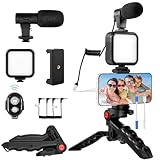
- 【High-Quality Microphone】This vlogging kit includes a microphone with foam ear cups, providing clear, high-quality audio. It is compatible with all devices featuring a 3.5mm audio input jack. We also provide adapters for Android and Apple devices, ensuring the microphone is fully compatible with your phone.
- 【Rechargeable LED Video Light】Built-in 62 high-brightness LED bulbs, 2500K-7000K color temperature, adjustable brightness, providing a bright light source and uniform lighting to meet the needs of various scenarios; can be easily charged via a USB port. Note: Press and hold the switch for 3 seconds to turn the light on or off.
- 【Wireless Remote Control】The Vlog Kit comes with a wireless Bluetooth remote control for easy use and quick connection to your phone. The smartphone camera Vlog kit frees your hands, allowing you to take photos and videos from a distance, effortlessly capturing vibrant and beautiful photos and videos. Perfect for Vlogging, video recording, YouTube, TikTok, and more.
- 【Adjustable-angle Tripod and Phone Mount】This iPhone vlogging kit tripod can be adjusted by 120° as needed, ensuring you find the optimal shooting angle and perspective. It can be used for handheld or desktop placement, making filming more convenient. The phone mount features a 360° horizontal rotation design, allowing you to adjust your phone to the ideal shooting angle.
- 【Wide Range of Applications】This YouTube starter kit is designed for smartphone video recording. It is lightweight and portable, so you can carry it with you wherever you go. It is commonly used for vlogging, interviews, live streaming, online makeup tutorials, video chatting, YouTube, TikTok, and more.
For 24/7 looping streams, geo-restrictions are set when you first create the live stream, and they persist. If you have a looping stream running for weeks or months, the same geographic restrictions apply throughout. Changing them requires ending the current stream and starting a new one with new restrictions. This is another reason to be intentional about restrictions: changing them has operational cost.
For a persistent broadcast, StreamNeo lets you upload the prerecorded video, paste the YouTube stream key, and keep the stream running in the cloud while your PC stays off. Set the geographic restrictions in YouTube Studio when creating the stream, then use the free 24-hour 720p/30fps trial to verify the setup.
Some creators wonder whether they can use geo-restrictions as a way to create VIP access. The answer is no. Geo-restrictions are purely geographic. You can’t restrict to specific channels, accounts, or user tiers. YouTube’s other tools (membership features, premiere premieres with limited access, private streams) are better suited if you want to limit access to specific people rather than by geography.
The technical side of IP geolocation means that geographically dispersed viewer populations always have some inaccuracy. A viewer using a corporate VPN might be geolocated to their company’s headquarters, not their actual location. A viewer on a mobile network might be geolocated to the mobile carrier’s network hub, not their actual city. These errors are small percentages but they exist. This is another reason geo-restrictions work for broad compliance but not for surgical precision.
The Tool Desk
Outbyte PC Repair FREERepair Windows errors before they cause bigger problemsFix Now →Outbyte Driver Updater FREEFix the driver behind crashes, sound loss and screen glitchesFind Drivers →Best Value
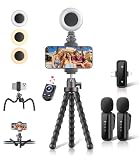
- All-in-One Vlogging Kit: Designed for content creators for TikTok/YouTube/influencer/live streaming/video recording. It combines flexible tripod, wireless microphones, led fill light, phone holder, and scrolling remote. The entire kit weighs only 241g, about the weight of a single phone, making it lightweight and portable for creating content. Whether you’re shooting vlogs, live streaming, conducting interviews, or recording videos, this greatly helps beginners start creating easily
- Flexible Octopus Tripod: Compact 9-inch lightweight & Portable tripod (only 155.6g) with bendable, non-slip legs that securely wrap around branches, railings and uneven surfaces for creative angles. It also works as a desktop stand and selfie stick. The 360° rotating ball head allows quick switching between landscape, portrait and overhead shots, with a standard 1/4" screw for universal compatibility with phones, small cameras and action cameras
- Plug&Play Wireless Microphones: No app, No bluetooth. Simply plug the receiver into your iPhone or Android device and you’re ready to record high-quality audio. Advanced noise cancellation and mixing capabilities interference to deliver crystal-clear, natural sound for recording ensure your voice stays crisp.Boasts a 79ft stable transmission range for free movement during filming, live streaming, interviews, vlogging, and content creation
- Adjustable Fill Light & Scrolling Remote: The compact LED fill light offers three color modes (white, natural, warm), each with three adjustable brightness levels, so you can match the lighting to live streams, selfies, night shoots and makeup tutorials. Paired with a 33ft long-distance Bluetooth remote, it supports hands-free photo/video shutter control, TikTok scrolling, iPad page turning, and double-press like sending, bringing you better lighting and easier control for your creation needs
- Wide Compatibility: Universal phone holder fits 4.7-6.7 inch smartphones securely with adjustable width, compatible with iOS and Android devices. Combined with the rest of the kit, you have everything needed for content creation on the go. This Content Creator Essentials Kit Includes: Octopus Tripod*1, Microphones receiver*2, Microphone Transmitter*1 ,Led Fill Light *1, Phone Holder *1, Scrolling Remote*1, Type-C charging cable*1, Storage bag*1
For streams you’re running on a cloud platform, geo-restrictions are set the same way: in YouTube Studio. The platform you use to handle the stream infrastructure doesn’t affect the restrictions you can set in YouTube. The restriction is applied at the YouTube ingest and delivery layer, independent of where the stream originates.
For creators running looping streams with licensed content, geo-restrictions are part of the compliance setup. The infrastructure supporting the stream is also part of it. StreamNeo handles cloud-based looping streams with the same geo-restriction options as any other YouTube broadcast. Set your geographic restrictions in YouTube Studio and the looping stream respects them immediately. You upload your video once, set the restrictions, paste your stream key, and the cloud infrastructure handles the rest. There is a free 24-hour trial and no card required, allowing you to test the full setup including geo-restrictions with real audience segments before committing.
The most important misunderstanding to avoid is thinking that geo-restrictions are about access control for paying viewers. They’re not. They’re about complying with regional licensing agreements. If you have licensed music, sports content, or regional broadcast rights, geo-restrictions help you honor those agreements. If your content is entirely original and unrestricted, you don’t need them.
Geo-restricting a live stream is a simple feature that solves a specific problem. It’s not a security tool, and it doesn’t prevent determined circumvention. It’s a compliance mechanism that allows you to honor regional content agreements. Understanding what it actually does—block access from specific regions, not secure the content from copying—lets you use it appropriately for your channel’s needs.
Quick Recap
Product prices and availability are accurate as of the date/time indicated and are subject to change. Any price and availability information displayed on Amazon at the time of purchase will apply.
Independent reader supportYour contribution helps us test, update, and keep practical guides available for everyone.



