Outdated Drivers Are Slowing You Down
One free scan finds every outdated or missing driver and matches the right update for your exact hardware.Free scan · exact hardware matchPC Slower Than It Used to Be?
A free scan shows the junk files, broken settings and background clutter dragging Windows down - then fixes them in one click.Free scan · Windows 10 & 11Choose a home battery by sizing it to the loads you want to keep running, the hours you need backup, and the power those appliances draw at the same time. Then check whether its controls can work with your utility’s time-of-use (TOU) rates and the backup reserve you want to keep. A battery’s capacity alone cannot tell you whether it will cover your home or lower your bill.
How much battery storage do I need for my home?
Start with your home’s actual electricity use, not a national average or a headline battery size. Review recent utility bills to estimate daily use in kilowatt-hours (kWh), then account for seasonal peaks. Heating, air conditioning, well or sump pumps, electric cooking, and EV charging can all change demand substantially. Tesla’s sizing guidance cites a U.S. median of 10,500 kWh of annual household electricity use in 2023, based on EIA data; that is context, not a sizing target for your home.
Build an outage energy target
- List the loads you need during an outage. Separate must-run items—such as a refrigerator, selected lights, internet equipment, or medical devices—from loads you can do without. Include the expected hours of use for each.
- Estimate their energy over your backup window. Add the essential loads’ expected kWh use for the duration you want to cover. A bill’s daily average can help as a starting point, but it does not show which circuits will be on or how much they will draw during an outage.
- Decide whether to count on recharging. Solar may recharge a compatible system during an outage if the system is configured for backup operation and sunlight is available. Do not assume consistent production: night, weather, and season affect how much energy solar can provide.
- Choose a reserve. Set aside the amount you want available for outages rather than spending all stored energy on everyday bill optimization.
The U.S. Energy Information Administration figure cited by Tesla for 2022 is an average of 5.5 hours of electricity interruption. That national average does not predict the length of an outage at a particular address; local conditions and individual events vary.
Check power as well as capacity
Capacity, measured in kWh, describes how much energy is stored and helps estimate how long selected loads may run. Power, measured in kilowatts (kW), describes how much load the battery can supply at once. A system can have enough stored energy for several hours yet still be unable to start or run several high-draw appliances simultaneously. Motors and compressors can also have startup demands that differ from their normal running loads, so ask the installer to check those demands against the proposed system.
#1 Best Overall

- 1500VA/1000W PFC Sinewave Uninterruptible Power Supply (UPS): Uses sine wave output to provide battery backup power for Active PFC & conventional power supplies; Safeguards computers, workstations, network devices, and telecom equipment
- 12 NEMA 5-15R OUTLETS: 6 battery backup & surge protected outlets, 6 surge protected outlets; INPUT: NEMA 5-15P right angle, 45 degree offset plug with 5 foot power cord; 2 USB charge ports (1 Type-A, 1 Type-C) quickly charge phones and tablets
- MULTIFUNCTION, COLOR LCD PANEL: Displays immediate, detailed information on battery and power conditions; Color display alerts users to potential issues before they can affect critical equipment and cause downtime; Screen tilts up to 22 degrees
- AUTOMATIC VOLTAGE REGULATION (AVR): Corrects minor power fluctuations without switching to battery power; UL SAFETY CERTIFIED: Product has been tested in a UL certified lab and listed with UL as meeting or exceeding safety standards
- 3-YEAR WARRANTY – INCLUDING THE BATTERY; $500,000 Connected Equipment Guarantee; FREE PowerPanel Management Software (Download)
As one current product example—not a recommendation or a full market comparison—Tesla lists Powerwall 3 at 13.5 kWh capacity and 11.5 kW continuous backup power. Tesla lists a Powerwall 3 Expansion unit as adding 13.5 kWh of capacity. Confirm the supported configuration, power limits, and site design with the installer; adding capacity does not by itself resolve a power or circuit limitation.
What can a home battery run during a power outage?
It depends on the circuits connected for backup, their combined demand, and the battery’s available energy and output. A battery does not automatically power every circuit in a home just because it is connected to the electrical system.
Rank #2

- One Powers All. The unit of DELTA Pro Ultra whole house generator includes an inverter and a battery. One inverter supports 120V & 240V and has an exceptional 7200W output, allowing you to run almost any heavy household appliance, even a 3-ton central air conditioner. Triple the inverters for an incredible 21.6kW AC output, allowing you to live life to the fullest even during an outage. The electric generator achieves a total 7200W output even during charging.
- Strong Power Security. Scalable from one battery of 6144Wh, two days of essential power, all the way to 15, it multiplies the energy to a gigantic 90kWh. For a standard North American household, that's over 30 days of essential power secured.
- Customize Your Home Power. Use the EcoFlow app to priolritize specific circuits in your home, extending your backup even longer. For more than just blackouts, it intelligently analyses your home power usage to offset peak rates while utilizing solar to lower energy bills.
- Multi Ways to Charge. One battery of 6144Wh can be fully recharged in 2 hours. Faster than any other 6kWh solar generator. Users can choose among electric vehicle piles, solar, wall outlets or outdoor generators for charging.
- Uninterrupted Life. Online UPS with 0-ms transfer time, offering 24/7 protection for sensitive electrical devices against power disturbances or grid failure. All fans are off for the first half hour of outputting 2000W, giving you absolute silence for tranquility in everyday life.
Partial-home backup
With partial backup, an installer selects critical circuits and leaves other loads—often heavier ones—outside the backed-up panel. This can focus the battery on essentials and avoid designing around the home’s full demand. Ask for a written list of backed-up circuits and confirm how the system handles high-demand appliances and motor starts.
Whole-home backup
Whole-home backup aims to support the home’s full electrical demand, but whether that is practical depends on the system configuration, panel arrangement, backup gateway or transfer switch, utility requirements, and site conditions. “Whole home” does not mean unlimited simultaneous use: the system still has power and energy limits. Have the installer explain which loads can operate together and any operating restrictions.
Recommended Free Tools
Rank #3

- UL9540 | UL1973 | CEC LISTED - Completed comprehensive testing by Intertek and has officially earned two key North American safety certifications.And has met the standards set by the California Energy Commission.The outstanding performance in design, electrical safety, and thermal runaway management,providing users with greater quality assurance
- Whole-Home Off-Grid Power: The 6-pack 51.2V 100Ah system delivers up to 30.72kWh of capacity, enough to cover an entire household’s daily electricity needs. It helps reduce reliance on rising electricity costs and serves as a reliable solution for achieving true off-grid living and energy independence.
- Closed-Loop Communication Battery: ECO-WORTHY 48V (51.2V) server rack battery features integrated CAN/RS485 interfaces and multiple communication protocols, enabling communication with leading integrated solar inverters for more intelligent system operation. Built-in Bluetooth and WiFi functionality allow you to easily monitor battery status via ECO-WORTHY APP.
- Powerful Expansion Capability: Designed for server rack compatibility with vertical mounting support, this 48V 100Ah battery maximizes space efficiency. It allows paralleling of up to 32 units (up to 163.8kWh), enabling flexible capacity expansion to meet a wide range of needs. Built with Grade A LiFePO₄ cells, it delivers reliable power output, exceptional cycle life, and stable safety performance.
- Complete Plug-and-Play Kit: We include every accessory you need: parallel cables, communication cables, grounding wires, protective terminal covers, screws, and a user manual. Unbox, install, and start enjoying clean power—it's that easy.
Can a home battery save money on time-of-use rates?
Potentially. A battery configured for time-based operation can charge when electricity is less expensive and discharge when rates are higher, shifting some grid purchases away from peak periods. Whether that reduces your bill depends on your actual tariff, the hours and prices it sets, your household’s consumption timing, system settings, and utility support. There is no universal savings figure that applies to every home.
Before treating TOU savings as part of the financial case, compare the utility’s current peak and off-peak prices and periods with when you use electricity. Check whether your utility supports the battery’s relevant grid-charging or export features; availability can differ by utility. Use a local bill or tariff, not a generic example, to evaluate the opportunity.
Rank #4

- 1500VA/900W Intelligent LCD Uninterruptible Power Supply (UPS): Uses simulated sine wave technology to provide battery backup power to safeguard workstations, networking devices, and home entertainment equipment
- 12 NEMA 5-15R OUTLETS: Six battery backup & surge protected outlets; six surge protected outlets; INPUT: NEMA 5-15P plug with 6-foot power cord; USB charge ports (1 Type-A, 1 Type-C) quickly charge mobile phones and tablets
- MULTIFUNCTION, COLOR LCD PANEL: Displays immediate, detailed information on battery and power conditions; Color display alerts users to potential issues before they can affect critical equipment and cause downtime
- AUTOMATIC VOLTAGE REGULATION (AVR): Corrects minor power fluctuations without switching to battery power; UL SAFETY CERTIFIED: Product has been tested in a UL certified lab and listed with UL as meeting or exceeding safety standards
- 3-YEAR WARRANTY – INCLUDING THE BATTERY; 500,000 Connected Equipment Guarantee; FREE PowerPanel Personal Software (Download)
Balance rate shifting against outage protection
A backup reserve keeps some stored energy available for an outage. Energy held in reserve is not available for ordinary rate shifting, so a higher reserve can reduce the capacity used for daily savings operation. Choose the setting based on how much outage protection you want and how often you are willing to use stored energy for bill management. Tesla’s Savings Mode and Backup Reserve materials describe these controls for Powerwall; other systems may use different settings or have different utility limits.
Independent reader supportYour contribution helps us test, update, and keep practical guides available for everyone.How to compare battery proposals
Ask installers to quote the same backup goal and compare the system details, not only the battery’s advertised kWh. A proposal should explain what is included in the installation and how the system will operate at your home.
What’s actually slowing this PC down?
Pick the symptom - the matching free tool is one click away.
Best Value
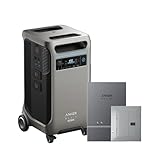
- The F3800 Plus Power Station and Home Power Panel will be dispatched separately. If you receive one item before the others, please await the arrival of the remaining items.
- Power Your Home for Weeks: F3800 Plus starts at 3.84kWh, enough to power your home for a full day. Need more? Expand to 26.9kWh with 6 batteries, or double up to 53.8kWh with 12 for weeks of power.
- Power More Appliances Simultaneously: F3800 Plus offers a massive 6,000W output, 58% more than other portable power stations at the same capacity. For more power, pair two for up to 12,000W max AC output.
- Dual-Voltage for Any Appliance: With 120V / 240V dual-voltage support, you can run everything at home without limitations, including your dryer.
- 63 Minutes UltraFast Recharging: Get outage-ready in just 63 minutes via solar and generator, and recharge flexibly in 4 ways—solar, generator, home power panel, or AC outlet.
- Energy and power: usable capacity in kWh, continuous and peak output in kW, and motor-start capability.
- Backup scope: the circuits supported, whether the design is partial- or whole-home, and how the gateway or transfer equipment is arranged.
- Solar fit: compatibility with your existing panels and inverter, and whether solar can recharge the battery during an outage in the proposed configuration.
- Expansion: supported future additions and any limits on the system configuration.
- Controls: reserve settings, TOU operation, and whether grid charging or export is available under your utility’s rules.
- Ownership and project terms: warranty, installation scope, itemized installed price, required permits, and utility interconnection steps.
Installed cost, payback, incentives, export compensation, and permission to charge from the grid are location- and project-dependent. Ask the installer for an itemized local quote and verify current terms with your utility and relevant incentive administrator. Have a qualified installer assess your panel, existing solar equipment, site, and local requirements before choosing a configuration.
Quick Recap
Product prices and availability are accurate as of the date/time indicated and are subject to change. Any price and availability information displayed on Amazon at the time of purchase will apply.




