To share your LinkedIn profile, copy its public profile URL and paste it into an email, text, resume, application, website, or social bio. On desktop, go to Me → View Profile and copy the link under Public profile & URL. In the mobile app, open your profile and use Contact → Your Profile → Share via…, or copy the URL from Contact info. You can also send a profile through LinkedIn itself. What a recipient can see depends on your public-profile settings.
Share your profile by copying its URL
Copying the public profile URL is the most reusable option: you can paste the same link into an email, text, job application, resume, website, portfolio, or social account. The address commonly contains linkedin.com/in/, though regional variations may occur. Use LinkedIn’s displayed URL rather than typing one from memory.
- Open LinkedIn and go to your profile.
- Find and copy your public profile URL.
- Paste it into the destination and add a short note explaining why you are sharing it.
- Before sending, open the pasted link in a private or incognito browser window to check that it works and see what a visitor who is signed out can view.
A live link lets the recipient visit your profile as it appears at the time they open it; a screenshot is static and does not provide a direct route to your profile.
Find your profile link on desktop
- Click Me at the top of the LinkedIn homepage.
- Click View Profile.
- In the right-hand panel, find Public profile & URL.
- Copy the displayed URL and paste it where you want to share it.
LinkedIn documents this path in its instructions for finding a public profile URL. From your profile’s introduction area, you can also choose Resources → Send profile in a message to share it inside LinkedIn. Labels or placement may vary slightly with account and interface updates.
What’s actually slowing this PC down?
Pick the symptom - the matching free tool is one click away.
#1 Best Overall

- Package includes 3 black mesh business card holders.
- Mr. Pen business card holder is made of premium quality stainless steel with well-painted surface, which is sturdy and great for long-term use.
- Our business card holders, which are stylish and functional, make a great first impression on your clients and associates and help to promote your business by keeping your business cards organized and within reach all the time.
- Mr. Pen mesh business card holder has extensive use and is ideal for clinics, offices, travel agencies, stores, and more.
- You can use it as an everyday business card holder, smartphone holder, small size holder, or sticky note holder.
Find or share your profile in the mobile app
For sharing through your phone’s available apps, open your profile, scroll to Contact, tap Your Profile, then tap Share via…. Choose LinkedIn messaging or another app offered by your device.
To copy the URL yourself, tap your profile photo, open your profile, tap More beside Add section, then tap Contact info. Find the public profile URL under Your Profile and copy it. LinkedIn documents these mobile options in its URL instructions and profile-sharing instructions.
- Share via… opens sharing options on your device.
- Send profile in a message shares within LinkedIn.
- Copy URL gives you a link you can reuse anywhere.
If you are using LinkedIn in a mobile browser rather than the app, controls may be in different places. Look for your public URL in your profile’s contact information or use LinkedIn’s profile-sharing controls if available.
Rank #2

- Great Stroage: With double pocket, mo more need for a bulky wallet or purse, our card holder easily hold your credit cards, id and some cash and you're ready to go
- Quality Material: The phone card holder is made of strong quality, anti-slip silicone material. It is strong and durable enough to keep its shape and cards will not fall out
- Universal Size: Fit with almost all Smartphones, such as iPhone 17, 16, 15, 14 Pro, 14 , 13 Pro Max, 13 Pro, 13, 13 Mini, 12 Pro Max, 12 Pro, 12, 12 Mini, 11 Plus, 11, 11 Max, Xs, Xs Max, XR, 8 Plus, 8, X, SE, 7, 7 Plus, 6, 6 Plus, 5, 5s, 5c, 5, 4, 4s; Samsung Galaxy S5, S4, S3, S2; Galaxy Note 4, 3, 2, 1; LG G3, G2, Optimus series; Nexus 6, 5, 4; HTC M8, EVO, Desire, Sense
- Easy to Install and Use: Easy use, peel off the cover of the back of the card holder, and stick on the back of the phone, then done. With the strong sticker, it can adhesive on any smooth face and hold things firmly. Notice: The phone holder for hand would not suitable for case as: liquid silicone/3D bump/leather/glass
- Multi Function: Not just only a phone wallet, attach it to your car, desk, fridge or any other place you want and get extra storage space
Use the link in an email, text, resume, or website
Email or text
Paste the copied URL into your message and give the recipient a reason to open it. For example:
- Recruiter or application: “Here is my LinkedIn profile, including my recent experience and projects: https://www.linkedin.com/in/your-name”
- Networking follow-up: “It was great meeting you. Here’s my LinkedIn profile so we can stay connected: https://www.linkedin.com/in/your-name”
- Referral request: “I’m sharing my LinkedIn profile for context on my background. I’d appreciate any advice or relevant introductions: https://www.linkedin.com/in/your-name”
Resume or application
Place the link in the contact-information line near your email address, phone number, portfolio, or personal website. On a digital resume, make concise visible text such as linkedin.com/in/your-name clickable, with the full profile URL as its destination. Keeping a readable URL helps when a document is printed or a system does not preserve hyperlinks. Do not use only a QR code.
Website, email signature, or social bio
Add the copied URL as an ordinary hyperlink. The visible text can be brief—such as LinkedIn, View my LinkedIn profile, or Professional profile—while the link points to your full profile address. A profile link opens a profile; it is not necessarily a connection invitation.
Rank #3

- Anti-lost Cards Design: Are you still worried that it doesn't fit 1 card? It can only hold 1 card, you don't worry the card will fall out. Put your cards or some cash in this high-quality silicone material phone wallet, will not be lost, convenient and suitable for shopping near home, walking, walking the dog.
- Wide Compatibility: SHANSHUI phone wallet is compatible for iPhone,Samsung Galaxy and all most smartphones. ★Note - Glass Back for iPhone 11/X/8/8+ has an anti-fingerprint coating on the back of these devices that doesn't allow adhesive so we recommend a case with these phone models.
- Strong Adhesion & No Residue: Made of strong 3-m Adhesive, it can be firmly attached to the back of your phone. If you didn't stick it perfectly at the first time, peel off, adjust and re-stick. No sticky residue will be left after removing it.
- Strong Storage & Slim: Replace your bulky wallet or purse with a slim phone pocket comfortably holds up to 4 cards (credit cards, ID card, drivers license, business card, debet card and some cash).It's ultra-slim and easy to carry, you can put it in your pocket.
- Used For Various Scenarios:Widely used for computer back, glass,car window,car dash,desk,refrigerator door or home front door. It holds pencil, small ruler,makeup brush,comb and more.
Send your profile inside LinkedIn
To send it directly to a LinkedIn connection, open your profile and choose Resources → Send profile in a message on desktop. The mobile app’s Share via… flow can offer LinkedIn messaging. These options share the profile within LinkedIn and may let you add a personal note; they are not substitutes for a reusable link in a resume, website, or non-LinkedIn application. See LinkedIn’s profile-sharing instructions for its documented controls.
Share another member’s profile
On desktop, open the member’s profile, click More in the introduction area, and choose Share Profile. Select the connection or connections, add context if useful, and send. In the mobile app, open the profile and tap More; choose the private-message option to share within LinkedIn or Share via… to use another app. Available labels can vary. LinkedIn describes these options in its profile-sharing help.
The Tool Desk
Outbyte PC Repair FREERepair Windows errors before they cause bigger problemsFix Now →Outbyte Driver Updater FREEScan for outdated or missing drivers - takes under a minuteDriver Scan →Share someone else’s profile when it is relevant, and explain why you are sending it rather than dropping an unexplained link. Do not assume every section of their profile is public. If you are making a sensitive or commercially important introduction between two people, ask permission first.
Rank #4
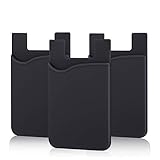
- SILICONE MATERIAL: The phone card holder stick on is made of high quality, anti-slip silicone material, smooth on the outside with a corrugated-looking texture on the inside. This strong and durable material will keep its shape and cards will not fall out.
- MINI SIZE & MULTI COLORS: Dimensions: 3.42 x 2.24 x 0.12 inch (87 x 57 x 3 mm); The extra-slim adhesive credit card holder for back of phone is just 3mm thick, adds no bulk to your smartphone, carry only what you need but leave your bulky wallet behind when going out. A range of colors makes it suitable for men, women and even kids. Also, multiple colors enables you to choose the best color to match your device, changing colors as often as you like become reality.
- CONVENIENT CARD HOLDER CASE: This stick on card holder for phone case can securely hold cards (we suggest fit 3 cards) and cash, as well as small items that can be easy to lose such as SD cards, junkdrives, earphones, keys, etc. In addition, the phone wallet stick on can also be used on walls and refrigerators to organize daily essentials. No more need for a bulky wallet or purse. Just slip your credit cards, ID and some cash into the card holder and you're ready to go!
- SUPER ADHENSIVE, EASY TO INSTAL AND REMOVE: Each Pofesun stick on phone wallet uses a 3M adhesive tape backing for a strong, firm, long-lasting hold. It won't lose strength due to pocket heat, light moisture or sweat. When you want to remove the card holder, it can be peeled off without leaving any residue. ( Notes: Make up remover can help you if residue leaves).
- BROAD COMPATIBLE FOR SMARTPHONE & TABLETS: The sticky phone card holder is compatible with all smartphones with a minimum size of 4-inch LCDs or larger such as the iPhone 4 / 4s / 5 / 5s / 6 / 6 plus / 6s / 6s / 7 plus/ 7, Galaxy S2 / S3 / S4 / S5 / S6 / S7 edge/s8 plus, Galaxy Note 1 / 2 / 3 / 4 / 5 / 6 / 7, LG G2 / G3 / G4 / G5, HTC M8, iPod Touch , Sony Xperia, tablets including iPad Air, Galaxy, Surface Pro, and so much more!
Customize your public profile URL
A name-based URL is easier to read on a resume or share aloud. LinkedIn recommends a variation of your name or professional brand. Examples include linkedin.com/in/jane-doe, linkedin.com/in/janedoe, or linkedin.com/in/jane-doe-design.
Change it on desktop
- Click Me → View Profile.
- Click the edit icon beside Public profile & URL.
- Under Edit your custom URL, click the edit icon.
- Edit the final part of the URL and click Save.
Change it in the mobile app
- Tap your profile photo and open your profile.
- Tap More → Contact info.
- Tap the edit icon, then Profile URL.
- Edit the custom URL and save.
LinkedIn’s URL guidance says the custom portion can be 3–100 characters and should not include spaces, symbols, special characters, or the word “LinkedIn.” It is case-insensitive, and only one custom public profile URL can be active at a time. A preferred address may already be taken because custom URLs are first-come, first-served; choose a professional variation rather than repeatedly trying the same unavailable name.
LinkedIn says a custom URL can be changed up to five times within six months; after the fifth change, another change may be unavailable for six months. Previously used URLs may remain linked to the member for six months unless unlinked. Avoid putting sensitive personal information in the URL or changing it frequently. If you do change it, update resumes, signatures, applications, websites, portfolio pages, social bios, and any QR codes or printed materials that contain the old address.
Best Value

- SLIM & COMPACT DESIGN: Holds 15–25 business cards (depending on card thickness) or a small number of standard-sized cards. Lightweight and slim profile fits easily in your pocket, briefcase, or bag—ideal for everyday business carry.
- PREMIUM PU LEATHER & STAINLESS STEEL: Crafted with a high-quality PU leather exterior and a durable stainless steel interior, offering a professional appearance with enhanced protection and long-lasting use.
- SECURE MAGNETIC CLOSURE: Built-in magnetic flip closure keeps your cards securely stored while allowing quick and easy access during meetings, presentations, or networking events.
- RFID BLOCKING PROTECTION: Integrated RFID blocking technology helps reduce the risk of unwanted wireless scanning for RFID-enabled cards, providing added peace of mind during daily professional use.
- IDEAL GIFT FOR PROFESSIONALS: A practical and stylish choice for business owners, entrepreneurs, sales professionals, and corporate staff—perfect for work, networking, or professional gifting.
If your URL is missing, restricted, or outdated
No public URL appears
LinkedIn says the public URL will not appear when the profile is not public. To check visibility on desktop, go to Me → View Profile, click the edit icon beside Public profile & URL, then turn on Your profile’s public visibility or enable the public sections you want to show. In the app, tap your profile photo → Settings → Visibility → Edit your public profile under Visibility of your profile & network. LinkedIn’s public-profile visibility guide explains these controls.
The link opens a limited profile, or the visitor is asked to sign in
A public profile is a simplified version of your LinkedIn profile, and you control which eligible sections are displayed. The version a visitor sees can depend on their sign-in status and the context; some visitors may be prompted to sign in or join LinkedIn. Review LinkedIn’s public-profile information and test the link while signed out before distributing it broadly.
The profile does not look right in Google or Bing
Changing public visibility does not update external search results instantly. LinkedIn says it may take weeks or months for changes to appear, and external search engines control their own refresh schedules. Check the profile link itself and its visibility settings rather than treating an old search result as proof that the link is broken. See LinkedIn’s visibility guidance and public-profile information.
The URL changed
LinkedIn says changing the country listed on your profile can automatically change the public profile URL; old URLs should continue to work. Do not rely on an old address indefinitely, especially after changing a custom URL. Copy the current URL from your profile and replace older versions wherever you shared them. LinkedIn explains URL changes in its URL help.
Do these 3 things before closing this tab:
1Scan for outdated or missing drivers - takes under a minute2Clear out junk files and repair common Windows errors3Fix the driver behind crashes, sound loss and screen glitchesProfile URL and Follow link are different
A profile URL takes someone to your profile. LinkedIn’s separate Follow link or button is meant to let people follow a member from a website, email, or another platform; access can depend on eligibility and geographic availability. If your goal is to let visitors follow you, not simply open your profile, see LinkedIn’s Follow link and button guidance.
Can you share a profile without making it public?
The public profile URL is associated with having a public profile, so if public visibility is off, a public URL may not be available. You can still use LinkedIn’s profile-sharing message feature, subject to LinkedIn’s access and visibility behavior. That does not make every profile section available to anyone on the internet; people outside LinkedIn may see limited information or be asked to sign in. LinkedIn explains the relationship between URL availability and visibility in its URL instructions, sharing instructions, and public-profile information.
Quick Recap
Product prices and availability are accurate as of the date/time indicated and are subject to change. Any price and availability information displayed on Amazon at the time of purchase will apply.




