The digital HM Armed Forces Veteran Card launched on 17 October 2025. It is an optional digital version of an existing Veteran Card, stored in the GOV.UK One Login app. Eligible cardholders need a compatible smartphone, and the physical card remains valid and useful.
What launched on 17 October 2025?
The UK government introduced a digital version of the HM Armed Forces Veteran Card. It shows the information already associated with the physical card, including the holder’s name, photograph, latest service and date of birth.

This is a credential for proving veteran status, not a replacement for a passport, driving licence or universal online identity. The government describes it as the first digital credential in the GOV.UK One Login app. Its longer-term plan is to add credentials such as a digital driving licence and develop the wider GOV.UK Wallet concept. See the official launch announcement and the GOV.UK One Login roadmap.
Who can get the digital card?
The official digital service is for people who already have an HM Armed Forces Veteran Card. Installing One Login does not create veteran status or substitute for applying for a Veteran Card in the first place.
Do these 3 things before closing this tab:
1Repair Windows errors before they cause bigger problems2Scan for outdated or missing drivers - takes under a minute3Clear out junk files and repair common Windows errors#1 Best Overall
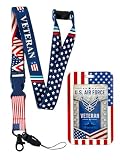
- PATRIOTIC DESIGN: Features a U.S. Airforce theme with a matching Airforce Veteran card and U.S. Flag card holder.
- VETERAN PRIDE: Proudly display your Airforce Veteran status with the included dedicated veteran card slot.
- CARD HOLDER INCLUDED: The U.S. Flag card holder keeps your ID, badge, or access card secure and visible.
- VERSATILE USE: Perfect for displaying badges, ID cards, or keycards at events, offices, or everyday use.
- GREAT GIFT IDEA: A thoughtful and patriotic accessory for U.S. Airforce veterans and military supporters.
- The digital version is optional.
- Your physical card remains available and valid.
- The launch announcement said nearly 2 million veterans could benefit; that is a government estimate, not an independently verified current total.
Start with the government’s get a digital version of your Veteran Card guidance.
Phone and account requirements
The requirements below are those listed in the official guidance checked for this article; app requirements can change.
| Device or account | Requirement |
|---|---|
| iPhone | iOS 16.7 or later |
| Android phone | Android 10 or later |
| App | GOV.UK One Login app from the relevant app store |
| Account | A GOV.UK One Login account may be required |
| Photograph | A replacement passport-style photograph may be requested if the existing image is not clear enough |
The published instructions describe adding the card to a smartphone. They do not establish support for every older phone, tablet or desktop computer.
Rank #2

- Premium ABS Material: Made of durable ABS, this badge holder resists wear and corrosion, offering long-lasting protection and reliability for daily use
- Stylish Double-Slide Design: Features a sleek dual‑sided sliding cover that is lightweight yet sturdy, keeping ID cards secure while maintaining a professional appearance
- Compact 4x2.5 Inch Size: Perfectly sized to fit standard ID cards, this holder is portable and convenient, ideal for business events, office use, and daily activities
- Clear Waterproof Film: Transparent protective layer allows quick scanning without removing cards; waterproof and stain‑resistant to keep IDs clean and legible
- Comfortable Lanyard Attachment: Center slot fits the included soft lanyard; comfortable for all‑day wear, with strong connection that detaches and re‑installs easily
How to add your digital Veteran Card
- Open the GOV.UK service for getting a digital version of your Veteran Card.
- Sign in with GOV.UK One Login, or create an account if the service asks you to.
- Complete the identity and Veteran Card verification questions.
- Install or open the GOV.UK One Login app on your compatible phone.
- Use the QR code or on-screen add button supplied by the browser journey to connect the card to the app.
- Submit a new passport-style photograph if the service requests one.
- Open GOV.UK One Login whenever you need to display the digital card.
The government’s setup and troubleshooting guidance explains the QR-code and button step.
The Tool Desk
Outbyte Driver Updater FREEScan for outdated or missing drivers - takes under a minuteDriver Scan →Outbyte PC Repair FREEClear out junk files and repair common Windows errorsFree Scan →Do not install the wrong government app
Where can it be used?
The launch announcement gives these examples of in-person use:
Rank #3
- Confirming veteran status when registering with a GP.
- Accessing housing or mental-health support.
- Showing eligibility at museums and other cultural venues.
- Presenting evidence for shopping discounts and other veteran offers.
These are examples, not a promise that every provider accepts the digital card. Each organisation sets its own evidence rules and staff procedures. Check with the provider before travelling, booking or relying on a discount.
What it could not do at launch
The October 2025 launch material stated that the digital card was for in-person use only. On that published position, it could not be used online, for domestic air travel or to obtain a Veteran Railcard, and it did not provide universal end-to-end programmatic verification.
Quick wins for a faster PC:
Scan for outdated or missing drivers - takes under a minuteDriver Scan →Clear out junk files and repair common Windows errorsFree Scan →Those restrictions may change as the programme develops. Confirm the current rules with the relevant service before relying on the card for a particular transaction.
Rank #4

- Military-Grade Durability: The cool and stylish Oaridey carbon fiber ID badge holder is built with military-spec PC and a manganese steel clip. This combo delivers superior crack & impact resistance compared to ordinary card holders, securing your credentials in demanding environments like police duty or construction.
- Dual-Lock Security System: This ID card holder features embedded silicone grains that grip the card sides and an internal metal spring that locks the card itself in place. This dual-point locking prevents slips without damage, while a simple bottom-push allows instant card release.
- Multi-Function Manganese Steel Clip: Engineered for movement — whether you're in and out of vehicles or on the move across worksites. Gone are the days of the instinctive check for your badge. Designed to grip securely, it stays reliably in place so you never have to worry about it slipping off. What you’re really getting is peace of mind and undivided attention.And when it comes to functionality, the robust clip on this ID holder also serves as a convenient badge wallet, securely holding 5–10 bills.
- 5-Card Capacity Without Bulk: This ID badge holder is engineered for efficiency. Its sleek, slim profile is optimized to carry up to 5 cards—such as your license, credit cards, and work ID—securely in one convenient place, eliminating the need for a bulky wallet.
- Designed for Diverse Professionals: Engineered to perform in any setting, this durable ID holder is equally reliable on a construction site, in the office, or during patrol. It's the trusted ID card holder for police, medical staff, workers, cyclists, and travelers.
Digital card versus physical card
| Digital Veteran Card | Physical Veteran Card |
|---|---|
| Convenient on a compatible smartphone | Works without a phone, signal or battery |
| Displayed through the One Login app | Tangible document that some providers may prefer |
| Protected by app security such as a passcode, Face ID or Touch ID | Can be shown when the phone is lost, damaged or unsupported |
| Acceptance varies and launch restrictions applied to online and certain transport uses | Remains available and valid alongside the digital version |
Keep the physical card. It is the practical fallback if your phone is unavailable, your operating system is unsupported, a provider refuses the digital version or a service specifically asks for the physical document.
Independent reader supportYour contribution helps us test, update, and keep practical guides available for everyone.Security and privacy
The government compares the One Login experience with banking apps and cites passcodes, Face ID and Touch ID as security measures. The app’s security does not make the card universally accepted or equivalent to a passport.
The digital display contains personal information, including your name, photograph and date of birth. Show it only to a legitimate service provider, and avoid screenshots or unofficial copies that could be altered or exposed.
Best Value

- 32" long
- Strong Nylon
- Officially Licensed by the U.S. Army
Troubleshooting
The QR code or add button is missing
Restart the process from the digital Veteran Card service. Sign in and answer the questions again if prompted. The QR code or button is supplied within that browser journey.
The card will not add
- Check that you installed the correct GOV.UK One Login app.
- Restart the digital-card journey and repeat the sign-in and verification steps.
- If it still fails, contact the Veterans UK Helpline for Veteran Card assistance.
- Contact GOV.UK One Login support for account or app problems.
The photograph is rejected
The service may require a replacement image when the existing card photograph is unclear. Submit a photograph that meets passport-photo rules, following the instructions in the official guidance.
You have no compatible smartphone
Continue using the physical Veteran Card. The published service does not establish a desktop or tablet alternative.
A provider refuses the digital card
Ask which evidence the organisation accepts and show the physical card if you have it. Acceptance depends on the provider, not solely on whether the card appears correctly in One Login.
Recommended Free Tools
Quick Recap
Practical checklist
- You already hold an HM Armed Forces Veteran Card.
- Your iPhone runs iOS 16.7 or later, or your Android phone runs Android 10 or later.
- You installed GOV.UK One Login—not the general GOV.UK or GOV.UK ID Check app.
- You can access the email, phone and account details used for One Login.
- You can provide a passport-style replacement photograph if requested.
- You will retain the physical card.
- You have checked that the specific organisation accepts the digital version for the service or discount you need.
Product prices and availability are accurate as of the date/time indicated and are subject to change. Any price and availability information displayed on Amazon at the time of purchase will apply.




