Free tools Windows power users keep installed
One-click scans. No signup required.
There is no single best stock-market game. Wall Street Survivor is the strongest starting point for most beginners, StockTrak is better for structured contests and classrooms, and thinkorswim paperMoney or Webull paperTrade are better when you want to rehearse a broker’s order-entry workflow. TradingView, NinjaTrader and TradingSim serve charting, futures and day-trading practice rather than ordinary long-term investing.
Every simulator gives you hypothetical cash, but the rules differ: some use live or delayed quotes, some replay history, and some simplify fills into a game. Use the comparison below to match the tool to your goal—and treat virtual profits as practice results, not evidence that live trading will be profitable.
Quick comparison: which simulator fits your goal?
| Platform | Best for | Format | Cost/access | Products | Mobile | Realism note |
|---|---|---|---|---|---|---|
| Wall Street Survivor | Beginner education and game play | Browser; mobile access may vary | Free virtual portfolio; registration details can change | Stocks, ETFs, options and crypto advertised | Verify current iOS/Android feature parity | Educational simulation, not broker-grade execution |
| StockTrak | Classrooms, contests and broad markets | Browser and contest platform | Paid; page shows $16.98/month normal and $12.98/month promotional pricing when checked, plus a 30-day money-back guarantee | Stocks, ETFs, mutual funds, bonds, options, futures, forex, crypto and 50+ global exchanges advertised | Verify current mobile experience | Highly configurable, but rules depend on the contest |
| Investopedia Stock Simulator | Simple stock-market practice | Browser game | Free functions may require registration | Verify current instruments and quote timing | Verify current mobile support | Check current order rules and data delay |
| MarketWatch Virtual Stock Exchange | Social contests | Browser game | Availability and features vary by edition | Verify current coverage | Verify current mobile support | Competition-oriented rather than execution-focused |
| TradingView Paper Trading | Charts and technical analysis | Browser, desktop and mobile ecosystem | Basic paper trading; paid plans/data are separate | Coverage follows supported symbols and connected markets | App exists; verify simulator feature parity | Displayed-price fills may omit spread, slippage and liquidity |
| thinkorswim paperMoney | Advanced stocks, options, futures and forex | Desktop, browser and mobile platform | Free, but a Schwab account is required; Guest Pass access is separate | Equities, options, futures and forex | Mobile app; advanced tools may differ | Schwab advertises real-time data and $100,000 virtual buying power |
| Webull paperTrade | Broker-style mobile practice | iOS/Android, browser and desktop | Advertised free; account and product rules apply | Stocks, options, crypto and futures-related features advertised | Strong mobile orientation; verify current parity | Market, limit, stop, stop-limit, OCO and trailing-stop orders; simulated fills are not live fills |
| Interactive Brokers Paper Trading | Professional and global workflows | Desktop, browser and mobile | Broker registration and eligibility conditions apply | Broad multi-asset and international access; verify account permissions | Mobile platform available | Powerful but complex for a first-time learner |
| TradeStation Simulator | Strategy and automation-oriented practice | Desktop/web platform | Confirm current account requirements | Verify current simulated products | Verify current mobile support | Useful for platform workflow; simulator access rules can change |
| moomoo Paper Trading | Mobile-first active trading | Mobile, browser and desktop | Registration and U.S. eligibility may apply | Verify eligible products by country and edition | Mobile-focused | Broker-style charts and orders; check current data conditions |
| eToro Demo Account | Social investing and portfolio experiments | Web and mobile platform | Demo registration; products vary by jurisdiction | Stocks, ETFs, crypto, indices, commodities and currencies advertised globally | Mobile app available | Leverage, CFDs and availability differ substantially by country |
| NinjaTrader Simulator | Futures practice | Desktop trading platform | Free simulator access is subject to current conditions | Primarily futures | Not primarily a mobile game | Order-entry practice, but futures leverage is simulated—not harmless |
| TradingSim | Historical day-trading replay | Browser simulator | Paid plans; verify current pricing | Intraday equities and replay markets as supported | Verify mobile support | Replay is different from live paper trading |
| MetaTrader 5 demo | Forex-oriented practice | Desktop and iOS/Android apps | Demo supplied through a selected broker | Broker determines forex, CFDs and other instruments | iPhone/iPad and Android apps | Conditions, spreads and symbols depend on the broker |
| The Stock Market Game | K–12 and classroom education | School program/browser | Program registration; access varies | Structured investing game; verify current markets | Verify current app/browser access | Designed for education, not a live-broker replica |
“Free” can still mean a login, brokerage account, delayed data, paid exchange data or a limited demo. Confirm the current terms before relying on a feature.
The 15 best options, by use case
1. Wall Street Survivor — best overall beginner game
Wall Street Survivor combines a free virtual portfolio with lessons, articles, videos, contests and practice in U.S. stocks, ETFs, options and crypto, according to its site. It is the most approachable choice if you want explanations alongside trades rather than a professional terminal.
#1 Best Overall
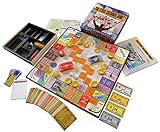
- NOW STEM.org Certified!!! Now being played in over 22+ countries and every state in the USA!!!!
- No Stock Knowledge needed to have a Great Time!!!!! Based on real stock market principles.
- 3 Levels of Play - Family Friendly, Strategy level, and Teams Play
- No financial, economics, or heavy math required. A fun way to learn about finance and money management.
- Ages 10+ to adult / 2-6 Players
Use it to learn order vocabulary, diversification and portfolio tracking. Skip it if your main objective is precise bid/ask simulation, partial fills or automated strategy development. Start at Wall Street Survivor; verify current mobile capabilities and quote timing.
2. StockTrak — best for classrooms and serious contests
StockTrak is the broadest classroom-style option in this list. Its practice page advertises stocks, ETFs, mutual funds, bonds, options, futures, forex, cryptocurrencies and more than 50 global exchanges. Teachers and clubs can customize contests, starting balances and rules. The page currently displays $16.98 per month as a normal price, $12.98 as a promotional price and a 30-day money-back guarantee; those figures are time-sensitive.
Choose it when a fixed contest, reporting and broad asset coverage matter more than a casual free game. It is likely overkill for someone who only wants to buy a few virtual U.S. stocks. See individual practice accounts and simulation features.
3. Investopedia Stock Simulator — best simple educational simulator
Investopedia’s simulator is a familiar, game-style entry point for basic stock practice. Before joining, verify the current U.S. edition’s data delay, supported assets, order rules, registration flow and mobile experience at Investopedia Stock Simulator. It is better suited to learning portfolio decisions than to testing professional execution.
Do these 3 things before closing this tab:
1Clear out junk files and repair common Windows errors2Fix the driver behind crashes, sound loss and screen glitches3Repair Windows errors before they cause bigger problems4. MarketWatch Virtual Stock Exchange — best for social competition
MarketWatch’s game format emphasizes portfolios, rankings and contests. It can work well for an investment club that wants a shared leaderboard. Because long-running games can change registration and supported markets, check the current version at MarketWatch Games before creating a contest.
5. TradingView Paper Trading — best for chart-based practice
TradingView lets you paper trade from charts, watchlists, indicators and saved layouts. That makes it a strong bridge for people who analyze price action or want to rehearse entries visually. Paper fills can still be more convenient than live fills: a displayed price may not reflect spread, queue position, slippage or available liquidity.
Use the platform’s paper-trading instructions to check order types and account limits. Paid chart plans and market-data subscriptions are separate from the basic simulator.
6. thinkorswim paperMoney — best advanced all-around platform
Charles Schwab advertises $100,000 in virtual buying power, real-time market simulation and practice for equities, options, futures and forex. PaperMoney is free, but Schwab says a Schwab account is required; a Guest Pass is a separate way to explore thinkorswim.
Rank #2

- Fun & Simple Financial Education: Easily grasp stocks, bonds, commodities, and Bitcoin investing through engaging, interactive gameplay. Perfect for teens and adults!
- Ideal Group Size: Designed for 2-6 players, ages 12 and up. Great for family game nights, classroom activities, or friend gatherings.
- STEM-Authenticated & Engaging: Approved by STEM educators, this game offers an addictive learning experience that's both intellectually stimulating and incredibly fun.
- Develop Real-World Skills: Face exciting market scenarios and cryptocurrency challenges to sharpen your decision-making skills in a highly engaging format.
- Play with Purpose: Enjoy an easy-to-learn, captivating game that gives back - a portion of our profits supports Feeding America, adding meaning to your gameplay.
This is the strongest choice when you may eventually use Schwab and need advanced order tickets, analysis and multi-asset practice. It is not the simplest option for a child or a first lesson. Details are at Schwab’s paper-trading page.
7. Webull paperTrade — best broker-style mobile practice
Webull advertises free paperTrade with real-time pricing, Level 2 data, simulated margin calls and liquidations, options strategies and 24/5 U.S. stock trading in the simulator. Listed order types include market, limit, stop, stop-limit, OCO and trailing-stop orders. Virtual funds can be reset or reloaded, so a win-loss record is meaningful only if you keep a fixed starting balance and trade history.
It suits active traders who want a mobile-to-desktop workflow and may later use Webull live. Rules and available products can change; consult Webull paperTrade.
8. Interactive Brokers Paper Trading — best for global and professional workflows
IBKR’s simulated account mirrors a powerful professional environment and can be useful for experienced users who need international markets or complex order workflows. The interface and permissions are unnecessarily complicated for many beginners, and simulated access should not be mistaken for live approval. Start with IBKR simulated trading.
The Tool Desk
Outbyte PC Repair FREEClear out junk files and repair common Windows errorsFree Scan →Outbyte Driver Updater FREEFix the driver behind crashes, sound loss and screen glitchesFind Drivers →9. TradeStation Simulator — best for strategy-oriented traders
TradeStation’s simulator is a logical fit for users interested in analytics, scripting or automated strategies. Confirm whether current access requires an account or funding at TradeStation simulated trading. It is not a no-registration classroom game.
10. moomoo Paper Trading — best mobile-first active practice
moomoo combines paper trading with brokerage-style charts and market tools. U.S. availability, eligible products and account requirements differ by edition, so check moomoo’s U.S. paper-trading page. It is a better fit for active order practice than for teaching a long-term allocation plan.
11. eToro Demo Account — best for social investing
eToro’s demo environment sits alongside its social-investing, CopyTrader and Smart Portfolio ecosystem. Its global page lists stocks, ETFs, crypto, indices, commodities and currencies, but products, leverage, CFDs and regulatory treatment vary by country. U.S. readers should verify exactly which instruments are available before treating the demo as a model of a U.S. account: eToro demo account.
12. NinjaTrader Simulator — best for futures
NinjaTrader is built around futures order entry, charts and simulation, not ordinary buy-and-hold stock investing. Use it to learn contract specifications, tick values and order placement, while remembering that futures leverage can create losses far beyond a small initial deposit in live trading. See NinjaTrader’s simulator.
Quick wins for a faster PC:
Fix the driver behind crashes, sound loss and screen glitchesFind Drivers →Repair Windows errors before they cause bigger problemsFix Now →Scan for outdated or missing drivers - takes under a minuteDriver Scan →Rank #3

- Issued in 1963 by Whitman Publishing
- For 2 to 8 players
13. TradingSim — best for historical day-trading replay
TradingSim focuses on replaying historical sessions so you can practice intraday decisions deliberately. Replay is not live paper trading: it cannot reproduce current news uncertainty, real-time queue priority or the emotional effect of an open position. It is generally a paid product, so verify current plans at TradingSim.
14. MetaTrader 5 demo — best for forex-oriented practice
MetaTrader 5 supplies desktop and iPhone/iPad and Android terminals, but the broker you select supplies the demo symbols, spreads, leverage and trading conditions. It is therefore not a single standardized stock simulator, and U.S. stock investors may find it a poor match. Review the MetaTrader 5 mobile platform and the broker’s own terms.
15. The Stock Market Game — best school program
The SIFMA Foundation’s Stock Market Game is a structured education program used by schools. It is appropriate when a teacher needs curriculum and class controls, not when an individual wants a broker replica. Confirm current browser or app access at The Stock Market Game.
Choose by the skill you want to build
- Complete beginner: Wall Street Survivor or Investopedia.
- Classroom or club: StockTrak or The Stock Market Game.
- Long-term investing: Use a game that supports dividends, splits, benchmark comparison and fixed starting capital; verify those rules before joining.
- Technical analysis: TradingView Paper Trading.
- Options: thinkorswim paperMoney or Webull, while separately learning expiration, assignment and margin.
- Futures: NinjaTrader Simulator.
- Forex: A MetaTrader 5 demo supplied by a carefully selected broker.
- Social investing: eToro Demo or a MarketWatch contest.
- Most realistic brokerage workflow: thinkorswim, Webull or IBKR, depending on the platform you may actually use.
- Historical day-trading practice: TradingSim.
How realistic is virtual trading?
“Real-time” describes quotes, not necessarily execution. A simulator may use live prices but fill your order instantly at the displayed price. Check these specific mechanics:
- Quote timing: live, delayed or historical replay.
- Order types: market, limit, stop, stop-limit, trailing stop and OCO.
- Execution: partial fills, bid/ask spread, slippage, queue priority and liquidity limits.
- Costs: commissions, regulatory fees, borrow charges and exchange fees.
- Portfolio events: dividends, splits, mergers, option expiration and assignment.
- Risk controls: margin requirements, forced liquidation, short-sale constraints and overnight gaps.
- Sessions: pre-market, regular hours, after-hours, overnight and weekend rules.
- Account integrity: whether starting cash can be edited, reset or reloaded.
Most games simplify at least some of these items. A convenient fill, unlimited virtual cash or repeated resets can make results look far better than a live account.
Independent reader supportYour contribution helps us test, update, and keep practical guides available for everyone.A disciplined practice routine
- Set a fixed balance, such as $10,000 or $100,000, and do not reset it after losses.
- Write an objective, time horizon and appropriate benchmark.
- Build a diversified portfolio instead of concentrating in the most volatile names.
- Place one market order and one limit order; record the expected and actual simulated fills.
- Set a maximum position size before entering a trade.
- Record commissions, spreads, dividends, splits and cash changes shown by the simulator.
- Define an exit rule and, where relevant, a stop before placing the order.
- Complete at least one trade during a down market or earnings event so you experience gaps and uncertainty.
- Rebalance on a schedule rather than reacting to every price move.
- Compare performance with a suitable broad-market index or ETF, not only with other players.
- Journal the reason for every trade and review whether you followed the rule.
- Consider live trading only after you can follow the same process consistently—and then begin with an amount you can afford to lose.
Trade-journal template
| Date | Ticker | Thesis | Entry | Stop or exit rule | Position size | Exit | Result | Lesson |
|---|---|---|---|---|---|---|---|---|
| YYYY-MM-DD | ABC | Why the trade exists | $0.00 | Specific invalidation or target | Shares/contracts | $0.00 | Gain/loss and costs | What to change |
Why paper profits do not equal live profits
- Emotion: Virtual losses do not create the same fear, regret or loss aversion as real money.
- Execution: Live orders can be rejected, partially filled, delayed or moved by the spread and market impact.
- Liquidity: A simulator may let you buy or sell any size without changing the price.
- Costs and taxes: Commissions, borrow costs, regulatory fees and tax consequences may be simplified or omitted.
- Leverage: Simulated margin and options permissions do not guarantee live approval or safe risk.
- Overnight risk: News can create gaps before an order can be placed.
- Ranking pressure: Leaderboards reward concentrated bets and leverage as easily as sound investing.
Use a simulator to test a repeatable process, not to prove that a large virtual return is transferable to a real account.
FAQ
What is the most realistic stock-market simulator?
There is no universal winner. thinkorswim paperMoney, Webull and Interactive Brokers are stronger for broker-style order practice; TradingView is stronger for chart-based practice. None can reproduce every live-market condition.
Is virtual stock trading free?
Some basic games and paper accounts are free, but registration, a brokerage account, delayed data, paid exchange data or a subscription may apply. StockTrak and TradingSim are examples of paid products, while Schwab requires an account for paperMoney.
What’s actually slowing this PC down?
Pick the symptom - the matching free tool is one click away.
Rank #4

- Strategic Gameplay and Negotiation: Compete as a real estate tycoon in this classic strategy game where you manipulate construction, negotiate mergers, and trade stocks to build your fortune and dominate competitors
- Updated Board Design with Improved Components: Enjoy the enhanced 9x12 grid board with printed designations and legible building tiles that provide a refined, visually appealing gameplay experience built to last
- Multiple Game Modes for Flexible Play: Choose between Classic Mode and Tycoon Mode to tailor your experience, ensuring fresh challenges whether you're a casual player or serious strategist seeking variety
- Engaging for 2 to 6 Players, Ages 12 and Up: Perfect for family game nights, friend gatherings, or competitive matchups with flexible player counts that accommodate any social situation or group size
- Timeless Strategy Classic Reimagined: Master Sid Sackson's legendary design now with modern improvements that reward strategic thinking, negotiation skills, and the satisfaction of outsmarting opponents
Can I practice options without real money?
Yes. Wall Street Survivor, thinkorswim, Webull and some other platforms advertise options simulation. Learn contract size, expiration, assignment, spreads and margin separately; simulated permission does not equal live approval.
Can I use a simulator on an iPhone or Android phone?
Some platforms have full mobile apps, including Webull, eToro and MetaTrader 5. Others are primarily browser or desktop tools, and a live-trading app may not include the simulator’s full feature set. Verify the current app capabilities.
Do I need a brokerage account?
Game sites often require only a login. Broker-linked tools can require an account, identity verification or country eligibility; Schwab explicitly requires an account for paperMoney.
Can children or students use these games?
Classroom products such as The Stock Market Game and StockTrak are designed for structured education. Age, privacy and registration rules vary, so a teacher or parent should review the current terms.
Is paper trading useful for long-term investing?
Yes, if the simulator records portfolio allocation, dividends, splits, cash and benchmark performance. A day-trading replay tool is not a substitute for practicing a long-term savings and rebalancing plan.
How long should I paper trade?
Use a defined process rather than a calendar deadline. Complete enough trades and market conditions to show that you can follow position-size, entry, exit and journaling rules without resetting losses.
Why are my simulated returns better than expected?
Instant fills, no slippage, omitted fees, unlimited resets, concentrated risk or favorable replay conditions can inflate results. Compare every fill with the bid/ask and keep a fixed balance.
Can paper trading prepare me for a market crash?
It can expose you to drawdowns and gap scenarios if the platform models them, but it cannot reproduce the stress of risking money or guarantee that historical behavior will repeat.
Recommended Free Tools
Are virtual-trading profits taxable?
Normally a simulator gain is not a realized investment transaction because no real asset was bought or sold. Tax treatment can differ for prizes, paid contests or real-money accounts, so ask a qualified tax professional about your situation.
Can I lose real money in a simulator?
The simulated balance itself is not real capital. You can, however, lose money if you move from the demo to a live account, pay for a service or trade leveraged products after gaining false confidence.
Quick Recap
Product prices and availability are accurate as of the date/time indicated and are subject to change. Any price and availability information displayed on Amazon at the time of purchase will apply.




