A sync meeting improves efficiency when people genuinely need to think together in real time. That means resolving a complex or uncertain problem, making a decision, creating something jointly, coordinating an urgent issue, or getting stuck work moving again. For routine information sharing and simple status updates, a written message or shared document usually reaches the same outcome with less disruption. The skill is not avoiding meetings altogether. It is choosing the format that fits the task, then running the meeting that remains so that it earns its time.
What “sync” and “async” mean
A sync meeting is any collaboration in which people communicate in real time, whether in a room or on a video call. Asynchronous work does not require everyone to be present at the same moment: a comment on a document, a recorded update, or a thread that people answer on their own schedule. Most teams use both. The useful question is not which mode is better in general, but which one suits the work in front of you.
When a meeting earns its time
Microsoft Research, in a March 11, 2021 article by Sean Rintel, Abigail Sellen, Advait Sarkar, Priscilla Wong, Nancy Baym, Rachel Bergman, Sharon Gillett, and Danielle Bragg, put the principle plainly: “The best meetings, especially when remote, promote interactivity over information sharing.” That observation points to the main test. A meeting is justified when the value lies in the interaction itself. The usual cases are:
- Complex or uncertain topics, where questions and objections surface faster in conversation than in a string of messages.
- Decisions that need several perspectives heard and weighed at once.
- Creative or joint work, such as drafting a plan together or working through a design.
- Urgent coordination, when a time-sensitive issue needs a prompt, shared response.
- Unblocking work, when one person is waiting on an answer that a short conversation can settle.
- Interpersonal connection, which matters for teams that rarely see each other, though it is a different purpose from getting business done and should be planned as such.
Meetings are a poor default for information that can be read. A status update, an announcement, or a document review rarely needs a room full of people listening to someone talk through slides. Microsoft Research makes a related caution: meetings work well for complex discussion mainly when participants arrive prepared, and a long conversation without preparation often produces less than a well-written brief.
#1 Best Overall

- 360° Coverage: 6 microphones arranged in a 360° array pick up voices from all directions to instantly transform any space at home or the office into a meeting room.
- Voice Radar 3.0 Technology: Powered by AI deep learning capabilities to reduce noise, cancel echo, and detect multiple speakers.
- Optimized Clarity and Volume: Your voice is automatically balanced to make up for differences in volume and distance from the Bluetooth speakerphone.
- Perfect For Home Offices: Connect to your phone via Bluetooth or to your computer with a USB-C cable—without needing to install drivers. PowerConf Bluetooth speakerphone is Zoom certified and is compatible with all popular online conferencing platforms.
- 24 Hours of Call Time: A built-in 5,200mAh battery gives you the option to go wireless and hold meetings virtually anywhere. Integrated Anker PowerIQ technology allows you to charge other devices via PowerConf at optimized speeds.
Efficiency also does not mean minimizing every meeting. A short, well-prepared conversation can resolve an ambiguity faster than a long written exchange. The opposite failure is equally real: a meeting with no clear outcome consumes attention and breaks up the focused blocks people need for their own work.
Choosing sync, async, or a blend
Atlassian frames the choice around a handful of factors: urgency, collaboration goal, group size, speaker pattern, and complexity. The table below turns those factors into a working decision aid. Treat it as a set of signals rather than a formula.
Rank #2

- EXCELLENT SOUND FOR MEETINGS: Enjoy crystal-clear audio that makes every call and meeting sound professional and sharp with this Jabra Speak 510 Wireless Bluetooth Portable Speaker.
- SETUP IN SECONDS: Easy to use and set up, this portable conference speaker gets you started with your meetings in no time, hassle-free.
- CONNECT YOUR WAY: Whether it’s Bluetooth or USB, connect this Jabra speakerphone effortlessly and stay flexible with your laptop or smartphone.
- TAKE IT ANYWHERE: Portable design lets you carry high-quality sound with you, this wireless, Bluetooth speakerphone is perfect for on-the-go meetings.
- WORKS WITH MANY DEVICES – Connect or plug this Jabra conference speakerphone into your desk phone, mobile phone, soft-phone or whatever device you hav. Works with all online meeting platforms for conference calls and streaming music.
| Decision factor | Sync can fit when | Async or a blend can fit when |
|---|---|---|
| Urgency | A time-sensitive issue needs prompt coordination. | The matter can wait for considered responses. |
| Goal | People need to create, decide, clarify, or unblock work together. | The goal is to inform, share status, or collect input without an immediate exchange. |
| Complexity and uncertainty | The discussion needs to surface questions and resolve ambiguity. | The topic is straightforward and can be explained clearly in writing. |
| Participation | A small group needs to exchange perspectives in real time. | A large audience can read and respond in a shared channel or document. Atlassian’s guidance uses an eight-person heuristic as a rule of thumb, not a universal threshold. |
| Access and time zones | Everyone can attend, and live interaction is essential. | Colleagues are spread across time zones; written context, live notes, recordings, or follow-up can extend participation. |
In practice, the strongest pattern is a blend. Circulate the reading or questions in advance, meet to work through the hard part, then write down the decisions and actions for everyone afterward. This keeps the expensive part of the process, live discussion, focused on the parts that need it.
Reading workplace meeting statistics carefully
Two sources are often quoted when people argue for fewer meetings. Both are useful, but neither proves that a particular meeting policy raises productivity.
What’s actually slowing this PC down?
Pick the symptom - the matching free tool is one click away.
Rank #3

- Crystal-Clear Conference Calls: The SP92 speakerphone delivers exceptional audio quality with real-time AI noise cancellationthat filters over 1,000 noises (like keyboard taps or AC hum etc.) for accurate speech reproduction.
- 360° Room Coverage: Equipped with an omnidirectional mic and 50mm speaker for clear audio pickup within a 13ft (4m) radius, designed for 4-8 person conference rooms.
- Enhanced Audio Experience: Features built-in full-duplex microphones for natural multi-person simultaneous conversation, Virtual Bass for balanced voice clarity and deep music, and echo cancellation technolog.
- Microsoft Teams Certified: Compatible with Zoom, Google Meet, Cisco Webex, and other UC platforms. Runs seamlessly on Windows, macOS, Android.
- 20-Hour Battery Life: Built-in rechargeable battery supports up to 20 hours of calls or music per charge — enough for all-day meetings. Fully recharges in 2.5 hours with 5V/2A source. Standby time to 20 days.
Microsoft WorkLab on meeting growth
Microsoft WorkLab reported that, for the average Microsoft Teams user, weekly meeting time rose by 252 percent and weekly meeting count by 153 percent, comparing against February 2020. The figures describe a shift in usage during the early remote-work period. They do not describe current conditions in 2026, and the page excerpt reviewed did not show a publication date, so the comparison period should always be stated when the numbers are cited.
Atlassian’s Workplace Woes survey
Atlassian’s “Think Before You Sync” playbook cites its Workplace Woes research. The company says it surveyed 5,000 knowledge workers across four continents. Its headline figures include that 72 percent of meetings are considered ineffective, 80 percent say fewer meetings would make them more productive, 54 percent say meetings shape their day, and 76 percent feel drained after a meeting-heavy day. The survey year is not identified in the material reviewed. These are a vendor’s self-reported survey results, and they are best presented as Atlassian’s findings rather than independent consensus.
Rank #4

- Exclusive DSP Algorithm Voice AI: This conference speaker and microphone have built-in Echo Cancellation, Voice Enhancement, Full Duplex, and deep learning to isolate your voice from the background noise, ensuring that only your voice is heard.
- Fit for Small and Extra-Large Rooms: This conference speakerphone has a flexible Daisy Chain. Its composition is simple and efficient, by daisy-chaining multiple speakerphones based on different meeting scenarios to optimize your meeting experience.
- Sensitive Expansion Microphone: The speakerphone is equipped with a 1.8m long extension microphone. It has the same 360-degree sound pickup function as the host microphone, noise reduction, and voice enhancement, and the pickup range is easily identified within a radius of 3-5m.
- Various Connection Methods & Wide Compatibility: The conference speaker and microphone can connect to various methods, including Bluetooth, USB, Wireless Dongle, and Daisy Chain. Compatible with all popular conference software on the market, such as ZOOM, Teams, Skype, GoToMeeting, and more.
- RayBit POD4 Meeting Kit: Bluetooth Speakerphone X1, 1.8M Expansion Microphone X1, Wireless Dongle X1, 3M Daisy Chain Cable X1, 1.5M USB-C to A Cable X1, User Manual X1.
Running a necessary meeting
Once the format is justified, the meeting itself needs structure. The steps below follow the sequence most organizations’ meeting guidance recommends: prepare before, keep the discussion anchored during, and capture results after.
Before the meeting
- State the purpose and the intended outcome. If the organizer cannot say whether the group needs to decide, create, clarify, or unblock something, the invitation probably should not go out.
- Ask whether async could reach the same result. If it can, send the material in writing instead.
- Invite only the people whose participation is needed. Mark other attendees as optional where that is appropriate, so they can opt in without carrying a conflict.
- Give notice and account for time zones. GitLab’s handbook recommends sending invitations 72 hours ahead, with a minimum of 24 hours, and sharing the agenda on the same timetable. This is GitLab’s own policy guidance, not an industry standard.
- Attach an agenda and a shared, editable document. Supplying the material in advance lets people prepare and contribute before the meeting starts.
During the meeting
- Keep the conversation tied to the outcome. Return to the agreed question whenever the discussion drifts.
- Build in ways to contribute. In hybrid settings, Microsoft WorkLab recommends deliberate design for participation, so remote attendees are not reduced to listeners. GitLab recommends documenting discussion live.
- Record decisions, open questions, and action items in the shared document. A live document reduces dependence on memory and leaves a searchable record. GitLab’s guidance describes this as a way to make outcomes easy to find.
- Start and end on time. GitLab suggests calendar settings of 25 or 50 minutes so that people have transition time. This is company-specific advice rather than a proven ideal length for every meeting.
After the meeting
- Share notes, decisions, and recordings where appropriate. People who could not attend live should be able to catch up. Follow your organization’s privacy and recording rules before sharing a recording or transcript; the sources reviewed do not establish a universal policy.
- Assign owners and track follow-up where the team already tracks work. Actions that live only in the meeting tend to disappear.
Reviewing recurring meetings
Recurring meetings deserve the most scrutiny, because they continue long after their original purpose has been served. GitLab recommends reviewing them once the purpose has been met and cancelling, shortening, or reducing the frequency of any meeting that the work no longer needs. A simple test is to ask whether the last three occurrences produced a decision, a unblocked task, or a useful exchange that could not have happened in writing. If they did not, change the cadence before deleting the series outright. Teams that are unsure can run a shorter version for a few weeks and see whether anyone misses the longer one.
Best Value
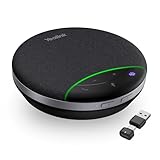
- AI Noise Cancellation: Equipped with AI noise reduction technology, the SP92 accurately identifies noise from all directions and filters out background noise from voices, ensuring that your voice is transmitted clearly without interference from surrounding sounds. This creates a smooth and enjoyable calling experience
- Brilliant Audio Quality: Are you still troubled by the issue of unclear voices and blurred speech during meetings? SP92 equipped with a 50mm speaker, ensures clear voice transmission from anywhere. The exclusive virtual bass technology compensates for the lack of bass in small devices, better-balancing music, and calling experiences
- Multiple Connection Options: Supports versatile connectivity options including Bluetooth, wired, and dongle connections. Equipped with a USB-C/A adapter for broad compatibility, the SP92 offers seamless connectivity convenience for all users. The plug-and-play design eliminates complex setups-simply plug in to automatically power on, simplifying connectivity and enhancing user experience
- Ultra-long Battery Life: The SP92 is designed to provide an exceptional talk time of up to 20 hours and music time of up to 20 hours, ensuring that you can stay connected and engaged for extended periods without worrying about battery life. Superior battery life ensures your all-day usage
- 360-Degree Microphone Coverage: Features a 360-degree omnidirectional microphone that captures sound from all directions with full-duplex technology, ensuring everyone in the meeting room is heard clearly during conference calls
Common mistakes to avoid
- Using sync for information. If the meeting is mainly a presentation, a written update with a question at the end usually does better.
- Treating the meeting as the work. Decisions made in a call still need to be written down and assigned.
- Ignoring who is absent. When teammates are in other time zones, schedule with them in mind, and make sure they can contribute through the shared document.
- Assuming shorter is always better. A meeting cut so short that the hard part is never reached has not saved time; it has moved the work to another, slower channel.
GitLab’s handbook puts the balance in a single line: “Strategically leveraging sync and async is an art, not a science.” Atlassian’s playbook makes a similar point: “Meetings aren’t the enemy, but they’re not always the right tool for the job.” Both statements describe the discipline the article has covered. Use real-time time for the questions that need it, use writing for everything else, and check each recurring series against its purpose.
Quick Recap
Product prices and availability are accurate as of the date/time indicated and are subject to change. Any price and availability information displayed on Amazon at the time of purchase will apply.




