Quick wins for a faster PC:
Scan for outdated or missing drivers - takes under a minuteDriver Scan →Clear out junk files and repair common Windows errorsFree Scan →Automating insurance-card workflows takes more than reading a card. Card capture collects evidence from an image; OCR extracts candidate data; an eligibility transaction checks coverage for a particular person and date. A readable card does not prove coverage is active, and an eligibility response does not guarantee that a claim will be paid.
What insurance-card automation does
A reliable workflow links image capture to a payer response and makes uncertainty visible. OCR can identify text such as a member ID, but it cannot independently confirm active coverage, benefits, or payer responsibility. In the United States, eligibility is commonly checked through the X12 270 inquiry and 271 response, directly or through a clearinghouse or API.
- Collect front and back images when applicable.
- Check image quality and identify the card type.
- Extract candidate fields and confidence scores.
- Normalize payer names and identifiers, then match the member and subscriber to the patient record.
- Route a date-specific eligibility inquiry through an appropriate payer connection.
- Interpret the response, update the EHR or practice-management system, and send exceptions to staff.
- Keep an auditable record of the evidence, request, response, and any human correction.
CMS describes HETS as a real-time system for Medicare 270/271 inquiries; it does not accept batch transactions. HETS is not a universal commercial-payer service. CMS says its inquiry dates can reach up to four years into the past and four months into the future from the transaction date. CMS HETS 270/271 overview
What to capture from the card
Use a structured schema rather than saving only raw OCR text. Capture fields that appear on the card, without assuming every card contains them:
Recommended Free Tools
#1 Best Overall

- SUPERIOR CARD HANDLING: Patient IDs. Insurance cards. Driver’s licenses. Vaccine cards. The ImageScan Pro 687 handles them with ease in just three seconds – even cards with raised characters.
- DUPLEX SCANNING: When you need all the information on identification, insurance and driver’s licenses, the ImageScan Pro 687 is the scanner for the job. Capture the front and back of any card in one pass, giving you the important images you need in half the time.
- INDUSTRY STANDARD TWAIN DRIVER: Ensures compatibility for use of any software application with communication support to TWAIN devices.
- CITRIX READY: Citrix Ready certification provides added assurance that our scanners have met the standards set by Citrix, confirming compatibility within the Citrix environment.
- COMPLETE SOLUTION: The included AmbirScan capture software makes your document scanning easy. Save documents as PDF, TIF or JPG to your local PC, or to one of these popular cloud services: Box, DropBox, Evernote and Google Drive.
- Medical coverage: payer name and identifier, member or subscriber ID, patient and subscriber names, relationship, group number, plan or product name, coverage dates, and coverage type.
- Routing and service details: claims address, electronic payer ID when shown, provider- or member-services contacts, authorization instructions, referral indicators, and network or product labels.
- Pharmacy coverage: RxBIN, RxPCN, RxGRP, pharmacy member ID, and pharmacy contact details. These are not substitutes for medical payer identifiers.
- Image and processing metadata: front/back classification, capture time and channel, image-quality score, per-field confidence, model version, duplicate indicator, and review status.
Keep the original image only as long as policy and operational needs justify it. Store extracted and normalized values separately, with field-level confidence and, where available, the source location on the image. A payer logo is not necessarily an electronic payer ID, and a number beside claims instructions is not automatically a valid eligibility-routing value.
Capture images that can be processed
Ask the patient or staff member to include the entire card, capture both sides when relevant, and avoid glare, blur, cropping, rotation, and objects covering text. Support camera capture and file upload, detect duplicate uploads, and provide accessible manual entry. An unfamiliar card design should trigger review rather than automatic rejection.
Return a clear state: accept a usable image, request a recapture when quality blocks extraction, or send a readable-but-uncertain image for review. Explain the specific problem—such as glare or a cropped member number—and offer retry, manual entry, or staff assistance. Retain failed attempts only when the organization’s privacy and retention policy allows it.
Extract and validate candidate fields
A document-AI model can classify a document, distinguish front from back, extract labeled or unlabeled values, and assign confidence. Microsoft documents a U.S. health-insurance-card model, `prebuilt-healthInsuranceCard.us`, in Document Intelligence v4.0. It supports card images including phone captures, scans, and digital PDFs; confirm current model behavior and service terms before implementation. Microsoft health-insurance-card model documentation
General OCR can be used in a custom pipeline, but it does not supply payer-specific interpretation by itself. Google describes Cloud Vision as OCR and points to Document AI for structured document processing. Google Cloud OCR documentation AWS Textract offers text and structured extraction capabilities; the cited AnalyzeID documentation concerns identity documents, not a dedicated insurance-card model, so it should not be treated as equivalent without testing. AWS Textract FAQ
- Validate member IDs against known payer-specific formats where available; never silently replace a group number with a member ID.
- Flag ambiguous characters such as O/0 and I/1 when they affect identifiers.
- Maintain a payer master for aliases, subsidiaries, and third-party administrators instead of relying on text similarity alone.
- Classify medical, pharmacy, dental, and vision cards separately; do not route a pharmacy BIN as a medical payer ID.
- Score confidence by field, not just by image. A high overall image score cannot compensate for an uncertain member ID.
Set review thresholds using representative cards and the cost of false acceptance versus false rejection. Require human review when a required identifier or payer is uncertain, patient data conflicts with registration, a response says “not found” despite a plausible card, or secondary coverage creates coordination-of-benefits questions. There is no universal confidence percentage suitable for every payer mix and specialty.
Rank #2

- BCR901 Simplex (single side) USB Optical Card Scanner. Ultra-compact footprint saves desk space. Mount and use scanner horizontally or vertically.
- Scans medical insurance cards, laminated cards, IDs, photos, etc. (NOTE: Scans cards ONE SIDE at at time.)
- Included Scan-ID LITE app scans and manages database of card images. NOTE: All card information is manually entered. THIS LITE VERSION DOES NOT READ DRIVER LICENSES.
- Direct scanning to PDF, JPEG, TIF formats. Automatically saves scanned images to folder.
- Fully TWAIN compliant - works with numerous bank, medical, healthcare, and other imaging apps. Windows only - NOT MAC compatible.
What an eligibility response can establish
A 270 inquiry carries member, provider, date, and service information as supported by the connection; a 271 returns coverage and benefit information available from the payer. CMS describes HETS as accepting HIPAA-compliant 270 requests and returning 271 responses. CMS HETS 270/271 overview
An eligibility result should be displayed with its service date and response timestamp. Depending on the payer and transaction, it may report active or inactive status, effective dates, subscriber relationship, coverage type, other coverage indicators, and benefit details such as copay, deductible, coinsurance, or service limitations. Responses vary in completeness; a successful transaction may return little detail about the service being checked.
Free tools Windows power users keep installed
One-click scans. No signup required.
Use precise language such as “the payer response indicates coverage for the queried date.” Do not present it as a payment guarantee. Eligibility alone may not establish that a specific procedure is covered, medically necessary, authorized, in network for the exact product, or payable after claim edits. A result can also become stale after a coverage change.
Choose a payer connection
Direct payer connections
Direct integration may suit organizations with a concentrated payer mix and the ability to manage enrollment, credentials, payer-specific formats, testing, and maintenance. The trade-off is fragmented contracts and differing response behavior.
Clearinghouse or network
A clearinghouse can provide a broader payer-routing layer and normalize some responses, reducing the number of connections an organization maintains. It also creates vendor dependency, contract costs, and another potential point of failure. Availity describes administrative transaction connectivity that includes eligibility and benefits, claims, remittances, claim status, and prior authorization. Availity interoperability
Revenue-cycle platform
A broader patient-access platform may combine connectivity with staff queues, rules, reporting, and EHR integration. It may be a better fit when workflow matters more than control of each component, but buyers should confirm exactly which image, extraction, routing, and review functions are included.
What’s actually slowing this PC down?
Pick the symptom - the matching free tool is one click away.
Rank #3

- EFFICIENT CARD AND ID SCANNING: The ImageScan Pro 667 is a rugged simplex card scanner. Because it’s USB-powered, you’ll never need to search for an outlet. Weighing just under one pound and about 8” long, it fits on any crowded desk, registration area or mobile cart.
- PROFESSIONAL-GRADE QUALITY: The ImageScan Pro 667 is designed to handle serious workloads. Inside, you’ll find high quality imaging hardware that captures quick, clear images of identification and insurance cards. Outside, you’ll find a durable shell that stands up to continuous use.
- YOUR WORKFLOW, UPGRADED: At just three seconds per scan, the ImageScan Pro 667 makes quick work of capturing any card. Identification and insurance cards are handled easily, along with credit cards with raised characters. Quit wasting time with flatbed scanners. Get the right tool for the job.
- CITRIX READY: Citrix Ready certification provides added assurance that our scanners have met the standards set by Citrix, confirming compatibility within the Citrix environment.
- COMPLETE SOLUTION: The included AmbirScan capture software makes your document scanning easy. Save documents as PDF, TIF or JPG to your local PC, or to one of these popular cloud services: Box, DropBox, Evernote and Google Drive.
Availity documents a coverage submission pattern using POST /v1/coverages and retrieval by GET /v1/coverages/{id}, and says the older list endpoint is no longer supported. Its developer guidance is version-specific: verify current documentation, authentication, enrollment, payer availability, and production terms before building against it. Availity coverage transaction guidance
Build a data contract and exception path
Keep card evidence, extracted values, verification results, and workflow decisions as distinct records. An illustrative model might contain:
- Patient: internal identifier, name, date of birth.
- Card: secure image references, document type, capture timestamp, model version.
- Extraction: raw and normalized payer name, member and group identifiers, subscriber name, field confidence, and corrections.
- Verification: transaction type, date of service, request ID, normalized status, response timestamp, and secure reference to the raw response.
- Workflow: decision, reason codes, reviewer identity, and override history.
This is a conceptual schema, not a universal payer format. Map fields according to the selected payer or clearinghouse implementation and the EHR interface. Preserve the raw response securely so staff can investigate an interpretation instead of relying only on a normalized status.
Route failures deliberately
| Result | Likely issue | Action |
|---|---|---|
| No member ID extracted | Glare, blur, unsupported layout | Request a better image, allow manual entry, or send to staff. |
| Payer not recognized | Logo-only card, administrator differs, payer master is incomplete | Search the maintained payer master and use a staff lookup path. |
| “Not found” response | Identifier, payer routing, or demographic mismatch | Compare with the card, correct data, retry when appropriate, and escalate unresolved cases. |
| Benefits absent | Payer did not return requested detail | Use a payer portal or manual benefits-verification workflow. |
| Multiple coverages or unclear primary payer | Coordination-of-benefits complexity | Collect all relevant coverage information and route for COB review. |
| Timeout or outage | Payer or intermediary unavailable | Retry with backoff, queue the case, and label any prior result with its timestamp. |
| Patient/card mismatch | Wrong household record or similar demographics | Require stronger matching and human confirmation before writing back. |
Do not turn a timeout into an inactive result or silently overwrite a patient record with low-confidence extraction. The system should distinguish not found, inactive, error, and review states.
Protect sensitive data and audit decisions
Insurance images and associated identifiers can contain protected health information. Use appropriate contractual and technical safeguards, including a business associate agreement where applicable, encryption in transit and at rest, role-based access, least-privilege service accounts, access logging, and redaction of identifiers from routine application logs. Set retention and deletion rules for images, extracts, requests, and responses; review vendor subprocessors and incident-response obligations.
A vendor’s use of the phrase “HIPAA compliant” does not establish compliance for an organization’s deployment. Compliance depends on contracts, configuration, safeguards, policies, and operations. CMS’s HETS rules of behavior are relevant when using that Medicare service. CMS HETS inquiry rules of behavior
Rank #4
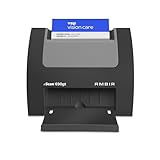
- ULTRA-COMPACT FOOTPRINT: The nScan 690gt takes up far less space than ADF or flatbed scanners. That makes it perfect for crowded desks and tight patient registration workspaces.
- FRONT FACING EJECT MODE: Simplify your scanning process and reduce points of contact. Using the auto feed function, drop your cards in the front slot for hassle free scanning and ejection in under two seconds.
- BROAD COMPATIBILITY: The included TWAIN driver ensures compatibility with thousands of software applications and hardware systems.
- DOUBLE-SIDED SCANNING: If you regularly scan double-sided cards, this duplex scanner will save you time by quickly scanning both sides of cards in a single pass. Scan ID, insurance, vaccine cards and more with ease.
- COMPLETE SOLUTION: AmbirScan capture software makes scanning easy. Save scans as PDFs, TIFs or JPGs to your local computer or popular Cloud services such as: Box, DropBox, EverNote, Microsoft OneDrive and Google Drive.
Decide what to build, buy, or combine
| Approach | Suitable when | Main trade-off |
|---|---|---|
| Capture workflow plus specialized OCR | You need card extraction and can build matching, payer routing, and staff workflows. | More engineering and operational responsibility; OCR is not eligibility. |
| Internal workflow plus clearinghouse/API | You want control of registration and exceptions but need a payer connectivity layer. | Less direct control over routing or response normalization; vendor dependency remains. |
| End-to-end patient-access platform | You need connectivity, rules, queues, and reporting in a broader revenue-cycle workflow. | Greater contract and integration complexity; verify data portability and what is actually automated. |
Component services are not interchangeable. Microsoft offers a card-specific U.S. extraction model; Google Document AI supports broader document workflows; Textract provides general extraction capabilities. None of those facts alone establishes payer connectivity or benefit interpretation. For a broader vendor choice, compare products on payer coverage, card types and sides, returned fields, confidence and bounding-box access, real-time versus batch support, COB handling, EHR integrations, human correction, audit logs, security terms, retention, service levels, charges, and exit rights.
Google’s published Document AI pricing observed August 18, 2026 listed Enterprise Document OCR at $1.50 per 1,000 pages for 1–5 million pages monthly and $0.60 per 1,000 pages above 5 million, with a separate OCR add-on listed at $6 per 1,000 pages; pricing may change. Google Document AI pricing Microsoft says the card model can be tried with its free F0 tier subject to Azure account and service conditions. Microsoft model documentation OCR fees are only one part of total cost: include integration, staff exceptions, payer connectivity, support, and the financial cost of errors.
For larger platform choices, Waystar markets eligibility and financial-clearance functions, while Experian Health describes eligibility, demographic validation, insurance discovery, and COB capabilities. Product descriptions are vendor claims, not independent performance evidence; ask for outcomes defined against a comparable customer population and workflow. Waystar eligibility verification Experian Health Patient Access Curator
CMS’s HETS vendor list can help identify vendors with the relevant Medicare trading-partner arrangements and testing, but inclusion is not CMS endorsement and does not prove commercial-payer reach, card OCR, product quality, price, or fit. CMS HETS vendor list
Measure outcomes, not just OCR accuracy
Evaluate the complete workflow using a representative set of your own card types, payers, specialties, and image conditions. Track:
- Capture completion and recapture rates.
- Field accuracy and required-field completeness by field and card type.
- Automatic-processing and manual-review rates.
- Eligibility match, not-found, payer-routing error, latency, and outage rates.
- Coverage-related and COB denials, registration corrections, and patient-balance corrections.
- Staff time per completed verification and the share of results within your freshness window.
Separate model performance from payer response quality. A perfect extraction can still be routed incorrectly, while a correct request can return limited benefits. Measure financial outcomes alongside exception volume and review cost.
Quick Recap
Product prices and availability are accurate as of the date/time indicated and are subject to change. Any price and availability information displayed on Amazon at the time of purchase will apply.




