Digital wallets are designed to reduce exposure of your physical card number, but they do not make every payment safe. Apple Pay, Google Wallet and Samsung Wallet commonly use device-specific tokens, encryption and device authentication. The biggest real-world losses usually come from weak device or account security, phishing and impersonation, payments sent to the wrong person, or a user approving a scam.
Think of wallet security as three layers: device (can someone unlock or control it?), account (can someone access your Apple, Google, Samsung or payment-app account?), and transaction (are you authorizing the right recipient, merchant and amount?). Secure all three.
What a digital wallet protects—and what it does not
In a supported mobile-wallet transaction, the merchant generally receives a substitute credential rather than your underlying card number. Apple says Apple Pay uses a device-specific Device Account Number and transaction-specific dynamic security codes, and does not store the original card number used with Apple Pay (Apple Support). Samsung describes the same basic concept as replacing sensitive card information with a device-specific token (Samsung Support). Google says payment information is encrypted, eligible cards may receive a virtual card, and in-store payments require a screen lock (Google Pay Help).
- Tokenization limits exposure of the underlying card credentials during supported transactions.
- Encryption protects stored and transmitted data.
- Device authentication—a passcode, PIN, fingerprint or face recognition—helps authorize use.
- Dynamic transaction data can make a copied transaction credential less useful for another payment.
- Fraud monitoring may identify unusual activity, but it is not a guarantee of reimbursement.
These controls do not stop a fake merchant, a compromised email account, malware, an incorrect recipient or a scam payment that you approve yourself. A peer-to-peer transfer funded from a bank balance or app balance also does not necessarily receive the same protections as a credit-card purchase.
#1 Best Overall

- Durable Material:Made of stretchy fabric with self adhesive sticker.The pocket is suitable for credit cards or ID cards of back of phone or phone case.Soft and comfortable feel than silicone and leather card holder.It won't leave a sticky residue if you choose to move it.It won't lose strength due to pocket heat, light moisture or sweat.
- Thin and Compact Deisgn:Wallet attachment features durable stich work that ensures the pocket never loses elasticity or stays open when not in use. In fact, it's so thin and compact it won't add bulk or make your phone harder to carry even when in a front pocket, purse or handbags.compatible with magnets,support wireless charging,covers screen.
- Wide Compatibility: Compatible with Apple iPhone 7/7 Plus/8/8 Plus/X/6/6 Plus/5/5s/5c/4/4s,Google Pixel,Samsung Galaxy S9/S8/S8+/S9+/S7/S6/S5/S4/ S3/S2,Galaxy Note 9/8/5/4/3/2/1,Galaxy A8/A6,LG G6/G5/G6/G5/G4/G3/G2/X/Optimus series,Nexus 6/5/4,HTC M8/EVO/Desire/Sense,iPod Touch, Sony Xperia,HUAWEI P9 Lite,ZET,coolpad and much more.For anti-fingerprint glass back phone,please apply it on a phone case.
- More Usage:You could put some money,earphone,key,even gum in this card holder.And no more wallet needed when you out.Just take a phone with this card holder.Especially during exercise,go travelling,in the gym,running,doing sport.Indeed a handy&practical small phone wallet for your beloved phone.
- Great Protection:The special hat design helps to protect your cards and money from missing or being stolen.Over 8 cards or more the holder need one night to restore.Small but very handy and functional for mobile phone,which holds the content of the pocket from falling,even when the phone pocket is upside down.Adhesive tape backing for a strong, firm, long-lasting hold.
The 10 security mistakes that cause the most trouble
1. Using a weak or reused phone passcode
A wallet is only as strong as the device protecting it. Avoid short or predictable codes, shared unlock codes, birthdays and repeated digits. Use a long, unique passcode or PIN and enable biometrics where appropriate; keep the fallback code private and strong. Google requires a screen lock for in-store Google Wallet payments, while Samsung requires a Wallet PIN or registered biometric on supported devices (Google; Samsung).
If someone has observed your code, change it immediately and review wallet and banking activity.
2. Reusing passwords or skipping multifactor authentication
Your wallet may depend on an Apple, Google or Samsung account, an email account, or a PayPal, Venmo or Cash App login. A stolen password can therefore expose more than one service. Use a unique password, turn on multifactor authentication, and prefer a passkey or authenticator app where available. NIST explains that MFA adds protection after password compromise and that passkeys use public-key cryptography designed to resist phishing (NIST). Apple describes passkeys and their public/private key design at Apple Support.
Store recovery codes securely and protect the email account used for recovery. A passkey does not remove the need for a secure device and a workable recovery plan.
Outdated Drivers Are Slowing You Down
One free scan finds every outdated or missing driver and matches the right update for your exact hardware.Free scan · exact hardware matchPC Slower Than It Used to Be?
A free scan shows the junk files, broken settings and background clutter dragging Windows down - then fixes them in one click.Free scan · Windows 10 & 113. Trusting an unsolicited “wallet support” message
Texts, emails and calls may impersonate a bank, Apple, Google, PayPal or a payment-app support team. They often claim that an account is locked, a payment is pending or identity verification is urgent. Do not click the link, disclose a password or one-time code, install remote-access software, or read out a card number or PIN. Open the official app yourself or type a known address manually; call the number on the physical card when in doubt.
Google says it will not ask for passwords, card numbers or tax information by email, text or phone, and will not ask you to download an app to obtain support (Google Pay Help).
Rank #2
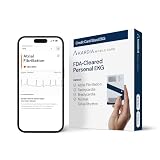
- Same size as Credit Card: Arrhythmias don’t wait for the doctor’s office, so we created THE most thin and light personal FDA-cleared EKG monitor. Truly slides in your wallet so it's always with you. Use free Kardia app to record, save, and share your EKG results with healthcare providers or anyone.
- Bluetooth-enabled EKG results in 30 Seconds: No WiFi, cords, or computer needed. KardiaMobile Card uses Bluetooth technology to connect to your smartphone or tablet. Simply place fingers on the sensors to record a medical-grade EKG to check on your heart.
- Portable Peace of Mind with No Subscription Required: Personal EKG Device detects AFib, Bradycardia, Tachycardia, and Normal Sinus Rhythm. FSA/HSA eligible. Additional detections and features available with an optional KardiaCare membership for an additional fee.
- Durable and Long Lasting: KardiaMobile Card tested for wear and tear in wallet. Built-in battery lasts minimum of 2,000 EKGs. Press power button to turn on (blinking light indicates card is active). Automatically shuts off after 10 seconds of inactivity to conserve battery. Ideal for people with heart conditions to record an EKG anytime symptoms appear.
- #1 Cardiologist Recommended Personal EKG brand: Recommended by cardiologists worldwide, with over 350 million EKGs recorded, recipient of health technology awards, trusted by leading hospitals and healthcare providers.
4. Sending money to a stranger
Peer-to-peer apps are convenient but are frequently used in impersonation, fake-prize, emergency and marketplace scams. The FTC warns that recovering money sent through a mobile payment app can be difficult (FTC). Use these apps primarily with people you know. Verify an unexpected request through a separate phone number or conversation, and never pay an “advance fee,” refundable deposit or prize charge.
For a marketplace purchase, choose a payment method with appropriate buyer protection and do not assume an account-to-account transfer has credit-card dispute rights. Google similarly warns against advance payment for suspicious listings and recommends sending money only to people you know (Google Pay Help).
Quick wins for a faster PC:
Fix the driver behind crashes, sound loss and screen glitchesFind Drivers →Repair Windows errors before they cause bigger problemsFix Now →Scan for outdated or missing drivers - takes under a minuteDriver Scan →5. Failing to check the recipient, merchant and amount
An authentication prompt proves that you approved an action; it does not prove that the action is legitimate. Before tapping Send, Pay or Confirm:
- Read the exact recipient or merchant name.
- Check the amount and currency.
- Confirm the funding card or bank account.
- Review the invoice, memo and transaction note.
- Pause if payment details changed at the last minute.
Cancel unusual requests and verify them independently. The FTC specifically recommends checking recipient information before submitting a payment (FTC).
6. Leaving cards on old or unused devices
Cards can remain provisioned on a phone, tablet or watch after an upgrade, trade-in or repair. Review the device list and remove cards and old sessions from devices you no longer control. Removing a digital card is not the same as canceling the physical account: Samsung says deleting a card from Samsung Wallet leaves the physical card active, so card cancellation requires the issuer (Samsung Support).
Phone and watch installations may be separate. Samsung says cards may need to be removed from both (Samsung Support).
Recommended Free Tools
Rank #3

- 【NO BULK】Getting tired of that bulky wallet or purse? Simply slide your ID and a credit card in the elago Card Pocket - you are ready to go!
- 【STORAGE】Two cards can be stored comfortably and safely inside the pouch. Removing the cards is simple thanks to a small cutout at the bottom of the pouch.
- 【MATERIAL】The Card Pocket is made from durable silicone which adds grip, but does not take away from the ergonomic feel of a case. The silicone will hold its shape and keep the cards from falling out.
- 【INSTALLATION】Simply remove the adhesive cover and stick the pouch on any phone case. Almost every phone is compatible with the elago Card Pocket.
- 【COMPATIBILITY】Supports all smartphones and tablets with enough size to fit a credit card - virtually every smartphone and tablet. NOT COMPATIBLE WITH MAGSAFE.
7. Not preparing for a lost or stolen phone
Set up remote-finding and locking before the device disappears. On an iPhone, enable Find My and use Lost Mode; Apple says Lost Mode can suspend Apple Pay on that device (Apple Support). On Android, enable the device-finding service so you can find, lock or erase the phone; Google says erasing removes payment information from it (Google Pay Help). On a Samsung phone, configure SmartThings Find; Samsung says remotely locking the phone locks Samsung Wallet and can request suspension of transactions made on it (Samsung Support).
After locking or erasing, contact the card issuer if misuse is possible. Do not assume deleting the wallet app from another device removes cards from the missing device.
8. Forgetting watches, browsers and shared devices
A phone lock does not protect a separately provisioned watch, browser session, tablet or family device. Check every place where cards or payment accounts are active, including wearable PIN settings and browser-stored payment methods. Convenience increases the number of devices and sessions you must review after a loss or account compromise.
Samsung notes that compatible watches can have separately registered cards and their own wallet PIN, and that support depends on the device, operating system, region and issuer (Samsung Support).
Do these 3 things before closing this tab:
1Fix the driver behind crashes, sound loss and screen glitches2Clear out junk files and repair common Windows errors3Scan for outdated or missing drivers - takes under a minute9. Bypassing device-integrity or software warnings
Do not root or jailbreak a payment device, sideload an unknown wallet app, disable security controls or install an unofficial “fix” when a wallet reports that the device is unsupported. Keep the operating system, wallet, browser and banking apps updated, and use official app stores or built-in wallet software. Samsung lists Android version, NFC, account, compatible-device, PIN or biometric and supported-card requirements (Samsung Support).
If a card will not provision after an update, use the provider’s official troubleshooting path or contact the issuer rather than circumventing an integrity check.
Rank #4

- 【Large Capacity】 The cell phone waist purse size is 6.69* 3.34* 0.7cm in, Black and brown are optional has 2 main bags, can hold the smartphone under 6.9 inch, and other small things such as wallet, keys, credit cards, short pens, chargers, headphone input line and so on.
- 【Multi-Function】 The size of the back belt buckle is 2.3 * 2.3 inch. The cell phone bag with a belt loop and a carabiner hook, you can put your belt through the belt loop of the phone pouch, or use the belt clip hook to clip on your pants or backpack.
- 【Premium Material】 The cell phone waist belt bag is made of premium Leather fabric with inside soft cloth which provides good protection to your electronic equipments, has the special touch feeling and elegant appearance, durable and wear-resisting.
- 【Occasions】 The cell phone belt clip holster is suitable for men and women, perfect for outdoor sport, hiking, camping, climbing, travelling, daily life, school, and work.
- 【Best Choice】 This phone belt pouch is a great choice to be used or presents for Wedding, Birthday, Valentines' day, Wedding Anniversary, Mothers' day, Christmas, Thanksgiving Day etc.
10. Waiting to report suspicious activity
Report a suspicious payment immediately. Contact the wallet or payment-app provider through its official app, then the linked bank or card issuer. Google advises reporting suspected unauthorized activity within 120 days of the transaction date; that period is Google’s stated guidance and should not be generalized to every provider or payment type (Google Pay Help).
Independent reader supportYour contribution helps us test, update, and keep practical guides available for everyone.What to do when a phone is lost or stolen
iPhone and Apple Pay
- Open Find My from another trusted device or the web.
- Place the iPhone in Lost Mode.
- Change the Apple Account password if account access may be exposed.
- Contact the card issuer about any questionable activity.
Android and Google Wallet
- Use Google’s lost-device tools to lock the phone.
- Erase it if recovery is unlikely or account compromise is suspected.
- Review Google Account sessions and change the password if necessary.
- Contact the issuer and Google through official channels.
Samsung Galaxy and Samsung Wallet
- Sign in to SmartThings Find from another device.
- Select the missing phone and use the lock function.
- Erase the device when appropriate.
- If remote locking fails, call the card issuer immediately.
Also check watches, tablets and browsers. A card may have a separate token on each device.
What to do after an unauthorized charge or scam payment
- Contain the problem. Freeze the card or account if appropriate and stop communicating with the suspected scammer.
- Contact the provider. Use the official wallet or payment-app support path, not a link in the message that triggered the incident.
- Contact the bank or card issuer. Explain whether the transaction was unauthorized, a scam payment you approved, a merchant dispute or a wrong-recipient transfer.
- Secure accounts. Change compromised passwords, revoke unfamiliar sessions and replace exposed recovery methods.
- Preserve evidence. Save messages, phone numbers, account handles, receipts, transaction IDs and screenshots.
- Report the scam. The FTC recommends reporting mobile-payment scams to the app and to ReportFraud.ftc.gov.
- Monitor for follow-on fraud. Review statements, alerts and credit reports for additional activity.
Reimbursement depends on the provider, funding source, payment rail, transaction type, timing and applicable rules. A card purchase, debit transaction, bank transfer and peer-to-peer balance do not necessarily have the same dispute process.
Before, during and after: a practical security checklist
Before you pay
- Use a strong, unique phone passcode and enable suitable biometrics.
- Turn on MFA or a passkey for the wallet, primary cloud account, email and payment apps.
- Install updates and avoid modified or unsupported devices.
- Enable Find My, Find My Device or SmartThings Find.
- Review cards and sessions across phones, watches, tablets and browsers.
- Enable transaction alerts and keep issuer contact information available offline.
While paying
- Verify the recipient or merchant, amount, currency and funding source.
- Ignore unexpected support requests and open the official app yourself.
- Do not repeatedly tap after a failed payment until you check the wallet and issuer history.
After a loss or incident
- Lock or erase the missing device.
- Remove cards from secondary devices and revoke suspicious sessions.
- Call the provider and issuer promptly.
- Save evidence and monitor all linked accounts.
When a wallet payment appears to fail
A declined or offline-looking terminal does not prove that no charge occurred. Check the wallet history and the card issuer’s app or statement before trying again. Ask the merchant to verify the transaction, and contact the issuer if the charge is duplicated or unclear. Samsung notes that transaction details can be missing because of connectivity problems or card-issuer policy (Samsung Support).
When an issuer replaces a card, the digital credential may also need to be removed and re-added; Samsung explicitly recommends removing the original card and adding the replacement (Samsung Support).
What digital wallets cannot protect you from
- A fake merchant or phishing checkout that receives details you enter manually.
- Impersonation, fake prizes, emergencies and bogus refunds.
- Sending money to the wrong handle or account.
- An authorized scam payment that you approve yourself.
- A compromised email, cloud account or recovery method.
- Malware or a fully compromised device.
- Missing recovery planning when your only MFA device is lost.
- Provider outages or incomplete transaction displays.
Device wallets, payment apps and crypto wallets are different
| Type | Typical use | Primary security focus | Main failure mode |
|---|---|---|---|
| Device wallet | Tap-to-pay and online checkout | Tokenization, device authentication and issuer controls | Lost device, compromised account or fraudulent merchant |
| Peer-to-peer app | Sending money to individuals | Account security and recipient verification | Impersonation, wrong recipient or authorized scam |
| Crypto wallet | Blockchain assets and transfers | Private keys, seed phrases and transaction signing | Irreversible transfer or lost recovery phrase |
Crypto wallets require a separate security model involving seed phrases, private keys, hardware devices and irreversible blockchain transactions. Do not apply ordinary mobile-payment assumptions to them.
The Tool Desk
Outbyte Driver Updater FREEScan for outdated or missing drivers - takes under a minuteDriver Scan →Outbyte PC Repair FREERepair Windows errors before they cause bigger problemsFix Now →The Bottom Line
The safest habit is simple: secure the device, secure the account, and slow down before authorizing every transaction. Tokenization can reduce card-number exposure, but it cannot verify a stranger’s story or undo a payment you approved.
Quick Recap
Product prices and availability are accurate as of the date/time indicated and are subject to change. Any price and availability information displayed on Amazon at the time of purchase will apply.




