Do these 3 things before closing this tab:
1Scan for outdated or missing drivers - takes under a minute2Repair Windows errors before they cause bigger problems3Fix the driver behind crashes, sound loss and screen glitchesFor most U.S. consumers with a supported phone and card, a mobile wallet is a useful way to pay in person: it can keep the original card number from the merchant and require device authentication. It is not a universal replacement for a physical card. Your phone, wallet, issuer, software, battery and checkout terminal all have to cooperate, so keep a backup payment method for travel and emergencies.
What tapping to pay does
Tap-to-pay uses Near Field Communication (NFC) to let a phone or watch communicate at short range with a compatible checkout terminal. In a typical transaction, you select a payment card, authenticate if required, and hold the device near the reader. The wallet sends a payment credential and security data; the card network and issuer then authorize or decline the purchase.
In ordinary mobile-wallet transactions, the credential is generally a device-specific token rather than the original card number. Apple says its payment flow uses a Device Account Number and a transaction-specific dynamic security code, with the Secure Element handling payment information. Apple’s security and privacy overview explains the design; EMVCo’s mobile-payment material describes tokenization and contactless technology.
- NFC tap-to-pay: You hold a phone or watch near a contactless payment terminal.
- QR-code payment: You scan or display a code; the payment may use a different system.
- Online wallet checkout: You select a wallet in an app or website rather than tapping a physical terminal.
- Peer-to-peer payment: You send money to another person through a separate service.
- Tap to Pay on iPhone: A merchant-facing capability that lets a supported iPhone accept contactless payments through a participating payment app. It is not the same as a consumer using Apple Pay to pay.
Tokenization can make a stolen payment credential less useful than a reusable physical card number, but it does not make purchases anonymous or eliminate fraud and disputes.
PC Slower Than It Used to Be?
A free scan shows the junk files, broken settings and background clutter dragging Windows down - then fixes them in one click.Free scan · Windows 10 & 11Outdated Drivers Are Slowing You Down
One free scan finds every outdated or missing driver and matches the right update for your exact hardware.Free scan · exact hardware match#1 Best Overall

- With Square Terminal, you can ring up sales, accept payments, and print receipts, all with one device. Use it at the counter or ring up customers anywhere in your store.
- Accept all major credit and debit cards and pay one low rate with no hidden fees and no long-term contracts.
- Process chip cards in just two seconds.
- Get your money as soon as the next business day.
- Use it cordlessly with the built-in battery, designed to last all day.
The advantages of a mobile wallet
Less exposure of the physical card number
For an ordinary wallet tap, the merchant generally receives a tokenized credential rather than the original card number. That reduces one form of exposure if a retailer’s payment environment is compromised. A token is not a guarantee against fraud, and the merchant, issuer and payment network still process information needed to complete the purchase.
Device authentication
Wallets can require Face ID, Touch ID, a device passcode, a screen lock, a fingerprint or a wallet PIN, depending on the device and transaction. That adds a hurdle compared with a physical contactless card that may be accepted without a PIN for some purchases. The benefit depends on keeping the device and its passcode secure.
Convenience and organization
You can store several payment cards and select one at checkout, rather than carrying each card. Depending on device, region and participating providers, the same wallet may also hold transit passes, tickets, loyalty cards or keys. A compatible watch can sometimes pay without taking the phone out of a pocket.
Mobile payment is often quick, but it is not always faster. Authentication problems, selecting the wrong card, a terminal that needs resetting, or an issuer verification prompt can add time.
Rank #2

- Use the, easy-to-use, and customizable POS to get started.
- Accept contactless payments, chip cards, Apple Pay, and Google Pay from anywhere, with improved connectivity, extended battery life, and enhanced security. Pay one low rate for every tap or dip.
- No long-term commitments or contracts, no monthly fees- and with offline payments, keep taking payments for up to 24 hours.
- Safely and securely accepts payments anywhere. Plus, get data security, 24/7 fraud prevention, and payment-dispute management at no extra cost.
- Use the, easy-to-use, and customizable POS to get started.
Remote controls if a device goes missing
Platform tools may let you lock a lost device or suspend its wallet credentials. Apple says Find My can place a device in Lost Mode and suspend its virtual-card transactions under the U.S. wallet terms. That does not necessarily close the underlying card account or disable a physical card. Apple’s U.S. Wallet terms describe its lost-device controls.
The disadvantages and limits
Phone failure can mean payment failure
A dead battery, damaged phone, locked account or lost device can leave you unable to pay. Outcomes vary by model, watch, wallet mode and remaining reserve power; do not assume a dead phone can still make a purchase. Keep a physical card or another payment option, especially for transport, hotels, fuel and emergencies.
Compatibility has several moving parts
A card can work when inserted but be ineligible for a particular wallet. The issuer, card type, payment network, country, phone security configuration and wallet must all be supported. Google says banks decide which cards work with Google Wallet and may restrict particular cards from mobile payments. Google’s U.S. supported-payment-methods page is the place to check card support.
Acceptance is not universal
A merchant may lack a contactless terminal, disable NFC, or have a terminal that does not handle a particular card, network or transaction type. Even where a terminal has an NFC reader, it may be unavailable at a specific checkout. Keep a backup for merchants that require chip insertion or swipe.
Rank #3

- 【Universal Compatibility】 - The MDB Payment Device to PC Converter is designed to connect a variety of MDB devices such as acceptors, bill receivers, and card readers effortlessly. It offers seamless integration with any vending equipment compliant with MDB specifications, ensuring versatility in your payment solutions.
- 【User-Friendly Interface】 - This USB adapter features a straightforward setup process. Simply connect it to your computer, and the adapter transforms MDB protocols into RS-232 serial protocols. This allows for easy communication between your vending machine and your PC, simplifying operations while providing reliable performance.
- 【Enhanced Control】 - With capabilities to control up to eight MDB-compatible devices simultaneously, this converter enhances your management efficiency. Whether you’re handling dispensers or bill acceptors, experience effective monitoring and command over your vending machine operations like never before.
- 【Robust Functionality】 - The MDB-PC USB converter supports a variety of interfaces, including cash interfaces (10H and 60H) and USD interfaces (40H). This broad support mechanism ensures compatibility across multiple configurations, making it an ideal solution for complex setups.
- 【Comprehensive Package】 - Each converter comes complete with required cables, a user guide, and a user agreement, providing everything you need for successful installation. Designed for easy implementation, enjoy a plug-and-play experience with reliable support for all essential MDB functions.
Account security still matters
Tokenization does not prevent phishing, malware, account takeover, social engineering, fraudulent merchants or misuse by someone who knows your device passcode. The phone, wallet account, issuer and payment system all remain part of the security chain.
Privacy is broader than the card number
Not sending the original card number to a merchant does not mean no one processes transaction data. The merchant, processor, acquiring bank, card network, issuer, wallet or operating-system provider, and loyalty or transit services may handle information for payment, rewards, fraud prevention or service delivery. Apple says merchants do not receive the actual card number in Apple Pay transactions and describes limits on transaction information it retains; its documentation also notes that rewards enrollment can send information to a merchant under that merchant’s privacy policy. Read the relevant provider policies rather than treating all wallets as identical. See Apple’s privacy explanation and Google’s overview of Wallet features and availability.
Does a tap require internet access?
Adding a card, completing issuer verification, recovering an account or refreshing credentials may require connectivity. Once a card is provisioned, the payment tap itself may work without an active cellular or Wi-Fi connection in many situations, but requirements can differ by card, transaction, transit system and device. It is not safe to assume every wallet function works offline indefinitely. Samsung explicitly requires an active internet connection when adding a payment card. Samsung’s purchase FAQ covers that setup requirement.
Which wallet fits your phone?
| Wallet | Best fit | Important conditions |
|---|---|---|
| Apple Pay / Apple Wallet | iPhone and Apple Watch users who want Apple hardware integration and supported payment cards and passes. | Requires an eligible device, supported card issuer and network, and participating merchant or service. Features vary by region and provider. Apple’s U.S. terms describe dependencies. |
| Google Wallet | Android users seeking payment cards and, where available, passes, tickets, keys and other items. | Google’s current support information specifies Android 9 or later for the app, current Google Play services, NFC and a supported security configuration for tap-to-pay. Rooted, modified or uncertified devices may fail security checks. See app requirements and U.S. card support. |
| Samsung Wallet | Owners of selected Galaxy phones or watches who prefer Samsung’s ecosystem. | Samsung’s U.S. setup guidance specifies selected compatible devices, Android 9 or later, a supported card and bank, Samsung account, and registered fingerprint or Wallet PIN. Availability depends on device, bank and country. See Samsung’s setup requirements. |
On Android, check which NFC payment app is set as the default if more than one is installed. Do not choose a phone solely for a wallet feature without confirming the exact device, card and region are supported.
Quick wins for a faster PC:
Fix the driver behind crashes, sound loss and screen glitchesFind Drivers →Repair Windows errors before they cause bigger problemsFix Now →Rank #4

- Effortless payments and printing: Accept card payments and print payment receipts on the spot with the built-in 40 mm thermal printer.
- Faster sales processing: Use pre-set menus and catalogs to make transactions faster and smoother for you and your customers.
- Reliable and portable: Featuring a 6.5" HD touchscreen made from Corning Gorilla Glass and a powerful battery that lasts all day.
- Seamless connectivity: Stay connected with free mobile data and WiFi, ensuring uninterrupted transactions.
- Real-time payment tracking: Monitor payments and issue refunds right from your device, so you're always in control.
How to set up and use tap to pay
Apple Pay
- Open Wallet and tap the add-card button or Add Card.
- Choose a debit or credit card, scan it or enter its details, then follow the issuer’s verification instructions.
- At checkout, authenticate and hold the top of the iPhone near the contactless reader. Exact labels and steps can vary by iOS version and region.
If the issuer will not verify the card, contact the issuer using the number on the card. Confirm that device authentication works and, if a tap fails, try selecting the card manually or using another terminal.
Google Wallet
- Open Google Wallet, tap Add to Wallet, then Payment card.
- Choose New credit or debit card, scan the card or enter its details, and tap Save and continue.
- Accept the issuer terms and complete any verification it requests. Google’s card-addition instructions describe the flow.
- Turn on NFC, set Google Wallet as the default NFC payment app, and set a secure screen lock. Google’s tap-to-pay instructions cover device prerequisites and use.
- Unlock the phone and hold it near the contactless terminal; open Wallet and select the intended card first if needed.
Samsung Wallet
Use Samsung’s setup flow on a compatible Galaxy phone or watch, add a supported card and complete bank verification. Samsung’s U.S. requirements include a Samsung account and a fingerprint or Wallet PIN; an internet connection is needed when adding a card. Check Samsung’s current setup page for device-specific steps.
Independent reader supportYour contribution helps us test, update, and keep practical guides available for everyone.What to do if a payment fails
The phone says contactless payments are unavailable
- Confirm NFC is enabled and the intended wallet is the default payment app.
- Check that a supported card is added and that the phone is unlocked with a secure screen lock enabled.
- Update the wallet app and operating system, and check the device’s certification and security status.
- On Android, rooted devices, custom ROMs, unlocked bootloaders or uncertified software can block contactless payments. Google lists these and other checks in its tap-to-pay troubleshooting guide.
- Confirm that the issuer supports the card for wallet use and that the terminal accepts contactless payments.
The card works physically but cannot be added
The card type, issuer, country or device may not be supported, or the issuer may require verification. A replacement, suspended or already provisioned card can also complicate setup. Contact the issuer rather than repeatedly retrying if verification fails.
The terminal asks for chip insertion or swipe
Cancel or reset the terminal transaction, unlock the phone, open the wallet and select the intended card, then hold the correct part of the device near the reader. Try a second terminal. If it still fails, use the physical card.
The Tool Desk
Outbyte Driver Updater FREEScan for outdated or missing drivers - takes under a minuteDriver Scan →Outbyte PC Repair FREEClear out junk files and repair common Windows errorsFree Scan →Best Value
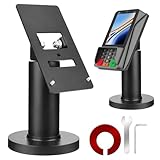
- Compatibility - This POS display stand is compatible for Pax A35, Pax S300. Note: Please carefully confirm the POS machine model before purchasing.
- Easy Installation - Installs quickly using the included type adhesive tape or can be permanently installed to any surface via a drilled hole and bolt mount. And can be removed by heating the area with a hairdryer and using string/thread to detach it if needed.
- Adjustable Card Terminal Mount - The 360-degree swivel allows cashiers to effortlessly turn the device left and right to assist customers without leaving their side, while the 65-degree tilt ensures the terminal is positioned at the optimal angle for various counter heights.
- Commercial Strength - Steel construction gives this universal POS stand durability for use as counter payment terminal in almost any setting.
- Perfect Height - The Pax A35 credit card payment machine stands' ideal height of 4.7" is designed for optimal counter alignment. It provides ample clearance for card insertion and can be adjusted using the tilt feature. Once the perfect tilt angle is set, secure it in place with the included Allen key and wrench to prevent unwanted movement.
You used the wrong card or see a possible duplicate charge
Select the intended card before tapping and check the amount shown at checkout. If a transaction appears twice, compare pending and posted activity: a temporary authorization or retry can look like a duplicate. Keep the receipt and contact the merchant or issuer if both charges post.
If your phone is lost or stolen
- Use the platform’s device-finding service to lock the phone or place it in lost mode.
- Suspend wallet credentials through the platform’s available controls.
- Contact the card issuer if you suspect misuse; ask it to secure the card or account as appropriate.
- Change the related account password if the phone or account may have been compromised, and monitor transactions.
- When replacing the device, expect to add cards again or complete issuer verification. Google notes that cards transferred to a new phone may need to be set up again for tap-to-pay use in its Wallet guidance.
Remote protection depends on the relevant finding feature and account access being available. A thief who knows the device passcode presents a more serious risk. Suspending a wallet credential does not necessarily disable the physical card.
Should you still carry a physical card?
For everyday shopping in familiar places, a mobile wallet can reduce card-number exposure and make checkout convenient. Keep a physical card or separate backup if you travel, rely on transit, often have a low battery, use an unsupported card, or cannot afford to be stranded by a damaged, locked or lost phone. A wallet is most useful when it complements a backup rather than becoming the only way you can pay.
Quick Recap
Product prices and availability are accurate as of the date/time indicated and are subject to change. Any price and availability information displayed on Amazon at the time of purchase will apply.
Recommended Free Tools




