The INNOCN 40C1R, a flat 40-inch 3440×1440 ultrawide monitor with a maximum 144Hz refresh rate, was reported at $359.98 on Amazon on February 18, 2026. WePC called that its lowest tracked price, but a later PCWorld deal report cited $380 as the lowest price it had seen. The February offer is historical, not a confirmed live price: the latest official US listing reviewed for this article, dated August 18, showed the new monitor at $449.99 and a refurbished version at $299.99.
What was the deal, and is it still available?
WePC reported the new INNOCN 40C1R at Amazon for $359.98 on February 18, 2026, against a stated $549.99 list price. That is about 35% below the list price, or roughly $190 in stated savings. The deal post described it as the lowest price it had tracked for the monitor. WePC’s February deal report is a record of that dated offer, not evidence that the same price is available now.
For comparison, PCWorld reported an Amazon price of $380 on April 10, 2026, and called it the lowest price it had seen. Those two record claims conflict: the February figure is lower than the later April figure. Neither cited report supplies a complete, independently auditable price history, so the absolute all-time low is not settled.
| Date | Retailer and condition | Reported price | What the figure means |
|---|---|---|---|
| February 18, 2026 | Amazon; apparently new | $359.98 | WePC’s lowest-tracked price claim; about 35% below the stated $549.99 list price. |
| April 10, 2026 | Amazon; apparently new | $380 | PCWorld’s lowest-price-seen claim; reported as $150 off, or 28% below MSRP. |
| August 18, 2026 | INNOCN direct; new | $449.99 | Price shown on the official US product page reviewed that date, against $549.99. |
| August 18, 2026 | INNOCN direct; refurbished | $299.99 | Price shown on the official refurbished listing reviewed that date; not comparable to a new unit without accounting for condition. |
Amazon coupons, seller changes, stock, shipping, and item condition can all affect the checkout price. Check the final listing before treating a displayed discount or past deal price as your expected cost. The August 18 official prices are dated reference points, not a live quote for September 29.
#1 Best Overall
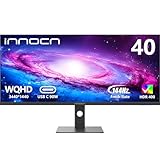
- 【21:9 Ultrawide Computer Gaming Monitor - 40"】 Premium ADS panel delivers high resolution 1440p 144hz monitor for gaming, 21:9 ratio bring more wide visual than normal 16:9, +18% viewable area than 34 inch gaming monitor, capture game details more clearly for quick response. 144Hz(DP), 100Hz(HDMI). Tilt / Swivel / Height Adjustable meet different viewing visions
- 【AMD FreeSync Premium & HDR 400 & & 500Nits Brightness】 INNOCN 40C1R computer monitor adopt high dynamic range (HDR) technology with professional color gamut (95% DCI-P3) delivers high contrast 1200:1 and color performance that meets the Display HDR 400 and AMD FreeSync, bring smooth images and video viewing experience
- 【USB Type C, DP and HDMI Ports】40C1R delivers powerful USB C connectivity and have richful interfaces: 1 x DP, 1 x USB C, 2 x HDMI, 1 x 3.5MM Audio Jack, you can directly connect your USB C devices such as laptop, Mac, Phones, Tablets, Gaming Console( like Switch, PS5/4/3, XBOX Series etc) . It's much more convenient. Coming with US Power Adapter
- 【ΔE <2 Color Calibration & TUV Authentication & Blue Light Reduction】Each INNOCN monitor coming with color calibration report, the ΔE <2, deeply restore the true nature colors. Low blue light technoilogy ensure the comfot when long time watching or playing, INNOCN monitors are TÜV Rheinland certified.
- 【Split Screen for productivity】 Equipped PBP/PIP technology which can enhance the productivity for multi-tasking such as data analysis, photo / video editing etc, you will not go wrong with any details, produce more fun and innovative things with INNOCN monitor.
What does the 40C1R offer for the money?
The 40C1R is designed to combine a broad workspace with a high refresh rate, rather than maximize pixel density or HDR performance. INNOCN’s current US product page identifies the model as 40B2R/40C1R and lists these main specifications:
- Screen: 40-inch, flat IPS/ADS panel in a 21:9 aspect ratio.
- Resolution and refresh: 3440×1440 (UltraWide QHD), up to 144Hz through DisplayPort 1.4.
- Color claims: 94.2% DCI-P3 and 99.6% sRGB coverage, with a claimed Delta E below 2. These are manufacturer specifications, not independent test results.
- Brightness and contrast: 370 cd/m² typical brightness, 570 cd/m² listed maximum, and 1200:1 typical static contrast ratio.
- Gaming features: AMD FreeSync Premium and a stated 2ms overdrive response time; the page also lists a 14ms native on/off response time.
- Other features: HDR400, picture-in-picture and picture-by-picture modes, built-in 5W speakers, and a height-, tilt-, and swivel-adjustable stand.
- Mounting and size: 100×100mm VESA mounting; approximately 944.1×572.2×253.6mm with the stand and 12.56kg in the listed configuration.
These specifications make it potentially useful for side-by-side documents, spreadsheets, editing timelines, and games that benefit from a wide field of view. At 3440×1440, it also asks less of a graphics card than a 5120×2160 5K2K display at high refresh rates, though demanding games can still need a capable GPU.
Rank #2

- Replace Two Monitors With One Seamless 40" Canvas - Stop losing your cursor in the bezel gap. A 3440x1440 ultrawide gives you the width of two 16:9 panels with no dead zone in the middle. Spread three full-size windows side by side — code editor, browser, and terminal for developers; spreadsheet, email, and Slack for analysts; timeline, preview, and audio mixer for editors. Everything stays visible, so you stop Alt-Tabbing and start finishing.
- Keep Every Reference Open While You Write, Edit, or Trade - Writers and researchers: keep source material on the left, your draft on the right, and notes in the middle — no more scrolling up and down a single document. Traders and analysts: watch charts, order books, and news feeds simultaneously without overlapping windows. The extra 33% horizontal space over 16:9 means fewer clicks and less scrolling per hour.
- One USB-C Cable Powers Your Laptop and the Screen - Walk in, plug in one cable, and your MacBook or Windows ultrabook is charging at 65W while driving the display. No dock, no dongle, no second power brick. For hybrid workers who move between laptop and desktop, this single-cable workflow cuts setup time from minutes to seconds — and clears the cable nest under your desk.
- 200Hz + 1ms + FreeSync/G-SYNC for Work Hard, Play Hard - The same screen that runs your spreadsheets also runs your games. 200Hz and 1ms keep fast-paced shooters and racing games smooth and tear-free, with FreeSync and G-SYNC compatibility covering both AMD and NVIDIA GPUs. IPS panel keeps colors consistent from any seat at the desk
- Built-in Speakers and a 40" Fit That Respects Your Desk - Dual built-in speakers mean you can take a call or watch a demo without hunting for external audio. At a typical 28–32 inch viewing distance, the 40" screen fills your field of view without forcing you to turn your head like a tennis match.
Which connection gives you 144Hz?
The advertised maximum refresh rate depends on the input. INNOCN’s current US specifications list different limits by connection:
| Connection | Listed maximum refresh rate | Practical use |
|---|---|---|
| DisplayPort 1.4 | 144Hz | Use this for the monitor’s maximum refresh rate, with a compatible graphics output and cable. |
| HDMI 2.0 | 100Hz | Suitable if 100Hz is enough; it will not deliver the listed 144Hz maximum. |
| USB-C video | 60Hz | Useful for compatible laptop video and charging, but not for 144Hz gaming. |
If 144Hz does not appear as an option, check the full signal path: the computer’s output, cable, dock or adapter, and the monitor input can each be a bottleneck. After connecting via DisplayPort, select the display in your operating system’s display settings, set 3440×1440, and choose 144Hz if offered. Menu labels vary by operating system and graphics driver. Enable FreeSync or Adaptive-Sync in the monitor’s on-screen menu and compatible graphics software if your system supports it.
Rank #3
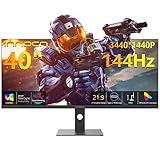
- Immersive Ultrawide Visuals: 40" WQHD, 144Hz & HDR400 - Experience stunning 34401440 resolution on a 40-inch ultrawide monitor with 144Hz refresh rate, AMD FreeSync Premium, and HDR400 for smooth gaming and vivid PC entertainment
- Vibrant Gaming & Professional Color: 95% DCI-P3 IPS Panel, 500 Nits - Featuring an IPS screen with 95% DCI-P3 color gamut and 500 nits brightness, this display delivers true-to-life colors and sharp details for gaming, design, and desktop productivity
- USB-C for Video, Data & Power: Streamline your desktop setup with a versatile USB-C 90W full functioned port that connects to your PC or laptop for video, data transfer, and power delivery-all with a single cable. Work with Laptop, MacBook, Mini PC, Tower PC, Gaming Consoles
- Ergonomic Flexibility: Height/Tilt Adjustable & VESA Mountable - Customize your viewing comfort with a fully adjustable stand (height/tilt) and VESA mount compatibility for long gaming sessions or multitasking on your PC
- Ultrawide Multitasking & Console Gaming: 21:9 Cinematic Display - The 21:9 ultrawide ratio offers expansive screen space for desktop multitasking and an immersive cinematic experience with your gaming console or PC
Does USB-C make it a good laptop monitor?
The USB-C port accepts video and supports up to 90W of power delivery according to the current US specification page. That can simplify a compatible laptop setup by carrying video and charging over one cable. Laptop support, cable capability, and any dock in between still matter, and the display is limited to 60Hz over USB-C. The listed connections do not establish that the monitor includes a conventional USB-A hub, so do not assume it replaces a full docking station.
What are the trade-offs behind the large screen?
More room, but lower pixel density
A 40-inch 3440×1440 screen gives more physical workspace than a conventional 34-inch ultrawide at the same resolution. But spreading the same pixel dimensions across a larger panel means lower pixel density: text and fine interface details will not look as crisp as on a smaller 3440×1440 monitor or a similarly sized 4K/5K2K display. Buyers who prioritize sharp text or detailed creative work may prefer a higher-resolution screen; the 40C1U is an in-brand 5120×2160-class alternative listed at 100Hz in INNOCN’s catalog, rather than this model’s 3440×1440 at 144Hz.
Rank #4

- 【Curved Ultrawide Monitor 49" & VA】 Premium VA Panel delivers double FHD 1080p resolution up to 144hz( DP1.4) monitor for content creation and gaming, 32:9 aspect ratio bring more wider visual than ordinary 16:9 monitor, capture game details more clearly for quick response. Tilt / Swivel / Height Adjustable meet different viewing visions
- 【USB Type C, DP and HDMI Ports】49C1G widescreen curved monitor delivers powerful USB C power delivery connectivity and have richful interfaces: 1 x DP 1.4, 1 x USB C 65W, 1 x HDMI 2.1, 2 x USB A, 1 x USB-B, 1 x RJ45, 1 x 3.5MM Audio Jack, you can directly connect your USB C devices such as Laptop, Mac, Phones, Tablets, Gaming Console( like Switch, PS5/4/3, XBOX Series etc) . It's much more convenient
- 【Adaptive-Sync & HDR 400 Technology】 INNOCN 49C1G ultrawide computer gaming monitor adopt high dynamic range (HDR) technology with professional color gamut (99% sRGB) delivers high contrast 3000:1 and color performance that meets the Display HDR 400 and Adaptive-Sync, bring smooth images and video viewing experience
- 【Enhanced Comfort & Double Your Experience】: 1800R curvature results in less eye fatigue; The curved screen allows content to be viewed at a glance while proven to limit eye strain compared to flat monitors. Dual FHD ensures enhanced depth in every detail, delivering incredibly realistic images; INNOCN 49C1G 32:9 super ultra wide display maximizes your screen real estate for seamless multitasking on just one computer screen
- 【Boost Productivity with Ultrawide Display】 Equipped PIP / PBP split screen technology which allowing you to configure your monitor to show content from two separate input sources. Play, watch, stream or work from multiple input sources at the same time, on one screen. You will not go wrong with any details, produce more fun and innovative things with INNOCN monitor. Just turn on and play
Flat-panel geometry and desk fit
The panel is flat, not curved. Some people prefer that for straight lines and office work; at 40 inches, others may find the far edges harder to take in from a close seating position. Check desk depth and viewing distance, as well as whether the stand footprint fits. If using an arm, confirm it supports the monitor’s listed weight and 100×100mm VESA pattern, and that the desk itself is stable enough for the setup.
HDR is a feature, not a promise of dramatic highlights
The monitor supports HDR400, but that label alone does not establish strong HDR contrast, local dimming, or OLED-like blacks. Its listed 1200:1 typical contrast and IPS/ADS panel are reasons to keep expectations modest. For this product, screen size, resolution, refresh rate, and USB-C charging are more concrete purchase considerations than HDR.
Free tools Windows power users keep installed
One-click scans. No signup required.
Best Value

- Samsung’s 40” Odyssey G7 G75 WUHD 180Hz Curved Gaming Monitor provides breathtaking realism for epic gameplay.
- 40” 1000R curved display with a 21:9 screen and brilliant Ultrawide 4K resolution wraps around the field of vision for next-level gaming.
- VESA DisplayHDR 600 delivers more contrast, with deeper blacks and brighter whites for greater clarity even in dark scenes.
- 180Hz refresh rate and near-instant 1ms response time (GtG) minimizes lag for ultra-smooth gameplay.
Is it a good value for gaming, work, or creative tasks?
- For PC gaming: The 144Hz DisplayPort limit, FreeSync Premium, and wide 21:9 format suit buyers seeking an immersive large screen. The flat panel is a matter of preference, and newer games at 3440×1440 can demand substantial GPU performance. The official specifications list one DisplayPort input, which may be limiting if you routinely connect multiple DisplayPort systems.
- For office work and multitasking: The width can accommodate multiple windows, broad spreadsheets, and long timelines. Consider whether the lower pixel density than a smaller 3440×1440 display is acceptable for your text and detail needs.
- For laptop docking: Up to 90W USB-C power delivery and video input are useful if your laptop supports video over USB-C and the charging level suits it. This connection tops out at 60Hz on the monitor.
- For creative work: The manufacturer’s gamut and Delta E claims may look appealing on paper, but they are not independent measurements. If color-critical work depends on verified accuracy, seek independent testing rather than relying on the specification claims alone.
- For console use: The official specifications list HDMI 2.0 inputs capped at 100Hz and do not list HDMI 2.1. Do not assume a console will use the monitor at 144Hz; confirm the console’s supported output modes and the monitor’s behavior for the resolution you plan to use.
What should you check before buying new or refurbished?
INNOCN’s official US product page reviewed August 18, 2026, stated a 30-day return window and a one-year limited warranty for manufacturing defects and hardware issues. It said it ships within the United States except Alaska, Hawaii, and offshore territories; most orders are processed within 1–2 business days, with typical delivery in 3–7 business days. Shipping charges should be confirmed at checkout. Terms can vary by seller and listing, so check the actual purchase page rather than assuming INNOCN’s direct-store terms apply to an Amazon marketplace order.
The official refurbished listing showed $299.99 on August 18 and stated a 30-day return period and one-year limited warranty. Because it is refurbished, verify the condition description, seller, applicable warranty, return shipping costs, and final checkout total before comparing its price with a new monitor.
- Confirm the exact model is 40C1R, not the 5K2K-class 40C1U or another 40-inch model.
- Check whether the unit is new, refurbished, open-box, or used, and whether any coupon or membership is required.
- Confirm seller identity, stock, shipping charges, return terms, and whether the warranty applies to that seller’s listing.
- Check desk depth, stand footprint, and monitor-arm weight rating before ordering.
INNOCN’s older alternate product page gives different figures for USB-C power delivery and brightness than the current US specification table. This article uses the current US page’s 90W USB-C and 570-nit maximum figures rather than blending specifications from different pages. Check the exact product listing and documentation for the SKU you buy.
When does the 40C1R make financial sense?
Value depends on the price and condition you can actually buy, not a historical list-price comparison alone. Based on the dated reports and listings above, the $359.98 new offer was a notably lower entry point than the $449.99 official new listing reviewed in August. The $299.99 refurbished listing was cheaper still, but the condition difference changes the buying risk. At either price, the monitor is best suited to someone who values a large flat ultrawide, accepts 3440×1440 pixel density on a 40-inch panel, and will use DisplayPort for 144Hz. Paying more for the 40C1R makes less sense if high pixel density, premium HDR, HDMI 2.1, or a stronger established support reputation is the priority.
Quick Recap
Product prices and availability are accurate as of the date/time indicated and are subject to change. Any price and availability information displayed on Amazon at the time of purchase will apply.




