The simplest way to accept payments online is to open an account with an all-in-one provider such as Stripe, PayPal, Square, or Shopify Payments, then connect a hosted checkout, payment link, invoice, or online-store checkout. Complete identity and bank verification, enable the payment methods your customers actually use, test successful and failed transactions, and monitor payouts, refunds, fraud, and disputes. Availability, fees, tax rules, currencies, and payout timing vary by country and business type.
What “accepting payments online” includes
Online payments are more than entering a card number. Depending on your business, you might collect:
- Credit and debit cards.
- Digital wallets such as Apple Pay, Google Pay, PayPal, Venmo, or Shop Pay where available.
- ACH or other bank-payment methods.
- Buy-now-pay-later or installment payments.
- Recurring subscription charges.
- Invoices, deposits, tips, donations, bookings, and variable-amount payments.
- Cryptocurrency only when your provider, location, product category, and terms permit it.
A method can be available to a customer in one country, currency, browser, or device and unavailable in another. Provider approval, risk rules, business category, and platform support also matter.
Payment terms in plain English
- Payment processor
- Moves a transaction through card networks or another payment rail, obtains authorization, and helps settle funds.
- Payment gateway
- Transfers payment information between your checkout and the processor.
- Merchant account
- The acquiring arrangement used to receive card-payment funds. With modern payment facilitators, this relationship is often bundled and not shown as a separate account.
- Payment service provider
- An all-in-one provider that simplifies access to processing, checkout, fraud tools, refunds, and payouts.
- Checkout
- The customer-facing payment page or component.
- Payment link
- A hosted checkout URL you can share by email, text, social media, QR code, or invoice.
- Payout
- The transfer of collected funds from the provider to your business bank account.
- Chargeback or dispute
- A reversal process started through a customer’s bank or card issuer.
Most beginners do not need to buy a gateway, processor, and merchant account separately. An all-in-one provider is usually faster to launch, although larger merchants may eventually negotiate separate acquiring and gateway relationships.
What’s actually slowing this PC down?
Pick the symptom - the matching free tool is one click away.
#1 Best Overall

- With Square Terminal, you can ring up sales, accept payments, and print receipts, all with one device. Use it at the counter or ring up customers anywhere in your store.
- Accept all major credit and debit cards and pay one low rate with no hidden fees and no long-term contracts.
- Process chip cards in just two seconds.
- Get your money as soon as the next business day.
- Use it cordlessly with the built-in battery, designed to last all day.
Choose the right setup
| Your situation | Best starting point | What it does not automatically solve |
|---|---|---|
| No website or occasional sales | Payment link or invoice | Inventory, shipping, customer accounts, and advanced order management |
| Existing website with a few products or services | Hosted checkout, buy button, embedded provider form, or payment link | Complex catalog and fulfillment workflows |
| Online store with inventory and shipping | Shopify Payments, Square Online, or another integrated ecommerce platform | Country, currency, plan, and provider eligibility limits |
| Subscriptions | A billing product with recurring payments, retries, and customer self-service | Automatic tax compliance or perfect recovery of failed cards |
| Custom software or marketplace | Developer API with webhooks and server-side payment confirmation | Identity checks, seller onboarding, reconciliation, and dispute operations |
| Online plus in-person sales | A provider that unifies online and point-of-sale reporting | Every device, currency, or country |
No website: links, invoices, and QR codes
Payment links and invoices suit freelancers, consultants, tutors, tradespeople, creators, social sellers, deposits, appointments, custom orders, donations, and small events. PayPal Payment Links creates a hosted checkout and shareable URL without requiring a website. Square Payment Links supports link and QR-code collection. You still need clear prices, delivery terms, refund rules, and a way to record fulfillment.
A simple website
A hosted checkout or provider-controlled payment button is usually safer and quicker than building a card form. It can collect money without supplying inventory, shipping, customer accounts, abandoned-cart recovery, or sophisticated returns management.
Inventory-based ecommerce
Use a full ecommerce platform when you need product variants, inventory, shipping rules, customer accounts, returns, analytics, and order workflows. Shopify Payments is administered in Shopify and supports cards and accelerated checkouts when eligible. Square Online is a natural fit for businesses already using Square for point of sale, catalogs, invoices, or in-person payments.
Rank #2

- Packaging Included: Look like real payment terminal toy with light and sounds, including 2 credit cards and 2 receipts. Required 3 AAA batteries (Not Included). Encouraging kid to use their imagination ability to play pretend game and satisfying children’s role-playing desires.
- Pretend Play Interactive Game: Parents and kids can play pretend play interactive game together. Play the role of customer or cashier in the supermarket or coffee shop. Training children’s imagination and communication skills, help children’s understand the real life.
- Play like Real POS Terminal: Calculate the shop items and put figures into the payment machine, then, insert the fake credit card into the card slot for payment or make non-contact payment, input the pin numbers, next, print out the receipt and finish the payment.
- Quality and Safety: The payment terminal toy is made of eco-friendly and ABS plastics, smooth surface, curved corners. Great quality for long-time playing. No harm to kids and environment.
- Great Gift for Pretend Play Game: Great addition toy for pretend play game lovers. Great gift choice for kid's birthday, baby shower, Christmas and New Year. Great gifts for boys and girls. Suitable for kids aged 3 and up. Great toys for children who like the pretend play game. Encouraging kids to develop with their imagination and communication social skills.
Subscriptions
Choose billing software that handles recurring authorization, failed-payment retries, expired cards, cancellation, refunds, prorating, customer notices, and tax requirements. A basic payment link is not automatically a subscription-management system. State renewal terms clearly and determine whether the provider is only processing payments or is also the merchant of record.
Custom apps and marketplaces
Use a server-side API integration only when the business needs custom workflows. Plan for webhooks, idempotency keys, secure secret-key storage, payment-intent status handling, full and partial refunds, disputes, seller KYC, split payments, delayed payouts, reconciliation, and 3-D Secure or other authentication. Do not put secret keys in browser code or build a raw card form when a provider-controlled component is available.
Stripe, PayPal, Square, or Shopify Payments?
| Provider | Best fit | Strengths | Limitations to check |
|---|---|---|---|
| Stripe | Custom websites, SaaS, subscriptions, developers, and international expansion | Hosted or embedded Checkout, payment links, billing tools, APIs, fraud and authentication products | More technical setup; less natural for a business primarily needing retail POS and inventory |
| PayPal | Payment links, invoices, social selling, and customers who prefer PayPal or Venmo | Recognizable hosted checkout, links without a website, Venmo and Pay Later options | Product-specific rates and fixed fees; less checkout control; holds and protection have eligibility rules |
| Square | Retailers, restaurants, service businesses, appointments, and Square POS users | Online store, links, invoices, POS integration, wallets, and selected installments | Country and currency limits; specialized international or highly custom workflows may not fit |
| Shopify Payments | Shopify merchants needing integrated catalog, checkout, orders, inventory, and payments | Cards, accelerated checkouts, Shopify POS, selected local methods, fraud and authentication features | Requires a Shopify store and plan; outside providers can trigger additional Shopify transaction fees |
There is no universal winner. Match the provider to your sales channel, average order value, customer geography, technical capacity, and need for online-plus-in-person reporting.
Rank #3
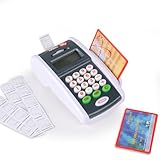
- Payment Terminal Playset: Look like a real payment terminal toy with light and sounds, including two credit cards and 2 receipts. Required 3 AAA batteries (Not Included). Satisfying children’s role-playing desires, providing endless fun for kids.
- Play Like Real POS Terminal: The POS terminal toy features a real calculation function. Kids can calculate the shop items and put figures into the payment machine, input the pin numbers, then, put the fake credit card into the slot and swipe the credit cards, next, put receipt paper into the printing slot, print out the receipt and finish the payment.
- Interactive Game Toy: Parents and kids can play pretend play interactive game together. Play the role of customer or cashier in the shop or supermarket. Training children’s imagination and communication skills, helping children to understand real life and enjoy the fun of pretend play.
- Quality and Safety: Made of eco-friendly and high-grated ABS plastics, like real function card reader machine. Provide a good and happy experience of shopping payment experience in pretend play game.
- Great Toy for Pretend Play: The card reader machine toy is a good addition for play store pretend play or coffee shop game. Great gift choice for kid's birthday, baby shower, Christmas and New Year.Great toy for boys and girls. Suitable for kids aged 3 and up, great toys for children who like the pretend play game. Encouraging kids to develop with their imagination and improving their communication social skills.
Step-by-step setup
- Choose the sales channel. Decide whether customers will pay through a website, store, invoice, link, booking page, social profile, email, or mobile device.
- Open a business account. Use the legal business and bank information that will be used for verification and payouts. Do not create duplicate accounts to evade a review.
- Complete verification. Providers may request your legal business name, registration details, owner identity, tax ID, address, website and product description, expected volume, average order value, refund and fulfillment policies, and bank details. Shopify says requirements vary by country, an eligible bank account is required, and two-step authentication is required for Shopify Payments setup: onboarding requirements.
- Choose the checkout type. Select hosted checkout, embedded provider-controlled components, a payment link, an invoice, or an API flow. Stripe Checkout supports hosted and embedded experiences and can simplify validation for eligible integrations, but it does not eliminate all merchant PCI responsibilities.
- Add products and prices. Define product or service descriptions, currency, taxes, shipping or delivery timing, deposits, tips, and recurring terms.
- Publish policies. Show your business name, contact details, privacy policy, terms, refund, return, cancellation, subscription, shipping, and fulfillment policies before payment.
- Enable relevant methods. Start with major cards, Apple Pay and Google Pay where supported, and PayPal when customers request it. Consider ACH for high-value or recurring payments and installments only when their higher cost and refund complexity make business sense. In Shopify, local methods may depend on the buyer’s location and can require activation: U.S. payment-method rules.
- Configure payouts and accounting. Set the bank account, payout schedule where available, notifications, staff permissions, refund permissions, exports, and accounting integration. Reconcile gross sales − processing fees − refunds − disputes ± adjustments = net payout.
- Test the complete flow. Use official test mode and credentials for integrations, never invented card data.
- Launch gradually. Watch approval rates, failed payments, duplicate orders, fraud alerts, refunds, payout timing, webhook delivery, tax records, and disputes.
Minimum prelaunch test checklist
- Successful card payment.
- Declined card and incorrect security code.
- Apple Pay or Google Pay on a supported device.
- Mobile payment-link checkout.
- Full and partial refund where offered.
- Failed subscription payment and retry.
- Receipt, order confirmation, and fulfillment notification.
- Transaction-to-payout matching.
- Retrieval of evidence for a possible dispute.
How much does it cost?
Pricing below is a U.S. snapshot checked August 18, 2026. Rates change; verify the provider’s current terms immediately before signing up.
| Product | Published signal | Qualification |
|---|---|---|
| Stripe standard online cards | 2.9% + $0.30 per successful domestic-card transaction | Standard pricing has no setup or monthly fee; international cards, conversion, disputes, billing, tax, and other products can add fees. Source |
| Stripe Checkout | Included with Payments under standard pricing; custom domain hosting listed at $10/month | Some add-ons are priced separately. Source |
| PayPal Payment Links | 2.99% + $0.10 for cards and Apple Pay; 3.49% + $0.10 for PayPal and Venmo; 4.99% + $0.10 for Pay Later | Fixed fees vary by currency; international and conversion fees may apply. Source |
| PayPal Checkout | U.S. comparison page shows 2.99% + $0.49 for cards and 3.49% + $0.49 for PayPal/Venmo | Product configurations and account pricing can differ. Source |
| Square Online Free | No monthly subscription cost | Processing, instant-transfer, hardware, and optional service fees can still apply. Source |
| Square Payment Links | No upfront fee advertised | Processing rates depend on payment type and account terms. Source |
| Shopify Payments | Rates depend on Shopify plan and card type | Third-party transaction fees can apply with outside providers. Rates and third-party-provider rules. |
Budget for the percentage fee, fixed fee, ecommerce subscription, third-party transaction fee, international-card surcharge, currency conversion, ACH fee, instant-payout fee, dispute fee, subscription billing, tax-calculation tools, hardware, and development. A refund may not return the original processing fee; check the provider’s terms.
Quick wins for a faster PC:
Fix the driver behind crashes, sound loss and screen glitchesFind Drivers →Clear out junk files and repair common Windows errorsFree Scan →For a $100 U.S. domestic card payment, the published rates produce these illustrations: Stripe charges $3.20 and leaves $96.80; PayPal Payment Links at 2.99% + $0.10 charges $3.09 and leaves $96.91; the PayPal Checkout rate shown above charges $3.48 and leaves $96.52. These are arithmetic applications of the listed rates, not guarantees or recommendations.
Rank #4

- Effortless payments and printing: Accept card payments and print payment receipts on the spot with the built-in 40 mm thermal printer.
- Faster sales processing: Use pre-set menus and catalogs to make transactions faster and smoother for you and your customers.
- Reliable and portable: Featuring a 6.5" HD touchscreen made from Corning Gorilla Glass and a powerful battery that lasts all day.
- Seamless connectivity: Stay connected with free mobile data and WiFi, ensuring uninterrupted transactions.
- Real-time payment tracking: Monitor payments and issue refunds right from your device, so you're always in control.
Security, fraud, and compliance
Reduce card-data exposure
- Prefer hosted checkout or provider-controlled payment fields.
- Never store raw card numbers in email, spreadsheets, ordinary databases, or a CRM.
- Use HTTPS, update website software and plugins, and restrict dashboard access.
- Turn on two-factor authentication and separate staff roles.
- Keep secret API keys on your server, never in browser code.
- Complete the applicable PCI self-assessment. SAQ A and SAQ A-EP distinguish fully outsourced payment pages from merchant websites that embed or control payment elements. Using a named provider does not automatically make your business PCI-exempt.
Use layered fraud controls
Consider address and security-code checks, 3-D Secure, velocity limits, CAPTCHA or card-testing protection, device and IP signals, manual review for unusual high-value orders, billing/shipping comparison, delivery tracking, and blocking repeated failures. Stripe describes machine-learning tools, 3-D Secure, and card-testing protection in Checkout; Shopify describes fraud detection, encryption, and authentication protections in its U.S. documentation. These are controls, not guarantees that every fraud or chargeback will be reimbursed.
Prevent avoidable disputes
Use a recognizable statement descriptor, send receipts, describe goods accurately, publish refund and cancellation rules, and retain fulfillment evidence. Square recommends clear business details and policies, direct invoices, identity and billing checks for large transactions, and records for disputes: dispute-prevention guidance. Never ask a customer to waive dispute rights; Square identifies that practice as a card-network violation.
What happens in a chargeback
- The customer contacts the issuing bank.
- The issuer opens a dispute and the provider may hold or debit funds.
- You receive a response deadline.
- You submit order, terms, communication, delivery, attendance, access, and refund evidence.
- The issuer or network decides whether funds are returned, retained, or adjusted.
Common failures and recovery
Verification fails or a payout is held
Check for legal-name, bank, identity, website-description, volume, or business-category mismatches. Stop taking payments if account status is unclear, answer the provider’s exact request with consistent documents, and use authenticated support. Do not open duplicate accounts to bypass review. A new-account reserve, risk review, bank verification, weekend settlement, refund, or negative balance can delay or reverse a payout; keep a cash reserve and do not promise customers a payout date.
The Tool Desk
Outbyte PC Repair FREEClear out junk files and repair common Windows errorsFree Scan →Outbyte Driver Updater FREEFix the driver behind crashes, sound loss and screen glitchesFind Drivers →Best Value

- iPad to POS in Minutes: Slide in an iPad and download the included Square point of sale app to get started. No training or service visits needed.
- Your entire business in one place: Power every part of what you do, all on one device. That’s payments, your website, daily reporting, and so much more.
- No extra readers required: Super fast built-in payments mean far fewer cords, zero fears of disconnecting, and a cleaner counter from here on out.
- Keep selling, even offline: Keep taking payments with offline payments even when your Wi-Fi or connectivity is down. Just reconnect to the internet within 24 hours to upload transactions. Terms and conditions apply.
- Stay powered even without power: if you need to unplug or if you lose power, Square Stand can run off a full iPad battery. iPad-powered mode only on USB-C compatible version.
Payment succeeds but no order appears
A browser redirect is not authoritative. Check the provider dashboard and payment ID, confirm the server-side status or webhook, make order creation idempotent, and do not ship until payment is confirmed.
Customer is charged twice
Search for duplicate payment IDs, refund the duplicate promptly, add idempotency keys, disable repeat submission after initiation, and process webhook retries safely. Double-clicks, refreshes, timeout retries, and duplicate webhook handling are common causes.
A card is declined
Show a non-accusatory message: confirm billing details, try another card or wallet, contact the issuing bank, or use an approved alternative. Avoid repeatedly retrying the same decline, which can resemble card testing.
A wallet button is missing
Check device and browser support, country, HTTPS and domain configuration, currency and product eligibility, provider activation, and whether the site was republished. Square recommends republishing or toggling wallet settings when Apple Pay or Google Pay does not appear in Square Online: setup guidance.
Crashes, No Sound, or Screen Glitches?
Random freezes, missing sound and display glitches usually trace back to one bad driver. Find and replace yours safely.Free scan · under a minuteWindows Errors? Fix Them Before They Spread
Repair common Windows errors and clear accumulated junk for a smoother, more stable PC - no reinstall needed.Free scan · no reinstallCountry, tax, and provider-risk caveats
This guide is U.S.-focused. Elsewhere, local payment methods, supported currencies, identity documents, consumer protections, tax registration, payout schedules, and cross-border fees differ. A provider may approve an account initially and later request documents, impose a reserve, delay funds, or restrict a business after volume or transaction patterns change. Payment providers can calculate or collect tax in some products, but that does not automatically transfer your legal duty to register, collect, file, and remit taxes.
Bottom line: match the tool to the sale
Choose Stripe for custom or developer-led payments, PayPal for links, invoices, and PayPal/Venmo-oriented customers, Square for small businesses combining online and in-person sales, and Shopify Payments for Shopify stores needing integrated catalog and order management. Whichever you choose, treat verification, policies, testing, reconciliation, security, and dispute evidence as part of accepting payments—not optional extras.
Quick Recap
Product prices and availability are accurate as of the date/time indicated and are subject to change. Any price and availability information displayed on Amazon at the time of purchase will apply.




