Quick wins for a faster PC:
Scan for outdated or missing drivers - takes under a minuteDriver Scan →Repair Windows errors before they cause bigger problemsFix Now →Fix the driver behind crashes, sound loss and screen glitchesFind Drivers →You may need a virtual assistant (VA) when recurring work is taking time away from higher-value responsibilities, and the value of delegating it is greater than the full cost of hiring and managing someone. Being busy alone is not enough: first identify work that can be clearly explained, safely shared, and measured. A VA can add flexible capacity, but the benefits depend on the role, training, oversight, and how you use the time you recover.
What is a virtual assistant?
A virtual assistant is a remote human professional who supports a client with administrative, creative, technical, customer-service, marketing, bookkeeping, or operational work. A VA may work independently, through a marketplace, or as part of a managed service. Engagements can be hourly, part-time, full-time, retainer-based, or limited to a project. Some VAs are generalists; others specialize in areas such as CRM administration, e-commerce, or bookkeeping support. Upwork’s overview describes a similarly broad range of VA duties: Upwork’s guide to virtual assistants.
The label does not tell you how the work is staffed or managed. An independent freelancer may offer direct communication and flexibility but leave recruiting, backup planning, and day-to-day management to you. An agency may handle more of those responsibilities, usually with less direct control over who performs the work. An employee is part of your organization and may be a better fit for a stable role that requires close integration. An AI assistant is software, not a human VA.
| Option | What it means | Often suits |
|---|---|---|
| Independent freelance VA | You hire and manage an individual directly or through a marketplace. | Flexible, clearly scoped support when you can handle screening and oversight. |
| Specialized VA | A freelancer focused on a skill or function, such as bookkeeping support, social media, customer service, or CRM work. | Tasks where relevant experience matters more than broad administrative coverage. |
| Managed VA agency | A service sources or manages assistants and may offer backup or replacement options. | Clients who want help with recruiting or continuity and accept less direct control or a higher total cost. |
| Employee assistant | A person employed directly by your organization. | Stable, ongoing work needing close integration, predictable availability, or significant institutional knowledge. |
| AI assistant | Software that generates, summarizes, classifies, or automates parts of a workflow. | Structured, repetitive digital tasks that can be reviewed and handled safely. |
Why hire a virtual assistant?
Recover time for work that needs you
A VA can take routine work off your plate so you can spend more time on sales, client delivery, strategy, product development, leadership, or other responsibilities that depend on your expertise and judgment. Recovered hours have value only when you use them productively. If delegating ten hours of administration gives you ten hours back but you direct only three toward valuable work, the financial case should reflect those three hours, not all ten.
#1 Best Overall

- [Steam VR Compatibility] Optimized for flight and racing sims requiring high-detail graphics.You can play all popular VR games, such as Half-Life: Alyx, Beat Saber, VR Chat.... Especially for Microsoft Flight Simulator and iRacing games and so on.
- [Ultra HD Visuals & Upscaling] 2880×2880 per-eye resolution with 35 PPD for razor-sharp details, even small in-game text. AI upscaling boosts frame rate and clarity for smoother high-FPS gameplay.
- [Immersive Field of View & Night Vision] Large FOV (close to natural human vision) enhances presence in VR. Advanced local dimming for deeper blacks and higher contrast, improving dark-scene details.
- [Lightweight Design & Refresh Rate Options] 30% lighter than Crystal with balanced weight distribution for long sessions. Choose 72Hz/90Hz/120Hz to match your GPU performance.
- [Easy Plug & Play Setup] Easy setup with inside-out(Camera) tracking or expand with Lighthouse(base station) tracking:connect to PC and follow the intuitive Pimax Play software instructions, and complete room setup in 10 minutes.
Add capacity without immediately filling a full-time role
Freelance and part-time arrangements can suit workloads that fluctuate with seasons, launches, projects, or a temporary backlog. They can also let you test whether a recurring process should become a permanent role. Flexible hours do not mean guaranteed availability, however: agree on working hours, response windows, and backup arrangements.
Bring in a skill you do not need full-time
A specialist may help with a defined operational need, such as coordinating podcast production, maintaining an online store, preparing a CRM, or organizing customer-support workflows. For complex, regulated, or high-stakes work, a generalist may not have the qualifications or authority required.
Improve follow-through and responsiveness
With appropriate training and authority, a VA may keep a CRM current, route customer requests, follow up on leads, or keep a publishing schedule moving. Those results are not automatic; they depend on clear standards, access to the right tools, and escalation rules for unusual situations.
What tasks can a VA handle?
Good starting tasks are repeatable, explainable, and low-risk. The examples below describe possible support, not a promise that every VA has the relevant skills or that every task should be delegated.
Rank #2

- Unmatched Performance: The DPVR E3S Virtual Reality Headset delivers an immersive visual experience with a 360° view, 110° field of view (FoV), and a high-precision 4K display panel. Currently, the headset operates in an optimized 2.5K rendering mode based on the E3C software platform, ensuring stable and reliable performance for commercial applications, with plans for future 4K mode support. With a 72Hz refresh rate, the E3S provides smooth and comfortable visuals even during fast-paced simulations. The headset supports wearing glasses and is designed specifically for professionals seeking immersive experiences tailored for commercial use.
- Ergonomic Comfort for Extended Use: Designed with the user in mind, the DPVR E3S features a lightweight body (313g), making it one of the lightest headsets available for business applications. The ergonomic face liner, nose guard, and soft foam padding allow for an incredibly comfortable experience, even during long sessions. The adjustable head strap accommodates various head sizes, with IPD self-adjustment ranging from 53mm to 73mm to enhance visual clarity for every user.
- Innovative 3-in-1 Cable Design: The DPVR E3S comes with a versatile 5m (16 feet) 3-in-1 cable that connects seamlessly to the headset through a Type C interface. This durable cable features one HDMI and two USB connections—allowing for easy charging and data transmission. Constructed with robust materials, this flexible cable is stretch-resistant and abrasion-resistant, ensuring longevity and dependable performance in busy commercial environments.
- Custom Solutions for Diverse Applications: Specifically crafted for various business scenarios, the DPVR E3S can function as a wired broadcast solution, enabling content from a single HDMI source to be shared across multiple devices. Its adaptability makes it ideal for use in egg seats, simulator rides, training sessions, educational environments, and medical applications. Note that the E3S is designed strictly for commercial use, making it unsuitable for personal entertainment.
- Robust and Reliable Design: Built to withstand demanding commercial settings, the E3S operates in a wide temperature range (-20°c to 70°c) while ensuring durability under pressure. The headset's robust construction and reliable cabling system are designed to endure extensive bending and friction, making it perfect for high-usage applications in commercial venues.
| Work area | Examples | Boundary to define |
|---|---|---|
| Administration | Schedule appointments, format documents, organize files, update contact lists, track deadlines, prepare recurring reports, or coordinate vendors. | Set approval limits for commitments, purchases, and changes to shared records. |
| Email and calendar | Triage messages, draft replies from approved templates, schedule meetings, prepare agendas, and track follow-ups. | Specify which messages the VA may answer, what can be promised, and what must be escalated. |
| Customer support | Respond to routine questions, update records, manage tickets, monitor chat, and prepare support reports. | Provide approved answers, response-time expectations, and escalation steps for complaints or sensitive requests. |
| Research and data | Compile prospect lists, gather competitor information, clean spreadsheets, deduplicate records, or format research. | Define acceptable sources, required evidence, and when uncertainty must be reported rather than guessed. |
| Marketing and content operations | Schedule approved posts, upload newsletters, format blog content, organize assets, and prepare basic analytics reports. | Keep strategy, factual review, legal review, and final approval with the appropriate person. |
| E-commerce | Upload product listings, maintain catalog data, monitor orders, organize product images, or draft routine customer replies. | Restrict decisions about refunds, payments, inventory commitments, and regulatory claims unless expressly authorized. |
| Bookkeeping administration | Organize receipts, prepare invoices, categorize routine expenses, send payment reminders, or prepare reconciliation materials. | Distinguish clerical support from accounting, tax advice, audit work, payroll compliance, or financial decisions. Requirements vary by jurisdiction. |
| Executive support | Coordinate travel, prepare meeting materials, protect calendar time, track follow-ups, and organize expenses. | Agree on discretion, availability, authority, and handling of personal or confidential information. |
How to tell whether you need one
Look for recurring evidence, not just a general sense that you are busy. Strong signals include:
- You repeat the same administrative tasks every week and can describe how to complete them.
- You work evenings or weekends to catch up on routine operations.
- Follow-ups, deadlines, or customer messages are being missed.
- Operational work is delaying revenue-producing or specialist work.
- You turn down projects or clients because routine execution has used your capacity.
- Your inbox, calendar, or routine approvals dictate the shape of your day.
- You have recurring work but not enough predictable volume for a full-time position.
- You need a particular skill for a limited period rather than as a permanent hire.
Those signals are strongest when you can identify the task, expected output, deadline, and decision owner. “I’m busy,” “I want someone to handle everything,” or “other founders have assistants” are not sufficient role definitions. If the work is unpredictable, requires constant supervision, or depends on decisions only you can make, document and simplify the process before delegating it.
How much does a virtual assistant cost?
There is no single VA price. Rates vary with experience, specialty, location, urgency, scope, availability, and whether you hire a freelancer or use a managed service. Marketplace figures are platform-specific estimates or listings, not a guaranteed market rate or a like-for-like comparison with an employee.
| Platform signal | Figures shown | How to interpret it |
|---|---|---|
| Upwork cost guide | Approximately $18–$35 per hour for virtual assistants. | Upwork’s cost-page estimate; actual freelancer rates vary by skills and experience. See Upwork’s VA cost guide. |
| Upwork hiring page | A broad range of approximately $10–$190 per hour; the page describes basic administrative work around $12–$20, advanced support around $20–$35, and executive or highly specialized work at $40–$100 or more. | Marketplace listings and platform descriptions, not fixed rates. See Upwork’s VA hiring page. |
| Fiverr guide | Fixed-price services commonly around $28–$91 and hourly listings commonly around $7–$60. | Fiverr’s guide dated March 12, 2026; listing signals vary with scope and complexity. See Fiverr’s VA cost guide. |
Compare cost per acceptable outcome, not just the advertised hourly rate. Include likely costs such as the service fee, platform or agency charges, paid trial, training time, software seats, security measures, quality review, rework, payment processing, currency conversion, and recruiting or replacement time. Also check applicable contractor, tax, and employment rules; calling someone a contractor does not by itself settle their legal classification.
Do these 3 things before closing this tab:
1Scan for outdated or missing drivers - takes under a minute2Repair Windows errors before they cause bigger problems3Fix the driver behind crashes, sound loss and screen glitchesRank #3

- Light & Comfortable: This vr headset for phone weighs only 13oz (about 368g)—lighter than a regular bottle of mineral water. Toss it in your backpack for at-home VR marathons, camping trips, or commutes. The T-shaped elastic headband with side adjustment buckles fits most head sizes (kids to adults), spreading facial pressure so you can wear this phone vr for an hour straight without tightness or discomfort.
- Eye-Care & Crystal Clear: Our Virtual Reality Headsets feature lenses with 94% light transmittance, plus anti-reflective and blue light-blocking coatings—no more dry, tired eyes during long VR movies or gaming sessions. The aspheric, anti-distortion lens design eliminates blurriness at the edges, turning 1080p phone content into sharp, lifelike 3D visuals. We recommend a 30-minute break every half-hour for extra eye care.
- Immersive & Game-Ready: With a 120° golden field of view, this vr headset for phone strikes the perfect balance between immersion and clarity. Step from spectator to participant: explore the world via 360° videos or dive into adventure games. It has a built-in interactive button—tap to shoot, trigger storylines, or execute in-game actions, no need to fumble with your phone. Game immersion is taken to the next level.
- Glasses-Friendly & Easy Focus: Unlike most VR Goggles for iPhone and other phone VR devices, it has extra space for prescription glasses (max size: 5.9×2.3 inches)—no need to take off your glasses for clear viewing. The wide-range pupil distance dial slides smoothly, so users with uneven vision or unique PD can quickly find a sharp, comfy view without complicated settings.
- Works Everywhere, Anytime: This Virtual Reality Headset boasts a sleek, user-friendly design with no fancy parts. The intuitive interactive button makes it easy for kids and seniors to use in seconds. At 13oz with a compact shape, it takes up little space under your Christmas tree and fits in carry-ons for business trips or post-holiday travels. Grab this VR headset for phone as a thoughtful Christmas gift, tap the button to start the fun, and turn downtime into exciting VR moments for your loved ones this holiday season.
Estimate the value and break-even point
A practical starting model is:
Potential net value = (productive hours recovered × realistic value per productive hour) + revenue preserved or created + avoidable costs − total VA cost − onboarding and management cost.
Use a realistic value for the hours you will genuinely redirect to useful work, not your aspirational hourly rate. Include revenue only when there is a reasonable basis for connecting the VA’s work to it. Then calculate:
Break-even productive hours = total monthly VA cost ÷ value of one genuinely recovered productive hour.
For example, if a role frees ten hours but only three can realistically go to client delivery or sales, use three hours in your value estimate. If the expected value is below total cost, consider narrowing the scope, improving the process, automating a step, or not hiring yet. An employee comparison also needs to account for benefits, employment taxes, equipment, supervision, continuity, and required availability—not just wages versus an hourly VA rate.
What’s actually slowing this PC down?
Pick the symptom - the matching free tool is one click away.
Rank #4

- Immersive 3D Experience: Put on our VR headset and enter the breathtaking world of immersive 3D virtual reality. 90°-110° FOV wide field of view makes it compatible with almost all smartphones to bring you a fully immersive visual 360 experience, allowing you to enter another dimension in games, movies and virtual tours.
- Ergonomic Design for Maximum Comfort: Enjoy all-day comfort with the TECKNET VR Headset. Featuring an adjustable headband and soft nose rest, it fits all head shapes and sizes perfectly. Weighing only 268g, its lightweight design and breathable soft foam mask reduce pressure and enhance airflow, allowing for extended gaming and viewing sessions without discomfort.
- Universal Compatibility: Our VR glasses support smartphones with 4.7-7.2 inch screens. It's compatible with iPhone 16/15/14/13/12/11/Pro/Max/Mini/Xs Max/XR/X/Xs, 8, 8 plus, 9, 9 plus, SE, for Samsung S23/ 22/ 21 Ultra/ S22/ S21/ S20/S10/ S10e/S10 Plus/S9/ S9 Plus/S8 Plus/Note 20/10 Plus/Note 10/ 9/8/A20e/A50 Google Pixel, Android etc. Mobile phones with a screen size of 6.2 inches or larger can have the screen frame removed for usage. This feature allows for a perfect fit and improved heat dissipation.
- Eye Protection & Myopic Usable: Our VR goggles are equipped with blue light protection lenses, which block harmful blue light and can relieve eye fatigue and protect your eyes. With a dual independent lens, adjustable pupil distance and focal length, it perfectly matches your focal length and reduces aberration. Support naked eye viewing for people with myopia within 600°. Even if you use it for a long time, it will not cause eye strain, giving you the best 3D immersive experience possible.
- Eye Protection & Myopic Usable: Our VR goggles are equipped with blue light protection lenses, which block harmful blue light and can relieve eye fatigue and protect your eyes. With a dual independent lens, adjustable pupil distance and focal length, it perfectly matches your focal length and reduces aberration. Support naked eye viewing for people with myopia within 600°. Even if you use it for a long time, it will not cause eye strain, giving you the best 3D immersive experience possible.
Human VA or AI assistant?
AI tools can assist with drafting routine messages, summarizing material, cleaning up meeting notes, suggesting calendar options, categorizing information, extracting data, and starting standardized content or research tasks. They work best when inputs and outputs are predictable and a person can catch mistakes.
A human VA is often better suited to ambiguous work, shifting priorities, relationship-sensitive communication, persistent follow-up, coordination among people, handling exceptions, and taking ownership of a process. In practice, the choice need not be either-or: AI can prepare a first draft or classification, a VA can verify and route it, and you can retain consequential decisions.
Do not let an AI tool act without suitable review on financial decisions, legal or medical content, confidential information, disputes, regulatory claims, irreversible transactions, or high-value relationship communication. Upwork’s 2026 Future Workforce Index discusses changing demand for specialized and fractional talent as AI is adopted; it is an Upwork study, not proof that AI will replace VAs across the labor market: Upwork’s Future Workforce Index 2026. Its 2026 skills report also lists general virtual assistance among continuing areas of marketplace demand, which should likewise be read as platform-specific evidence: Upwork’s In-Demand Skills 2026 report.
Independent reader supportYour contribution helps us test, update, and keep practical guides available for everyone.Should you delegate, automate, or hire someone else?
| Option | Best fit | Trade-off |
|---|---|---|
| Do it yourself | The task is infrequent, not yet understood, or depends on your judgment. | Recurring work can keep crowding out higher-value responsibilities. |
| Software automation | The process is standardized, inputs and outputs are predictable, and exceptions are rare. | It may not handle messy information, nuanced decisions, or human follow-up. |
| AI assistant | High-volume, low-risk digital assistance with review available. | It is not a dependable sole operator for sensitive, ambiguous, or consequential workflows. |
| Freelancer | A defined deliverable or specialist project. | A project hire may not provide ongoing ownership of daily operations. |
| Managed VA agency | You want recruiting help, an account lead, or possible backup and replacement coverage. | The service may cost more and give you less direct control over the individual doing the work. |
| Employee | The workload is stable and substantial, with a need for close integration, predictable availability, or continuity. | You take on the responsibilities and costs associated with employment under applicable rules. |
Upwork reported increased small-business demand for virtual assistance and other operational roles in its December 2025 hiring report. That is evidence about activity on its marketplace, not a measure of the entire labor market: Upwork’s December Monthly Hiring Report.
Best Value
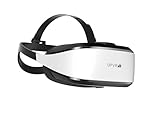
- Unmatched Performance: The DPVR E3S Virtual Reality Headset delivers an immersive visual experience with a 360° view, 110° field of view (FoV), and a high-precision 4K display panel. Currently, the headset operates in an optimized 2.5K rendering mode based on the E3C software platform, ensuring stable and reliable performance for commercial applications, with plans for future 4K mode support. With a 72Hz refresh rate, the E3S provides smooth and comfortable visuals even during fast-paced simulations. The headset supports wearing glasses and is designed specifically for professionals seeking immersive experiences tailored for commercial use.
- Ergonomic Comfort for Extended Use: Designed with the user in mind, the DPVR E3S features a lightweight body (394g), making it one of the lightest headsets available for business applications. The ergonomic face liner, nose guard, and soft foam padding allow for an incredibly comfortable experience, even during long sessions. The adjustable head strap accommodates various head sizes, with IPD self-adjustment ranging from 53mm to 73mm to enhance visual clarity for every user.
- Innovative 3-in-1 Cable Design: The DPVR E3S comes with a versatile 5m (16 feet) 3-in-1 cable that connects seamlessly to the headset through a Type C interface. This durable cable features one HDMI and two USB connections—allowing for easy charging and data transmission. Constructed with robust materials, this flexible cable is stretch-resistant and abrasion-resistant, ensuring longevity and dependable performance in busy commercial environments.
- Custom Solutions for Diverse Applications: Specifically crafted for various business scenarios, the DPVR E3S can function as a wired broadcast solution, enabling content from a single HDMI source to be shared across multiple devices. Its adaptability makes it ideal for use in egg seats, simulator rides, training sessions, educational environments, and medical applications. Note that the E3S is designed strictly for commercial use, making it unsuitable for personal entertainment.
- Robust and Reliable Design: Built to withstand demanding commercial settings, the E3S operates in a wide temperature range (-20°c to 70°c) while ensuring durability under pressure. The headset's robust construction and reliable cabling system are designed to endure extensive bending and friction, making it perfect for high-usage applications in commercial venues.
How to hire a VA effectively
- Audit the work. Track one to two weeks of tasks. Mark each one keep, eliminate, automate, delegate, or defer. Start with work that is repetitive, documentable, important, and low-risk.
- Write a narrow role. Specify responsibilities, deliverables, expected hours, working-time overlap, tools, communication channels, response expectations, approval limits, escalation rules, and the proposed trial period. Avoid “help with everything.”
- Choose how to source. Referrals, professional networks, marketplaces, and agencies all transfer different amounts of screening and management work to you. A marketplace offers candidates to evaluate; a managed service may reduce sourcing effort but can limit direct choice. Verify the arrangement rather than assuming backup coverage or particular safeguards.
- Screen for evidence. Ask for relevant work examples, tool experience, normal working hours, references or verifiable history, and how the person handles unclear instructions. Ask what happens during an outage or absence.
- Run a relevant paid trial. Use a bounded task from the actual role to assess accuracy, communication, judgment, speed, documentation, and willingness to flag uncertainty. Do not disguise unpaid production work as an assessment.
- Onboard in stages. Share a written role brief, examples of acceptable work, procedures, internal terminology, access instructions, security rules, and escalation contacts. Begin with low-risk work and grant additional permissions only as needed.
- Review outcomes. Agree on a review rhythm and track quality as well as speed. During the first month, frequent feedback can catch unclear instructions before they become routine.
Protect business and customer information
Delegation can expose inboxes, customer records, payment systems, shared files, or internal documents. Set access according to the actual tasks, and obtain appropriate legal, tax, privacy, or cybersecurity advice when regulated information is involved. A generic contractor agreement alone does not establish compliance.
- Create a separate account for the VA; do not share a master login.
- Enable multifactor authentication and use a password manager rather than sending credentials in chat.
- Grant only the permissions required for the assigned work, and add access gradually.
- Keep sensitive files in controlled shared storage and set rules for downloading, copying, and retaining data.
- Put confidentiality and data-handling expectations in writing, and log important actions where appropriate.
- Remove access promptly when the engagement ends, and keep procedures, files, credentials, and task history under business control.
Apply particular care to personal, payment, health, tax, legal, employee, and client information, as well as security keys, source code, and unreleased product details.
Common ways a VA arrangement goes wrong
- The role is vague: The assistant waits for direction or completes the wrong work. Start with one workflow and defined outputs.
- Instructions rely on guesswork: Revisions multiply. Supply examples, templates, quality standards, and decision rules.
- Access is too broad: Accidental changes or exposure become more likely. Use separate accounts and staged permissions.
- Hiring is based on the lowest rate: Rework, supervision, or replacement can outweigh the apparent saving. Compare paid-trial results and cost per acceptable outcome.
- Every judgment call requires you: Work stalls. Define what the VA may decide, the limits of that authority, and when to escalate.
- Feedback is irregular: Errors become habits. Review early work consistently and set a sustainable cadence.
- AI output is treated as verified: Incorrect information may reach a client or customer. Require source checks and human review for consequential work.
- Knowledge lives only with the assistant: An absence or departure disrupts operations. Keep procedures and work records accessible to the business.
Delegation usually takes time before it saves time: documenting a process, answering questions, reviewing work, and correcting early errors all have a cost. Measure whether that effort declines as the workflow becomes established. If it does not, the task may be poorly scoped, inadequately documented, or a poor fit for delegation.
A practical decision check
- Do you have recurring work that can be described and checked?
- Will the work’s likely value exceed the complete cost, including your management time?
- Can you provide examples, instructions, and clear decision boundaries?
- Can you review the work and give timely feedback?
- Can you share the necessary information securely?
- Would software, AI, a project freelancer, or an employee fit better?
If the answers are mostly yes, test one measurable workflow before expanding the role. If you cannot yet define the work or secure the access, improve the process first. A VA is a way to buy execution capacity—not a substitute for deciding what matters or building a manageable process.
The Tool Desk
Outbyte PC Repair FREEClear out junk files and repair common Windows errorsFree Scan →Outbyte Driver Updater FREEFix the driver behind crashes, sound loss and screen glitchesFind Drivers →Quick Recap
Product prices and availability are accurate as of the date/time indicated and are subject to change. Any price and availability information displayed on Amazon at the time of purchase will apply.




