Quick wins for a faster PC:
Fix the driver behind crashes, sound loss and screen glitchesFind Drivers →Clear out junk files and repair common Windows errorsFree Scan →Your phone bill is rarely just the advertised plan price. The amount due usually combines recurring service, device payments, add-ons, usage, one-time or prorated charges, taxes, carrier surcharges, and any previous balance—minus payments, discounts, credits, and refunds.
This U.S.-focused guide shows how to reconcile those pieces, understand a high first bill, identify missing promotional credits, investigate roaming charges, and dispute an error without creating a larger payment problem. Exact labels and amounts vary by carrier, plan, billing address, state, and locality.
The basic phone-bill formula
Amount due = previous balance + current service + device payments + add-ons + usage + one-time charges + taxes and fees - payments - credits - refunds
This is a practical reconciliation formula, not a universal carrier calculation. Providers may display credits before charges, combine categories, or allocate bundled service revenue internally when calculating taxes and surcharges.
The advertised price generally describes only some recurring service. Your actual bill may also include a financed phone, insurance, a smartwatch line, activation costs, location-based taxes, or usage outside the plan.
Free tools Windows power users keep installed
One-click scans. No signup required.
#1 Best Overall
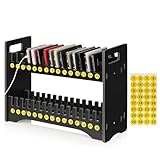
- 1. Mobile Phone Holder Material: Made of PVC compression board, can bear up to 30 pounds, not easy to break and the surface is easy to clean.
- 2. 30 Slots Multiple Cell Phone Storage: The gap of each card slot is 0.6 inches, and the height is 2.4 inches, which is suitable for most mobile phones, and 30 card slots are enough for a whole classroom student of mobile phones.
- 3. 1-30 Free Number Stickers: There are 30 free number stickers for the phone holder storage organizers. Each slots has a number, helps you find your cell phone quickly, save your time.
- 4. Extended Function Cell Phone Storage Stand: It can also be used as a mobile phone charging station, the back panel of this mobile phone holder can be bound to charging or power.
- 5. Easy Assembly: Installation tools and instructions included, simple assembly required.
The anatomy of a phone bill
Start with the account summary, then work downward into line-level detail. The major sections usually mean the following:
| Bill section | What to check |
|---|---|
| Account number and billing address | Confirm that the statement belongs to the correct account and that the service or billing address has not changed. |
| Billing period | Identify the dates covered. The period and the payment due date are different. |
| Previous balance | Determine whether an earlier balance remains unpaid or whether the statement was generated before a payment posted. |
| Payments received | Check the payment date, posting date, payment method, and whether a payment was returned. |
| Credits and adjustments | Look for autopay, paperless-billing, trade-in, promotional, refund, or service credits. |
| Current monthly service | Review the base plan, per-line access, shared data, hotspot, and family-plan discounts. |
| Device charges | Check installment payments, remaining balances, lease or upgrade charges, and device-related credits. |
| Add-ons and usage | Look for protection, subscriptions, international packages, roaming, premium messages, and other pay-per-use charges. |
| Taxes, fees, and surcharges | Separate government-imposed taxes and fees from carrier-created recovery charges. |
| Total due and payment schedule | Confirm the amount due, due date, AutoPay date, and payment method. |
A billing period may cover service already used, service billed in advance, or both, depending on the provider. For example, Google Fi explains that billing timing and prorated charges vary with the account’s billing cycle: Google Fi billing-cycle guidance.
Six types of phone-bill charges
1. Recurring service charges
These are the regular charges for keeping service active. Labels can include monthly access, line access, unlimited plan, shared data, voice and messaging, mobile hotspot, premium data, international calling, or connected-device line.
On a family plan, the bill may combine a shared base plan with separate charges for each phone, tablet, watch, or other connected device. Compare the statement with your plan confirmation and account agreement—not only the carrier’s current website. Your plan may have been renamed, grandfathered, migrated, or modified after a promotion expired.
Windows Errors? Fix Them Before They Spread
Repair common Windows errors and clear accumulated junk for a smoother, more stable PC - no reinstall needed.Free scan · no reinstallOutdated Drivers Are Slowing You Down
One free scan finds every outdated or missing driver and matches the right update for your exact hardware.Free scan · exact hardware match2. Device financing
A phone advertised as “free” commonly means that monthly installment charges are offset by promotional credits. It does not necessarily mean there are no costs or obligations. You may still owe device taxes, activation charges, a qualifying trade-in, a specific plan, or the remaining device balance if service ends early.
Audit the installment and credit together:
- Monthly installment amount
- Number of payments made and remaining
- Current device payoff balance
- Trade-in credit and promotional credit
- Whether taxes were paid upfront or financed
- Insurance, protection, or upgrade-program charges
- Accessories billed to the account
If the installment appears but the promised credit does not, check the promotion’s terms before assuming the credit is missing. Some credits begin after the first or second billing cycle.
3. Add-ons
Common recurring add-ons include device protection, international packages, premium subscriptions, cloud storage, hotspot features, and tablet or smartwatch service. These may be attached to one line rather than shown as part of the family-plan total.
Rank #2

- 【Multi Devices Organizer】: This product is a device organizer and does not come with charging ports. The stand holder works with most 6-port chargers. It can store five phones and one tablet at the same time. Not recommended for tablets larger than 10 inches.
- 【Light and Portable】: Durable and stable plastic separators hold your iPhone, tablet and smart phone in place, The external hard drive holder very easy to depatchable and carry(Not recommended if your tablet is larger than 10 inches ).
- 【Adjustable Size Tablet Organizer Stand】: As the thickness of your device, you can decide which baffle is left then you have enough space to place it. Save more space for your desk space , The ipad rack holder is a good choice for organizing multiple devices.
- 【Unique Design】: The multiple phone holder features a fashion boat design, when you put smart phone on the bow position, the bracket will not cover the screen of your device(Note: The organizer measures 5.70 "L x 3.74" W x 1.37 "H, with a device height of 0.98" H and adjustable minimum spacing of 0.70 "W. The weight is 90 grams.).
- 【What You Get】: 1 X UDOLI bracket stand ; 4 X narrow slat ; 2 X wide slat ; Satisfactory customer service, if you want any questions please email us and let us know, we will get back to you within 24 hours.
4. Usage charges
Conditional charges can result from international roaming, international calls, premium-rate destinations, excess data, hotspot usage, premium text messages, directory assistance, or cruise-ship, airplane, satellite, or maritime networks.
Do these 3 things before closing this tab:
1Repair Windows errors before they cause bigger problems2Fix the driver behind crashes, sound loss and screen glitches3Clear out junk files and repair common Windows errorsDomestic cellular data, Wi-Fi data, hotspot data, and international roaming are not interchangeable. When investigating a surprise charge, check the affected line, date, country or territory, roaming partner, type of use, and data record. Google Fi lists international calls and international usage among possible additional charges: Google Fi guidance on higher-than-usual bills.
5. One-time and prorated charges
These may include activation, upgrade, SIM or eSIM, shipping, restocking, returned-payment, late-payment, technician, or service-reactivation charges. A plan change or mid-cycle activation can also create a partial-month adjustment.
6. Taxes, fees, and carrier surcharges
These are separate categories even when they appear together on the bill. Possible government taxes and fees include state and local sales taxes, telecommunications taxes, 911 fees, relay-service fees, federal regulatory assessments, and state or federal Universal Service Fund-related assessments.
The Universal Service Fund supports telecommunications programs, but the amount a customer sees is not necessarily a direct government fee. A carrier may pass through an assessment separately, recover it through a broader surcharge, or include some costs in advertised pricing.
Carrier-imposed charges may be called an administrative charge, regulatory charge, telco recovery charge, network-cost recovery, gross-receipts recovery, or regulatory cost recovery. “Fee” does not automatically mean government-imposed. Verizon, for example, states that its Administrative and Telco Recovery Charge is a carrier-imposed charge rather than a government tax or fee: Verizon’s explanation of taxes and surcharges.
Totals can differ between carriers at the same address because providers use different surcharge policies, tax-allocation methods, bundled-service allocations, and rules for device and service charges. Verizon explains that bundled mobile voice, messaging, data, and other services may be allocated among categories for tax and surcharge calculations: Verizon’s fixed-service charge explanation. Location-specific estimates may be available through Verizon’s tax and surcharge estimator.
Rank #3

- Gifts for Men Women Dad Husband Boyfriend: Introducing the VEIYAILU wood phone docking station - skillfully crafted from solid wood with a non-toxic protective finish. Effortlessly charge your phone and enjoy seamless compatibility with a variety of smartphones, making it an essential accessory for all users. Size when assembled: 7.7x6.5x10.6". Please note! Accessories shown in the pictures are not included!
- VERSATILE MEN'S ORGANIZER: Embrace a clutter-free lifestyle with our multi-function phone stand featuring compartments for wallets, glasses, watches, keys, fitness trackers, and other accessories. It's the perfect nightstand organizer for men, bid farewell to messy desktops!
- EASY TO ASSEMBLE: The VEIYAILU cell phone stand boasts a smart and minimalist design, making it incredibly easy to assemble. Rest assured, an assembly manual and screws are provided for a hassle-free setup.
- Sturdy & Premium Wood Construction: Our VEIYAILU stand is meticulously crafted from top-grade solid wood, guaranteeing durability. Its sleek surface is expertly polished and boasts an aesthetically pleasing finish, effortlessly complementing both classical and modern interior styles.
- Ideal Men's Gift: In search of the perfect gifts for him? Look no further! Our docking station makes an excellent choice for husbands, boyfriends, or any significant men in your life. Whether it's Christmas, birthdays, Father's Day, anniversaries, or graduations, it's a practical and memorable present, wrapped in love.
Why the first bill is often higher
A first bill may combine charges from different periods, so it can be substantially higher without indicating a recurring price increase. A typical timeline looks like this:
| First-bill item | Why it appears |
|---|---|
| Partial-month service | Service began before the normal billing-cycle date. |
| Next-month service | The provider bills recurring service in advance. |
| Device installment | Financing began when the device was activated. |
| Activation or upgrade fee | A one-time setup charge was assessed. |
| Device taxes | Taxes may be collected upfront rather than financed. |
| Promotion credit | The credit may start after eligibility is verified or after a later cycle. |
| Insurance or add-on | The service began at activation or was selected during checkout. |
AT&T specifically describes partial-month charges when service starts in the middle of a billing period and explains that taxes and surcharges on certain items may be due upfront: AT&T’s first wireless bill explanation.
How to audit a family-plan bill
Reconcile each line before judging the account total. Use a worksheet like this:
| Line | Plan/access | Device | Protection | Usage | Credits | Taxes/fees | Total |
|---|---|---|---|---|---|---|---|
| Phone 1 | |||||||
| Phone 2 | |||||||
| Watch/tablet |
Then add shared plan charges, account-level credits, and account-level taxes. This is more reliable than comparing the grand total with an advertised family-plan price.
How to investigate a sudden increase
Compare the current bill with the previous two or three statements and identify the exact dollar difference.
- Did the plan change? Check the effective date, new recurring price, and any prorated adjustment.
- Did a discount or credit stop? Check autopay, paperless billing, trade-in credits, promotional expiration dates, and eligibility.
- Did a device change? Look for a new installment, upgrade, payoff, insurance charge, or missing device credit.
- Was a line or add-on added? Check watches, tablets, subscriptions, hotspot features, and protection plans.
- Was there unusual usage? Review roaming, international calls, hotspot use, premium messages, and activity on secondary lines.
- Did a prior balance or payment problem appear? Check late, returned, delayed, or misapplied payments.
- Did location-related charges change? A billing-address change or changed tax and regulatory assessment can affect the total.
A bill can rise even when you used less data. The cause may be an expired promotion, failed autopay discount, late-posted prorated charge, insurance addition, roaming on another line, or previous balance.
The Tool Desk
Outbyte PC Repair FREEClear out junk files and repair common Windows errorsFree Scan →Outbyte Driver Updater FREEFix the driver behind crashes, sound loss and screen glitchesFind Drivers →How to check a missing promotional credit
- Find the original promotion and save its terms.
- Identify the qualifying line and device.
- Confirm the required plan and trade-in conditions.
- Find the promised monthly credit and maximum number of credits.
- Check whether the promotion has a delayed start.
- Confirm that the credit is attached to the correct line.
- Look for a plan change, upgrade, early payoff, cancellation, or rejected trade-in that ended eligibility.
- Compare remaining device payments with remaining credits.
Do not assume a credit is missing solely because it is absent from the first statement. Carrier-specific terms control. Conversely, do not treat an installment as free unless the required credits continue to appear.
Rank #4

- 【Cell Phone Holder for Classroom】 Used as classroom phone storage box, perfectly to hold students cell phones in class. Let students focus more on learning, say goodbye to students playing with their phones in class and create an efficient classroom.
- 【No Assembly Necessary】 The solid wood construction means it did not need you to assemble it when you received it, saves you the hassle of unnecessary installations. And bottom groove on the bottom of the cell phone storage box makes it easy to move everywhere.
- 【Wooden Mobile Phone Holder】 The multi phone holder is made of pine wood which means all solid wood, stable and sturdy. It has the natural and clear texture, safe and healthy. Humanized and stable base, simple and beautiful, firm and practical.
- 【Wide Range of Applications】 This cell phone organizer is not only for school, but also can be used in office, educational institution, meeting room , mobile shop, etc. To make the desktop more tidy and orderly. This wooden cell phone holder can also be used as a mobile phone charging station.
- 【Phone Box Size】 Overall Size: 12.2 x 10.83 x 4.53 inch. Each slot size: 3.74 x 0.79 x 1.97 inch. Perfect for your phones, pens/pencils, calculators, remote control, scissors, and cards or other small supplies.
What to do with an unfamiliar charge
- Copy the exact label, amount, and statement date.
- Identify the responsible line, device, or service.
- Review recent orders, account changes, emails, and the prior two or three bills.
- Search the carrier’s official billing glossary or account portal. Verizon’s billing glossary explains common sections and surcharge terminology.
- Ask the carrier for the product name, activation date, usage record, calculation method, and applicable plan or promotion terms.
- Request removal or a credit if the item was unauthorized or incorrectly applied.
- Save screenshots, bills, chat transcripts, representative names, and case numbers.
Disputing a phone-bill error
1. Contact the carrier first
Use billing support rather than sales. State the exact charge, date, line, and correction you want. Ask for a case number and written confirmation.
“I am disputing the $___ charge labeled ‘___’ on the statement dated ___. This charge does not match my plan agreement or an authorized account change. Please explain the charge, identify the line or service responsible, and remove or credit it if it was applied in error. Please provide the case number and written confirmation.”
2. Keep the undisputed portion current
Do not automatically ignore the entire bill because one item is wrong. Ask the carrier what happens while the dispute is pending, and pay the undisputed amount if possible. Do not cancel autopay casually: doing so may remove a discount or create a late-payment problem. Confirm the carrier’s dispute and payment rules first.
Recommended Free Tools
3. Escalate internally
If the first representative cannot resolve the matter, request a supervisor, executive customer-relations review, or formal written billing dispute. Keep the documentation and use the case number in every follow-up.
4. Use the appropriate outside complaint channel
The FCC accepts complaints about provider billing, advertised rates, service charges, taxes, fees, and surcharges. It distinguishes ordinary billing complaints from cramming, an unauthorized charge placed on a phone bill, and slamming, an unauthorized change of telephone provider. Select the category that matches the problem: FCC phone complaint issue descriptions.
The FCC may send a complaint to the provider, but it does not guarantee a refund or a particular result. The complaint process and limitations are described at How the FCC handles complaints. For telephone-company complaints, USAC directs consumers to the relevant state utility commission where applicable: USAC complaint guidance.
Do not automatically apply the 60-day written-dispute rule for credit-card billing errors to the wireless account itself. That FTC process concerns qualifying credit-card and revolving-credit billing errors: FTC guidance on disputing credit-card charges.
Best Value

- 【Introducing the Unplug Phone Box,1-Year Warranty 】the perfect solution for moments when family members need to disconnect from smartphones, tablets and electronic distractions, work, messages, and enjoy quality time together. Simply place phones, game controllers, or electronic gadgets inside this sleek bamboo wood box to create a tech-free, communication-friendly zone.
- 【Focused on What We Do At the Present】By putting away phones temporarily in this wooden phone box organizers, and be focus 100% on what truly matters, such as our families, study, important projects, meetings, discussions. This cell phone jail box is designed to reduce screen time, eliminate unnecessary texting, phone scrolling, create space for deeper thinking and more productive moments.
- 【Quality Phone Organizer that Made-to-Last】Crafted from premium solid bamboo wood, which outperforms pine wood in durability and wear resistance. Measures 11.81" x 5.12" x 4.13", holds up to 18 phones and 6 tablets. There’s a charging hole at the back, allowing easy access for charging your devices while stored.
- 【Modern Farmhouse Style Phone Box】We offer two elegant color options – natural wood and black. Each box is engraved with the "Unplug" design as shown. Unlike other phone organizers with sharp edges, Intarsio’s wooden phone box features rounded, handcrafted edges that ensure both safety and style.
- 【Great Gifts】This versatile phone box works perfectly on your desk, kitchen counter, bedside table, home office, or even in the classroom or workplace. Great Gifts for Men, Women. Your satisfaction, our promise. We stand behind the quality of our product with a 1-year warranty. For any issues, please reach out to us. Our friendly customer support team is here to assist.
Special cases
“Taxes included”
Ask whether the claim includes all government taxes and fees, carrier surcharges, device taxes, and international usage. “Taxes included” does not necessarily mean the bill can never change, particularly after an account change or unusual usage.
You canceled but received another bill
Possible explanations include a final billing cycle, a remaining device balance, delayed usage, unreturned equipment, a final prorated credit or charge, or promotional credits reversed under the promotion’s terms.
You paid but still see a balance
Check the payment’s posting date, payment method, returned-payment status, bank processing delay, account number, and whether the statement was generated before the payment posted.
Compare phone plans by real cost
When deciding whether to switch, calculate the expected total rather than comparing headline prices:
- Monthly service after taxes, fees, and surcharges
- Number of lines and per-line access charges
- Device installment balance and required trade-in
- Duration and conditions of promotional credits
- Autopay or paperless-billing requirements
- Included high-speed data and hotspot allowance
- Domestic roaming and international coverage
- Network coverage at home, work, and travel locations
- Congestion, deprioritization, throttling, and video restrictions
- Customer support and number-porting process
- Cancellation, payoff, and equipment-return obligations
Postpaid plans may offer device financing, family discounts, roaming options, and larger promotions, but they generally create more complicated bills and can leave device balances or delayed credits. Prepaid plans often offer more predictable payment and fewer financing obligations, but may provide fewer device promotions, different international options, or less priority during congestion. MVNOs can cost less, but check the underlying network, roaming, support, compatibility, eSIM availability, and data-priority rules. No carrier is universally cheapest.
For official plan and billing information, use the provider’s own materials, such as AT&T wireless plans, Verizon wireless plans, and Google Fi plans. Prices and promotions can change, so verify current terms for your location, line count, device, and payment settings.
Quick Recap
Product prices and availability are accurate as of the date/time indicated and are subject to change. Any price and availability information displayed on Amazon at the time of purchase will apply.




