There is no single “most private” Android finance app. The right choice depends on whether you want a phone-only ledger, a user-controlled backup, a cloud budget, or automatic bank imports. This guide treats “private” as a specific storage and permission model—not as a synonym for secure, free, or highly rated.
Quick verdict: Choose Monefy for local-first manual tracking, Money Manager for deeper records and reports, Goodbudget for envelopes, YNAB for zero-based budgeting, and Wallet or Spendee only if cloud sync and possible bank aggregation are acceptable.

Dating note: The headline refers to apps available around 2024. Policies, prices, Android compatibility, and availability can change; the links below are the vendors’ current documentation and should be checked before installing.
What “private” means in a money app
Privacy has several levels. A local-only app keeps the financial database on the phone, but a backup or analytics SDK can still send other data elsewhere. A cloud budget stores records on the provider’s servers. Bank aggregation adds a financial-data connection provider and exposes balances and transaction history, even when access is read-only.
Windows Errors? Fix Them Before They Spread
Repair common Windows errors and clear accumulated junk for a smoother, more stable PC - no reinstall needed.Free scan · no reinstallOutdated Drivers Are Slowing You Down
One free scan finds every outdated or missing driver and matches the right update for your exact hardware.Free scan · exact hardware match#1 Best Overall
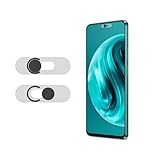
- Protecting your privacy: To safeguard personal privacy and security, a front camera cover is must-have. You can shield the camera according to your own needs at any time to prevent unauthorized monitoring and hidden shooting risks, letting you enjoy the fun of the Internet with confidence.
- Carefully made: Front camera slide design carefully matched with transparent bottom, completely does not obstruct the screen display area. The sliding cover only covers the front camera and does not interfere with the normal use of various functions of the phone. Just swipe to take photos.
- Premium black lens cover:Made of high-quality plastic material, lightweight, with a thickness of only 0.02 inches, no burden. It will not affect normal photography and video recording, and can also prevent the lens from being scratched or worn. It is equipped with a strong backing adhesive that is not easily detached.
- Scope of application: Before purchasing, please ensure that your Android phone matches the camera cover. Our lens cover is designed specifically for the front top center single hole camera model, and the precise fitting design can bring you a more comfortable user experience.
- Easy to install: Please clean the lens first, then remove the tape on the back of the camera cover, align with the front camera, gently press and stick together. Simply swipe with one finger to open and block the lens, ensuring your privacy and security at all times.
- Local/manual: no account or bank connection is needed; you enter transactions yourself.
- User-controlled backup: the database is copied to a Google Drive, Dropbox, or file location you choose.
- Cloud budgeting: an account enables synchronization and recovery across devices.
- Bank aggregation: the app imports transactions through connected financial-data services.
Do not equate “encrypted in transit” with end-to-end encryption, “does not sell data” with collecting nothing, or a high Google Play rating with privacy. Check account requirements, offline behavior, storage, permissions, export, deletion, and the Play data-safety label separately.
Shortlist at a glance
| App | Best for | Storage and entry model | Bank linking | Account | Main qualification |
|---|---|---|---|---|---|
| Monefy | Fast local-first tracking | Manual; encrypted local database; optional user-selected backup | Not required | Not required for basic use | Local financial storage does not mean zero telemetry |
| Money Manager | Detailed manual records | Manual, receipts, budgets, assets and reports | Not required for manual use | Verify current version | Official material does not establish every version is offline or ad-free |
| Bluecoins | Detailed Android tracking | Manual-first | Not required for manual use | Verify | Current privacy policy and Play disclosures need checking |
| Ivy Wallet | Open-source experimentation | Manual budgeting | Not required | Verify | Maintenance, backup, and distribution require verification |
| Cashew | Modern manual budgeting | Manual; verify sync model | Verify | Verify | Confirm current policy and Play listing |
| Goodbudget | Envelope budgeting | Cloud account and synchronization | Not the core method | Required | Not local-only |
| YNAB | Zero-based budgeting | Cloud subscription; optional linked accounts | Optional | Required | Paid cloud service |
| Wallet | Automation and reports | Cloud; manual, bank sync, notifications and receipts | Optional | Required for sync | Financial and technical data are processed on servers |
| Spendee | Multiple wallets and sharing | Cloud app with free and paid tiers | Feature-dependent | Required for sync | Not local-first; verify current policy |
| Verified alternative slot | Only after checking a current candidate | Use a verified Android tracker | Depends | Depends | Do not publish an unverified tenth app as private |
The privacy spectrum and how to choose
For maximum data minimization
Start with Monefy or Money Manager, enter transactions manually, deny optional permissions, and make encrypted or app-specific exports. This reduces provider access but makes backup your responsibility.
For envelope budgeting
Goodbudget provides the envelope method and household synchronization, but its account and cloud model mean it is not a local-only ledger. Review its current retention, export, and deletion terms at Goodbudget’s privacy policy.
For zero-based planning
YNAB is designed around assigning every dollar and supports shared plans. It says subscription revenue, rather than ads in the service, funds the product and says it does not sell financial data; its policy still describes account, device, IP, billing, usage, and—if enabled—linked-account data. See YNAB’s privacy policy and terms.
For automation
Wallet and Spendee trade greater convenience for cloud storage. Bank aggregation also adds a connectivity provider, your bank, cloud infrastructure, support systems, and analytics to the trust chain. Use automation only when its time savings justify that exposure.
Rank #2

- Protect Personal Privacy: Web camera cover can efficiently protect personal and family online privacy secure and prevents unwanted hacking attacks. It also protects your front camera from dirt and dust.
- Compatible with Most Devices: Webcam cover perfectly fits most models of computers, tablets, and cell phones. Such as MacBook Pro, MacBook Air, Mac, laptops, surfaces Pro, iPad Pro, Android tablet, PC, all-in-one desktop, cell phone, and more smartphones. Please note that the lens cover needs to be used on a flat surface and not suitable for full-screen devices.
- Ultra-Thin and High Quality: Mini size Web camera cover slide is only 0.027 inches in thickness which will not interfere with the closing lid of your laptop. It also does not interfere with web use or indicator light. It is made of premium high-strength ABS plastic that could provide long-term reliable protection for your privacy. One set comes with 6 pieces of webcam covers in two different dimensions (3pcs in 1.10*0.43*0.027 inch, 3pcs in 0.71*0.36*0.027 inch), which meet your everyday need.
- Easy to Use: Laptop Camera Cover Slide is extremely easy to install. Just need to remove the back sticker and align it to your webcam, attach and press firmly for 15 seconds. It can be opened or closed with just one simple finger movement, when the webcam is not in use just cover it to provide you with privacy security. And you can easily remove the webcam privacy cover, it doesn’t leave any sticky traces on your devices.
- Quality Guarantee and After-Sales Service: If you have any questions, please feel free to contact us, We will reply within 24 hours and give a satisfactory solution.
App-by-app privacy and budgeting details
1. Monefy — best local-first choice
Monefy’s help center says the budget is held in a single encrypted database inside the app’s private device sandbox. Optional copies can be placed in your own Google Drive or Dropbox account: Monefy Help Center. Its Play listing documents passcode protection and multiple accounts, while also disclosing possible collection or sharing of app activity, app information and performance, and device or other IDs: Google Play listing.
Use it for: quick manual entries and simple category budgets. Avoid it when: you need sophisticated bank aggregation or complex household planning. Local storage protects the financial database, not necessarily every piece of app telemetry.
2. Money Manager by Realbyte — best detailed manual tracker
Realbyte lists weekly and monthly totals, category budgets, receipt storage, filters, charts, double-entry booking, savings, insurance, loans, real estate, and asset graphs at its official site. The site also links privacy, terms, and account-deletion resources.
Use it for: detailed records, assets, receipts, and reports without needing bank imports. Check first: the current Play data-safety label, advertising, synchronization, and backup behavior; the available documentation does not prove every release is fully offline or ad-free.
3. Bluecoins — candidate for detailed Android tracking
Bluecoins is a plausible manual-tracking candidate, but current first-party privacy, maintenance, backup, and Google Play evidence was not established here. Verify the official listing and developer policy before treating it as private or assigning it a score.
Rank #3

- PRIVACY DISPLAY: Automatically hide your screen from those beside you. The built-in privacy display can be preset¹ to turn on when receiving notifications, typing passwords, or using specific apps
- TYPE IT IN. TRANSFORM IT FAST: Enhance any shot in seconds on your smartphone by using Photo Assist² with Galaxy AI.³ Add objects, restore details, or apply new styles by simply typing or tapping
- NIGHTS, CAPTURED CLEARLY: From gigs to city lights, record and capture moments after dark with clarity using Nightography so your photos and videos stay crisp and clear on your Samsung Galaxy
- MAKE IT. EDIT IT. SHARE IT: Turn everyday moments into something personal with creative tools built right into your mobile phone, whether it’s a special contact photo, custom wallpaper, an invitation or more⁴
- HELP THAT KEEPS UP: Stay in the moment while Now Nudge with Galaxy AI helps you respond faster and stay organized with smart suggestions⁵ that appear exactly when you need them on your phone
4. Ivy Wallet — open-source candidate
Ivy Wallet has a public repository at GitHub, which lets technically capable users inspect code. Open source is not proof that the distributed APK, backend, analytics, backups, and current maintenance have the same properties. Confirm the current release, Play availability, export, and storage model.
5. Cashew — modern manual-budgeting candidate
Cashew is often considered for manual category budgeting. Before installation, verify whether the current version requires an account, offers cloud sync, uses analytics, supports encrypted export, and remains available from the official Google Play developer listing.
6. Goodbudget — best envelope method
Goodbudget’s core value is digital envelope budgeting, including shared household use. Its published policy covers the website and mobile apps at goodbudget.com/privacy-policy. Because synchronization requires a service account, it belongs in the cloud category rather than local-only category. Confirm current data retention, export, and deletion terms before entering long-term records.
7. YNAB — best structured zero-based system
YNAB is a subscription-funded cloud service. Its policy says it does not sell users’ financial data, but it describes ordinary service, marketing, operational, and targeted-advertising processing, plus linked balances, transactions, and holdings when accounts are connected. Third-party OAuth applications can receive YNAB data under their own policies. Continued access is subscription-based under its terms.
Choose it for: deliberate zero-based planning and shared plans. Do not choose it for: a no-account or phone-only workflow.
8. Wallet by BudgetBakers — best automated dashboard
Wallet supports manual entry, budgets, reports, goals, shared finances, and bank synchronization. Its documentation says it is not a bank and cannot send money, make payments, withdraw cash, or issue loans: Wallet overview. Connected access is described as read-only at this support page, but read-only still exposes balances and transaction history.
The Tool Desk
Outbyte Driver Updater FREEScan for outdated or missing drivers - takes under a minuteDriver Scan →Outbyte PC Repair FREEClear out junk files and repair common Windows errorsFree Scan →Wallet’s privacy documents list account and financial information, technical data, analytics, optional Android notification access, and receipt processing. Its privacy page says receipt scanning may use OCR and AI models supplied by OpenAI: privacy details. Account deletion requests can be made in settings or through support; production-server removal is stated as occurring within one month, subject to legal retention: legal privacy policy.
9. Spendee — best for multiple wallets and sharing
Spendee offers a free basic plan plus Plus and Premium plans purchased through Google Play or the App Store: Premium information. Its cloud synchronization and account model make it unsuitable for local-only privacy. Check the current privacy policy, permissions, Play data-safety entry, export, and deletion process before relying on it for sensitive records.
10. A verified alternative — do not fill this slot casually
A tenth “private” recommendation should be added only after checking the current official site, Google Play listing, privacy policy, backup implementation, export, pricing, and maintenance status. Bluecoins, Ivy Wallet, and Cashew are candidates to investigate—not established evidence that they meet the same standard as Monefy.
Independent reader supportYour contribution helps us test, update, and keep practical guides available for everyone.How transactions enter the app
- Manual entry: lowest permission exposure, but depends on consistent recording.
- Recurring transactions: useful for bills without granting bank access.
- CSV import: practical migration option; inspect files before sharing them.
- Bank aggregation: convenient, but adds third-party access and can break after bank login or multifactor changes.
- SMS or notification capture: may expose amounts, merchants, balances, account fragments, and potentially unrelated notifications.
- Receipt OCR: images can contain names, addresses, loyalty numbers, and card fragments; determine whether processing leaves the phone.
Security, loss, and provider failure
If the phone is lost
- Use a strong Android screen lock and the app’s PIN or biometric lock.
- Turn off lock-screen notification previews.
- Enable only backups you understand; test restoration on another device.
- Check whether exported files are encrypted and what password restores them.
If an app or provider disappears
- Export CSV or another portable format regularly.
- Keep a separate offline copy of important records.
- Verify that backups exist before replacing or resetting the phone.
- Check whether account deletion also removes cloud backups.
Common recovery problems
- Bank sync fails: confirm bank login changes, update the app, reauthenticate through its official flow, export before disconnecting, and use manual or CSV import if necessary.
- Transactions duplicate: preserve the original export, compare date, amount, merchant, and account, then remove duplicates.
- Excessive permissions: decline contacts, location, notification, or receipt permissions unless your chosen workflow genuinely needs them.
A practical privacy setup checklist
- Choose manual entry unless automation is essential.
- Deny optional notification, contact, location, and receipt permissions.
- Use a strong device lock and disable notification previews.
- Prefer user-controlled encrypted backups over automatic provider sync when possible.
- Export monthly and test a restore before changing phones.
- Delete old exports from messaging apps and shared folders.
- Review the app’s Play data-safety disclosure and privacy policy after major updates.
How to score an app without guessing
| Category | Points | Evidence to require |
|---|---|---|
| Privacy and control | 40 | Account-free use, offline operation, storage control, no required bank link, export/deletion, and transparent code or documentation |
| Money management | 30 | Budgets, recurring entries, reports, multiple accounts, goals, sharing, and debt or asset tools |
| Security usability | 15 | PIN/biometric lock, encryption description, recovery, and minimal permissions |
| Cost and sustainability | 15 | Useful free tier, advertising limits, transparent pricing, maintenance, and support |
Award points only for features confirmed by official documentation, the current Play listing, a source repository, or a clearly attributed independent test. Prices vary by country and billing channel; verify U.S. Android pricing at publication time.
Do these 3 things before closing this tab:
1Fix the driver behind crashes, sound loss and screen glitches2Repair Windows errors before they cause bigger problems3Scan for outdated or missing drivers - takes under a minuteBest Value

- PRIVACY DISPLAY: Automatically hide your screen from those beside you. The built-in privacy display can be preset¹ to turn on when receiving notifications, typing passwords, or using specific apps
- TYPE IT IN. TRANSFORM IT FAST: Enhance any shot in seconds on your smartphone by using Photo Assist² with Galaxy AI.³ Add objects, restore details, or apply new styles by simply typing or tapping
- NIGHTS, CAPTURED CLEARLY: From gigs to city lights, record and capture moments after dark with clarity using Nightography so your photos and videos stay crisp and clear on your Samsung Galaxy
- MAKE IT. EDIT IT. SHARE IT: Turn everyday moments into something personal with creative tools built right into your mobile phone, whether it’s a special contact photo, custom wallpaper, an invitation or more⁴
- HELP THAT KEEPS UP: Stay in the moment while Now Nudge with Galaxy AI helps you respond faster and stay organized with smart suggestions⁵ that appear exactly when you need them on your phone
Bottom line by privacy tolerance
- Most privacy-conscious manual users: Monefy first; Money Manager when detailed records matter more.
- Envelope budgeters: Goodbudget, accepting an account and cloud synchronization.
- Zero-based budgeters: YNAB, accepting subscription cost and cloud processing.
- Automation seekers: Wallet or Spendee, after reviewing bank, notification, receipt, and cloud implications.
- Open-source explorers: Ivy Wallet only after verifying the current build and backend behavior.
Frequently Asked Questions
What is the most private budgeting app for Android?
For a local-first manual workflow, Monefy is the clearest documented choice; Money Manager is stronger for detailed records. Neither should be treated as zero-data-collection by default.
Can I use a budgeting app without linking my bank?
Yes. Monefy, Money Manager, and manual modes in cloud apps allow direct entry, although sync and premium features may require an account.
Are bank-linked apps safe?
They can use read-only connections and security controls, but balances and transaction history still leave your bank and are processed by additional services.
Does local storage mean no data collection?
No. Monefy documents a local encrypted financial database while its Google Play disclosure also lists possible app-activity, performance, and device-ID collection.
Free tools Windows power users keep installed
One-click scans. No signup required.
Should I use a spreadsheet instead?
A spreadsheet can minimize app permissions, but you must secure the file, create reliable backups, and build your own budgeting and reconciliation workflow.
Quick Recap
Product prices and availability are accurate as of the date/time indicated and are subject to change. Any price and availability information displayed on Amazon at the time of purchase will apply.




