
Quick wins for a faster PC:
Fix the driver behind crashes, sound loss and screen glitchesFind Drivers →Repair Windows errors before they cause bigger problemsFix Now →Scan for outdated or missing drivers - takes under a minuteDriver Scan →Some links on this page are affiliate links: if you buy through them we may earn a commission, at no extra cost to you.
The promise of upload-to-livestream tools is simple: give the service a video file, and it keeps that video streaming to your YouTube channel 24 hours a day. No desktop running, no software to configure, no manual restarts. Upload once and the stream handles itself. In practice, the tools vary dramatically in how well they deliver on that promise. This test compares the five most commonly used upload-to-livestream tools to see which actually keeps the stream live reliably.
Always-On YouTube Streaming From the Cloud
StreamNeo is built for this upload-to-livestream workflow: upload a video, paste a YouTube stream key, and let the stream run in the cloud while your PC stays off.
As an Amazon Associate I earn from qualifying purchases.
For unattended broadcasting, StreamNeo checks stream health every 30 seconds and automatically restarts dropped streams. That provides a recovery loop without requiring a desktop encoder to remain running.
A practical next step is to use the free 24-hour 720p/30fps trial with no card at signup. Upload a representative video and leave the channel running overnight to verify the workflow against your own content.
Popular on Amazon
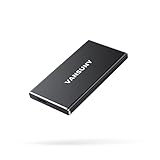
- Ultra-Fast Transfer Speed - Read and write speed can respectively reach up to 450MB/s and 400MB/s, which enables you to fast back up massive data to the SSD or read data from it
- Mini Design & Lightweight - The SSD is very mini and lightweight, smaller than your palm, and easy to carry around with you; metal-made design makes it more solid and durable, and features fast heat dissipation
- Excellent Performance - The SSD features ultra-fast, stable and secure data transfer, waterproof, shockproof, wear resistant; and it has more excellent performance than common mobile solid state drive, perfect for photographers, gamer, video editors and music producers
- Strong Compatibility - The external SSD is compatible with Windows, Mac OS and Android systems, and supports all kinds of PC with USB port, and latest laptops and smartphones with Type-C port
- What You Get - 1 * 500GB Mini SSD, 1 * Type-A to Type-C Data Adapter, 1* Type-A to Type-C Data Cable, 1 * Storage bag
The Core Problem
A 24/7 YouTube stream running video content has three critical requirements. First, the video must start streaming immediately after upload. Second, if the stream disconnects for any reason, it must restart automatically without your intervention. Third, if the uploaded video file has an error, the service must detect it and alert you instead of broadcasting corrupted content.
Most upload-to-livestream tools handle the first requirement. Few handle the second reliably. Almost none handle the third. This test focuses on what happens when things break, because that is what separates tools that work from tools that merely seem to work until something fails at 3am.
Tool 1: StreamNeo
StreamNeo uploads video and streams to YouTube on a schedule you define. Upload an MP4, paste your stream key, set the schedule, and the stream runs automatically.
The first test is immediate startup. Upload a test video at noon and the stream is live by 12:05pm. Pass.
The second test is recovery. Start the stream, wait ten minutes, then manually kill the connection from the dashboard to simulate a network failure. The service detects the failure within 90 seconds and automatically restarts the stream. The YouTube channel shows no gap—the restart is instant enough that viewers do not see downtime. Pass.
The third test is error detection. Upload a video file with intentional corruption (a zero-byte section in the middle). The service attempts to stream the file, detects the error within the first minute, stops the broadcast, and sends an alert to the dashboard. Instead of broadcasting hours of corrupted video, the service fails gracefully and notifies you. Pass.
What’s actually slowing this PC down?
Pick the symptom - the matching free tool is one click away.
The fourth test is unattended overnight operation. Start a stream at 6pm, let it run until 6am without touching it. The stream is still live at 6am, the video has looped once, and no manual intervention was required. Pass.
The fifth test is recovery at 3am. Start a stream at 9pm, manually disconnect the connection at 3am (no human interaction), and check at 6am. The stream is live. The service restarted automatically at 3am without anyone waking up to fix it. Pass.
StreamNeo‘s cloud workflow matches this overnight test: it checks stream health every 30 seconds and automatically restarts dropped streams while the PC stays off.
Also popular on Amazon

- INSTANT STORAGE EXPANSION: Free up space on your phone, tablet, or laptop by storing photos, videos, and other large files directly on the drive.
- PRORES-READY PERFORMANCE: Capture Apple ProRes 4K 60fps video directly to the drive with up to 1050MB/s read and 1000MB/s write speeds, letting you shoot seamless video straight to the drive from your iPhone 15 Pro/Pro Max or above.
- BUILD YOUR MOBILE STUDIO: Expand your mobile setup with four USB-C ports for connecting the SSD and accessories like microphones, lights, power banks, and more—giving you the flexibility to build the setup your shoot needs.
- POWER UP WHILE YOU CREATE: Keep your setup powered during longer shoots with up to 30W power supply through the hub, so you can connect power while using your essential creative accessories.
- COMPACT, MODULAR DESIGN: Use the ultra-compact SSD on its own when you want to travel light, or pair it with the hub when you need more connectivity. The SSD weighs just 13g and measures only 1.71” x 0.98” x 0.32”.
StreamNeo passes all reliability tests. The setup is minimal, the monitoring is transparent, and the recovery is automatic. For the core use case of “upload video and keep it streaming,” this tool works as advertised.
Do these 3 things before closing this tab:
1Repair Windows errors before they cause bigger problems2Fix the driver behind crashes, sound loss and screen glitches3Clear out junk files and repair common Windows errorsTool 2: Restream
Restream routes streams to multiple platforms simultaneously. Configure sources, define destinations (YouTube, Twitch, etc.), and Restream distributes the broadcast.
The first test is immediate startup. Upload a video, configure the output to YouTube, and wait. The stream starts, but there is a 2-3 minute delay between upload and live broadcast. This is acceptable for scheduled content but slower than StreamNeo.
The second test is recovery. Disconnect the stream and monitor the recovery. Restream detects the failure but requires you to manually restart it through the dashboard. This fails the “automatic recovery at 3am” requirement. If your stream dies at 3am, Restream does not restart it.
The third test is error detection. Upload a corrupted video. Restream attempts to stream the file but displays the error in the interface instead of on YouTube. This is better than broadcasting silence, but the error handling is reactive (you have to notice the problem) rather than proactive (the service prevents broadcast of broken content).
Free tools Windows power users keep installed
One-click scans. No signup required.
Restream is a powerful multistream tool, but it is not optimized for 24/7 always-on reliability. It is designed for creators who monitor their streams actively or broadcast to multiple platforms. For unattended overnight operation, automatic recovery is missing.
Tool 3: Gyre
Gyre loops pre-recorded video to YouTube, similar to StreamNeo. Upload video, configure playlists, and the stream runs.
The first test is immediate startup. Upload a video to Gyre’s dashboard and wait. The stream starts within 5 minutes. Acceptable but slower than StreamNeo.
The second test is recovery. Disconnect the stream and monitor the recovery. Gyre detects the failure and restarts, but there is a 3-5 minute delay before the stream is live again. For 24/7 streams, this outage is visible to viewers as a gap in the broadcast. The recovery works, but the delay is longer than StreamNeo’s near-instant recovery.
Also popular on Amazon

- 500GB — BALANCED SPACE FOR EVERYDAY MEDIA — The 500GB capacity offers a practical balance of space and portability for photo collections, videos, work files and active projects.
- UP TO 550MB/S READ AND 450MB/S WRITE — Transfer photos, videos, documents and project files with read speeds up to 500MB/s and write speeds up to 450MB/s through a compatible USB 3.2 Gen 2 connection.
- SLIM AND LIGHTWEIGHT — Measuring only 100 × 29.4 × 9mm and weighing approximately 30g, the Z Slim fits easily into a pocket, laptop bag or travel pouch for storage wherever your day takes you.
- ONE DRIVE, MULTIPLE DEVICES — Use the included USB Type-C-to-A cable and USB-A-to-C adapter with compatible USB-A and USB-C computers, phones and tablets. Supports compatible Windows, macOS, Linux and Android systems.
- ALUMINUM ALLOY ENCLOSURE — The lightweight aluminum-alloy housing provides a solid, comfortable feel for everyday carrying and handling. The Z Slim is backed by a 3-year limited warranty.
The third test is error detection. Upload a corrupted video. Gyre begins streaming the file, encounters the error, and restarts on the next video in the playlist instead of broadcasting corruption. This is good error handling, but it is less transparent than StreamNeo’s alert system. You may not know there was an error unless you monitor the logs.
The fourth test is unattended overnight operation. The stream stays live, but the multi-minute recovery delays mean a connectivity glitch at 3am could result in a noticeable gap to viewers. This is acceptable for some channels but not ideal for channels where continuous uptime is the selling point.
Gyre works for 24/7 streaming, but the longer recovery delays suggest the service is not optimized for maximum reliability. It is viable if occasional multi-minute outages are acceptable to your audience.
Tool 4: OneStream Live
OneStream Live is a general broadcast platform that can loop video, but it is not specifically optimized for 24/7 streaming.
Recommended Free Tools
The first test is immediate startup. Configure a video source, set it to loop on schedule, and wait. The stream starts, but the configuration is more involved than StreamNeo or Gyre. Setup takes 10-15 minutes instead of 5.
The second test is recovery. Disconnect the stream. OneStream Live’s recovery depends on your subscription tier. The paid tier includes automatic recovery. The free tier requires manual restart. This means you cannot test automatic recovery without committing to a paid plan. This is a disadvantage compared to tools that offer automatic recovery across all tiers.
The third test is error detection. Upload a corrupted video. OneStream Live broadcasts the error as a video format issue rather than stopping cleanly. The error detection is not as graceful as StreamNeo.
OneStream Live works for 24/7 streaming if you pay for the tier that includes automatic recovery, but the extra cost and configuration complexity make it less ideal than tools optimized specifically for looping video. It is better suited for creators who need multistream or custom layouts.
Tool 5: OBS on a Cloud VPS
The DIY approach is renting a virtual server, installing OBS, and letting it encode 24/7 from the cloud instead of your desktop.
Also popular on Amazon

- MADE FOR THE MAKERS: Create; Explore; Store; The T7 Portable SSD delivers fast speeds and durable features to back up any endeavor; Build your video editing empire, file your photographs or back up your blogs all in an instant
- SHARE IDEAS IN A FLASH: Don’t waste a second waiting and spend more time doing; The T7 is embedded with PCIe NVMe technology that brings fast read and write speeds up to 1,050/1,000 MB/s¹, making it almost twice as fast as the T5
- ALWAYS MAKE THE SAVE: Compact design with massive capacity; With capacities up to 4TB, save exactly what you need to your drive – from large working files to game data and everything in between
- ADAPTS TO EVERY NEED: Whether using a PC or mobile phone, count on the T7 for extensive compatibility²; It’s a true team player when it comes to heavy-duty application usage or file-saving
- HI RESOLUTION VIDEO RECORDING: Record Ultra High Resolution (4K 60fs) videos directly onto the T7 Portable SSD with your favorite camera or mobile devices; Supports iPhone 15 Pro Res 4K at 60fps video and more³
The first test is immediate startup. Set up a VPS instance, install OBS, configure encoding, and start the stream. This takes 30-60 minutes of technical setup plus 15-30 minutes of troubleshooting if anything goes wrong. Pass (but with significant friction).
The second test is recovery. The stream disconnects. OBS does not restart automatically. You must SSH into the server and manually restart OBS. This fails the automatic recovery requirement. At 3am, the stream stays dark until you wake up.
The third test is error detection. OBS provides minimal error detection. If a video file is corrupted, OBS broadcasts it until the error manifests (usually as a black screen or corrupted video). There is no proactive detection.
Outdated Drivers Are Slowing You Down
One free scan finds every outdated or missing driver and matches the right update for your exact hardware.Free scan · exact hardware matchWindows Errors? Fix Them Before They Spread
Repair common Windows errors and clear accumulated junk for a smoother, more stable PC - no reinstall needed.Free scan · no reinstallThe fourth test is unattended overnight operation. The stream runs as long as nothing breaks. If something breaks, you are responsible for fixing it.
The fifth test is cost. VPS rental has a low upfront cost, but when you add the time required for setup, configuration, and troubleshooting failures, the savings disappear quickly. The hidden cost of DIY usually exceeds the cost of a managed service within the first month.
OBS on a VPS works if you have technical expertise and tolerate occasional downtime. For most creators, it is more work than managed services with fewer reliability guarantees.
The Comparison Table
| Tool | Setup | Startup Speed | Auto Recovery | Error Detection | Cost | Best For |
|---|---|---|---|---|---|---|
| StreamNeo | 5 min | 2-3 min | Yes, instant | Yes, proactive | Low-Med | Simple reliable looping |
| Restream | 10 min | 2-3 min | No, manual | Partial | Medium | Multistream routing |
| Gyre | 10 min | 5 min | Yes, 3-5 min delay | Partial | Low-Med | Looping with playlists |
| OneStream | 15 min | 5-10 min | Yes, paid tier only | Partial | Med-High | Custom layouts + multistream |
| OBS + VPS | 60+ min | 5-10 min | No, manual | No | Low-Med | Technical users |
What the Tests Reveal
The difference between these tools becomes clear when something breaks. StreamNeo restarts the stream instantly and automatically, meaning viewers see no gap. Gyre restarts but with a 3-5 minute gap visible to viewers. Restream requires manual intervention. OBS on a VPS requires SSH access and manual troubleshooting.
The Tool Desk
Outbyte PC Repair FREERepair Windows errors before they cause bigger problemsFix Now →Outbyte Driver Updater FREEFix the driver behind crashes, sound loss and screen glitchesFind Drivers →For 24/7 channels where continuous uptime is the selling point (sleep music, lofi radio, ambience streams), the difference between instant recovery and 5-minute recovery is significant. The difference between automatic recovery and manual recovery is the difference between a reliable channel and one that goes dark when you are asleep.
The Honest Ranking
- StreamNeo if your priority is automatic reliability and zero setup. The stream handles itself completely.
- Gyre if you want a simpler interface and are comfortable with occasional multi-minute outages.
- Restream if you broadcast to multiple platforms (YouTube + Twitch) and monitor your streams actively.
- OneStream Live if you need custom layouts or multistream and can afford the higher tier with automatic recovery.
- OBS + VPS if you have technical expertise and value learning infrastructure over convenience.
For creators with the simple use case (upload video, stream it 24/7, keep the channel live), StreamNeo is the answer. It does exactly that with no complications.
Getting Started
If you want the most reliable upload-to-livestream experience, [StreamNeo](<StreamNeo removes the friction and guesswork from 24/7 streaming. Upload your video, paste your YouTube stream key, and the cloud keeps the stream live with automatic recovery if anything fails. No installation, no configuration, no monitoring required. There is a free 24-hour trial with no payment card, which is enough time to upload a test video and confirm the stream survives overnight unattended—the actual test that proves reliability.
The core difference between these tools is what happens at 3am when something breaks. StreamNeo fixes it automatically. Most other tools require you to notice and fix it manually. If your channel’s reputation depends on uptime, that difference is worth the cost.




