
Do these 3 things before closing this tab:
1Repair Windows errors before they cause bigger problems2Fix the driver behind crashes, sound loss and screen glitches3Clear out junk files and repair common Windows errorsThe best iPad tripod for filming sports is really an iPad mounting system: a secure tablet holder paired with a support that is tall and stable enough for the venue. For most outdoor field sports, that means a full-size tripod and preferably a fluid head. For indoor training or compact setups, a flexible or freestanding stand can be more practical.
Our five picks cover both complete systems and mount-only products. Check the comparison carefully: the Manfrotto, Ulanzi, and mount-only JOBY products do not include a full-size tripod.
As an Amazon Associate I earn from qualifying purchases.
Quick comparison
| Product | Best for | Tripod or stand included? | Tablet compatibility | Main limitation |
|---|---|---|---|---|
| JOBY GripTight Tablet PRO 2 GorillaPod | Portable, compact setups | Yes: GorillaPod 1K Stand | 13–23.5 cm wide; up to 17 mm deep | Too short and light for many outdoor fields |
| Manfrotto TetherGear Tablet Holder 9–13" | Premium existing tripods | No | 9–13-inch tablets | Requires a separate tripod and head |
| Ulanzi U-Pad III | Budget-conscious buyers with a tripod | No | 4.7–12.9-inch devices; 3.9–9.1-inch clamp range | Not a complete filming kit |
| K&M 19793 Tablet PC Stand | Indoor training and studio use | Yes: freestanding stand | Approximately 5.04–9.13-inch height and 8.75–13.15-inch width | Less suited to outdoor wind or smooth panning |
| JOBY GripTight Tablet PRO 2 Mount | Modular setups | No | 13–23.5 cm wide; up to 17 mm deep | Mount only |
Our picks
1. JOBY GripTight Tablet PRO 2 GorillaPod: best portable option
The JOBY GripTight Tablet PRO 2 GorillaPod is the strongest choice when portability and unusual mounting positions matter more than height. It combines the GripTight Tablet PRO 2 holder with a GorillaPod 1K Stand, so it is one of the few options here that arrives as a complete compact setup.
The holder accepts tablets from 13 to 23.5 cm (5.1 to 9.25 inches) wide and up to 17 mm (0.67 inches) deep, including room for a slim case. It supports landscape and portrait orientation, tilts up to 180 degrees, includes a removable Cold Shoe PRO, and provides two additional 1/4"-20 mounting points. The manufacturer lists stainless steel, ABS plastic, and TPE among its materials. See the manufacturer’s specifications.
#1 Best Overall
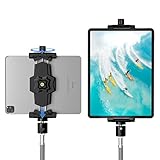
- 【More Stable & Secure】The upgraded iPad tripod mount adapter is built-in reinforcing rib in the middle of the base. Powerful spring-loaded arms and large jaws combined to make sure your device being held steadily. Moreover, the iPad clamp mount base and jaws are covered with non-slip pads to protect your device from scratches and slips, reducing the risk of its falling.
- 【Universal Compatibility】KDD tablet tripod mount has the 5.3-10.6” width opening, which fits different size screen cell phones and tablets, such as iPad 1 2 3 4 5 6 7 8 9, iPad Mini 1 2 3 4 5 6, iPad Air 1 2 3 4, iPad Pro 12.9" 11" 10.5" 9.7", iPhone 15/15pro/15pro max,14/14pro/14pro max, 13/13pro/13pro max, 12/12 Pro/12 Pro, 11/11 Pro/11 Pro Max, X/XS/XR/XS Max, Galaxy tab, Surface Pro, Nexus etc.
- 【Wide Application】Equipped with 2 standard 1/4" screw holes on the bottom and back of base, this iPad holder for tripod supports mounting tablet to steering gimbal, tripod stand, selfie stick, ring light tripod or any devices with standard 1/4"-20 thread. Perfect for video recording, selfie, remote teaching, online courses, live music shoot, Zoom meeting, watching movies and more.
- 【360°Adjustable Angle】This ipad mount for tripod comes with a high-quality & durable swivel metal ball head, allowing you rotate or adjust the angle of the tablet between portrait and horizontal orientations to meet your needs at different angles. PS: It does not include a tripod stand.
- 【Friendly Design】The ipad holder stand, based on a stretchable spring design, has a locking knob for easy width adjustment to fit different sized devices. Jaws on both sides have reserved charging space which make it easier for tablet charging.
It makes sense for close-range drills, indoor workouts, table tennis, sideline commentary, or filming from a bench or table. The flexible legs can also wrap around suitable sturdy structures.
Skip it if: you need an unobstructed view across a soccer, football, baseball, or lacrosse field. The GorillaPod format is not a replacement for a tall sports tripod, and a large iPad can catch wind or transmit vibration through flexible legs.
2. Manfrotto TetherGear Tablet Holder 9–13": best premium holder
The Manfrotto TetherGear is the best fit for readers who already own a serious camera tripod or video support and want a more substantial tablet holder. It is a holder only, not a complete tripod system.
Its adjustable sliding arms support tablets from 9 to 13 inches. Soft rubber grips and corner sections help protect the device, while the aluminum, rubber, and steel construction weighs 0.44 kg. The included mounting adapter provides 1/4-inch and 3/8-inch threads, Manfrotto and ARRI-style anti-rotation lugs, and Arca-Swiss compatibility, according to Manfrotto.
Those mounting options make it easier to integrate the holder into an existing camera system. However, the holder’s weight must be added to the iPad, case, and accessories when checking the tripod’s payload. A premium clamp attached to a lightweight tripod or loose ball head will still produce an unstable setup.
Skip it if: you want an inexpensive, ready-to-use kit with a tripod included.
3. Ulanzi U-Pad III: best value metal mount
The Ulanzi U-Pad III is the practical budget choice for someone who already owns a suitable tripod. It uses aluminum-alloy construction with rubber contact material, weighs 199 g (7 oz), and includes a cold shoe, 1/4-inch thread, and Arca-type compatibility.
Recommended Free Tools
Rank #2
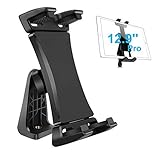
- Ball Head Rotation - 360° Rotation & 40° Tilt Supports devices in Both mode landscape & portrail. 360° ball joint allows you to adjust the tablet in any angle and position
- Best Design Mount - an adjustable loading button in upper, press to open the clip upward. double spring-locked system in bottom, provide the strong clamping force, will secure your device steadily in place allows you fast install and remove your tablet
- FIT for All Tablet - this iPad tripod mount suit for 3.5 - 13.5in tablet and smartphone with thick case. the maximum opening of the tablet clamp holer is 23.5CM (9.25in), and the size of the claw is 2 (0.8in), you do not need to remove your thick tablet case. fit for iPad Pro 12.9" 11" 10.5" 9.7", iPad Mini , iPad Air and Samsung tab, Surface Pro, Nexus, Kindle Fire, Amazon Fire, iPhone 11 XS Max XR X 8+ 8 7+ 7, Galaxy S20 S10 + S10e A9 A8 etc
- Well Made - iPad tripod adapter Made of ABS, the solid structure, thick spine and ball joint supporting pivot at the back centre make sure your iPad be held very steadily, not wobble.the four claws use high density sponge pad with more friction, They can tightly hold your thin tablet and protect it from scratch
- Allows to access all ports without blocking magnetic connector, mic and power port
Ulanzi lists compatibility with devices from 4.7 to 12.9 inches and a clamp extension range of 3.9 to 9.1 inches. Confirm the exact case-installed dimensions before ordering; the marketing size of an iPad is not the same as the width or thickness a clamp must accommodate. Full specifications are on the Ulanzi product page.
The manufacturer’s pages have shown different price and stock states, including a listing around $39.99 and another temporary sale price of $34.95. Treat those figures as volatile and verify the price, currency, retailer, and availability before buying.
Skip it if: you do not already have a tripod. The U-Pad III cannot make a narrow, lightweight, or poorly locked tripod suitable for outdoor sports.
4. K&M 19793 Tablet PC Stand: best complete indoor stand
The K&M 19793 combines a universal tablet holder with a freestanding stand. It is the most convenient complete option here for indoor courts, training rooms, studios, and controlled sideline positions where the camera can remain static.
The Tool Desk
Outbyte Driver Updater FREEFix the driver behind crashes, sound loss and screen glitchesFind Drivers →Outbyte PC Repair FREEClear out junk files and repair common Windows errorsFree Scan →K&M lists tablet height compatibility of approximately 5.04 to 9.13 inches and width compatibility of approximately 8.75 to 13.15 inches. The product result also shows a 2.205-pound load signal. Check the exact dimensions of your iPad and case against the manufacturer’s specifications.
A freestanding stand avoids the need to source a separate tripod. It can work well for coaching demonstrations, gymnasium recording, dance, or athletic training. It is less compelling outdoors, where wind, uneven ground, impact, and the need for smooth panning favor a heavier camera tripod with a video head.
Skip it if: you need a portable field system or expect to follow fast action smoothly.
Rank #3

- Universal Fit - Adjustable clamp expands from 6.25 to 9.30 inches and securely holds any iPad or tablet including iPad Pro 12.9, iPad Air, iPad Mini, Surface Pro, Galaxy Tab and other 7 to 13 inch tablets. Tripod not included.
- Metal Swivel Ball Head - Durable metal ball head allows smooth rotation between landscape and portrait orientation and easy angle adjustment for video recording, streaming and photography.
- Bluetooth Remote Included - Wireless remote shutter lets you capture photos and videos from up to 30 feet away without touching your device. Ideal for content creation, group photos and hands free recording.
- Secure Screw Lock Design - Strong adjustable screw lock keeps your tablet stable and prevents slipping while padded grips protect your device from scratches.
- Compatible with Most Tripods - Attaches to any tripod with a 1/4 inch screw mount. Lightweight and portable design makes it easy to use at home, in the studio or on location.
5. JOBY GripTight Tablet PRO 2 Mount: best modular option
The mount-only version of the JOBY GripTight Tablet PRO 2 is useful when you want to select the support separately. It can attach to a full-size tripod, monopod, clamp, or compatible GorillaPod arm.
It supports tablets from 13 to 23.5 cm (5.1 to 9.25 inches) wide and up to 17 mm deep. It rotates between landscape and portrait, tilts up to 180 degrees, includes a removable Cold Shoe PRO, and offers 1/4"-20 mounting points. See the JOBY product page.
This is a sensible upgrade for someone who already owns quality camera support. The 1/4"-20 connection, however, does not provide smooth panning or outdoor stability by itself.
Skip it if: you expect a tripod in the box or need the simplest complete package.
Is an iPad suitable for filming sports?
That depends on what the iPad is doing.
- Recording with the iPad’s camera: The iPad faces the action and records directly. A tripod can steady the device, but it cannot improve its lens, autofocus, zoom, frame rate, audio, or tracking.
- Monitoring or controlling another camera: The iPad may display video or control a separate camera. In that case, the mount mainly needs to provide a readable, secure viewing angle.
- Recording a coaching session: A static position may make a basic stand adequate.
- Following fast action: A tall support and fluid video head become more important than the tablet clamp. A tripod does not provide automatic player tracking.
An iPad on a tall tripod may still face wind shake, limited optical reach, glare, battery drain, overheating, and awkward repositioning. The support solves physical stability only.
Free tools Windows power users keep installed
One-click scans. No signup required.
What makes a tripod suitable for sports?
Height and footprint
A tabletop or mini tripod can work for close training drills but is usually too low for an unobstructed view of a full field. Outdoor sports generally benefit from a full-size tripod with a wide leg spread and a low center of gravity. More weight improves resistance to wind and accidental bumps, although it also increases carrying cost and effort.
Head type
- Ball head: Compact and easy to reposition. It can be adequate for a locked-off shot, but panning may be jerky.
- Fluid head: Better for smooth movement while following athletes, but typically heavier and more expensive.
For a fixed frame, a ball head may be enough. For tracking action, a fluid head is usually the more appropriate purchase.
Rank #4
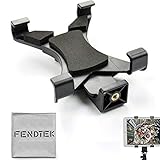
- FendTek Adjustable mount adapter fits any tablet with 5.5" to 9.7" inch screens.
- Easy adjustable width, with easy and secure lock.
- Comes with sponge cushion to protect your tablet from scratching and holds your device tightly preventing the tablet from slipping and falling down
- Universal tripod mount securely screws into all tripods monopods, and selfie sticks
- Perferct for most tablets, including all iPad Tablet models (except 12")
Security and case fit
Measure the iPad with its case installed. Check width, height, and thickness—not only whether the product listing mentions an “11-inch” or “12.9-inch” tablet. Also check whether the jaws block buttons, ports, speakers, or cameras. Rugged cases, keyboard covers, folios, and attached accessories can exceed the manufacturer’s stated range.
Orientation and accessories
Landscape is generally better for wide conventional sports footage. Portrait may be preferable for social clips, interviews, or drills. The holder should rotate without loosening or shifting. Cold-shoe and 1/4-inch mounts can help accommodate a microphone, light, or power accessory, but you must separately verify the accessory, cable, adapter, and iPad port.
Full-size tripod versus flexible tripod
| Support | Best use | Trade-off |
|---|---|---|
| Full-size tripod | Soccer, football, baseball, lacrosse, track, and large venues | Heavier, less discreet, and may be restricted by the venue |
| Flexible tripod | Small indoor spaces, benches, tables, railings, and close-range training | Limited height and more vulnerable to vibration and wind |
A tall, very lightweight selfie-stick tripod is often a poor compromise when carrying a large iPad outdoors. A sturdy travel tripod paired with a metal tablet clamp is a more balanced option when portability still matters.
Independent reader supportYour contribution helps us test, update, and keep practical guides available for everyone.Outdoor and event problems to plan for
Wind and tipping
An iPad’s broad surface can act like a sail. Spread the legs fully, lower the center column, and avoid maximum height in strong wind. If the tripod allows it, add ballast from the center hook. Keep the setup away from foot traffic and stop recording if it becomes unsafe.
Glare and visibility
If the iPad is only recording, screen visibility is less important. If you are framing or tracking through the screen, direct sunlight can make the display difficult to see. A mount does not solve glare; shade, viewing angle, and screen brightness still matter.
Battery and heat
Begin with a full charge, carry a power bank and a sufficiently long cable, and secure the cable so it cannot pull the tablet or tripod. Avoid direct sun where possible and leave ventilation around the iPad. The listed mounts do not provide power or thermal protection.
Audio
The built-in microphones may capture wind, crowd noise, or distant speech poorly. A cold shoe can help attach an external microphone, but verify the microphone adapter, cable, and iPad connection separately.
Best Value

- 【Versatile Tripod Kit】 Adjustable tablet tripod includes: 1* Aluminum Tripod, 1* Universal Phone / Tablet Holder, 1* Wireless Remote, 1* Carry Bag, and 1* Extra Quick-release Plate. Tripod for iPad is suitable for various shooting occasions, video recording, selfies, Vlogs, photography, live streaming, suitable indoor and outdoor activities
- 【Wireless Remote Tripod】68" Phone tablet tripod is equipped with wireless remote, which works with cellphones ( IOS 5.0+ and Android 4.3+) and cameras within a distance of 33 ft / 10 m effective range. You can easily connect and quickly response when filming, and don't need to touch your cellphone to start easy selfies, group photos, filming and vlogging.
- 【Aluminum Tripod & 3-Way Pan Head】 JOILCAN compact tripod is made of high-quality aluminum alloy and non-slip rubber feet provide sturdy support to protect your equipment, and lightweight tripod weighs only 1.68 lbs, and the max load is 9.26 lbs. The 3-way pan head and dual built-in bubble view levels are ideal for precise framing, and the 360-degree swivel functions allow you to easily take superb panoramic shots or switch from portrait to landscape mode.
- 【Extendable Height Tripod】With 4-stage quick flip locks on the legs, travel tripod's height can easily be adjusted from height 17 inches to 68 inches in a few seconds, it meets different height requirements, for various shooting and photography needs. And portable tripod size with a carry bag, you can easily take it anywhere.
- 【Tripod for Phone & Tablet】Phone tripod stand with a 2-in-1 universal holder with cold shoe mount, size between 5.1-9.4 inches, compatible with iPad Pro, iPad mini, iPad, iPad Air, SAMSUNG Galaxy Tab, and many other Android tablets. For smartphones like iPhone 17 16 15 14 pro max 13/12/11, iPhone X XR XS Max series,Samsung, and other cellphones, etc.
Venue rules and privacy
Check venue, school, league, and privacy rules before arriving. Restrictions may cover tall tripods, equipment near sidelines or spectator aisles, commercial recording, livestreaming, and recording minors.
Common failure modes and fixes
The iPad slowly rotates
Recenter the tablet and tighten the holder and tripod head independently. Route the charging cable downward with slack. A case or cable can shift the center of gravity, and an off-center clamp can increase rotation.
The tripod tips
Lower the center column, widen the legs, add ballast where appropriate, and move away from wind or foot traffic. A large iPad mounted high is a greater tipping risk than a small camera.
Quick wins for a faster PC:
Fix the driver behind crashes, sound loss and screen glitchesFind Drivers →Clear out junk files and repair common Windows errorsFree Scan →The case does not fit
Measure the device with the case installed. Remove only an outer folio if safe and practical, or choose a holder with greater depth tolerance. Never force the jaws against the screen, buttons, or ports.
The footage is shaky
Use heavier support, reduce digital zoom, avoid touching the iPad during recording, and consider a fluid head. If the action fits the frame, locking the shot is often steadier than attempting to pan with a ball head or flexible tripod.
The iPad stops recording
Battery depletion, full storage, app crashes, thermal shutdown, and cable interference are all possible. Test the complete setup, free storage, disable unnecessary background activity, keep the iPad shaded, and carry backup power. For important events, a second recording device reduces the risk of losing the session.
What to buy for different situations
- Indoor training or compact travel: JOBY GripTight Tablet PRO 2 GorillaPod.
- An existing professional tripod: Manfrotto TetherGear Tablet Holder.
- A budget mount for an existing tripod: Ulanzi U-Pad III.
- A freestanding indoor setup: K&M 19793.
- A modular upgrade path: JOBY GripTight Tablet PRO 2 Mount.
- Large outdoor fields: Choose a suitable full-size tripod and, ideally, a fluid head first; then pair it with a compatible holder such as the Manfrotto, Ulanzi, or mount-only JOBY.
Pre-recording checklist
- Confirm the iPad and case dimensions against the holder’s stated limits.
- Test landscape and portrait orientation.
- Tighten the holder, tripod connection, and head locks separately.
- Check framing at the maximum zoom you intend to use.
- Secure charging and microphone cables with slack.
- Fully charge the iPad and power bank.
- Test the support on the actual surface.
- Check venue, league, school, and privacy rules.
- Make a short test recording before the event starts.
Bottom line
For a compact, complete kit, choose the JOBY GripTight Tablet PRO 2 GorillaPod. For a serious existing tripod, the Manfrotto TetherGear is the strongest premium holder. The Ulanzi U-Pad III is the value choice, while the K&M 19793 is the most convenient freestanding indoor stand. Choose the mount-only JOBY GripTight Tablet PRO 2 when you want to build a system around your own support.
PC Slower Than It Used to Be?
A free scan shows the junk files, broken settings and background clutter dragging Windows down - then fixes them in one click.Free scan · Windows 10 & 11Outdated Drivers Are Slowing You Down
One free scan finds every outdated or missing driver and matches the right update for your exact hardware.Free scan · exact hardware matchFor outdoor sports, remember that the holder is only one part of the purchase. Height, tripod footprint, head movement, wind resistance, power, glare, and venue rules will determine whether the setup is genuinely useful.
Quick Recap
Product prices and availability are accurate as of the date/time indicated and are subject to change. Any price and availability information displayed on Amazon at the time of purchase will apply.




