
Free tools Windows power users keep installed
One-click scans. No signup required.
Some links on this page are affiliate links: if you buy through them we may earn a commission, at no extra cost to you.
How to Start a 24/7 Lofi Radio Channel on YouTube
A 24/7 lofi music channel runs continuously, playing lo-fi hip-hop beats, ambient study music, or chill jazz around the clock. Viewers tune in for focus sessions during work, unwind after hours, or sleep with the stream as background. Unlike conventional music channels that upload a song once a week, a 24/7 lofi channel is always live. This consistency builds an audience that returns regularly, treats your channel as a radio station, and creates a stable revenue source from watch hours and ads.
The barrier to entry is low: you need lofi tracks, a way to compile them into a long video file, and a cloud platform to stream the compiled video on repeat. You do not need recording equipment, subscribers, or subscribers, or broadcast experience. Many successful lofi channels launched with under 100 dollars in total investment.
As an Amazon Associate I earn from qualifying purchases.
Why Lofi Works as a 24/7 Format
Lofi music has specific qualities that make it ideal for always-on streams:
Repetition is a feature, not a flaw. Lofi production relies on loops: a short melody repeating with slight variations. Listeners do not expect every bar to be unique. They expect calm consistency. A 4-hour compilation can replay indefinitely without jarring the audience.
Popular on Amazon
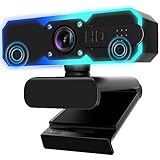
- Full HD 1080P Streaming webcam:With Full HD 1080p 60FPS video and built-in microphone function, it helps solve the embarrassing situation of poor video quality and unclear sound, which is good for streaming/gaming/video calling/conferencing /online school Computer Camera.
- Superior Low light performance:With the PC webcam camera's built-in optical sensor and Fill light, you can reduce picture graininess while ensuring that video remains clear and smooth in the dark.
- Fast focus and micphone:Web camera for desktop computer can ensure accurate focus on people's faces even when they are moving at high speed through face autofocus and 60fps function together. Also equipped with privacy cover and noise-canceling microphone, ensure that your voice reaches the other party's ears accurately and clearly without delay,perfect for use in remote meetings/live streaming/games/classes/chats.
- Webcam with light broad compatibility:customer certified to work with popular platforms such as Zoom, YouTube, OBS, Microsoft Teams and Skype. Also compatible with Mac/Windows9 10/PC/Laptop.
- Plug and play:USB 2.0 3.0 fast connection, no need to download the driver, reduce your preparation time, Cable Length 1.7 meters braided cable, do plug and play USB webcam. at the same time we t after-sales worry-free service, you have any questions about computer camera, you can contact us, we will give We will give you a satisfactory answer.
Mood stability. A lofi stream does not shift genres or intensity within a single session. It maintains a steady, focused energy for hours. This is why study channels thrive—the listener does not have to hunt for a particular song or mood.
Low production friction. Lofi tracks are short (2-3 minutes each) and can be sourced royalty-free from platforms designed for creators. You do not need to negotiate licenses or contact artists. Thousands of lofi beats are published daily under Creative Commons or creator-friendly licenses.
Passive monetization. A 24/7 stream running unattended generates ad revenue continuously. Your channel earns watch hours even while you sleep. A 1,000-viewer stream running 24 hours per day for 30 days generates 720,000 watch hours in a month.
Sourcing Lofi Tracks Legally and Affordably
The critical decision is where your tracks come from. Three paths exist:
Royalty-free music platforms: Services like Epidemic Sound, Artlist, and AudioJungle license music to creators. A subscription to Epidemic Sound costs 9-15 dollars per month and unlocks unlimited downloads. You can download lofi tracks, mix them into compilations, and use them on YouTube without further licensing. Drawback: subscription cost and limited exclusivity (the same tracks appear on other channels).
Creative Commons and creator-friendly licenses: Platforms like Free Music Archive, Incompetech, and YouTube Audio Library offer tracks licensed under Creative Commons (CC). These tracks are free to download and use on YouTube, with a simple credit in the video description. YouTube Audio Library, built into the creator studio, offers thousands of lofi and ambient tracks with no subscription. This is the lowest-cost path.
Do these 3 things before closing this tab:
1Fix the driver behind crashes, sound loss and screen glitches2Clear out junk files and repair common Windows errors3Scan for outdated or missing drivers - takes under a minuteDirect from independent producers: Many lo-fi producers publish their work under CC licenses or allow free use with credit. Searching “lofi beats free license” on SoundCloud, Bandcamp, or Soundcloud yields hundreds of artists who grant permission for creator use. Email a few and ask if you can use their tracks in compilations. Most will agree enthusiastically.
Do not use copyrighted music without permission. Even if a track sounds generic or “out of print,” using it without rights triggers copyright claims. YouTube will mute the audio, remove monetization from that section, or demonetize the entire channel if the claim is disputed and upheld.
Building Your First Compilation
A standard lofi stream runs 4-8 hours on repeat. Here is how to build one:
Select 80-120 lofi tracks (at 2-3 minutes each, this fills 4-6 hours). Use a free tool like Audacity or a paid option like Adobe Audition or FL Studio. Import the tracks in order, add 1-2 seconds of silence between tracks to prevent jarring transitions, and export as a single MP4 or WAV file.
Add simple visuals. Lofi streams rarely use talking heads or complex animations. Common approaches:
Also popular on Amazon

- 4K Dual-Camera Precision – The World's 1st Dual-Camera for Streaming features 2 cameras sharing a 1/2.8″ CMOS 4K sensor for superior clarity. The left gray wide-angle camera captures panoramic scenes with near focus for people and backgrounds, while the right blue telephoto camera delivers detailed close-ups at a recommended distance of 13.8 in. Switch freely between full-scene and close-up views to present every detail vividly in streaming, teaching, product demonstrations, or remote meetings.
- Max 11X Hybrid Zoom & PDAF Autofocus – The 4K webcam for PC offers smooth zoom from 1X to 11X—with examples like 3X, 5X, 7X, and Max 11X—for seamless transitions between full-scene and close-up views. PDAF autofocus keeps every zoom stable, clear, and fast. With remote or EMEET STUDIO control, the web cam enables flexible framing without moving the camera. Zoom not supported in 4K, 60FPS, or YUY2 modes. The integrated system saves time, space, and setup effort for a more efficient workflow.
- Smart Dual Control via Remote & EMEET STUDIO – C60E DUAL live streaming camera delivers a comprehensive image control experience, letting you manage every detail with ease. Remote control allows quick, real-timadjustments such as zoom and color without interrupting your stream, while EMEET STUDIO enables precise fine-tuning of brightness, focus, and RGB lighting. Together, they deliver online and offline control, offering superior flexibility and efficiency over typical single-mode webcams.
- Expressive RGB Lighting Design – The nintendo switch 2 camera features vibrant RGB lighting—red, green, and blue—that adds visual impact and personality. Aesthetically, it creates a sleek, modern look that stands out from plain webcams. Functionally, the glow helps users locate the camera and shows active status clearly. Emotionally, its dual-eye design with RGB accents feels friendly and alive. Personally, colors set moods—red for energy, green for focus, and blue for calm professionalism.
- Broad Compatibility & Clear Audio Capture – The streaming camera for gaming offers seamless compatibility across Windows 10/11 (64-bit), macOS 10.14+, and platforms like OBS, Twitch, YouTube, and Facebook. It connects easily via USB 2.0 Type-A with plug-and-play convenience and supports 1/4'' tripod mounting for flexible setups. 2 omnidirectional microphones capture clear, natural sound within a 9.8ft radius, ensuring smooth, high-quality communication for meetings, classes, or live streaming.
- A static image (abstract art, lo-fi girl artwork, a color gradient) that stays on screen for the entire 4-6 hours.
- A slowly panning background image or parallax effect that drifts across the screen.
- Animated text showing the current track title and artist (with a tool like FFmpeg or a video editor).
- A kaleidoscopic or particle effect that evolves slowly over hours (created with Blender or Shadertoy).
Static images are simplest and work fine. Lofi viewers value the audio; the video is secondary.
Set output quality to 720p at 30 fps. This strikes a balance between quality and file size. A 6-hour lofi mix at 720p is roughly 3-4 GB, uploading in 1-2 hours on a typical home connection.
Setting Up Your YouTube Channel
Create a new YouTube channel or use an existing one. Navigate to your channel settings and fill in:
Quick wins for a faster PC:
Repair Windows errors before they cause bigger problemsFix Now →Fix the driver behind crashes, sound loss and screen glitchesFind Drivers →Channel name: Something clear like “Lofi Study Mix” or “Chill Lofi Beats.”
Channel description: “24/7 lofi hip-hop, study music, and ambient beats. Available around the clock. No ads, pure focus.”
Channel art: A simple, recognizable image (a lo-fi girl, a coffee cup, a musical note, or an abstract design). Consistency helps viewers identify your channel at a glance.
Links and contact: Add your email or social media if you want listener messages, but this is optional. Many lofi channels remain completely hands-off after launch.
What’s actually slowing this PC down?
Pick the symptom - the matching free tool is one click away.
Playlists: Organize your streams into playlists (e.g., “Study Session,” “Sleep Mix,” “Chill Beats”) if you plan multiple concurrent streams or rotating content.
Uploading and Scheduling Your First Stream
After you have a 4-6 hour lofi compilation video ready, upload it to YouTube:
- Click “Create” > “Upload videos.”
- Select your compiled video file.
- Fill in title (“Lofi Hip-Hop Music 24/7 [Study Mix]”), description, and tags.
- Set visibility to “Unlisted” or “Public.”
- Check monetization settings (if your channel is monetized, ads will run automatically).
- Publish or schedule for a specific time.
YouTube will process the video (typically 5-15 minutes for HD files) and make it available. The video does not “go live” as a broadcast stream; it is a regular upload. You then convert it to a live stream using StreamNeo, which takes that uploaded video and broadcasts it continuously to YouTube as a live stream, allowing viewers to discover it in YouTube’s “Live Now” section and enjoy automatic recovery if the stream drops.
Keep Your Lofi Radio Live in the Cloud
StreamNeo is built for this exact lofi workflow: upload your finished prerecorded compilation and paste your YouTube stream key. It broadcasts the video continuously to YouTube Live from the cloud, turning a completed mix into an always-on channel.
Recommended Free Tools
Also popular on Amazon

- COMPLETE LIVE STREAMING SETUP – Everything you need to get started in one kit. Includes a 1080P webcam, RGB USB microphone, and adjustable LED light. Equipment for Twitch, YouTube, gaming, podcasts, and video calls.
- 1080P HD WEBCAM – Capture clear, smooth video at 1080P 30FPS. Features a glass lens, automatic brightness adjustment, and an adjustable monitor clip for streaming, recording, and video meetings.
- RGB MICROPHONE WITH CLEAR AUDIO – USB cardioid microphone with RGB breathing lights, adjustable gain, pop filter, and shock mount to help reduce background noise and unwanted vibrations.
- ADJUSTABLE LED STREAMING LIGHT – Choose from 3 lighting modes (warm, cool, and natural) and 10 brightness levels. USB-powered with adjustable positioning for your desk or monitor.
- EASY PC & MAC SETUP – NOT FOR PS5/XBOX – Plug-and-play USB connections for compatible Windows PCs and Macs. Ideal for streaming, gaming, podcasts, and working from home. Not directly compatible with PS5 or Xbox consoles.
Because the stream runs in the cloud while your PC stays off, you do not need to leave a playback computer or encoder running day and night. Start with one finished compilation and the channel’s stream key, then verify the live presentation before scaling to additional mixes.
Using Cloud Streaming to Loop the Video
Without a cloud platform, your uploaded lofi video plays once and ends, requiring a new upload every 4-6 hours. A cloud streaming service solves this: upload the video once, paste your YouTube stream key, and the platform loops the video indefinitely, presenting it as a live stream to viewers.
When the video ends, the platform restarts it automatically. Viewers joining at any time see an ongoing broadcast, not a static upload. The channel appears in YouTube’s “Live Now” sidebar and discovery interface, attracting viewers searching for “lofi,” “study music,” or “chill beats.”
StreamNeo checks stream health every 30 seconds and automatically restarts dropped streams, a useful safeguard for an unattended lofi broadcast that viewers expect to remain available around the clock.
The setup takes 5 minutes. Upload your lofi compilation to the streaming platform, paste your YouTube stream key from the creator studio, and the stream goes live. Your PC stays off. The platform’s servers handle all encoding and delivery.
Independent reader supportYour contribution helps us test, update, and keep practical guides available for everyone.Growing Your Audience
Initial growth is slow for new music channels, but 24/7 content compounds over time.
Consistency is the only marketing you need. A stream that is live 24/7 is discoverable every moment. A viewer looking for lofi at 2am finds your channel. Another searches at 10am. Over weeks, these random discoveries add up.
Customize the stream title frequently. YouTube’s algorithm tracks which titles attract clicks. Test different phrasings: “Lofi Hip-Hop 24/7 [Study + Sleep],” “Chill Beats for Focus,” “Ambient Lofi Radio,” “Study Music with No Ads.” Rotate every few days to see which drives the most clicks.
Outdated Drivers Are Slowing You Down
One free scan finds every outdated or missing driver and matches the right update for your exact hardware.Free scan · exact hardware matchWindows Errors? Fix Them Before They Spread
Repair common Windows errors and clear accumulated junk for a smoother, more stable PC - no reinstall needed.Free scan · no reinstallAdd chapters in the description. If your 6-hour compilation has distinct sections (study beats, sleep beats, focus beats), note the timestamps. Viewers will skip to their preferred section and return repeatedly.
Create a simple playlist. If you upload multiple lofi compilations (a fresh one each week), group them in a playlist. Viewers who like one lofi mix are likely to click through to others, increasing total watch hours.
Cross-promote with other lofi channels. Lofi creators are not competitors—they operate in a cooperative ecosystem. If a viewer is watching another 24/7 lofi channel and finishes it, they are likely to search for another. Mention other quality channels in community posts or video descriptions, and reciprocal awareness builds.
Also popular on Amazon

- Unrivaled 4K Performance - Experience unparalleled clarity with our EMEET NOVA 4K webcam, featuring a 30FPS rate and a CMOS sensor for the ultimate high-definition visual experience. Ideal for crucial business meetings, online education, or personal streaming, this webcam for PC ensures every detail is captured with precision. The 4K resolution enhances visual appeal and engagement. Note: Video resolution defaults to 1080P; Switch to 4K via built-in camera software or APPs like PotPlayer/OBS.
- Precise Autofocus, Clear Display – This 4K webcam features PDAF tech for fast and accurate autofocus within a fixed range of 7.9–118 inches (manual focus not supported), ensuring sharp images even with motion. It offers automatic light adjustment and a fixed 73° FOV for balanced visuals. EMEETLINK software lets users adjust brightness, contrast, and saturation, e.g., activating backlight compensation for better brightness. It does not support facial tracking, closing autofocus, or adjusting FOV.
- Superior Audio Clarity, Unmatched Compatibility – Featuring 2 built-in microphones that capture voices clearly, the NOVA 4K Webcam delivers clear, natural audio up to 8 feet away—ideal for busy offices or home use. For optimal performance (100–10KHz), keep the mic unobstructed, position it close to the speaker, and use it in a quiet environment. NOVA 4K Webcam is fully compatible with Zoom, Teams, Google Meet, and major systems like Windows 10/11, macOS 10.14+, and Android TV 7.0+.
- Plug&Play Connectivity, Guaranteed Privacy - Simply connect this USB 2.0 Webcam to any device with a Type A port and start your video communication instantly. A privacy cover is used to prevent unwanted surveillance. Relying solely on physical connections without WiFi or Bluetooth, wireless signal interceptions are eliminated. With no need for drivers or cloud storage, it offers a controlled environment that maintains data locally. It is ideal for professionals and settings that demand privacy.
- Flexible & Secure Design - The EMEET 4K webcam features a universal joint for 360° horizontal rotation, 15° vertical adjustment and a 180° adjustable stand, plus a standard ¼ inch nut for a tripod. Such flexibility allows you to capture perfect angle in any setting. Designed with stability, the PC camera boasts a robust swivel connection between the lens and its stand, uses an internal rubber material that grips securely to computer, and firmly integrates into the device with a 1.5m fixed cable.
Monetization and Revenue
YouTube monetization requires 4,000 watch hours and 1,000 subscribers in the past 12 months. A 24/7 lofi stream hits these thresholds faster than traditional channels because:
- A single viewer watching 24 hours straight contributes 24 watch hours. A 100-viewer concurrent audience generates 2,400 watch hours per day.
- At 100 concurrent viewers, you reach 4,000 watch hours in 2-3 days. Subscriber growth is slower but steady as regular viewers subscribe.
Once monetized, a 24/7 lofi channel generates revenue passively. YouTube serves mid-roll and pre-roll ads to viewers. Ad rates for lofi content are typically 1-3 dollars per 1,000 views, varying by geography and season. A stream with 1,000 concurrent viewers watching for 24 hours is 24,000 views. At 2 dollars per 1,000 views, that is 48 dollars per day, or roughly 1,440 dollars per month.
Lofi channels at 10,000+ concurrent viewers and established audiences earn 5,000-20,000 dollars monthly, with the bulk coming from ads and some from YouTube’s revenue-sharing program.
Common Pitfalls
Uploading copyrighted music. A copyright claim mutes the audio or removes monetization. Always verify licenses before adding a track to your compilation.
Uploading a low-quality video file. Compression artifacts and audio dropouts are noticed immediately. Render at 720p minimum, check audio levels (peaks around -6dB), and listen to 30 seconds of the rendered file before uploading.
The Tool Desk
Outbyte Driver Updater FREEScan for outdated or missing drivers - takes under a minuteDriver Scan →Outbyte PC Repair FREERepair Windows errors before they cause bigger problemsFix Now →Not optimizing the title and tags. A descriptive title (“Lofi Hip-Hop 24/7”) performs better than a generic one (“Chill Music”). Use tags like “lofi,” “study music,” “beats,” “ambient,” and “lo-fi hip-hop.”
Expecting immediate growth. A new lofi channel takes 2-4 weeks to see meaningful viewership. The first 100 concurrent viewers arrive via search and recommendations. After that, the audience compounds as the stream runs consistently.
Scaling to Multiple Streams
Once your first lofi stream is stable, consider variations:
- A separate “Sleep Music” stream with slower, ambient tracks (no beats, focus on pad sounds).
- A “Chill Jazz” stream mixing lofi with jazz standards.
- A “Study Beats” stream with higher energy than the default mix.
Each stream is a separate YouTube channel or a series of uploads to the same channel. Uploading a new 6-hour lofi mix every week or two keeps your content fresh and gives returning viewers novelty, which drives longer retention.
The Financial Case for 24/7 Lofi
A lofi channel requires minimal upfront cost: a royalty-free music subscription (10 dollars per month), a video editor (free with Audacity or ffmpeg), and a cloud streaming service (free trial, then 5-20 dollars per month after monetization). Total: 15-30 dollars per month before you earn any revenue.
StreamNeo offers a free 24-hour 720p/30fps trial with no card at signup, making it practical to test one compilation and the YouTube stream-key workflow before budgeting for a full-time channel.
After reaching monetization, the channel generates 1,000-5,000 dollars monthly at 1,000-10,000 concurrent viewers. The margin is enormous: you spend 20 dollars per month and earn 1,000+, or a 5,000% return. Even a small lofi channel with 100-200 concurrent viewers pulls 100-300 dollars per month.
This makes lofi channels one of the highest-return passive income projects available to creators with basic video skills.




