
Recommended Free Tools
Store cryptocurrency securely by separating four jobs: keep signing keys away from unnecessary online exposure, keep the recovery phrase secret, verify every transaction before approval, and maintain a tested backup that can survive loss of a device or location. A hardware wallet can reduce malware exposure, but it does not make a disclosed seed phrase safe or a deceptive transaction harmless. Self-custody gives you control and recovery responsibility; exchange custody leaves those controls with the provider.
What “secure storage” actually requires
Cryptocurrency is controlled by cryptographic keys. Your wallet software or device uses those keys to authorize transfers; the blockchain records the resulting transaction. Secure storage therefore is not simply finding a place to keep an app. It is a linked set of controls:
As an Amazon Associate I earn from qualifying purchases.
- Key control: know whether you or a service controls the signing keys.
- Secrecy: protect the recovery phrase and any other key material from people, malware, cameras and cloud synchronization.
- Transaction approval: check the destination and amount before signing.
- Recoverability: keep a complete, legible backup and know how to restore it.
- Physical resilience: plan for theft, fire, water, loss and the possibility that you cannot reach one storage location.
These controls are related but not interchangeable. Moving keys to a hardware wallet reduces one category of digital exposure; it does not replace a backup. Splitting a backup across locations reduces a single-location risk; it increases the number of procedures you must document and test.
Self-custody versus exchange custody
In self-custody, your wallet generates and protects the keys and you hold the recovery information. Ethereum.org describes this as responsibility for your own keys, with no ordinary customer-support process that can reset a lost self-custody seed (ethereum.org’s wallet guidance). If the phrase is lost, the provider cannot recreate it; if it is stolen, an attacker may control the assets.
#1 Best Overall

- [Indestructible Seed Phrase Steel] ELLIPAL 316 stainless steel metal seed phrase storage is virtually indestructible and fireproof, making sure your mnemonic is safe no matter what. With our waterproof,you can trust that ELLIPAL Seed Phrase Steel will withstand any condition, from a rainy day to extreme environments. Get peace of mind with our crypto seed storage, the ultimate backup solution for your mnemonic, guaranteed to last a lifetime.
- [Safeguard Your Crypto Assets] Are you looking for a product that can offer you extreme security and complete offline protection for your mnemonic codes? Look no further than our Seed Phrase Steel! Permanently back up your mnemonic on our metal seed phrase storage and keep it safe from hackers and malware. With our crypto seed storage, you can fully control your crypto assets.
- [Easy to Use & Support 24 Words] Designed to comply with the BIP39 principle, this phrase cold storage makes it incredibly easy to generate and store your seed phrase. Supporting 12, 15, 18, 21, and 24-word mnemonic phrases. With the crypto seed storage, you only need to remember the first 4 letters of your mnemonic phrase, making it simple and convenient to access your funds. Experience the peace of mind that comes with secure crypto storage.
- [Compatible with BIP39 Hardware Wallets] Designed to complement all ELLIPAL cold wallets, the metal seed phrase storage is the perfect accessory to ensure the safety of your crypto assets. But don't worry if you don't own an ELLIPAL hardware wallet, as the Seed Phrase Steel is compatible with all BIP39 hardware wallets on the market, including popular brands such as SecuX, Ledger, and Trezor. With ELLIPAL take the first step towards securing your asset's future.
- [Pocket-Sized, Take it Everywhere] The ELLIPAL Seed Phrase Steel is a pocket-sized device that provides unparalleled security and convenience. Unlike traditional storage methods that require specialized tools or third-party involvement, this crypto seed storage allows you to securely store your chosen data without any extra hassle. Its compact size makes it easy to carry with you wherever you go, whether you're attending an important meeting or going on a vacation.
With exchange custody, the exchange controls the underlying keys and gives you an account interface. You depend on its login security, withdrawal controls and account-recovery process. You do not receive the same seed-phrase backup because the service, rather than your wallet, manages key recovery. The choice is a responsibility trade-off, not a guarantee that one model is always safer.
| Question | Self-custody wallet | Exchange account |
|---|---|---|
| Who controls signing keys? | You, through wallet software or a signing device. | The exchange or custodian. |
| What is the critical backup? | The wallet’s complete recovery phrase and any documented settings. | Account credentials, approved recovery methods and the provider’s continuity. |
| Who can restore access? | You or someone who has the required recovery material. | The provider, subject to its policies and identity checks. |
| Main failure to plan for | Lost or exposed recovery information, or an incompatible restore. | Account compromise, withdrawal restrictions or provider outage. |
If you choose self-custody, treat the recovery phrase as a master secret. Ethereum.org warns: “Your recovery phrase (also called secret recovery phrase or seed phrase) is the master key to your wallet. Anyone who has it can access all of your accounts and drain every asset.” That page was last updated June 6, 2026 (Ethereum security and scam prevention).
Choose a storage approach based on use and threat model
There is no universally best arrangement. Decide how often you transact, how much online exposure you can tolerate, and whether you can reliably follow an offline procedure.
Hot wallet for routine spending
A hot wallet runs on a connected phone or computer. It is convenient for frequent transfers, decentralized applications and small balances, but a compromised device can expose keys or manipulate what you see. Bitcoin.org advises keeping only small, everyday amounts on a computer or mobile device and placing the remainder in a safer environment (Bitcoin.org: Securing your wallet).
Hardware wallet for reduced key exposure
A hardware wallet is a dedicated signing device. A connected wallet prepares a transaction and sends its details to the device; the device displays the details and signs, then the connected wallet broadcasts the signed transaction. Bitcoin.org characterizes hardware wallets as a balance between high security and ease of use, but that is a general description rather than an independent test of every model or threat scenario (Bitcoin.org: Securing your wallet; Bitcoin Developer Guide: Wallets).
Hardware does not mean risk-free. Someone who obtains the recovery phrase may restore the wallet elsewhere. You can also approve a malicious transaction, fail to maintain a usable backup, or lose access because your wallet requires settings you did not record. Physical threats remain relevant even when digital exposure is reduced (hardware-wallet security guidance).
Rank #2

- DURABLE AND INDESTRUCTIBLE: Made with grade 304 Steel, it's the long term solution to helping you safely store and backup your wallet’s seed phrase due to its resistance to corrosion. The various screws present in the tablet help protect it against deformation. It is also designed to have a fireproof threshold of house fires.
Fully offline signing for specialized needs
An offline computer or signer can keep key material away from a network, but it demands more operational discipline: secure data transfer, software verification, address checking and a recovery procedure. The Bitcoin developer workflow still applies—prepare online, transfer transaction details, review and sign offline, then return the signed transaction for broadcast (Bitcoin Developer Guide: Wallets). If you cannot perform those checks consistently, a simpler, well-understood hardware workflow may create fewer user errors.
PC Slower Than It Used to Be?
A free scan shows the junk files, broken settings and background clutter dragging Windows down - then fixes them in one click.Free scan · Windows 10 & 11Outdated Drivers Are Slowing You Down
One free scan finds every outdated or missing driver and matches the right update for your exact hardware.Free scan · exact hardware matchUse a layered arrangement when balances and activity differ
Many owners keep a small hot-wallet balance for routine activity and a larger reserve behind a hardware or offline signer. The separation limits the amount exposed to a connected device while preserving convenience. Keep the wallets’ recovery materials distinct and label which backup belongs to which wallet; never assume one phrase restores every wallet you use.
| Option | Online exposure | Convenience | Backup and recovery burden | Best fit |
|---|---|---|---|---|
| Hot wallet | Highest because keys operate on a connected device. | Highest for frequent activity. | Must protect the phrase and the device; restoration behavior varies. | Small, actively used amounts. |
| Hardware wallet | Lower for signing keys when used correctly; the companion computer remains exposed. | Moderate; requires a device and an approval step. | Phrase, device setup and compatibility must be documented. | Longer-term holdings with occasional transactions. |
| Offline signer | Lowest network exposure when the process is genuinely isolated. | Lower; more manual handling and verification. | Highest procedural and recovery complexity. | Users able to maintain a disciplined offline process. |
| Exchange custody | Keys are not on your device, but access depends on the provider. | High inside the account interface. | Account recovery replaces seed-phrase recovery. | Users who prefer provider-managed key operations. |
Protect the recovery phrase as a master key
Use the wallet’s own setup instructions to create and record the phrase. Do not invent a different word order, omit a word or add punctuation unless the wallet explicitly requires it. Wallets can use different recovery standards, derivation settings and account structures, so a phrase that looks valid may not restore the addresses you expect.
Never create a digital copy casually
- Do not photograph or screenshot the phrase. Screenshots may synchronize to cloud services.
- Do not type it into an ordinary phone, computer, email, notes app or password manager as a convenience copy.
- Do not paste it into a website, browser form or “verification” tool.
- Do not give it to support staff, moderators, friends or anyone claiming to help.
Legitimate support should not need your recovery phrase. A request for the words is a strong sign that the requester is trying to take control (Ethereum security and scam prevention; hardware-wallet security guidance).
Record the whole wallet, not only what is visible
Some wallets manage many keys or addresses. Bitcoin.org cautions that a backup covering only currently visible keys may fail to recover other funds; many modern deterministic wallets can derive past and future addresses from one phrase, but you must confirm how your particular wallet handles backups (Bitcoin.org: Securing your wallet). Record any wallet-specific information required for recovery, such as a passphrase or network/account setting, using the wallet’s documented procedure. A phrase without a required additional setting may open an empty or different wallet.
The Tool Desk
Outbyte PC Repair FREERepair Windows errors before they cause bigger problemsFix Now →Outbyte Driver Updater FREEFix the driver behind crashes, sound loss and screen glitchesFind Drivers →Confirm that the backup is usable
- After setup, read every word back from the physical record and compare it with the wallet’s verification prompt, if provided.
- Check spelling, order and word count under good lighting.
- Read the wallet’s recovery instructions and note the supported device or software versions.
- When practical, perform a recovery test with no meaningful balance, then verify that the expected addresses appear.
- Document any extra settings needed to reproduce the accounts, without exposing the phrase itself.
A backup that is secret but illegible, incomplete or incompatible is not a working backup.
Rank #3

- 【 DURABLE AND INDESTRUCTIBLE 】: Made with grade 304 Steel, the Keystone Tablet is the long term solution to helping you safely store and backup your crypto seed phrase due to its resistance to corrosion. The various screws present in the tablet help protect it against deformation. It is also designed to have a fireproof threshold of 1399 to 1455°C / 2550 to 2651°F (House fires go up to 649℃ / 1200°F).
- 【 SLEEK AND EFFICIENT DESIGN 】: Slightly bigger than a credit card, the Keystone Tablet is very portable. Easily access the contents of the tablet by sliding it open. You also can make use of the built-in keyhole to secure your mnemonics with a physical lock as well. All alphabetical letters come with anti-tampering stickers and are laser engraved to ensure they are resistant to corrosion.
- 【 SEED PHRASE STORAGE 】: Supports 12, 18 or 24 word seed phrases (Only first 4 letters of each word needed).Suitable for all types of cryptocurrencies (Bitcoin, Ethereum, Ripple, Litecoin, Dogecoin, Cardano, B【 HUGE RANGE OF COMPATIBILITY 】: Compatible with all BIP39 hardware and software wallets (Ledger Nano X, Trezor, Bitbox, KeepKey, Coldcard, MetaMask, Coinbase Wallet, Electrum, Mycelium, Exodus, Wasabi Wallet, Opolo, Cobo, ZenGo, CoinSmart etc.). inance Coin, Shiba Inu, Avalanche, Solana, Terra, Polygon, USDC, USDT etc.)
- 【 WHAT YOU GET 】: 1 Keystone Tablet, 4 sheets of metal alphabetical letters (252 letter tiles in total), 2 anti-tampering stickers, spare screws, a screwdriver, and a guide.
Choose physical locations that balance secrecy and survivability
A backup must survive foreseeable loss while remaining inaccessible to unauthorized people. Bitcoin.org recommends durable media and more than one secure physical location to avoid a single point of failure (Bitcoin.org: Securing your wallet).
- Keep copies in separate locations so one burglary, flood or fire cannot remove every copy.
- Do not store the phrase beside the signing device if theft of one container would expose both.
- Limit knowledge of the locations to the owner and, where appropriate, a trusted successor.
- Inspect the record periodically for fading, corrosion, damage or missing characters.
Metal plates and other durable products can be useful media, but the category name does not prove resistance to fire, water, corrosion or tampering. Check the exact product’s material, supported phrase format and independently documented test conditions before relying on a durability claim (seed-phrase storage guidance). Never describe a product as fireproof or waterproof without evidence for that specific product.
Why cloud backups are a poor default
An online copy can be stolen through a compromised account, malware or a provider breach. Bitcoin.org says that if an online backup is unavoidable, encrypting it is good practice while warning that online backups are highly vulnerable to theft (Bitcoin.org: Securing your wallet). The safer general practice is to keep the recovery phrase offline and avoid uploading it at all. If you use encryption for an exceptional case, the encryption key must be protected separately; otherwise the two secrets become one attack target.
Do these 3 things before closing this tab:
1Clear out junk files and repair common Windows errors2Fix the driver behind crashes, sound loss and screen glitches3Repair Windows errors before they cause bigger problemsUse a hardware wallet without skipping the verification step
The device’s security benefit comes from isolating signing keys and showing transaction details for your approval. Follow this sequence:
- Prepare: Install the wallet software from the manufacturer’s official documentation, initialize the device, and write the recovery phrase using the device’s instructions.
- Create: In the connected wallet, enter the recipient, amount and network fee to build an unsigned transaction.
- Transfer details: Send the transaction data to the hardware device.
- Inspect on the device: Compare the recipient address, amount, asset and network or fee information on the device display—not only on the computer or phone.
- Sign deliberately: Approve only when every detail matches your intended payment.
- Broadcast: Return the signed transaction to the connected wallet and broadcast it.
- Verify the result: Use the relevant block explorer or wallet history to confirm the transaction, while remembering that confirmation does not reverse a wrong destination.
The Bitcoin developer guide describes this prepare, review, sign and broadcast flow for hardware wallets (Bitcoin Developer Guide: Wallets). Keep the device firmware and companion software current according to official instructions, and verify that the wallet supports the asset and account type you intend to use; compatibility changes over time.
Independent reader supportYour contribution helps us test, update, and keep practical guides available for everyone.Make every transaction an approval decision
Cryptocurrency transfers generally cannot be reversed by customer service. Ethereum.org specifically describes Ethereum transactions as irreversible and advises checking the address exactly (Ethereum security and scam prevention). Malware can replace a copied address, a fake website can request a deceptive approval, and a social-engineering message can create urgency. Slow down when:
Rank #4
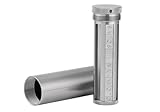
- [Seed Backup] Allows you to securely store your 24-word recovery phrase, providing you with the ultimate protection for your crypto assets. It is compatible with all BIP39 hardware or software crypto wallets, including Ledger, Trezor, KeepKey, and more
- [Durable and Secure] Made from high-quality 304 stainless steel, ensuring durability and resistance to wear and tear. The sturdy design and strong locking mechanism provide added security, making it a reliable tool for protecting your crypto seed phrase
- [Easy to Use] Straight forward setup by just sliding the corresponding letter tiles into the slots, without any third party involvement
- [Portable and Compact] Capsule design, compact and portable, making it convenient to carry with you wherever you go. It is suitable for those who are always on the move and want to ensure that their crypto seed phrase is always safe and secure
- [Gift Option] A thoughtful product for friends, family, or anyone who is interested in cryptocurrency
- The address on your screen differs from the address shown on the signing device.
- A site asks you to “validate” or “synchronize” a wallet by entering the recovery phrase.
- A token approval grants a contract more spending authority than the immediate action requires.
- The recipient changes payment details at the last minute.
- You cannot identify the network, fee or asset represented by the transaction.
For a new recipient, a small test transfer can reduce the chance of a transcription error, but it does not make a malicious contract or wrong network safe. The decisive control remains reading the transaction details before signing.
Free tools Windows power users keep installed
One-click scans. No signup required.
Create a recovery plan before you need it
Write a private, practical plan that answers what a trusted person would need if you were unavailable. Do not put the recovery phrase in the plan itself unless the plan is stored as securely as the phrase.
- List each wallet, the assets and networks it contains, and whether it is self-custodied or held by a service.
- Record the official recovery procedure, required device or software, and any additional settings needed to derive the accounts.
- Identify where the physical backup is held and how an authorized successor can locate it.
- Explain how to verify that restored addresses match the expected wallet before moving funds.
- Review the plan after changing devices, adding accounts, updating firmware or moving a backup.
Do not promise that an exchange, a blockchain information site or a hardware-wallet support team can reset a self-custody seed. Recovery depends on the material and settings you control (Ethereum wallet guidance).
Advanced arrangements: multisignature and split secrets
Multisignature wallets
Multisignature authorization requires multiple independent keys to approve a transaction. A 3-of-5 arrangement, for example, can require any three of five designated signers. It can reduce the damage from one stolen key or one unavailable person, but it introduces setup, coordination, software-compatibility and recovery demands. Every signer needs a documented backup and a clear procedure for replacing a lost key. Multisignature controls authorization; it does not eliminate the need to store recovery material safely (Bitcoin.org: Securing your wallet).
Split-secret schemes
Secret-sharing systems divide recovery material into pieces so that only a defined threshold can reconstruct it. Ledger describes Shamir Secret Sharing as an advanced approach and cautions that it is complex to implement carefully (seed-phrase storage guidance). You must document how many pieces are required, where each piece is stored, which wallet supports the method and how to recover if one piece is damaged. Splitting a secret does not help if every piece is stored together or if no one can execute the reconstruction procedure.
What to do when something goes wrong
| Situation | Immediate action | What not to do |
|---|---|---|
| Device lost, phrase still secret | Obtain a compatible replacement, restore using the documented procedure, and verify addresses before transacting. | Do not assume the device itself contains the only copy of the wallet. |
| Phrase may have been photographed, typed or disclosed | Treat the wallet as compromised. Create a new wallet with a new phrase and move assets after checking every destination. | Do not keep using the exposed wallet because the device remains in your possession. |
| Backup damaged or unreadable | Use another verified copy if available; if no complete copy exists, determine whether the wallet is still accessible and create a new secure backup immediately. | Do not guess missing words or rely on an unverified online “recovery” service. |
| Transaction details look wrong | Reject or cancel the signing request, disconnect the suspicious site and investigate from a trusted device. | Do not sign to see what happens; completed blockchain transactions may be irreversible. |
| Forgotten extra passphrase or setting | Consult the wallet’s official documentation and your private records; test possibilities only with negligible funds. | Do not assume the seed alone restores every account. |
A maintenance checklist
- Keep only the amount needed for regular activity in a hot wallet.
- Maintain at least two secure physical backup locations when that fits your threat model.
- Inspect backups for readability and damage on a schedule you can follow.
- Test recovery with a low-value wallet before trusting a new device or procedure.
- Verify recipient, asset, network, amount and fee on the signing device.
- Confirm wallet compatibility before moving funds to a new chain, account type or device.
- Update your recovery plan after any wallet, setting, device or location change.
- Assume anyone requesting the recovery phrase is attempting to obtain control.
How to choose among the options
Use the approach you can operate correctly over time. A frequent trader may value a hot wallet’s speed while limiting its balance. A long-term holder may accept the extra approval step of a hardware wallet in exchange for keeping signing keys away from a general-purpose computer. A technically experienced user may choose offline signing, multisignature or split-secret storage, but only after documenting compatibility and recovery. In every case, the decisive questions are whether the keys remain secret, whether the backup covers the whole wallet, and whether you will verify what you sign.
Quick Recap
Product prices and availability are accurate as of the date/time indicated and are subject to change. Any price and availability information displayed on Amazon at the time of purchase will apply.




