
Some links on this page are affiliate links: if you buy through them we may earn a commission, at no extra cost to you.
Use Amazon’s official support flow—not a phone number from a search result, text message, or unsolicited call. Amazon routes most retail customers through its Customer Service Home Page, where the available options may include self-service help, chat, or a callback.
The menu changes based on your account, location, order, and issue. The safest approach is to start inside Amazon, identify the exact transaction involved, and never give remote access, gift cards, or a “security payment” to someone claiming to be support.
As an Amazon Associate I earn from qualifying purchases.
Start with Amazon’s official Customer Service page
On a computer or phone browser, open amazon.com/gp/help/customer/contact-us. You can also go to Amazon.com and search for customer service using Amazon’s own search bar.
In the Amazon Shopping app, open the account or main menu and select Customer Service. Sign in if prompted. A signed-in session lets Amazon connect the request to relevant orders, refunds, Prime benefits, digital content, and registered devices.
Popular on Amazon
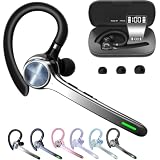
- Smart Digital Display: Easy-to-read digital display shows the remaining power of the charging case for the refill in time.
- High Capacity and Long-Lasting: Equipped with the 500mAh charging case to juice up the bluetooth headset for almost 72 hours of music/talking time. The single headset offer 18-23 hours of talking time.
- Design Ideas Of Mute: Add the individual mute button on the bluetooth earpiece to meet your demand for muting more simply on the cell phone call. (ONLY ALLOW TO MUTE DURING CALL ON PHONE)
- Ear Painless: Maximizing compactness of wireless headset based on ergonomics. Small and light even unobtrusive but still stable, and provide a more comfortable wearing experience.
- Ultra-Powerful Bluetooth Tech: Wireless earpiece features the updated 5.3 Bluetooth technology to quickly and stably connect devices in the 10m range.
Amazon says associates are available by chat or phone support 24/7, but that does not mean every customer or issue will display every contact method. Amazon’s system decides which options are available.
How to reach a live agent by chat
The labels can vary, but this is a commonly documented route on the website:
- Open the Amazon Customer Service page.
- Sign in when Amazon requests it.
- Select Help with something else, if that option appears.
- Select Something else.
- Select I need more help.
- Choose Start chatting now, or the equivalent chat option.
Amazon may instead show an automated assistant first. If it does not understand the problem, type a direct request such as I need to speak with a customer service associate. A live-chat button is not guaranteed to appear; Amazon may send a particular issue to a help article or another support channel.
How to request an Amazon callback
Amazon generally presents phone help as a callback rather than publishing one universal retail customer-service number for everyone to call. Look for wording such as:
- Phone
- Call me
- Request a phone call
- Get a call from us
If the option appears, confirm the phone number shown by Amazon and submit the request. The system may offer chat instead, or report that callback service is temporarily unavailable.
Do not use an “Amazon support number” supplied by an unofficial website, social-media account, email, text, or unexpected caller. The FTC warns that scammers publish fake Amazon numbers and can spoof legitimate-looking caller ID information.
PC Slower Than It Used to Be?
A free scan shows the junk files, broken settings and background clutter dragging Windows down - then fixes them in one click.Free scan · Windows 10 & 11Crashes, No Sound, or Screen Glitches?
Random freezes, missing sound and display glitches usually trace back to one bad driver. Find and replace yours safely.Free scan · under a minuteFor an order, start from Your Orders
Order-specific support usually provides more useful choices than a general request because Amazon can see the shipment, seller, fulfillment method, return status, and refund history.
- Open Your Orders.
- Find the relevant purchase.
- Select the available tracking, return, refund, or problem option.
- Choose the issue that most closely matches what happened.
- Follow the prompts for self-service, chat, or a callback if offered.
This route can help with delivery delays, damaged or incorrect items, returns, refunds, and packages marked delivered. For a package marked delivered but missing, Amazon may require you to wait until its stated eligibility period has passed before offering an investigation or refund. The exact buttons differ by order.
What to do if you cannot sign in
Do not create a second account simply because you have lost access to the first one. Begin with Amazon’s sign-in recovery prompts if you forgot your password, cannot receive a one-time code, changed your phone number, or lost access to the recovery email.
Also popular on Amazon

- Padded Comfort: Headphones wired with adjustable headband feature swivel-mounted, leatherette ear cushions for hours of comfort and is easy to clean
- Rotating Noise Canceling Mic: Headset with mic minimizes unwanted background noise for clear conversations; the rotating boom arm can be tucked out of the way when you’re not using it
- Responsible Packaging: H390 Logitech Headset uses FSC-certified paper for responsible packaging
- Handy In-line Controls: Simple in-line controls on the wired headphones with microphone cable let you adjust the volume or mute calls without disruption
- Digital Stereo Sound: Fine-tuned drivers provide enhanced digital audio within this computer headset with microphone for music, calls, meetings and more
Amazon Pay’s official shopper guidance points customers with login problems to Account & Login Issues and the option equivalent to I do not have an Amazon Account but need assistance. A normal personalized support session may not be available until Amazon restores or verifies account access.
Recommended Free Tools
If you do not have an Amazon account
You can browse Amazon’s Help library without signing in. However, order history, refunds, account-specific investigations, and many personalized support options generally require an account or an account-recovery process.
Use the right support channel for the transaction
Not every Amazon-related payment belongs with ordinary Amazon retail customer service.
| Issue | Correct starting point |
|---|---|
| Amazon.com order, delivery, return, or refund | Amazon Customer Service or Your Orders |
| Amazon Pay transaction | Amazon Pay Contact Us |
| Amazon Pay merchant question | Sign in to Your Amazon Pay Activity, open the order, select Details, and use the merchant information under Business details |
| Amazon Business account | Amazon Business support while signed in |
| Third-party selling account | Seller Central, then Help and Contact Us |
| AWS technical, billing, account, or sales issue | AWS Support Center; availability depends on the support plan |
| Amazon Visa or Prime Visa | Chase |
| Prime Store Card or Amazon Store Card | Synchrony |
Amazon Pay specifically distinguishes its transactions from ordinary Amazon.com purchases. Likewise, AWS, seller, business, and card support operate through separate systems.
Why Amazon chat or callback may not appear
“Start chatting now” is missing
The contact page is personalized. Try signing in, starting from the affected order, selecting the closest issue category, or continuing through the automated assistant and choosing I need more help. You can also try the Amazon app or a current browser.
Quick wins for a faster PC:
Scan for outdated or missing drivers - takes under a minuteDriver Scan →Clear out junk files and repair common Windows errorsFree Scan →The Contact Us page keeps looping
Amazon may have routed the selected problem to a self-service article. Return to the previous menu and choose a closer category, or open Your Orders and start from the specific transaction. Older instructions that list Help with something else → Something else may not match the current screen.
The callback option says it is unavailable
Callback availability can depend on the issue, country, account, time, and current system capacity. Use chat if it is offered or return later through the official Customer Service page. Do not replace the official flow with a number from an unsolicited message.
Chat will not load or disconnects
Common causes include a blocked pop-up, stale browser data, an outdated browser or app, an unstable connection, or a temporary Amazon support problem. Try these steps:
- Refresh the official Amazon page and sign in again.
- Disable a pop-up blocker for the Amazon support window.
- Clear the browser cache or use a current browser.
- Update or restart the Amazon app.
- Try another browser, device, or network.
These fixes can restore the chat window, but they cannot force Amazon to offer live support for an issue that has been assigned to self-service.
The Tool Desk
Outbyte Driver Updater FREEScan for outdated or missing drivers - takes under a minuteDriver Scan →Outbyte PC Repair FREEClear out junk files and repair common Windows errorsFree Scan →Also popular on Amazon

- Experience Effortless Communication, Anywhere: Our Bluetooth headset incorporates cutting-edge AI noise reduction technology, delivering premium sound quality that effectively blocks 95% of background noise. Enjoy a crystal-clear, lifelike calling experience akin to in-person conversations.
- Extended 55Hrs Battery Life: With a swift 2-3 hours charging time, our Trucker Bluetooth headset offers an extended battery life of up to 36 hours of talk time, 55 hours music time and 80 days of standby time. Drive, commute, meeting or work from home without the hassle of frequent recharging, empowering you to make calls or attend meetings at your convenience.
- All-Day Comfort for Prolonged Wear: Crafted with soft, breathable earmuffs and an ultra-soft adjustable headband, our bluetooth headset features a 270° rotatable design for both earmuffs and microphone, ensuring prolonged comfort and easy to switch and left/right ear available. Ideal for extended use, this wireless headset is perfect for work, promising day-long comfort.
- Seamless Connection to 2 Devices: Effortlessly connect our bluetooth headset to two Bluetooth devices simultaneously. Never miss important calls or meetings while enjoying your favorite music. Compatible with various Bluetooth-enabled devices, this headset ensures versatility.
- Extended 59ft Wireless Range: Enjoy unparalleled freedom of movement with our wireless Bluetooth headset, featuring an impressive working range of up to59ft/18m. Maintain clear and smooth call quality, even when your mobile phone isn't immediately accessible. If you have any problems with the trucker headset, please feel free to contact us, we will offer 24 hours online serivce.
Protect yourself from fake Amazon support
Fake Amazon calls and messages often claim that a suspicious purchase, account lock, or refund requires immediate action. Caller ID is not proof that the contact is genuine. Open Amazon yourself, review Your Orders and account security, and begin support from the official site or app.
A legitimate Amazon representative will not ask you to:
- Install remote-access software.
- Give someone control of your computer or phone.
- Pay a fee to receive customer service.
- Transfer money to a “secure” account.
- Buy gift cards to fix an account or refund problem.
- Provide sensitive information through an unsolicited social-media conversation.
If you already shared a password, payment detail, verification code, or remote access, change the Amazon password from the official site, contact your bank or card issuer using the number on the card, and review recent transactions. If money was sent to a scammer, report it promptly to the payment provider and the FTC.
Claims about Amazon support that are misleading
- “There is one universal Amazon number.” Amazon’s current retail flow emphasizes Contact Us, chat, and callbacks; phone availability is shown inside that flow.
- “Amazon always offers email support.” Email or messaging may appear for some issues, but it is not a universal retail option.
- “Everyone sees the same menu.” Amazon changes the options based on the account, location, order, issue, and support availability.
- “A caller who knows my order must be Amazon.” Scammers can use information gathered elsewhere and spoof caller ID. Verify through Amazon’s app or website instead of following the caller’s instructions.
Official links
- Amazon Customer Service
- Amazon Pay Contact Us
- Amazon Pay shopper FAQ for account and login issues
- AWS Contact Us
- FTC warning about Amazon impersonation scams
FAQ
What is the safest way to contact Amazon customer service?
Open Amazon’s official Customer Service page at amazon.com/gp/help/customer/contact-us or use the Customer Service area in the Amazon Shopping app. Avoid phone numbers sent by unsolicited callers, texts, emails, or social-media accounts.
Free tools Windows power users keep installed
One-click scans. No signup required.
Can I call Amazon customer service directly?
Amazon commonly offers a callback through its Contact Us flow rather than one universal number. Look for Phone, Call me, Request a phone call, or Get a call from us. Availability varies by issue and account.
How do I reach an Amazon chat agent?
After signing in, try Help with something else, Something else, I need more help, and Start chatting now. Amazon may show different menus or an automated assistant first, and live chat is not guaranteed for every issue.
Is Amazon Pay support the same as Amazon customer service?
No. Use Amazon Pay Contact Us for an Amazon Pay transaction. For a normal Amazon.com order, use Amazon’s regular Customer Service page or Your Orders.
The Bottom Line
Start at Amazon’s official Customer Service page or in the Amazon app, and begin from Your Orders when the problem concerns a purchase. Chat and callbacks may be available, but the menu is dynamic. Treat any unsolicited request for gift cards, remote access, money transfers, or security codes as a scam warning.




