
The fastest way to cut recurring costs is to run a complete charge audit, classify every service as cancel, keep and reduce, or keep as is, then cancel through the provider and verify the next statement. Review bank and card activity, record renewal dates and contract terms, and treat payment blocks as a backup—not as a substitute for ending the service agreement.
Start with a complete recurring-charge audit
Recurring expenses include much more than streaming services. The Consumer Financial Protection Bureau (CFPB) expense-cutting worksheet points to memberships, mobile service, insurance, home energy, television, internet and late fees. A charge can be easy to miss when it appears on a different card, is billed annually, or changes slightly because of taxes and usage.
As an Amazon Associate I earn from qualifying purchases.
Collect the records
- Download or print at least the last three months of every checking-account and credit-card statement. Include accounts used for app stores, online marketplaces and digital wallets.
- Search each statement for repeating merchant names, even when the amount or descriptor changes. An annual charge may appear only once, so also review the prior 12 months when possible.
- Gather current invoices for utilities, insurance, phone service, television and internet. These bills can contain a base rate, equipment rental, taxes, usage charges, a promotional expiry date and late fees.
- Check email for “renewal,” “receipt,” “membership,” “trial,” and “subscription” messages. The billing merchant may differ from the product’s brand.
Use one inventory for every charge
| Record | What to write down | Why it matters |
|---|---|---|
| Provider and merchant descriptor | Legal company name shown on the statement and the service name | Identifies whom to contact when a platform, reseller and service have different names |
| Amount and frequency | Current charge, taxes or fees, and monthly, quarterly or annual timing | Shows the true recurring cost and catches variable increases |
| Billing and renewal dates | Next expected charge and the date a trial or promotion ends | Gives you a cancellation deadline before another charge |
| Payment source | Card, bank account, digital wallet or app-store billing | Helps you monitor the correct account after cancellation |
| Use and overlap | Last use, household user, and another service providing the same function | Reveals dormant and duplicate subscriptions |
| Contract details | Minimum term, early-termination charge, notice period and equipment obligations | Prevents a cheaper-looking change from creating a penalty |
Calculate an annual equivalent for nonmonthly charges: multiply a quarterly bill by four and divide an annual bill by 12 for a monthly comparison. Do not treat a one-time fee as recurring, but keep it in the record if it can recur after a missed renewal or late payment.
Choose whether to cancel, reduce or keep each bill
Make the decision from the inventory rather than from the most recent statement alone. A service may be inexpensive each month but costly over a year, while a necessary bill may be reduced without losing the service.
#1 Best Overall

- Effective Budget Plan Book – Take control of your finances with the SUNEE budget account book. This all-in-one budget planner allows you to plan and track your income, expenses, savings, and financial goals. Its intuitive layout and easy-to-use sections help you stay organized and make smart decisions to reach financial success. Our financial planner also included a comprehensive guidebook with valuable tips and instructions to help you get the most out of your budgeting planner.
- Full-Page Calendars – Each month’s full-page calendar provides plenty of space to track paydays, bills due dates, appointments, and important events. No more cramped boxes or tight writing areas, you can easily plan and organize your schedule at a glance.
- Colorful Pages Layout and Tabs – This vibrant budget planner features a user-friendly design for easy navigation and organization. Each month includes dedicated budget pages to set financial goals, track income, and plan expenses. Additional sections like debt trackers, savings goals, and bill payment trackers make managing your finances a breeze. The colorful backgrounds on each page offer clear, instant visibility.
- Bonus 4 Stickers and Convenient Design – This monthly budget planner is built for convenience and durability. Water-resistant cover protects against spills, while the elastic band keeps everything secure, and the dual-sided pocket offers extra storage. Plus, we’ve included 4 adorable sticker sheets to personalize your planner and make budgeting more enjoyable. Experience a budget planner that combines practicality with lasting quality.
- UNDATED DESIGN & 1 YEAR USE - Undated finance books start with 1 page-financial goals, 1 page-Mind Map, 1 page-Financial Strategy, 1 page-Tactics, 2 pages-Important Dates, 4 pages-Bill Tracker, 4 pages-Saving Tracker, 8 pages-Debt Tracker, followed by 12 Months(10 pages per month, 1 unique color for each month). 2 pages-Christmas Budgeting, 2 pages-Yearly Summary, 2 pages-Check Register and 12 pages-Notes(dotted). It is UNDATED, so you could start at any time, suitable for 1 year use.
Cancel unused or duplicate services
Cancel when nobody uses the service, when a free alternative meets the need, or when another subscription already supplies the same benefit. Check whether cancelling a bundle removes a discount from a service you intend to keep. Confirm any equipment-return requirement and the date access ends before you submit the request.
Keep the service but ask for a lower cost
For television and internet, ask the provider to list all lower-cost plans and explain the regular price after any promotion expires. For phone service, compare lower-data, prepaid or fixed-rate options. For insurance, request all available discounts and compare the premium, deductible, coverage limits and exclusions. A lower premium is not a saving if it leaves you without protection you need.
Compare the real trade-offs
| Option | Price questions | Service or coverage impact | Contract and operational checks |
|---|---|---|---|
| Cancel | Is there a final prorated charge, refund or equipment fee? | What access, data, records or coverage disappear, and when? | Is notice required? Is a device or router return required? |
| Switch to a lower plan | What is the ongoing rate after the introductory period, including fees? | How do speed, data, channels, features, limits or deductible change? | Does the new plan restart a contract or create an early-termination charge? |
| Negotiate or apply a discount | How long does the discount last, and what will the regular price be? | Are benefits, coverage and usage limits unchanged? | Will a discount disappear if another bundled service is changed? |
| Keep as is | Is the price still competitive after taxes and fees? | Does the household use enough of the service to justify the cost? | Set a calendar reminder before the next renewal or promotional expiry. |
Providers are not required to grant a discount. Ask for the available choices, obtain the terms in writing when possible, and compare the total recurring price rather than the advertised base rate.
Outdated Drivers Are Slowing You Down
One free scan finds every outdated or missing driver and matches the right update for your exact hardware.Free scan · exact hardware matchWindows Errors? Fix Them Before They Spread
Repair common Windows errors and clear accumulated junk for a smoother, more stable PC - no reinstall needed.Free scan · no reinstallRank #2

- Effective Budget Planning - Take control of your finances with the budget account book. This comprehensive planner allows you to plan and track your income, expenses, savings, and financial goals in one convenient place. With its intuitive layout and easy-to-use sections, you can stay organized and make informed decisions to achieve financial success.
- User-Friendly Layout - The budget planner features a user-friendly layout designed for easy navigation and organization. Each month, you'll find dedicated budget pages where you can set financial goals, track your income, and plan your expenses. Additional sections include debt trackers, savings goals, bill payment trackers, and more, making it simple to stay on top of your finances.
- Undated Monthly Calendar & Bonus Stickers - Featuring undated calendar each month, you'll have ample space to mark paydays, bills due, appointments, and important dates. Say goodbye to difficult writing spaces. Plus, we've included 3 cute sticker sheets that allow you to personalize your financial organizer and make budgeting more fun. Dates are not pre-printed and are completed by the user.
- Reliable and Convenient Design - Our monthly budget planner is designed for your convenience and built to last. The elastic band keeps everything securely in place, and the dual-sided pocket provides extra storage. Experience a budget planner that combines practicality and durability.
- Master Budgeting with Ease - Our financial planner includes a complete guidebook that provides valuable insights and instructions for optimal usage. From setting financial goals to tracking expenses, this guidebook offers step-by-step guidance and practical tips. Whether you're new to budgeting or an experienced user, this resource will help you make the most of your budget planner, empowering you to achieve financial success.
Prevent a free trial from becoming a paid subscription
Before starting a trial, read the offer’s terms for the conversion date, recurring price, taxes, billing frequency, cancellation method and refund policy. The Federal Trade Commission (FTC) advises consumers to confirm whether a trial automatically becomes a paid plan and to know how cancellation works before signing up.
- Record the signup date and the exact date by which cancellation must be completed.
- Save the confirmation page, terms and any email that states the trial price or renewal date.
- Put two reminders on your calendar: one several days before the deadline and another on the deadline itself.
- If you do not intend to continue, cancel through the stated channel before the deadline and save the confirmation number or email.
- Check whether cancellation ends access immediately or at the end of the paid period, and download data or receipts you are entitled to retain.
Do not assume deleting an app, removing a payment card or closing an account ends a subscription. Those actions may leave the underlying agreement active.
Cancel directly with the company and preserve proof
Locate the company that actually initiated the charge. An app store, payment wallet, reseller or marketplace may process payment, but its cancellation path can differ from the service provider’s own website. Follow the provider’s published cancellation instructions and use the account’s confirmation page, cancellation form, email address or telephone channel specified in the terms.
Rank #3

- Effective Budget Planning - Take control of your finances with the budget account book. This comprehensive planner allows you to plan and track your income, expenses, savings, and financial goals in one convenient place. With its intuitive layout and easy-to-use sections, you can stay organized and make informed decisions to achieve financial success.
- User-Friendly Layout - The budget planner features a user-friendly layout designed for easy navigation and organization. Each month, you'll find dedicated budget pages where you can set financial goals, track your income, and plan your expenses. Additional sections include debt trackers, savings goals, bill payment trackers, and more, making it simple to stay on top of your finances.
- Undated Monthly Calendar & Bonus Stickers - Featuring undated calendar each month, you'll have ample space to mark paydays, bills due, appointments, and important dates. Say goodbye to difficult writing spaces. Plus, we've included 3 cute sticker sheets that allow you to personalize your financial organizer and make budgeting more fun. Dates are not pre-printed and are completed by the user.
- Reliable and Convenient Design - Our monthly budget planner is designed for your convenience and built to last. The elastic band keeps everything securely in place, and the dual-sided pocket provides extra storage. Experience a budget planner that combines practicality and durability.
- Master Budgeting with Ease - Our financial planner includes a complete guidebook that provides valuable insights and instructions for optimal usage. From setting financial goals to tracking expenses, this guidebook offers step-by-step guidance and practical tips. Whether you're new to budgeting or an experienced user, this resource will help you make the most of your budget planner, empowering you to achieve financial success.
- Sign in to the account associated with the charge and open the subscription, membership or billing settings.
- Read the final screen carefully. Some services present a retention offer or a pause option before displaying the cancellation control; choose cancellation if that is your decision.
- Complete every confirmation step. Stop only after the page states that the subscription is cancelled or gives an end date.
- Save a screenshot or PDF showing the date, account identifier, end date and confirmation number. Keep the cancellation email in a folder you can search.
- For telephone or chat cancellations, note the date, time zone, representative’s name or identification number, case number, promised end date and any equipment-return instructions.
- If the provider requires written notice, send it through the specified channel and retain the sent message and delivery record.
A concise written request can state: “Please cancel [service] for account [identifier] effective [date]. Please confirm that no further recurring charges will be made and tell me whether any final balance or equipment return is required.” Put account details only in the provider’s secure channel.
What’s actually slowing this PC down?
Pick the symptom - the matching free tool is one click away.
Understand payment controls before you use them
A recurring bank debit is an authorization for a company to withdraw money from your account; it is separate from the service contract. Stopping a debit, replacing a card or closing an account may prevent one payment while leaving the agreement, balance or cancellation obligation in place. It can also cause a late fee or collections activity if the service was not properly cancelled.
The CFPB says a card issuer’s recurring-payment block can be useful as a backstop, but recommends cancelling with the company that initiated the charges. Use a payment block only after you have submitted the cancellation or when a company is drawing money without honoring a valid cancellation, and continue to keep records of the underlying dispute.
Rank #4

- ALL-IN-ONE B5 BUDGET PLANNER: With 15+ Functional Inserts –it covers every money-management pain point for beginners & pros. Stop juggling messy notebooks or incomplete trackers! The budget planner includes, monthly budget, bill expense detail, debt tracker, bill tracker, saving tracker...matches 90% of "how to manage money" search queries
- DURABLE BUDGET BOOK: Our budget organizer features a PVC waterproof cover and elastic band—no more ruined pages, made of 100GSM thick paper—no smudges or ghosting, coming with a heavy-duty double spiral binding—lays flat for easy writing. Built for daily use: toss it in your work bag, backpack, or purse without worry
- CONVENIENT B5 SIZE (7.3”X10.15”): No more choosing between "too small to write" or "too bulky to carry"! The B5 budget planner gives ample space to log expenses, note bill due dates, or map financial goals—without being cumbersome. Fits easily in laptop bags, backpacks, or purses—perfect for "on-the-go budget tracking
- UNMATCHED VALUE & COMPREHENSIVE GUIDEBOOK: Comes with 5 practical, high-quality freebies crafted, plus a comprehensive user guide that takes the guesswork out of financial planning. You’ll get: PVC waterproof colorful monthly tabs & wide range of label stickers, a ribbon bookmark, an elastic pen holder, a elastic band, an inner pocket, and a detailed step-by-step user guide handbook
- VISUAL CLARITY & LESS FATIGUE: Unlike plain black-and-white budget planners, our vivid color highlights reduce eye strain during long budgeting sessions, helping you track expenses, savings, and bills quickly and accurately. It’s the perfect fit for working professionals, international students, family financial managers, freelancers, new graduates, retirees
When a bank debit is scheduled
Ask the bank about its procedure and timing for stopping a particular electronic debit. A stop-payment request may have a fee, an expiration period or documentation requirements. Blocking one debit does not necessarily block every future debit from the same company, and it does not cancel other authorized payments.
When a card is replaced
A new card number may not stop a merchant that receives updated account information through a card network. Tell the card issuer which recurring merchant must be blocked and confirm the effective date. Keep the provider cancellation proof even if the issuer blocks the charge.
Verify the next billing cycle
Mark the expected end date in your inventory and review the next bank or card statement. For an annual plan, monitor through the date on which the next annual charge would have appeared. Check for a final prorated charge, refund, tax adjustment or equipment fee that was disclosed during cancellation.
Best Value
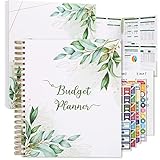
- Keep Track of Your Finances: Manage your personal and family’s finances with this monthly budget planner! Intuitive, comprehensive and fun, this budgeting planner allows you to keep track of your debts, expenses and bills, organize your spending and saving and optimize your budget for achieving your financial goals!
- Large Budgeting Planner: Our budget notebook features a large design of 8.5 x 11-inch that provides enough space for budgeting, financial planning and spending tracking but also for monthly reviews and building strategies for optimizing your budget!
- Well-Organized for Your Convenience: This budget book planner features an easy yet efficient template that includes a monthly budget with customizable categories, a debt tracker, a bill tracker, an expenses tracker as well as a section for financial goals and monthly review that will make things easier when it comes to budget planning!
- 12-Month Budget Management: Our budgeting book features a spiral-bound hardcover design made with high-quality 120gm thick paper and a 12-month undated design that allows you to start budget planning at any time of the year!
- Chic, Practical, Giftable: Featuring a superb boho cover and packed in a matching gift box, this budget book journal makes a lovely gift for a friend, family member or co-worker! The budget journal includes a special pocket for bills, receipts or other documents and comes with 5 stickers that will make your planning more fun and effective!
If a charge continues after cancellation
- Compare the charge’s date and merchant descriptor with your saved confirmation. Confirm that it is not a separate account, add-on or household member’s subscription.
- Contact the company promptly through a traceable channel. Provide the cancellation date, confirmation number and the continued-charge transaction details, and request reversal of any improper charge.
- Keep the complaint, replies, screenshots and statement. Write down promised resolution dates.
- If the company does not correct the charge, dispute the transaction with the credit-card company or bank using its stated dispute process. Supply the cancellation evidence and correspondence.
- Report unresolved subscription problems to the FTC or your state attorney general. State cancellation and automatic-renewal protections can differ, so do not assume one state’s rule applies everywhere.
Do not rely only on a verbal promise that future billing will stop. The written record and the statement showing the continued charge establish the timeline a bank or card issuer needs to evaluate a dispute.
Independent reader supportYour contribution helps us test, update, and keep practical guides available for everyone.Lower the recurring bills you decide to keep
Television and internet
- Ask for every currently available lower-cost plan, not just a temporary retention promotion.
- Compare the regular price after the promotion, equipment rental, installation, data overage charges, taxes and early-termination terms.
- Check whether reducing or removing television changes the internet price through a bundle discount.
- Match speed and channel needs to actual household use; a slower tier is not a saving if repeated overage charges result.
Mobile phone service
- Review the last several months of data, international use, hotspot use and device payments.
- Ask about prepaid or fixed-rate plans and compare the total price, network terms, taxes, device financing and data limits.
- Confirm that changing plans will not accelerate a device balance or remove a family-plan discount.
Insurance
- Request quotes and all available discounts, including eligible bundling discounts.
- Compare the same coverage limits, exclusions, liability amounts and deductibles; comparing premiums alone can produce a misleading result.
- Consider a higher deductible only after checking that you could pay it after a covered loss.
- Do not cancel a policy until replacement coverage is active and the insurer confirms the effective dates.
Home energy and utilities
- Separate unavoidable usage from fixed service fees and late charges on the bill.
- Ask the utility about available rate structures, budget billing or assistance programs, and check eligibility requirements before switching.
- Set a payment reminder or autopay alert to avoid late fees, while retaining access to the statement so unusual usage is visible.
Memberships and other services
- Check whether a pause, seasonal plan or lower-use tier costs less than a full membership, and compare the reactivation or cancellation terms.
- Remove duplicate cloud storage, software, fitness, education or delivery services after confirming that shared users will not lose needed files or benefits.
- For annual memberships, calculate the cost per use from the prior year before deciding to renew.
Create a system so savings do not disappear
After the first audit, keep the inventory as a living document. Add a new service on the day you start it, including its conversion and renewal dates. Record each cancellation immediately rather than relying on memory.
Use a monthly check and an annual deep review
- Monthly: scan new statements for unfamiliar or changed recurring descriptors and check that recently cancelled services are absent.
- Quarterly: review plans that had introductory prices, compare usage with the plan tier, and remove duplicates.
- Before annual renewal: obtain the upcoming price, compare alternatives, check contract notice requirements and decide before the renewal deadline.
- After moving or changing household members: reassess utilities, insurance, phone lines, shared accounts and equipment returns.
A spreadsheet is sufficient. Useful columns are provider, service, payment source, frequency, current amount, annual equivalent, next renewal, cancellation deadline, contract end date, confirmation number, and next statement checked. A paper planner works as well; no paid app is required to perform the audit.
Quick wins for a faster PC:
Scan for outdated or missing drivers - takes under a minuteDriver Scan →Clear out junk files and repair common Windows errorsFree Scan →Fix the driver behind crashes, sound loss and screen glitchesFind Drivers →Know what the current federal rule does—and does not—guarantee
In an October 16, 2024 press release, the FTC announced a final “Click-to-Cancel” rule describing required disclosures, informed consent and a simple cancellation mechanism. The Associated Press reported that the Eighth Circuit blocked the rule in July 2025. Therefore, do not assume the federal rule currently guarantees that every subscription can be cancelled as easily as it was started.
General FTC consumer guidance still supports reading trial terms, cancelling through the provider, keeping records, monitoring statements and disputing improper continued billing. State laws and contract terms may provide additional rights, but they vary by jurisdiction; obtain state-specific legal information before relying on a particular deadline, notice rule or remedy.
Common mistakes and the fix for each
| Mistake | What can go wrong | Better approach |
|---|---|---|
| Only searching for familiar streaming names | Insurance, phone, utility, membership and annual charges remain hidden | Review every statement and invoice category, including late fees |
| Deleting an app or card from a wallet | The provider’s recurring agreement remains active | Use the provider’s cancellation process and obtain confirmation |
| Blocking a debit without cancelling | Fees, an unpaid balance or collection activity may follow | Cancel the service first; use a payment block as a documented backstop |
| Accepting a “discount” without its expiry date | The bill returns to a higher regular price unnoticed | Record the promotional end date and the post-promotion total |
| Choosing insurance by premium alone | Higher deductibles or reduced coverage create a larger loss later | Compare limits, exclusions and deductible with the premium |
| Failing to check the next statement | A continued charge is discovered months later, making records harder to assemble | Review the next expected billing cycle and escalate promptly |
| Assuming a bundle always saves money | Changing one service raises the price of another or triggers a fee | Compare the combined total before and after the change |
A practical one-session checklist
- Open the last three months of statements and the prior year’s annual-charge history.
- List every repeating charge, its annual equivalent, payment source and renewal date.
- Mark each line cancel, reduce, compare or keep.
- Read contract, equipment-return, notice and promotion-expiry terms before changing anything.
- Ask retained-service providers for lower-cost plans, discounts and the post-promotion total.
- Cancel unused services through the provider and save confirmation evidence.
- Set a reminder for each next billing cycle and renewal deadline.
- Dispute and report any charge that continues after a documented cancellation.
This process will not guarantee a particular dollar amount of savings, because prices, usage, contracts and eligibility differ. It does ensure that each recurring charge receives an explicit decision and that a cancellation has a verifiable follow-through.
Quick Recap
Product prices and availability are accurate as of the date/time indicated and are subject to change. Any price and availability information displayed on Amazon at the time of purchase will apply.
Do these 3 things before closing this tab:
1Fix the driver behind crashes, sound loss and screen glitches2Repair Windows errors before they cause bigger problems3Scan for outdated or missing drivers - takes under a minute



