
The reliable way to work from a hill property is to plan for two separate failures: the connection can fail while the lights stay on, or the electricity can fail while the upstream network is still working. Map the exact failure point, test a genuinely independent internet option at your desk, size battery backup for the equipment you actually use, and set a clear point for moving to another location. A router UPS cannot restore a cut cable, a dead mobile mast, or a provider outage.
Start by identifying what has failed
“The Wi-Fi is down” describes a symptom, not a cause. On a remote property, the break may be inside your house, in the local electricity supply, in the last-mile link between the property and the provider, or in a wider network. Each problem needs a different response.
As an Amazon Associate I earn from qualifying purchases.
Use this four-part outage map
- Customer equipment: Check whether the laptop or phone is connected to the router, whether the router has power, and whether an ONT, modem, injector or external antenna also needs power. Restart equipment only after recording the status lights and any error message.
- Local electricity: Look at the consumer unit and ask whether neighbours have power. If the house is dark, your broadband equipment is likely off even if the provider’s network is operating.
- Last mile: A damaged overhead line, fibre, cabinet, pole, microwave link or local radio backhaul can disconnect one property or a small group. UK telecoms guidance describes the customer connection as the weakest link and advises asking providers about route diversity: UK Government telecoms resilience guidance.
- Wider network: If the router is powered and synchronised but multiple services fail, check the provider’s status page or fault line from a mobile connection. A second broadband brand may still use the same duct, pole, exchange, backhaul or power-dependent site, so two contracts do not automatically create two routes.
Write the results in a one-page outage map. Record your primary technology (fibre, copper, fixed wireless, mobile or satellite), provider fault number, router/modem/ONT power requirements, which mobile networks work at the property, and the nearest dependable place with internet and electricity. Keep a paper copy in case the home network and phone are both unavailable.
Measure the connection where you actually work
Coverage maps and advertised speeds describe an area or a plan; they do not prove that a particular room on a particular hillside will support a video call. Test every candidate backup at the desk, with doors and windows in their normal position, and at the times you normally work.
#1 Best Overall

- 【Features】mini UPS is the best solution to maintain a stable connection to your internet. In the event of a power outage or power failure, simply connect your device to our UPS and it will automatically power your device for hours, ensuring continuous operation.
- 【Versatile】No separate power adapter required, allows wide AC voltage range of 85Vac-265Vac input. It is easy to use and has multiple output options to ensure compatibility with a wide range of devices. Specifically, it supports 1×5V/2A USB, 1×5V/2A DC, 1×9V/1A DC, 1×12V/1A DC; for 1x POE 15V/0.6A or 24V/0.6A, making it a great choice for reliable power needs.
- 【Compatible with Most Devices】routers, modems, security cameras, aquariums, LED light strips, IP cameras, LED display panels, audio amplifiers, dashcams, speakers, card readers, smartphones, and most other digital devices.
- 【Intelligent Protection】short circuit prevention, voltage instability protection, overcharge prevention, deep discharge protection, thermal management, overcurrent protection, protect the device to ensure safe operation.
- 【Battery Power Indicator】The intelligent indicator shows the remaining battery capacity, so you can always know the status of the backup power supply. And you can take appropriate measures as needed in time. (The package does't include 18650 batteries)
Record useful performance, not just a headline download number
- Run several tests at morning, afternoon and evening. Note download, upload, latency and whether the connection drops during a five-minute call.
- Test an upload such as sending a large work file. Hillside links can show an acceptable download result but an unusable upstream channel.
- Walk the property with the phone or hotspot. A signal that works beside an upstairs window may fail at the desk or when rain, foliage or a busy cell changes conditions.
- Check data allowance, throttling and fair-use rules. A day of meetings can consume far more data than email and web browsing.
- Record the power draw and charging method of the hotspot, phone or outdoor antenna. A backup that works for an hour but cannot be recharged during a long outage is not a continuity plan.
Government consultation evidence illustrates why address-level testing matters: 65% of respondents in postcodes classified as remote estimated average downloads of 10 Mbps or less, compared with 28% of rural and 14% of urban/suburban respondents. These are respondent estimates from the Department for Digital, Culture, Media & Sport’s Very Hard to Reach Premises consultation, not current measurements for every remote home: Government response and Figure 5.1.
Choose backup internet by independence, not by brand count
Rank options by whether they use a different physical path and a different power dependency from your main service. Ask the provider exactly what is shared. Two suppliers can sell separate packages while relying on the same pole, exchange, fibre route, hilltop radio site or regional backhaul.
| Option | When it can help | What to verify at your address | Typical failure or trade-off |
|---|---|---|---|
| Phone tethering | Fastest way to test a second network with equipment you already own | Signal in the work room, upload stability, data allowance, phone battery and USB tethering support | Indoor signal may be weak; calls and hotspot use can drain the phone; the same mast may lose power or backhaul |
| Unlocked 4G/5G hotspot | Dedicated device can sit by the best window and serve several devices | SIM compatibility, network coverage, external-antenna support, battery runtime and charging from your backup battery | Performance varies with cell congestion, terrain and weather; service terms may restrict heavy use |
| Fixed wireless | Useful where a provider can reach the property by a local radio link | Line of sight, installation position, stated upload and latency, mast power resilience, equipment power and address eligibility | Hills, trees and rain can affect the path; the provider’s mast and backhaul remain dependencies |
| Satellite broadband | Potential option for premises beyond usable wired or mobile coverage | Exact address availability, unobstructed sky view, installation, equipment power, data policy, latency and all upfront and recurring charges | Higher latency than many terrestrial links, weather or obstruction issues, and a dish/router that also needs power |
| A second wired service | Can add capacity or resilience if it enters by a genuinely separate route | Physical route, exchange or cabinet, provider backhaul, power resilience and fault-handling arrangements | May be only contractual diversity if infrastructure is shared |
Fixed wireless and satellite are possibilities, not guarantees. The government’s very-hard-to-reach guidance notes that availability, equipment and terms depend on the premises; check the exact address rather than relying on a national map: Department for Digital, Culture, Media & Sport guidance. England’s official statistics landing page lists a 22 July 2026 release updating rural broadband and mobile coverage, with supplementary tables for detailed figures: Connectivity and Accessibility Statistics for Rural England. The landing page is not a substitute for an address-level service check.
Quick wins for a faster PC:
Fix the driver behind crashes, sound loss and screen glitchesFind Drivers →Repair Windows errors before they cause bigger problemsFix Now →Will a mobile hotspot work in the hills?
It may, but only a property test can answer the question. A handset showing one bar is not a capacity measurement, and a map shaded for outdoor coverage does not promise an indoor video-call connection.
Rank #2

- 425VA/260W Standby Uninterruptible Power Supply (UPS): Uses simulated sine wave output to provide battery backup power and to safeguard home office, home entertainment including computers, gaming consoles, and broadband routers
- 8 NEMA 5-15R OUTLETS: Four battery backup & surge protected outlets; Four surge protected outlets; INPUT: NEMA 5-15P right angle, 45 degree offset plug with five foot power cord
- ADDITIONAL FEATURES: LED status light indicates Power-On and Wiring Fault, transformer-spaced outlets
- GREENPOWER UPS HIGH EFFICIENCY DESIGN: Reduces power consumption by utilizing a compact charger and power inverter to create an ultra-efficient backup power system for home and office use
- 3-YEAR WARRANTY – INCLUDING THE BATTERY; 75K USD Connected Equipment Guarantee; UL SAFETY CERTIFIED: Product has been tested in a UL certified lab and listed with UL as meeting or exceeding safety standards
A practical hotspot test
- Obtain prepaid SIMs or eSIM trials from the networks that reach your area. Test more than one network if possible; do not assume networks share the same mast or backhaul.
- At the normal work position, tether a laptop by USB first. USB avoids some Wi-Fi variables and charges a compatible phone while it is connected.
- Make a real audio and video call for at least 15 minutes. Check whether upload freezes, latency becomes erratic, or the phone changes bands.
- Repeat beside likely window positions and outside locations where an antenna or hotspot could be installed safely. Record the best repeatable position rather than a one-off peak speed.
- Test during the evening and in poor weather. Cell loading, foliage and weather can change the result.
- Calculate data use for a normal workday, including cloud synchronisation and updates. Keep a lower-data meeting mode available.
An unlocked hotspot can be easier to place than a phone and can keep the work handset free. Budget for a spare charging cable and a power bank whose output matches the hotspot. If the mobile network itself is down, moving the hotspot around the house or buying a larger battery will not fix it; use the alternate location in your outage plan.
Is satellite broadband an option?
Satellite is worth investigating when terrain or distance defeats wired and mobile options, but it is not automatically independent or economical. Confirm that the service accepts your exact address, that the dish has an unobstructed view of the required sky, and that the installation can withstand local weather. Ask for the expected upload, latency, data policy, equipment power draw, installation work and cancellation terms in writing.
For interactive work, latency matters as much as download speed. A connection that can download a large file may still feel poor in remote desktop sessions or two-way video if delay is high or variable. Keep meetings, file transfers and emergency communications in separate priority tiers so a large synchronisation job does not consume the available link.
Crashes, No Sound, or Screen Glitches?
Random freezes, missing sound and display glitches usually trace back to one bad driver. Find and replace yours safely.Free scan · under a minutePC Slower Than It Used to Be?
A free scan shows the junk files, broken settings and background clutter dragging Windows down - then fixes them in one click.Free scan · Windows 10 & 11Satellite equipment normally includes an outdoor unit and an indoor power supply, so it must be included in the battery calculation. A satellite link can also fail because of a provider outage, ground-station problem, severe weather or a power loss at the property. Treat it as one possible path, then test it under the same realistic work conditions as every other option.
Rank #3
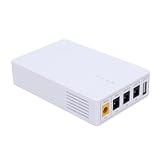
- 13500mAh Large-Capacity Battery: Built-in 13500mAh battery with sufficient power, the mini DC UPS can provide long-lasting backup electricity for devices, avoiding the trouble of sudden power outages.
- Multiple Ports for Wide Compatibility: Equipped with 12V, 9V, 5V multi-voltage output ports, the mini UPS can match devices with different voltage requirements, no need for additional power supplies, making use more convenient.
- Compact and Portable: The body is small and lightweight, easy to carry outdoors to charge devices anytime and anywhere.
- Power Indicator for Status Check: This portable UPS comes with a power indicator that clearly shows the remaining power, allowing you to check the power status at any time and prepare for charging in advance.
- Compatible with Multiple Devices: The backup power supply is compatible with various devices such as WiFi routers, cameras, switches, ONU and modems, with a wide range of application scenarios.
Can a UPS keep the router online during a power cut?
Yes, if the router, modem or ONT is the part without power and the provider’s upstream network remains live. A UPS cannot repair a cut fibre, restore a dead mobile mast, or make a satellite dish communicate when its provider is unavailable. UK guidance says some battery backup units keep a broadband router running for roughly four to seven hours, depending on the equipment and use; that range is not a promise for your model or for a router-plus-laptop setup: UK Government communication-provider guidance.
Size the backup for the actual load
- List every device: router, ONT or modem, fibre media converter, Wi-Fi access point, laptop, monitor, phone charger and any fixed-wireless or satellite power unit.
- Read the labels: match voltage, polarity, connector and minimum current. Do not connect a battery output that merely fits the plug.
- Estimate watt-hours: multiply each device’s watts by the hours required, then allow for conversion losses and battery ageing. A laptop’s charger rating is a ceiling, not proof that it draws that amount continuously.
- Choose the right form: a mini UPS designed for a router is simple for a low-power broadband setup; a larger battery or portable power station may support a laptop and monitor but costs more, weighs more and has greater conversion losses.
- Keep the network chain alive: powering only the Wi-Fi router is useless if the ONT, modem, injector, external antenna or provider-supplied box is unpowered.
Before relying on the setup, unplug mains power under a normal work load. Confirm that the router stays synchronised, the laptop remains charged, the hotspot or satellite unit behaves normally, and the expected runtime is plausible. Repeat the test every few months and after changing equipment. UK resilience guidance recommends realistic load testing rather than relying on a label or an empty-load runtime: Telecoms resilience guidance.
Phone and emergency-call limitations
A landline service delivered over the internet may not support a 999 call during a power cut or broadband failure. The UK Government states this limitation explicitly in its outage guidance: communication-provider resilience guidance. Keep a charged mobile phone available, know which network works at the property, and do not treat a UPS-backed router as your only emergency communication method.
Build an offline work plan before the first outage
Continuity is more than keeping a signal alive. Decide what work can continue without a connection and what must wait.
Rank #4
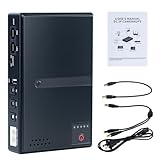
- 🔋【Uninterrupted Power During Outages】 Keep your internet and devices running even during blackouts. This mini UPS automatically switches to backup power, providing several hours of runtime for routers, modems, and other essential electronics.
- ⚡【Multiple Output Options for Versatile Use】 Supports wide AC input (85V–265V) and offers 5 output ports: 1× USB 5V/2A, 1× DC 5V/2A, 1× DC 9V/1A, 1× DC 12V/1A, 1× POE 15V/24V 0.6A. Perfect for a variety of low-voltage devices—no separate adapter needed.
- 🛡️【Built-In Safety Protection】 Equipped with intelligent protection: short-circuit prevention, overcharge and deep-discharge protection, voltage regulation, thermal control, and overcurrent protection to keep your devices safe.
- 🔋【Real-Time Battery Indicator】 Built-in batteries. Know your power status at a glance. The built-in LED indicator displays remaining battery capacity so you can recharge in time and avoid unexpected shutdowns.
- 📱【Compatible with Most Home and Office Devices】 Works with routers, modems, IP cameras, LED light strips, security systems, audio gear, dash cams, smartphones, card readers, aquariums, and more.
- Keep current copies of essential documents, meeting agendas, passwords stored in an approved offline method, and contact details available without cloud access. Respect your employer’s security and data-retention rules.
- Download maps for the area and save the address and route to your alternate work location. UK household guidance also recommends offline maps, an outage plan and a battery-powered radio: UK Government outage guidance.
- Agree a short status message such as “power outage at the hill property; reachable by SMS; next update at 14:00.” Store it where you can copy it without internet.
- Set a decision point: for example, move after the primary connection has failed for a defined period, the battery reaches a reserve level, or a client meeting cannot be completed. Choose the trigger in advance rather than waiting until every battery is empty.
- Keep a charged phone, charging cables, a power bank, essential medication and weather-appropriate travel gear with the outage kit.
Use a household continuity checklist
Every month
- Test the primary router, ONT or modem on its backup battery.
- Run a video call on each mobile network and record upload stability.
- Check battery health, cable condition and charge levels.
- Confirm that contact numbers, offline files and maps open without a connection.
Before severe weather
- Charge phones, hotspots, power banks and larger batteries.
- Download work files and meeting materials; pause non-essential cloud backups during an outage.
- Check provider notices and tell colleagues when you may be unreachable.
- Secure outdoor antennas, dishes and cables only if it is safe to do so; do not climb or work near damaged lines.
When the connection fails but power remains
- Check local Wi-Fi and router status lights.
- Test one wired device if available, then test the provider fault page over mobile data.
- Switch to the pre-tested hotspot or other independent path.
- Send the agreed status message and defer high-bandwidth tasks.
- Report the fault with the time, symptoms and equipment status; avoid repeated factory resets that erase configuration.
When the electricity fails
- Disconnect sensitive equipment if there is a surge risk and follow the electricity distributor’s advice.
- Start the UPS or battery in the tested configuration, powering the full network chain first.
- Reduce load: close the monitor, pause synchronisation and use audio-only meetings where acceptable.
- Monitor remaining runtime and preserve a reserve for communication and a safe shutdown.
- If the outage exceeds the agreed threshold, move to the alternate location rather than exhausting every battery.
Budget for resilience without paying twice for the same failure
Price the plan as a continuity budget, not as a race for the fastest advertised package. Separate one-off costs (hotspot, antenna, UPS, cables, installation and batteries) from recurring costs (second SIM, data allowance, fixed-wireless or satellite subscription and maintenance). The cheapest second contract is poor value if it follows the same physical route or has a data cap that makes it unusable for work.
Compare each option on these points:
- availability at the exact address and installation lead time;
- physical and logical route independence from the primary service;
- upload performance and latency for your work, not just download speed;
- data limits, fair-use rules and behaviour during congestion;
- equipment, installation, power consumption and battery compatibility;
- fault reporting, expected outage communication and cancellation terms;
- the cost of relocating for a day, including travel and lost productive time.
Keep receipts, contract terms and serial numbers with the outage map. If you claim equipment or service costs as a business expense, check the rules that apply to your tax status and retain evidence; eligibility depends on your circumstances and is not established by the connectivity sources.
How to decide whether your plan is good enough
Your plan is credible when it answers five questions without guesswork:
- Which component failed, and how will you tell within ten minutes?
- Which backup internet works at the desk, with what upload, latency and data limit?
- Which network equipment must stay powered, and for how long under a measured load?
- What can you do offline, and how will colleagues reach you?
- When will you stop troubleshooting and move to the alternate location?
Review the plan whenever you change rooms, providers, hardware or work requirements. Coverage and service availability change, and an outage plan based on a single speed test becomes unreliable as soon as the property, network or equipment changes.
Quick Recap
Product prices and availability are accurate as of the date/time indicated and are subject to change. Any price and availability information displayed on Amazon at the time of purchase will apply.




