Quick wins for a faster PC:
Fix the driver behind crashes, sound loss and screen glitchesFind Drivers →Repair Windows errors before they cause bigger problemsFix Now →Scan for outdated or missing drivers - takes under a minuteDriver Scan →The cheapest e-commerce platform is not always the one with the lowest monthly subscription. Payment-processing rates, transaction fees, apps, hosting, themes, developer work, shipping tools, and maintenance can matter more than the advertised plan price.
For this 2026 comparison, prices are U.S. list prices where publicly available and generally exclude taxes and payment-processing costs. Shopify is the best all-around choice for most new and growing stores. WooCommerce is usually the better financial fit for WordPress users who value ownership and control. BigCommerce is stronger for complex catalogs and B2B, while Square Online is particularly practical for a retailer already using Square in person.

Quick comparison
| Rank | Platform | Best for | Published price or pricing model | Main financial drawback |
|---|---|---|---|---|
| 1 | Shopify | Most new and scaling online retailers | Plan-dependent; online card rates shown from 2.9% + $0.30 | Third-party payment fees and app costs |
| 2 | WooCommerce | WordPress users wanting control | Core plugin has no platform fee | Hosting, maintenance, security, and extensions |
| 3 | BigCommerce | Complex catalogs and mid-market B2B | $39, $105, $399 monthly for Core, Growth, and Scale | New Open Payment Provider Fee on eligible orders |
| 4 | Wix | Small businesses prioritizing design | Core $29; Business $39; Business Elite $159 monthly when billed annually | Less capable for complex operations |
| 5 | Squarespace | Content-led brands and creators | Basic, Core, Plus, and Advanced plans | Advanced commerce features require higher plans |
| 6 | Square Online | Businesses already using Square POS | Free, Plus $29, Premium $79 monthly when billed annually | Processing costs and potentially per-location fees |
| 7 | Ecwid | Adding a store to an existing website | Tiered by product count and features | Lower tiers have catalog and channel limits |
| 8 | Adobe Commerce | Large, customized B2B and B2C operations | Quote-based | Large implementation and operating budget |
| 9 | PrestaShop | Technical teams wanting open-source flexibility | Open-source software or hosted offer | Merchant manages hosting, modules, upgrades, and security |
| 10 | Shift4Shop | Eligible U.S. merchants seeking low software costs | $29, $79, $229, or $0 for eligible End-to-End plan | Free plan is U.S.-only and tied to Shift4’s ecosystem |
Prices and plan features change frequently. Before choosing, calculate the platform’s cost using your expected monthly sales, average order value, number of products, payment provider, locations, and required integrations.
1. Shopify: best overall
Shopify is the safest default for a new online retailer that wants to launch quickly without managing servers, software updates, backups, or security patches. Hosting, SSL, custom-domain connection, abandoned-checkout recovery, analytics, marketing automation, Shopify Payments, and 24/7 chat support are built into its plans.
Recommended Free Tools
#1 Best Overall

- Windows 11 PROFESSIONAL POS TERMINAL - Equipped with Intel Core i5 High-Performance CPU, 4 GB Memory, and 128 GB Hard Disk. It also offers versatile connectivity options, including two serial ports, four USB ports, an HDMI output, an audio input, a DC 12V power input, and an Ethernet port.
- SLEEK & COMPACT DESIGN - Volcora POS Terminal is designed to take up as little space as possible so you can focus on better utilization of the counter space. Our sleek yet heavy-duty metal base ensures the terminal is well-stabled while taking orders with style. Suitable for any business such as retail stores, quick service restaurants, dine-in restaurants, cafes, bars, and more.
- DUAL WIDE TOUCHSCREEN - Terminal comes with one 15.6" capacitive LCD touchscreen and one 11.6” capacitive LCD touchscreen for customer display, combined with 1366x768 high-resolution, makes it easy to read and touch with minimal effort. Our POS Terminals can also withstand over 15000 hours of screen time with little to no quality sacrifice.
- IN THE BOX - Volcora 15.6" & 11.6” Dual-TouchScreen Windows 11 Professional POS Terminal, Power Adapter, Registration Card, and User Manual.
- LIFETIME WARRANTY & SUPPORT - Simply unbox, and set up your POS terminal like a Windows tablet with ease. We do understand that additional support might be needed for non-tech-savvy users and our US Based Customer Service team is committed to help. Plus, all Volcora products come with a limited lifetime warranty so you can purchase with peace of mind.
The main financial warning is that the subscription is only one part of the bill. Shopify shows U.S. online card pricing from 2.9% + $0.30 for standard cards and lists a 2% third-party transaction fee on its pricing page. Rates vary by country and plan, and apps can add recurring costs.
Shopify is also more capable for B2B than older comparisons suggest. Companies, catalogs, net payment terms, self-service ordering, and Shopify Flow automations are available on Basic, Grow, Advanced, and Plus. Basic, Grow, and Advanced stores are limited to three active B2B catalogs across all B2B markets; Plus supports unlimited B2B market catalogs and direct catalogs assigned to companies or locations.
A checkout-customization warning
Do not choose Shopify on the assumption that every checkout step can be edited with checkout.liquid. That approach is unsupported for the Information, Shipping, and Payment steps, and Shopify Scripts were scheduled to stop working on June 30, 2026. Checkout UI extensions for those steps are available only to Shopify Plus stores.
Since January 26, 2026, checkout UI extensions that support blocking default to non-blocking behavior. If an extension needs to stop checkout progression, the merchant must enable Allow app to block checkout in the checkout and accounts editor. Shopify recommends Cart and Checkout Validation Functions for validation logic.
Best financial fit: A DTC brand or omnichannel retailer that values predictable infrastructure and fast implementation more than minimizing every software fee.
2. WooCommerce: best for WordPress control
WooCommerce is an open-source commerce platform that runs on WordPress. Its core plugin has no platform fee or revenue share, but “free” does not mean cost-free. You still pay for hosting, payment processing, themes, extensions, backups, security, maintenance, and sometimes a developer.
WooCommerce is attractive when you already own a WordPress site, publish substantial content, or need code-level control over the store. It can also be financially efficient for a technically capable owner who can handle routine maintenance rather than paying for a fully hosted platform.
The current stable release listed by the project is WooCommerce 10.9.4, released July 7, 2026. WooCommerce recommends PHP 8.3 or newer, MySQL 8.0 or newer, or MariaDB 10.6 or newer. WooCommerce 10.8 introduced WordPress 6.9 as the minimum supported WordPress version.
Free tools Windows power users keep installed
One-click scans. No signup required.
Useful diagnostic paths
- WooCommerce version: WooCommerce → Status
- WordPress version: Tools → Site Health → Info → WordPress
- PHP version: WooCommerce → Status → Server environment
Updates are a common source of unexpected expense. WooCommerce 10.8.1 fixed a critical WooPayments onboarding regression and a fatal PHP error that could appear during an in-place upgrade from 10.7. Test updates on staging and keep a working backup rather than updating the live store first.
Best financial fit: A WordPress publisher, agency, or technical business that wants ownership and can budget for maintenance instead of treating it as an optional cost.
Rank #2

- COMPLETE RETAIL POINT OF SALE SYSTEM - The perfect turnkey solution for all of your POS Systems business needs. Perfect for retail stores: liquor, grocery, tobacco, clothing, convenience, garden and more!
- PREMIUM HARDWARE SET - Bundle includes: 15" Touchscreen PC with Windows 10 Pro, Thermal Receipt Printer (USB), Barcode Laser Scanner (USB), 16" Cash Drawer, Mini Keyboard (USB), and Integrated Two Line Display (USB).
- FREE TRAINING & REMOTE SETUP - Includes 60 days of FREE Standard Care Support for setup/training, hardware (1-year warranty) and software. Seamlessly track, report and analyze inventory, sales, returns, employees, and more.
- CASH REGISTER EXPRESS (CRE) - Trusted by over 70,000 merchants worldwide for 20+ years, CRE provides fast checkup and lookup items in seconds. CRE software integrates with QuickBooks Desktop for your small business needs.
- 100% CUSTOMER SATISFACTION GUARANTEED - We are the leading provider of retail point of sale systems and POS software because of our commitment to you. Contact our support directly for any of your needs or to learn about our extra turnkey services.
3. BigCommerce: best for complex catalogs and mid-market B2B
BigCommerce is a strong choice when the store has many products, multiple sales channels, international requirements, wholesale customers, or commerce features that would otherwise require a large collection of apps.
Its current self-service plans are Core, Growth, Scale, and Performance. Published monthly prices are $39, $105, and $399 for Core, Growth, and Scale, with Performance starting at $1,499 per month billed annually. Annual billing displays $29, $79, and $299 per month for Core, Growth, and Scale.
The 2026 payment-fee change
Advice that BigCommerce has no transaction fees regardless of payment gateway is outdated. From June 1, 2026, self-service plans added an Open Payment Provider Fee on eligible order GMV processed by Open Payment Providers:
| Plan | Open Payment Provider Fee |
|---|---|
| Core | 2.0% |
| Growth | 1.0% |
| Scale | 0.6% |
Orders processed by an Embedded Payment Provider are not subject to that fee, but ordinary payment-processing charges still apply. BigCommerce calculates plan thresholds using trailing-12-month GMV, defined on its pricing page as gross order value after a 10% reduction. Social-commerce transactions and native eBay and Amazon marketplace integrations count toward sales and order calculations.
To manage plans, use Account → Upgrade Plan.
Best financial fit: A merchant whose catalog and channel requirements justify built-in functionality and who has modeled the new payment-provider fee into gross margins.
4. Wix: best for small businesses that want design flexibility
Wix works well for a small business that wants a visually flexible website with commerce added, rather than a highly specialized retail operation. Its U.S. business tiers include Core at $29 per month, Business at $39, and Business Elite at $159 when billed annually. A free site-building tier exists, but accepting payments requires an appropriate paid business plan.
Windows Errors? Fix Them Before They Spread
Repair common Windows errors and clear accumulated junk for a smoother, more stable PC - no reinstall needed.Free scan · no reinstallOutdated Drivers Are Slowing You Down
One free scan finds every outdated or missing driver and matches the right update for your exact hardware.Free scan · exact hardware matchHosting, AI creation tools, customer care, and a 14-day money-back guarantee on Premium plans are included. The Core plan provides basic e-commerce, while Business and Business Elite offer broader commerce capabilities.
Budget separately for payment processing, paid apps, premium shipping and tax tools, and custom development. Wix becomes less suitable when the business needs complex product configuration, customer-specific pricing, or ERP-driven inventory logic.
Best financial fit: A local business, restaurant, boutique, or service company selling a relatively straightforward range of products.
5. Squarespace: best for content-led brands and creators
Squarespace is a good match when brand presentation, publishing, and a modest product catalog matter as much as inventory depth. The current plan structure is Basic, Core, Plus, and Advanced; Personal, Business, Commerce Basic, and Commerce Advanced are older names still relevant to some legacy subscribers.
Rank #3

- No fixed monthly fees or binding contract. Just a 2.6% + 10 fee per card reader payment.
- Simplify your checkout with the new out-the-box POS . So you have more time to focus on what counts – running your business.
- POS Lite touchscreen tablet with die-cast aluminium stand, free pre-installed POS software and automated updates.
All current paid plans can sell products or services, but commerce charges vary:
| Plan | Online-store transaction fee | Digital-product fee |
|---|---|---|
| Basic | 2% | Plan-dependent |
| Core | 0% | 5% |
| Plus | 0% | 1% |
| Advanced | 0% | 0% |
For U.S. domestic cards processed through Squarespace Payments, listed rates are 2.9% + $0.30 on Core, 2.7% + $0.30 on Plus, and 2.5% + $0.30 on Advanced. Squarespace includes tools such as subscriptions, POS, commerce analytics, Google Shopping, shipping labels, carrier-calculated shipping, and commerce APIs, but availability depends on the plan.
Best financial fit: An artist, creator, publisher, restaurant, or content-led brand with a manageable catalog. Watch the cost of upgrading if you sell many digital products or need advanced shipping and tax automation.
6. Square Online: best for retailers already using Square POS
Square Online is most valuable when it shares products, inventory, customer data, and payments with an existing Square point-of-sale operation. It supports pickup, local delivery, shipping, social selling, gift cards, Apple Pay, Google Pay, Cash App Pay, and Afterpay.
The published structure is Free, Plus, and Premium. Free costs $0 per month; Plus is $29 per month billed annually; and Premium is $79 per month billed annually. Listed online card rates are 3.3% + $0.30 for Free and 2.9% + $0.30 for Plus and Premium.
There is an important multi-location issue: paid-plan pricing is generally per location. Square has also displayed Plus at $49 per location and Premium at $149 per location in another unified-plan presentation. Check the price in your own Square account before relying on a published comparison.
Best financial fit: A restaurant, salon, pop-up, boutique, or physical retailer already paying for Square. “Free” removes the monthly software subscription, not payment-processing costs.
7. Ecwid: best for adding commerce to an existing site
Ecwid is designed to insert a store into an existing WordPress, Wix, Squarespace, or other website. It also provides an Instant Site builder. This makes it useful when replacing the entire website would be more expensive or disruptive than adding commerce.
What’s actually slowing this PC down?
Pick the symptom - the matching free tool is one click away.
Its tiers are separated by product limits and features:
- Starter: up to 10 products.
- Venture: up to 100 products and digital goods.
- Business: up to 2,500 products, subscriptions, marketplace selling, two staff accounts, abandoned-cart recovery, wholesale pricing groups, and multilingual stores.
- Unlimited: unlimited products, POS integration, and unlimited staff accounts.
Ecwid charges no transaction fee of its own, although payment processors still charge their normal rates. From the admin, go to My Profile → Billing and Plans, or choose the green Upgrade button at the top of an admin page.
Best financial fit: A business with an existing website and a small-to-midsize catalog. Check product and staff limits before selecting a lower tier.
8. Adobe Commerce: best for enterprise B2B and complex customization
Adobe Commerce is intended for organizations with a much larger technology and operating budget than the typical small online store. It supports large catalogs, multiple brands, global expansion, B2B workflows, AI-powered search and recommendations, and API-first storefronts.
Current deployment models include Adobe Commerce as a Cloud Service, Adobe Commerce on Cloud, and Adobe Commerce on-premises. Pricing is quote-based rather than a simple self-service monthly subscription.
Adobe Commerce as a Cloud Service is a fully managed, versionless SaaS model. Adobe manages the core application, infrastructure, and updates. Core application code is locked, customization uses APIs, App Builder, UI SDKs, and other extension points, and the SaaS storefront does not support the older Luma storefront. This is not simply traditional Magento hosted elsewhere.
To provision a SaaS instance in Adobe Experience Cloud, select Commerce under Quick access, open Commerce Cloud Manager, choose Add Instance, select Commerce as a Cloud Service, enter the name and description, choose Sandbox or Production, select a region, and choose Add Instance. The region cannot be changed afterward, and Adobe says the instance cannot be copied or deleted through that workflow.
Best financial fit: An enterprise with engineers, integration specialists, complex B2B rules, multiple brands, and a business case large enough to absorb implementation costs.
The Tool Desk
Outbyte Driver Updater FREEScan for outdated or missing drivers - takes under a minuteDriver Scan →Outbyte PC Repair FREERepair Windows errors before they cause bigger problemsFix Now →9. PrestaShop: best for technical teams wanting open-source flexibility
PrestaShop is available as open-source software and through a hosted offer. The hosted option includes hosting, unlimited support, and essential services. With the open-source version, the merchant arranges hosting and operational support.
PrestaShop 9.1 is available. Its published requirements include PHP 8.1 through 8.5, Composer 2, Node.js 20, and npm 10. PrestaShop 9 introduced a Symfony 6.4 base and a new Admin API. The 8.2.x branch is in extended support and receives security patches rather than the full feature development of the newer branch.
Major upgrades should be treated as development projects. Back up files and the database, create a staging copy, check module and theme compatibility, test payment and checkout extensions, and only then deploy. A low software price can be outweighed by hosting, incompatible modules, security work, and developer time.
Best financial fit: A developer-led business, agency, or European merchant needing source-level control and specialized localization.
Do these 3 things before closing this tab:
1Repair Windows errors before they cause bigger problems2Scan for outdated or missing drivers - takes under a minute3Clear out junk files and repair common Windows errorsBest Value
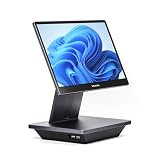
- Windows 11 PROFESSIONAL POS TERMINAL - Equipped with Intel Core i5 High-Performance CPU, 16 GB Memory, and 128 GB Hard Disk. Built-in WIFI, Audio, USB 2.0, USB 3.0, HDMI, and Ethernet ports for all kinds of connectivity. Windows 11 Professional for a wide range of POS applications of your choice.
- SLEEK & COMPACT DESIGN - Volcora POS Terminal is designed to take up as little space as possible so you can focus on better utilization of the counter space. Our sleek yet heavy-duty metal base ensures the terminal is well-stabled while taking orders with style. Suitable for any business such as retail stores, quick service restaurants, dine-in restaurants, cafes, bars, and more.
- WIDE TOUCHSCREEN - The 15.6" capacitive LCD touchscreen, combined with a 1920x1080 high-resolution display, makes it easy to read and touch with minimal effort. Our POS Terminals can also withstand over 15000 hours of screen time with little to no quality sacrifice.
- IN THE BOX - Volcora 15.6" Single Screen Windows 11 Professional POS Terminal, Power Adapter, Registration Card, and User Manual.
- LIFETIME WARRANTY & SUPPORT - Simply unbox, and set up your POS terminal like a Windows tablet with ease. We do understand that additional support might be needed for non-tech-savvy users and our US Based Customer Service team is committed to help. Plus, all Volcora products come with a limited lifetime warranty so you can purchase with peace of mind.
10. Shift4Shop: best low-software-cost option for eligible U.S. merchants
Shift4Shop publishes Basic Store at $29 per month, Plus Store at $79, Pro Store at $229, and an End-to-End Ecommerce plan at $0 for eligible U.S. merchants.
The paid plans include unlimited products and no additional transaction fees from Shift4Shop. The free End-to-End plan includes unlimited staff and all features, but it is restricted to U.S. merchants and tied to Shift4’s payment ecosystem. The relevant comparison is therefore not “$0 versus $39”; it is the required payment-processing economics versus the combined subscription and payment costs of other platforms.
Best financial fit: A U.S. merchant comfortable using Shift4 Payments and able to confirm eligibility before migrating a store.
How to choose an e-commerce platform by total cost
- Estimate monthly gross sales. Use a realistic 12-month average, not only your launch-month forecast.
- Calculate payment costs. Multiply expected sales by the processor’s percentage rate, then add the per-order fee multiplied by order count. A store with a low average order value pays the $0.30 component more often.
- Add platform transaction fees. Include Shopify third-party fees, BigCommerce’s applicable Open Payment Provider Fee, Squarespace’s Basic fee, or any other charge that applies to your payment setup.
- List required add-ons. Include email marketing, subscriptions, reviews, search, tax automation, shipping, wholesale pricing, accounting, and inventory integrations.
- Price your labor. For WooCommerce, PrestaShop, and self-managed systems, include updates, backups, security monitoring, troubleshooting, and developer time.
- Check operational limits. Confirm product counts, staff accounts, locations, catalogs, sales channels, currencies, and B2B features before comparing plans.
- Test a complete order. Before committing, place a test order covering payment, tax, shipping, refunds, fulfillment, inventory deduction, customer email, and accounting export.
A simple break-even calculation can expose misleading “free” plans. If one plan costs $30 more each month but reduces payment costs by 0.4 percentage points, its payment savings equal the extra subscription at $7,500 in monthly processed sales, before considering per-order fees or other features. Your own average order value and payment mix determine the actual result.
FAQ
What is the best e-commerce platform in 2026?
Shopify is the best general-purpose choice for most new and growing online retailers because it combines hosted infrastructure, omnichannel tools, payments, analytics, and a large app ecosystem. WooCommerce may be better for an established WordPress business, while BigCommerce is stronger for complex catalogs and B2B.
Which e-commerce platform is the cheapest?
There is no universal cheapest platform. WooCommerce has no core platform fee, Square Online has a $0 software plan, and Shift4Shop has a $0 End-to-End plan for eligible U.S. merchants. All can still involve payment processing, hosting, extensions, maintenance, or payment-provider restrictions.
Is WooCommerce really free?
The core WooCommerce plugin has no platform fee or revenue share, but running a WooCommerce store still requires hosting, payment processing, a theme or extensions, backups, security, updates, and potentially developer support.
What should I compare besides the monthly subscription?
Compare payment-processing rates, platform transaction fees, app and extension costs, hosting, product and staff limits, sales-channel charges, shipping and tax tools, multi-location pricing, and the value of your own maintenance time.
The Bottom Line
Choose Shopify if you want the most balanced hosted platform and a fast path from setup to growth. Choose WooCommerce if WordPress ownership and customization justify the maintenance burden. Choose BigCommerce for a complex catalog or B2B operation, but model its 2026 Open Payment Provider Fee. Wix and Squarespace suit smaller, design-led stores; Square Online makes the most sense alongside Square POS; Ecwid is efficient when you already have a website. Adobe Commerce and PrestaShop are specialist choices for teams with technical resources, while Shift4Shop deserves consideration from eligible U.S. merchants willing to use its payment ecosystem.
The financially sound decision is the platform that keeps your total cost of selling—software, payments, labor, and operational risk—proportionate to your actual sales and complexity.
Quick Recap
Product prices and availability are accurate as of the date/time indicated and are subject to change. Any price and availability information displayed on Amazon at the time of purchase will apply.




