Some links on this page are affiliate links: if you buy through them we may earn a commission, at no extra cost to you.
Yes—U.S. customers can generally buy Samsung Care+ after buying an eligible Samsung phone. Samsung’s current U.S. FAQ generally gives eligible mobile devices a 60-day post-purchase enrollment window. Samsung also advertises later enrollment—sometimes up to one year—for selected devices or enrollment programs, but eligibility and pricing after day 60 can differ.
Use Samsung’s official eligibility flow, not a third-party sign-up page, and do not assume coverage applies to damage that happened before enrollment.
The standard Samsung Care+ deadline is 60 days
Samsung’s current U.S. FAQ says eligible mobile devices can generally be enrolled in Samsung Care+ at purchase or within 60 days of the device purchase. That is the safest deadline to use.
Windows Errors? Fix Them Before They Spread
Repair common Windows errors and clear accumulated junk for a smoother, more stable PC - no reinstall needed.Free scan · no reinstallCrashes, No Sound, or Screen Glitches?
Random freezes, missing sound and display glitches usually trace back to one bad driver. Find and replace yours safely.Free scan · under a minuteSamsung’s current Care+ support page also describes post-purchase enrollment for some products for up to one year. Its terms distinguish between pricing available at purchase or within 60 days and a separate pricing category from day 61 through day 365. Samsung has also announced limited open-enrollment or “second chance” programs for selected devices.
#1 Best Overall

- PRECISE COMPATIBILITY: Designed exclusively for Samsung Galaxy S25 6,2 inches. Not compatible with Samsung Galaxy S25 Plus / S25+, Galaxy S25 Edge et Galaxy S25 Ultra. Please check the exact model of your phone before purchasing.
- ULTRA-THIN 0.25 MM: Ultra-thin tempered glass designed to maintain touchscreen sensitivity and facilitate the use of the under-screen fingerprint sensor, while providing protection against everyday scratches and impacts.
- FINGERPRINT SENSOR: After installation, delete your previously registered fingerprints and register them again. If necessary, enable Settings > Display > Touch sensitivity to optimise fingerprint recognition.
- CAREFUL INSTALLATION: Due to its ultra-thin 0.25 mm design, handle the glass carefully during installation. Avoid bending it or applying strong pressure to the edges. Clean and align the screen carefully before installation.
- PROTECTION & CLARITY: 9H tempered glass with an oleophobic coating that helps reduce fingerprints and makes cleaning easier. High transparency maintains the clarity of your display.
In practical terms:
- Within 60 days: this is the normal U.S. enrollment window for eligible mobile devices.
- Days 61–365: enrollment may be available for certain devices or campaigns, often with different pricing and eligibility rules.
- After the available window: Samsung may reject enrollment, even if the phone is otherwise a supported model.
Do not interpret Samsung’s later-enrollment language as a universal one-year guarantee. Enter your phone’s details into Samsung’s current eligibility system to see the offer available for that specific device.
Does the deadline run from purchase or activation?
Samsung’s current FAQ frames the standard deadline around the device purchase date. Some Samsung help material has used activation-based wording, however, and the date applied by Samsung can depend on the device and enrollment route.
When you check eligibility, pay attention to the date displayed by Samsung. If it conflicts with your receipt or order history, keep your proof of purchase and contact Samsung Care+ support before assuming the phone is ineligible.
Do these 3 things before closing this tab:
1Repair Windows errors before they cause bigger problems2Fix the driver behind crashes, sound loss and screen glitches3Clear out junk files and repair common Windows errorsHow to buy Samsung Care+ after purchase
Option 1: Use Samsung’s Care+ website
- Open Samsung’s official Samsung Care+ page.
- Choose the post-purchase enrollment option.
- Enter the requested information, usually including the phone’s IMEI or another device identifier.
- Review the Care+ plans offered for that phone.
- Compare monthly billing with any available upfront term.
- Read the plan’s service fees, deductibles, exclusions, claim limits and effective date.
- Complete enrollment and save the confirmation.
The confirmation matters. Submitting payment or an eligibility request is not the same as receiving accepted coverage.
Option 2: Try the Samsung Members app
Samsung’s support documentation describes another route:
- Open the Samsung Members app.
- Search for Samsung Care+.
- Open the Care+ content card.
- Tap Check Eligibility.
- Follow the enrollment prompts if the phone qualifies.
Labels can vary by app version, device and region, so you may not see exactly the same controls. If the option is missing, use Samsung’s website instead.
Option 3: Visit a Samsung Experience Store
Samsung says customers may be able to purchase Care+ at a U.S. Samsung Experience Store at purchase or within the applicable post-purchase period. Store availability and device eligibility can vary.
Free tools Windows power users keep installed
One-click scans. No signup required.
What to have ready
Before starting, gather:
- The phone’s IMEI. You can typically find it in Settings, on the phone’s packaging or on the original purchase documentation.
- The original purchase date.
- Your retailer, carrier or Samsung order information.
- Proof of purchase, if requested.
- The Samsung account associated with the phone, if applicable.
- A payment card if you select monthly billing.
Samsung’s product-registration guidance indicates that purchase and retailer details may be relevant to registration-related support. Requirements can vary by device and enrollment program.
Rank #2

- 6 Pack: You will get 3 pack screen protectors and 3 pack camera lens protectors are both made of High-quality Tempered Glass for Samsung Galaxy S25(6.2"). Unlock with ease using either Fingerprint or Face Recognition technology. Enjoy a natural, "True Touch" experience thanks to superior sensitivity
- It is 100% brand new, Precise laser cut Full Adhesive Sticky tempered glass and will not fall off, exquisitely polished, 2.5D rounded edges technique makes curved edges of the film to perfectly fit curved corners and edges of the phone, 1.4 mm margin around the edge of the device to be compatible with MOST cases
- Upgrade 12FT Military Shockproof with edge strengthening design, with Ultra-high 9H hardness and 10X Stronger Scratch resistant for maximum resistance against impacts and scratches from objects.Easy Installation and Bubble-Free, Removing dust and aligning it properly before actual installation, One-touch ultra-light automatic adsorption installation, no foam at all
- Night shooting made easy: This camera lens protective film is custom designed for the Galaxy S25 6.2Inch display. It seamlessly integrates augmented reality technology for improved light transmittance and night shooting capabilities. this protector restores the original quality of photos and videos even when using the flash at night.Transparent lens film keeps your phone and phone photos' original color all the time
- It adopts premium quality AGC glass materials, thus creating an oil-resistant, anti-fingerprint, Highly durable, and scratch-resistant surface that is easier to clean and protect against sweat effectively, and enhance the visibility of the screen and 99.99% HD clarity
Will Samsung inspect the phone first?
Do not assume that every post-purchase enrollment requires a formal photograph or physical inspection. Samsung’s current process may differ by device age, program and campaign.
Samsung does reserve the right to approve or reject enrollment. Its service-contract terms say Samsung may disapprove enrollment or deny coverage for a product that has not been properly registered or approved.
The safest approach is to enroll while the phone is in good working order. If it has already been dropped, cracked, exposed to liquid, lost or stolen, buying Care+ afterward does not make that event a covered claim. Do not provide inaccurate answers during enrollment or attempt to backdate a claim.
The Tool Desk
Outbyte Driver Updater FREEFix the driver behind crashes, sound loss and screen glitchesFind Drivers →Outbyte PC Repair FREEClear out junk files and repair common Windows errorsFree Scan →When does coverage begin?
Samsung’s FAQ says accidental-damage protection generally begins immediately after successful Care+ enrollment and purchase, subject to the plan terms. That does not mean coverage begins when you first submit an application, nor does it cover a previous incident.
Mechanical-breakdown protection follows a different timetable: Samsung says it begins after the manufacturer warranty expires. The effective date shown in your enrollment confirmation and the terms for your actual plan control.
What Samsung Care+ plans cover
| Plan | General purpose | Important qualification |
|---|---|---|
| Samsung Care+ | Accidental damage and mechanical breakdown | Repair benefits, service fees and any repair limits are governed by the applicable plan terms. |
| Samsung Care+ with Theft and Loss | Accidental damage, mechanical breakdown, and lost or stolen devices | Samsung’s FAQ describes up to three lost, stolen or unrecoverable-device claims in a 12-month period, subject to the plan terms and applicable charges. |
| Care+ Essentials | Mechanical-breakdown-focused protection | Samsung describes an upfront two-year payment option; it is not the same as theft-and-loss protection. |
| New York coverage | Separate theft-and-loss insurance treatment may apply | Do not assume the national plan description applies identically in New York. |
Samsung advertises unlimited accidental-damage repairs for some Care+ products, but “unlimited” remains subject to service fees, exclusions, parts availability, service-area limits and the terms for the plan you actually buy. A replacement is also subject to claim approval, inventory and applicable charges.
How much does Samsung Care+ cost after purchase?
There is no single Care+ price for every Samsung phone. Samsung says pricing depends on the device and plan. Payment structures can include:
- A one-time payment for a two-year term.
- Monthly billing that can generally continue for up to three years unless canceled or otherwise ended under the plan terms.
Late enrollment can cost more. Samsung’s support page separates pricing available at purchase or within 60 days from pricing available from day 61 through day 365.
Rank #3

- Please note: Compatible with Samsung Galaxy S25 (6.2")
For a current but model-specific example, Samsung’s February 2026 Galaxy S26 announcement listed Care+ with Theft and Loss at $10 or $15 per month, depending on the S26 model. That is not a universal Care+ price. Use the quote displayed after Samsung checks your phone’s IMEI.
What are the claim fees?
Samsung says mechanical-breakdown claims have no service fee, while accidental-damage fees vary by claim. Theft-and-loss claims involve a deductible or other applicable charge. The amount can depend on the phone, plan, claim type and state.
Samsung currently advertises $29 same-day cracked-screen and back-glass repairs in certain circumstances. Treat that as a current product-page offer subject to eligibility, location, parts availability and plan terms—not as a guaranteed nationwide price for every phone.
Who is eligible?
Eligibility depends on more than the Samsung logo. The phone, model, purchase channel, location, purchase or activation date and current Care+ program must all qualify.
Phones bought from Samsung, a carrier or a retailer
A Samsung.com purchase is usually easiest to associate with your order and Samsung account. A phone bought from a carrier or retailer may still qualify if it is an eligible U.S. model and Samsung’s system accepts its IMEI.
Used phones
Do not assume a second-hand phone qualifies. Its original sale date, activation history, model, purchase channel and prior coverage may affect eligibility. Check the IMEI through Samsung’s official enrollment flow.
Imported phones
Imported or international models may not qualify for the U.S. program. Samsung’s terms exclude products that are not registered or approved for sale in the United States.
U.S. location restrictions
Samsung’s FAQ lists mobile Care+ availability for residents of the continental United States, Alaska, Hawaii and Washington, D.C. U.S. territories may not be covered by this U.S. program.
Rank #4
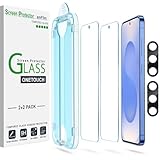
- 【Auto-Alignment Installation within 30 Seconds!】 Say goodbye to manually misalignment, the samsung galaxy S25 6.2"screen protector is embedded in a plastic frame that fits perfectly over your phone. Set the frame on your phone, swipe down the middle, and done! Perfect installation within 30 seconds! Watch our Installation Video to see how easy it is to use our Innovative OneTouch Auto-Alignment Screen Protector.
- 【Only Compatible with Samsung Galaxy S25 6.2"】 Specially designed ONLY for the Samsung Galaxy S25 6.2" 2025 Screen Protector 6.2". Please check your phone model before buying this tempered glass screen protector.
- 【9H Hardness】Our Samsung Galaxy S25 6.2" 2025 tempered glass screen protector leads the market with Ultra-high 9H hardness for maximum resistance against impacts and scratches from objects. No matter you’re daily routine, your phone is safely protected. Give your device that extra layer of sturdy protection it deserves!
- 【Anti-Fingerprint Resistance for a Cleaner Screen】Annoyed by fingerprints? Our Galaxy S25 6.2" 2025 screen protector comes with a transparent layer that is hydrophobic and oil repellent. After testing, they effectively prevented 99.99% of fingerprints caused by sweat and oil stains.
- 【2+2 Pack】 2* Samsung Galaxy S25 6.2" Screen Protectors, 2* Camera Lens Protectors, with 2 auto alignment tool kit (screen protectors come pre-installed in the auto alignment tool) and cleaning kits everything you need for installation.
What happens if you miss the deadline?
First, check Samsung’s official Care+ page anyway. A later open-enrollment offer may be available for selected devices. Samsung announced a June 2026 program covering certain Galaxy S25, S26 and foldable devices, but such offers are limited and can change.
If Care+ is unavailable, compare these alternatives:
- Samsung’s standard repair service or an authorized repair center. Use Samsung’s Find Mobile Care page.
- A carrier or retailer protection plan, if one is available.
- Credit-card purchase protection or extended-warranty benefits.
- Renters or homeowners insurance coverage, including any applicable endorsement.
Compare accidental-damage coverage, theft and loss, deductibles, claim limits, screen-repair fees and whether coverage follows the device, account, line or owner. Do not use an unofficial service claiming to provide backdated Samsung enrollment.
Recommended Free Tools
What if Samsung rejects enrollment?
Save the rejection message and check the basics:
- Confirm that you entered the correct IMEI.
- Check the purchase date on your receipt or order history.
- Verify that the phone is a U.S. model.
- Consider whether it was activated earlier than expected.
- Check whether your device is included in a current open-enrollment campaign.
If the information is correct, contact Samsung through its official Care+ support channels and keep your purchase documentation. Samsung’s terms reserve the right to deny enrollment, so a rejection may not be reversible.
Does Care+ transfer if Samsung replaces the phone?
No—not automatically. Samsung’s FAQ says a new device must be enrolled separately. If you receive or buy another phone, check its eligibility and cancel coverage on the old phone if you no longer want to pay for it.
Similarly, benefits included through a specific program such as New Galaxy Club should not be treated as universal permission to add ordinary Care+ after any purchase. Those programs have separate terms.
Is buying Care+ after purchase worth it?
Make the decision using the quote for your phone, not a generic price table. A simple comparison is:
What’s actually slowing this PC down?
Pick the symptom - the matching free tool is one click away.
Expected protection cost = total premiums + likely service fee or deductible.
Compare that amount with the phone’s current replacement cost, screen or back-glass repair cost, used value, theft risk and the inconvenience of being without it.
Quick Recap
Care+ may be more compelling when:
- The phone is expensive to repair or replace, particularly a Fold or Flip model.
- You are still within the standard 60-day period.
- You travel frequently or have a history of damaging phones.
- Theft and loss protection would be difficult to replace from your savings.
It may be a weaker value when:
- The phone is inexpensive or near the end of its useful life.
- You are offered only a high late-enrollment price.
- The premium plus deductible approaches the phone’s current used replacement value.
- You already have comparable carrier, credit-card or household-insurance protection.
- You are buying it only because the phone has already been damaged.
Final Samsung Care+ checklist
- Check the phone’s purchase date and, if relevant, activation date.
- Find the IMEI.
- Use Samsung’s official Care+ eligibility page.
- Try enrollment before day 60 whenever possible.
- If you are later than 60 days, check for a device-specific offer but expect different pricing or eligibility.
- Compare Care+, Theft and Loss, and Essentials based on the risk you need covered.
- Read service fees, deductibles, exclusions and claim limits.
- Save the enrollment confirmation and effective date.
- Do not wait until after damage, loss or theft to enroll.
Product prices and availability are accurate as of the date/time indicated and are subject to change. Any price and availability information displayed on Amazon at the time of purchase will apply.



