Recommended Free Tools
Some links on this page are affiliate links: if you buy through them we may earn a commission, at no extra cost to you.
Yes—Microsoft Edge can help eligible shoppers earn cashback, but it is not an automatic discount on every purchase. You must activate a specific Microsoft Cashback offer, follow that retailer’s terms, and complete a purchase that Microsoft can attribute to the offer. Cashback is generally paid after validation, not immediately.
What Microsoft Edge Cashback is
Microsoft Cashback is a free Microsoft shopping-rebate program, formerly known as Bing Rebates. It can be surfaced through Edge, Bing, MSN, Copilot, and selected Microsoft mobile apps. Microsoft says eligible users can transfer completed cashback to a linked PayPal account.

The program is funded through retailer and affiliate relationships. When you activate an offer, Microsoft may use an affiliate link and cookies to connect your purchase with the offer. That attribution is why simply having Edge open is not enough.
Do these 3 things before closing this tab:
1Repair Windows errors before they cause bigger problems2Scan for outdated or missing drivers - takes under a minute3Clear out junk files and repair common Windows errorsMicrosoft says the program is available to eligible users in 36 countries, including the United States. Requirements and offers vary by country.
Does Edge really offer cashback from thousands of retailers?
Microsoft has used different retailer-count descriptions at different times. It referred to more than 300 retailers in a 2021 announcement and to thousands of online merchants in 2023. Its current public description uses the more cautious phrase participating retailers and does not provide a stable, independently verified current total.
In practical terms, retailer participation does not mean every product or order qualifies. Offers can exclude particular brands, products, sellers, subscriptions, gift cards, taxes, shipping, coupon-based purchases, or marketplace transactions. Check the live offer and its terms before paying.
How to activate cashback in Edge
Current Copilot-based experience
- Open Edge and sign in with an eligible personal Microsoft account.
- Visit the participating retailer or product page.
- Open the Copilot sidebar.
- Look for a shopping insight or cashback notification.
- Review the rate, exclusions, cap, and expiration date.
- Select Activate or the equivalent cashback control.
- Complete checkout in the same browsing session.
Microsoft is moving standalone Edge shopping tools into Copilot in Edge, so the controls may differ by region, account, and rollout stage. See Microsoft’s current explanation of changes to Shopping in Edge.
The Tool Desk
Outbyte PC Repair FREERepair Windows errors before they cause bigger problemsFix Now →Outbyte Driver Updater FREEScan for outdated or missing drivers - takes under a minuteDriver Scan →Legacy shopping-tag experience
Some Edge installations may still show a blue shopping tag in the address bar:
Rank #2
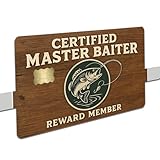
- ✨ Precision Fit for Standard Cards – Sized to 3.37” × 2.125” with chip-friendly cutout
- 💪 UV-Printed for Maximum Durability – Crisp detail, vivid colors, scratch-resistant finish
- 👌 Smooth Application – No bubbling, no peeling, and won’t affect tap-to-pay
- 🎣 Perfect Gift for Anglers & Fishermen – A funny fishing-themed wallet accessory
- 🏠 Made in the USA by Mama Lu’s Crew – Designed, printed & packaged by a small woman-owned business
- Open the retailer’s website in Edge.
- Select the blue Shopping tag.
- Review the offer terms.
- Activate cashback.
- Finish the purchase without leaving the retailer’s site.
The shopping tag is no longer a guaranteed interface. If it is missing, update Edge, sign in, check Copilot, and confirm that shopping features are enabled.
Who can use it?
Microsoft’s published requirements say users must:
- Be at least 18 years old.
- Live lawfully in a participating territory.
- Use an active personal Microsoft account.
- Remain enrolled in Microsoft Rewards.
Work and school accounts are not eligible under the published requirements. A US account and offer may also behave differently while traveling or shopping in another country.
Free tools Windows power users keep installed
One-click scans. No signup required.
How to make sure a purchase tracks
Use this checklist before checkout:
- Activate the offer before buying.
- Stay signed in to the correct Microsoft account.
- Use one uninterrupted browsing session.
- Do not click another cashback, advertising, email, or shopping-extension link afterward.
- Keep third-party cookies enabled when required by the offer.
- Temporarily adjust an ad blocker or privacy tool if it blocks affiliate tracking.
- Use only coupon codes allowed by the offer terms.
- Buy an eligible product from an eligible seller.
- Do not cancel, return, or materially change the order if you expect cashback.
Using multiple cashback extensions at once can create competing attribution. Compare rates first, then activate only the provider you choose.
How much can you earn?
Microsoft’s current public page lists a maximum of US$200 per calendar month and US$1,000 per year. Individual offers may have lower caps or additional restrictions. Microsoft says shoppers expecting to exceed the limit can contact Cashback Support to request consideration for a higher limit.
Your actual benefit is not simply the advertised percentage multiplied by the order total. It depends on the eligible portion of the order, exclusions, caps, successful tracking, and whether another coupon or cashback provider would produce a better overall saving.
When does cashback arrive?
A qualifying purchase normally appears as pending first. Microsoft and the retailer then validate the transaction, including returns and cancellations. Once finalized, it becomes complete and can be transferred.
Outdated Drivers Are Slowing You Down
One free scan finds every outdated or missing driver and matches the right update for your exact hardware.Free scan · exact hardware matchWindows Errors? Fix Them Before They Spread
Repair common Windows errors and clear accumulated junk for a smoother, more stable PC - no reinstall needed.Free scan · no reinstallMicrosoft says most rewards become available within 30 to 90 days. Travel purchases may take longer because validation can depend on the completed trip or a longer cancellation period.
Rank #4

- Different Style: Make a difference by adding the customized debit card sticker; The product contains 12 patterns and 4 styles, as shown in the picture; One of the styles is full-coverage for student cards, transportation cards, and other cards that do not display the chip
- High Quality: High quality PVC card sticker for long-lasting use; Durable, sun proof and waterproof; Professional grade vinyl sticks firmly to the card, making your card perfect and tidy; And if you frequently insert ATM or Card Reader (And occasionally the read fails), Suggested Single-sided Use a Skin
- Easy to Use: Just peel-and-stick; These card stickers are bubble-free to make it easy to install; You can personalize your card quickly and easily
- As a Gift: You can use the debit card sticker as a present or a decoration to your family, friends, colleagues, and anyone you care; Such a cool gift will uplift mood with every use
- Quality After-sales: If you have any questions or dissatisfaction about the product, you can contact us any time; We will respond to your inquiry as soon as possible and assist you in resolving the issue
- Pending: the purchase has been reported or is awaiting validation.
- Complete: the cashback is available in your balance.
- Redeemed: you have transferred the available balance to PayPal.
How do you receive the money?
Microsoft says completed cashback can be transferred to a linked PayPal account. The published page does not establish a universal minimum balance or promise bank transfers, gift cards, or instant payment. Check the redemption options shown in your account.
Why cashback may not appear
Common explanations include:
- The offer was never activated or was activated after checkout began.
- The wrong Microsoft account was used, or you were signed out.
- The purchase occurred outside the offer window.
- The product, seller, coupon, or order type was excluded.
- Another extension or affiliate link received attribution.
- Cookies, an ad blocker, or privacy software blocked tracking.
- The order was canceled, returned, refunded, or modified.
- The retailer has not yet reported the transaction.
- The account was restricted for suspected fraud or compliance reasons.
First check the offer terms and allow the stated reporting period. If the transaction still does not appear, use Microsoft’s Cashback support process and retain your order confirmation and activation details.
Independent reader supportYour contribution helps us test, update, and keep practical guides available for everyone.What if the shopping tag is missing?
- Update Microsoft Edge.
- Sign in with a personal Microsoft account.
- Open Copilot on the retailer or product page.
- Go to Settings and more → Settings → Privacy, search, and services → Search and connected experiences.
- Confirm that Save time and money with Shopping in Microsoft Edge is enabled.
- Check whether the offer and feature are available in your region.
Microsoft says the shopping transition is gradual, so not every user will see the same controls. InPrivate browsing follows the shopping setting of the profile that launched it, but private browsing is not a guarantee that cashback will track successfully.
Privacy and tracking trade-offs
Microsoft’s Edge privacy documentation says the shopping service can send the shopping domain and relevant cookies to Microsoft’s shopping service to retrieve offers. After activation, Edge can send the URL to receive an affiliate URL and store cookies used to attribute the purchase.
Best Value

- 5% Back at Amazon.com and Whole Foods Market with an eligible Prime membership* 2% Back at restaurants, gas stations* 1% Back on all other purchases*
- No annual fees*
- No foreign transaction fees*
The shopping service is enabled by default. To disable it, go to Settings and more → Settings → Privacy, search, and services → Search and connected experiences, then turn off Save time and money with Shopping in Microsoft Edge. This can also disable related Edge shopping features, not just cashback.
Edge Cashback versus another cashback extension
Edge Cashback is convenient if you already use Edge, Microsoft Rewards, and Copilot. It may be less suitable if you block third-party cookies, use aggressive anti-tracking tools, need immediate payment, require a bank transfer, or find a materially better confirmed offer elsewhere.
Microsoft’s Edge shopping-extension collection includes alternatives such as Capital One Shopping, PayPal Honey, Coupert, and RetailMeNot. Rates, availability, payout rules, and privacy terms vary. Do not activate several providers for the same transaction: competing links can prevent one or more rewards from being credited.
Is Microsoft Edge Cashback worth using?
It can be worthwhile when the offer is competitive, the purchase is eligible, and you are comfortable with affiliate tracking and a potential 30-to-90-day wait. Before a large purchase, compare the live Microsoft offer with one or two alternatives and account for coupon restrictions, exclusions, caps, and payout method.
The safest description is not “cashback from any retailer” or “automatic money back.” It is a free, conditional rebate available through participating retailers when Microsoft can successfully attribute a qualifying purchase.
Quick Recap
Product prices and availability are accurate as of the date/time indicated and are subject to change. Any price and availability information displayed on Amazon at the time of purchase will apply.



