The Tool Desk
Outbyte Driver Updater FREEFix the driver behind crashes, sound loss and screen glitchesFind Drivers →Outbyte PC Repair FREERepair Windows errors before they cause bigger problemsFix Now →Some links on this page are affiliate links: if you buy through them we may earn a commission, at no extra cost to you.
Apple does not have one standard processing time for every online order. The delivery or pickup estimate shown at checkout—and updated in Apple’s Order Status tool—is the best guide for your specific purchase. Processing and carrier transit are separate stages, and the estimate can depend on availability, payment processing, customization, destination, and fulfillment method.
Processing time is not the same as delivery time
An Apple order moves through fulfillment before a carrier delivers it or an Apple Store makes it available for pickup. “Processing” means Apple is preparing the item; it does not mean the parcel has been handed to a carrier. After shipment, carrier transit begins. Apple does not publish a universal number of days for the processing stage, so a rule of thumb such as “one to three business days” is not a reliable promise for every order.
Apple shows available delivery methods and timeframes during checkout. Use the estimate for your item and destination rather than trying to infer an arrival date from how long its status has stayed on one label. Estimates can change, and they are forecasts rather than guaranteed appointment times. See Apple’s Shipping & Pickup help for current U.S. delivery details.
Free tools Windows power users keep installed
One-click scans. No signup required.
What Apple’s order statuses mean
| Status | What it means |
|---|---|
| Order Placed | Apple has received the order and payment information. |
| Processing | Apple is preparing the item. It may still be handling availability, payment, or preparation; the status does not mean a carrier has the package. |
| Preparing to Ship | Apple is completing final fulfillment details before shipment. |
| Shipped | The item is moving into the carrier’s delivery process. Apple provides tracking information, generally within 24 hours after an item is marked shipped. |
| Delivered | Delivery is recorded as complete. |
| Shipping to Store | The item is traveling to the Apple Store selected for pickup. |
| Check in Today | The item is expected to become available at the store later that day. |
| Ready for Pickup | You can collect the item after receiving Apple’s pickup notification. |
| Picked up | The store pickup is complete. |
These labels describe stages, not a fixed countdown. Apple does not specify a universal number of hours between “Preparing to Ship” and “Shipped.” For Apple’s definitions and order-management instructions, visit Viewing & Changing Orders.
#1 Best Overall

- FIND YOUR ITEMS ON FIND MY — AirTag (2nd generation) helps you keep track of what matters. Attach one to an item you want to keep track of using the Find My app.*
- EXPANDED PRECISION FINDING ON IPHONE AND APPLE WATCH — Get step-by-step directions to your lost item on iPhone and, now, Apple Watch.*
- ENHANCED SPEAKER — With a 50% louder speaker and a new, distinctive chime, it’s easier than ever to hear and find AirTag.*
- PING FROM FAR AND WIDE — Upgraded Ultra Wideband and Bluetooth chips allow you to find your items from even farther away than ever before.*
- SHARE ITEM LOCATION — Share AirTag location access temporarily and securely with trusted contacts, third parties, or over 50 airline partners if you lose something important.
How to check your order’s current estimate
- Open Apple Order Status.
- Sign in with the Apple Account used to place the order. If you checked out as a guest, enter the order number and the ZIP code or email address associated with the order.
- Open the order and check each item’s status, delivery estimate, pickup information, or tracking link.
- If the item is marked shipped, follow the carrier tracking link for updates after handoff.
For an estimate before buying, check the delivery or pickup options shown for your destination during checkout. After purchase, compare the order acknowledgment email with the current Order Status page; the current item-level information is more useful than an old email or saved screenshot. Apple sends a shipment email with the carrier, tracking number, and delivery date when an item ships.
Why an Apple order may stay in Processing
A Processing status is not, by itself, evidence that an order is stuck. It can remain there while Apple prepares the item or completes steps that vary by order. Common factors include:
Rank #2

- 【AIR TAGS-4 PACK FOR APPLE FIND MY】 Includes two black and two white tracker tags. Apple MFi certified and compatible with the Apple Find My app and Find My network, these item finders help locate keys, luggage, backpacks, purses, and travel bags. Designed for iOS devices only; not compatible with Android.
- 【SHARE WITH UP TO 6 PEOPLE】 Each Bluetooth tracker can be shared with up to 5 additional people in the Find My app, allowing the owner and up to 5 trusted users to view the item’s location. Requires an Apple ID, iCloud sign-in, and an iPhone or iPad running iOS 14.5/iPadOS 14.5 or later.
- 【COMPACT DESIGN & REPLACEABLE CR2032 BATTERY】 Measuring approximately 1.22 × 1.22 × 0.38 inches, these lightweight item finder tags are easy to attach to keys, luggage, backpacks, and bags. Each tag uses a replaceable CR2032 battery that typically lasts about 5–8 months, depending on use; frequent use may require replacement after approximately 3 months. No monthly fee or additional app is required.
- 【IP67 PROTECTION WITH SILICONE CASE】 The tracker tag itself is not water-resistant. IP67-rated water and dust protection applies only when the included silicone holder is correctly and fully installed. Insert the tag with the printed side facing outward and the striped side facing inward for a secure fit. Suitable for protection against everyday rain, splashes, and moisture; do not submerge or expose it to water for extended periods.
- 【UP TO 70dB SOUND, NOTIFICATIONS & EASY BATTERY REPLACEMENT】 When the item is nearby, use the Find My app to play a sound up to approximately 70dB in an open environment. Separation notifications may be available depending on Find My settings, distance, and network conditions. To replace the battery, insert a coin or similar flat tool into the slot, turn 45° clockwise toward “Open,” install a CR2032 battery, then turn 45° counterclockwise toward “Close” until securely locked. Coin or tool not included.
- Availability: The estimate depends on the product and configuration being available. Limited stock or a preorder can mean a later fulfillment window.
- Payment processing: Apple says the payment method can affect the final shipment date. A bank authorization or pending transaction alone does not show that an item has shipped, and the timing of a posted charge can vary.
- Customization or engraving: Customized Macs and engraved products require additional preparation. Apple updates the delivery estimate during configuration and reflects it in the order confirmation and Order Status.
- Multiple items: Apple may ship items as they become available, so products in one order can have different statuses, delivery dates, or tracking numbers.
- Additional information: Apple may request qualifying information before processing an order. Check your order page and email for a prompt that needs action.
- Fulfillment choice: A pickup order must reach the selected store and be checked in before it is ready to collect.
Apple does not give a standard extra-day allowance for engraving, custom configurations, or other cases. Use the estimate shown for the actual product and destination. An expedited shipping option may shorten the transportation portion when available, but it should not be treated as a way to bypass product preparation, availability, or payment checks.
Windows Errors? Fix Them Before They Spread
Repair common Windows errors and clear accumulated junk for a smoother, more stable PC - no reinstall needed.Free scan · no reinstallOutdated Drivers Are Slowing You Down
One free scan finds every outdated or missing driver and matches the right update for your exact hardware.Free scan · exact hardware matchHome delivery and Apple Store pickup
Home delivery: The available methods and estimated timeframes appear during checkout. Standard delivery is free for U.S. online orders; faster options may be offered for an additional charge. Once Apple provides a tracking number, the carrier’s updates help explain where the package is. Some shipments require a signature, and a missed delivery attempt can affect arrival timing.
Rank #3

- Smart Finder:The luggage GPS tracker makes it easy to manage your valuables. Working with the Find My app(IOS ONLY), you can quickly locate your items. It comes with one case, allowing you to attach the tag to your keys, wallet, backpack etc.
- Find Nearby:Use the Find My app to ring your luggage tracker when it's within Bluetooth range,or ask your Siri to find it for you.Click the 'Play Sound' Button, the tag tracker will make a sound 'di di di'. You can according to the sound find your items
- Find Far Away: When outside of Bluetooth range, use the Find My app to view your 'Item Locator's most recent location on a map. You can use the network and GPS of millions of Apple devices to locate it anywhere in the world.Reduce the loss of your items
- Share Your Items and Privacy Protection:The item finders tag lets your family view the location of your items (a feature for iOS 17).The chip in this Bluetooth tracker is MFi certified,guaranteeing that your location data is encrypted and protected
- Water Resistant & Replaceable Battery: Designed for outdoor adventures, this tracker can withstand rain, ensuring you can use it confidently in various weather conditions. Plus, it features a replaceable CR2032 battery that lasts up to a year
Store pickup: Pickup timing depends on local availability and the estimate shown at checkout. Do not travel to the store based only on the estimated date or a “Shipping to Store” status. Apple says to wait for its pickup notification, which includes a QR code; the order may also show “Check in Today” before it becomes ready. When collecting it, bring the order number, a valid government-issued photo ID, and the QR code or Wallet pass. Apple’s instructions say screenshots or photographs of the QR code are not accepted.
What to do if the estimate passes
- Check Order Status and review each item separately for a revised estimate or a request for information.
- Check the order acknowledgment, shipment, and pickup emails, including spam or junk folders.
- If the item is marked shipped, use Apple’s carrier tracking link. Contact the carrier only once tracking information is available; before that, it may not have the package or useful details.
- Check for a required signature, a missed delivery attempt, or a carrier update about the address.
- If the promised window has passed, the estimate keeps changing, or Apple shows a payment or address issue, contact Apple through its order help. In the U.S., Apple lists 1-800-MY-APPLE for help with viewing or changing an order.
A delivery estimate is the best current forecast, not a guarantee against carrier, weather, holiday, or other disruptions. If the carrier reports delivery but you cannot find the package, follow the carrier’s delivery instructions and contact Apple if the issue remains unresolved.
Rank #4
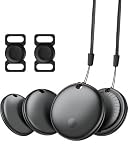
- 【Easy Tracking】Easily track and locate your belongings with smart tags. Connect to the global ‘Find My’ network of billions of iOS devices within range and easily track and locate your belongings with the Find My app. Built-in speaker allows you to locate your belongings with your iPhone within Bluetooth range (60m/200ft). Note: iOS devices only, not available for Android devices!
- 【Lost Alerts and Lost Mode】If your lost item has our smart tracker and loses the Bluetooth connection to your iOS device, the 'Find My' app will immediately notify you of the lost item. If you preset Lost Mode and keep contact information, Key Finder Tracker will allow nearby Apple devices to access your contact information and remotely provide you with the location of the Air Tag.
- 【IP65 Waterproof & Replaceable Battery】Ekebaotek Bluetooth tracking tag is IP65 waterproof, making it safe and durable even in the rain or short-term immersion in water. This luggage tracker is equipped with a replaceable battery that can last up to one year without frequent replacement. You can check the battery status in the ‘Find My’ app.
- 【Small & Light】Ekebaotek tracking tag weighs only 7 grams, making it easy to carry. Its lightweight and rounded design is not only easy to carry but also prevents items from being scratched, making it perfect for putting in wallets, backpacks, luggage, laptops, suitcases, car keys, etc. The matching silicone case is suitable for pet tracking, making it easy to locate your pet.
- 【Privacy Protection & Easy Pairing】Smart tags focus on privacy protection, all communications with the 'Find My' network are anonymously encrypted, and location data and history are not stored on the air tag. Open the 'Find My App' and Bluetooth, tap 'Items', then tap 'Add Items' and select 'Other Supported Items', and follow the instructions in the app to easily pair. (Please make sure your device system version is updated to IOS 18 and above)
Changes and cancellations while an order is processing
Apple may allow eligible edits or cancellation while an order is in “Order Placed” or “Processing.” Depending on the order, available changes can include the shipping address, email address, or engraving details. Options are order-specific and can disappear once preparation or shipment advances; an address change may no longer be possible after the item is prepared for shipment or shipped. Open Order Status and use the controls shown for that order rather than assuming a change can still be made.
Quick wins for a faster PC:
Repair Windows errors before they cause bigger problemsFix Now →Fix the driver behind crashes, sound loss and screen glitchesFind Drivers →Special destinations in the United States
Apple’s published transit guidance includes averages of 2–5 days for Puerto Rico and up to 6–8 weeks for APO/FPO addresses, depending on local conditions. These figures apply to those destinations and should not be used to estimate ordinary mainland U.S. delivery. Apple’s delivery methods and policies can differ by country, so this article’s guidance is for U.S. consumer Apple Online Store orders.
Best Value

- 💰 LIFETIME FREE TRACKING — NO SUBSCRIPTION, NO SIM, NO HIDDEN FEES** — Unlike traditional GPS trackers that require monthly plans, this device works entirely through the Apple Find My network. Pay once, track forever. No SIM card needed, no activation fees, no recurring costs — ever.
- 📡 HOW IT WORKS — APPLE FIND MY NETWORK TRACKING** — This is a Bluetooth-based tracking device that leverages Apple's global Find My network, not a satellite GPS. When your vehicle is near any iPhone (within ~30-40ft), the location updates automatically and anonymously through the Find My app. No GPS hardware means longer battery life and zero data costs. **Please note: iOS Only. Not compatible with Android devices.
- 🧲 SECURE MAGNETIC MOUNT — DISCREET INSTALLATION IN SECONDS** — Industrial-strength magnetic case attaches firmly to any metal surface under your vehicle, inside the wheel well, or beneath the chassis. No wiring, no tools, no professional installation. Includes adhesive metal plates for non-magnetic surfaces (aluminum body panels, plastic bumpers). Compact size (1.73 x 1.37 inches) makes it virtually undetectable.
- Anti-Theft Alert System: Receive instant notifications on your compatible device if your vehicle moves unexpectedly or leaves a set area, helping you act fast to protect what matters.
- 🔔 SMART ALERTS & MULTI-PURPOSE TRACKING** — Receive instant notifications when your vehicle moves unexpectedly (motion detection), leaves a designated area (geofencing), or when you walk away without it (left-behind reminder). Perfect for cars, trucks, motorcycles, RVs, trailers, boats, bikes, luggage, and fleet management. Share tracking access with up to 5 family members.
Quick answers
Does Processing mean Apple has charged my card? Not necessarily. Payment activity varies by method and order; a pending authorization or lack of a posted charge does not establish whether the order has shipped. Check Order Status and respond to any payment request.
Can I track an order without an Apple Account? Yes. For a guest order, use the order number and the associated ZIP code or email address in Apple Order Status.
Will Apple deliver everything in one package? Not always. Items can ship separately as they become available, so check each line item.
Quick Recap
Product prices and availability are accurate as of the date/time indicated and are subject to change. Any price and availability information displayed on Amazon at the time of purchase will apply.



