Quick wins for a faster PC:
Fix the driver behind crashes, sound loss and screen glitchesFind Drivers →Clear out junk files and repair common Windows errorsFree Scan →Some links on this page are affiliate links: if you buy through them we may earn a commission, at no extra cost to you.
On June 15, 2021, Box added self-service tools to Box Shuttle, giving customers a free route for qualifying migrations of up to 10 TB. That offer was aimed at relatively straightforward moves—not every source system, permission model, or metadata setup. Box Shuttle has since evolved into a migration capability in the Box Admin Console, with standard and advanced tooling and different current limits.
What Box announced in 2021
Box Shuttle had been positioned largely as a managed service for enterprise content migrations. The June 2021 announcement added a self-service path for customers able to plan and run simpler moves themselves. The change lowered the barrier to starting a migration, but “self-service” did not mean no preparation, administrator access, testing, or permission decisions.
Box said qualifying standard migrations of up to 10 TB would be free. The launch-era sources included network file shares, OneDrive, Google Drive, Dropbox, and SharePoint Online. The intended metadata scope was basic information such as file and folder names, size, creation date, and modification date. The offer assumed that user-based permissions could be mapped without major redesign. Box’s 2021 announcement describes the launch terms.
Those details are historical, not a complete statement of current eligibility or pricing. Today’s plan allowances and supported sources should be checked against Box’s current documentation before a project is scoped.
#1 Best Overall

- 104pcs USB FLASH DRIVE CASE: Large capacity flash drive storage case, design for SanDisk/ for Samsung/ for Pnstaw/ for Netac/ for Micro/ for PNY/ for TOPESEL/ for Aiibe/ for mosDART 8GB 16GB 32GB 64GB 128GB 256GB and more usb memory stick, sd card, thumb drives, coins, pen drives, jump drives. Clean your mess drawer and help you can easy find the flash drive you need (NO USB FLASH DRIVE INCLUDED)
- HARD PLASTIC USB THUMB DRIVE HOLDER: Electronic organizer made of strong, heavy-duty plastic, more resistant and crash worthiness than acrylic. Protect your flash drive scratch and damage. Extend usb service life. Locking latch design easy for open and close
- FITS ALL SIZE USB MEMORY STICK: Unique detachable foam inner fits usb flash drive snug and not tight, up-right design allows you can easy to put in and out of the case. Two size slots fits various kinds of usb sticks, big size: 0.75’’*0.4’’inches, small size :0.5’’*0.25’’inches
- FLASH DRIVE CARRYING CASE: Lightweight portable design with strong top handle easy for you to hang on the wall or put in the drawer. Also super convenient for traveling. Good for home, office use. external size:10*7.5*3.25 inches
- GOOD CHOOSE: Usb drive storage case is good for Christmas, Birthday, Anniversary. Suitable for people who have multiple USB drives. No more loss your small USB sticks
When the advanced path mattered
Box’s 2021 advanced tooling addressed migrations that exceeded the simpler path’s limits or needed more transformation. Examples included custom metadata, complex or folder-level permission remapping, corrections during a migration, larger datasets, and additional cloud or on-premises sources. The launch materials named SharePoint on-premises, Citrix ShareFile, FTP, AWS, Google Cloud Platform, and Microsoft Azure.
The distinction is practical: copying files is not the same as reproducing how an organization uses and secures them. Source systems differ in ownership, group membership, sharing, and permission inheritance. A file transfer can complete while users lose access, confidential material becomes too widely available, or important metadata and version history go missing.
Rank #2
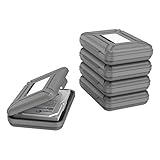
- CONVENIENT DESIGN: High-hardness PP material is adopted to protect the hard drive case which tightly fitted to ensure that your hard disk is free from moisture, anti-static and dust-proof that the high quality polypropylene material is more durable and stronger to uselish, portable and ingenious design, high quality plastic material injection molding, thicker and stronger for professional satisfactio
- [Multiple Protections]---Waterproof EVA exterior protects your device from everyday knocks and bumps--One-piece molding, with high-strength rib design inside and outside;The built-in EVA reinforced shock-resistant cushions wrapped on both sides are rigid on the outside and flexible on the inside to reduce external hard drive case vibration and make your data storage more secure
- [Size&Compatibility]---Max compatible dimensions(outside):7x5.03x1.53 inches (inside):6.1X3.93X1.1inches; 3.5 inch internal drive portable case can be applied to various 3.5 inch SSD/HDD hard drives which can easily fit into any backpack or briefcase
- [Functional Storage]---The label stickers help users organize 3.5 inch hard drive storage case efficiently, which is convenient for you to perform a more scientific classification and archive management of the vast data.Variety of colors to choose from,make more stably and stacked neatly, and at the same time subtly reduce the space occupation and clutter of the desktop
- [3.5'' Hard Drive Case]---The card slot design is easy to stack up and down with the design is highly fit, slim line design allows hard drive carrying case to easily fit into any backpack or briefcase; Good customer service gives you a better using experience
Box’s current documentation distinguishes a data-only migration from a migration with permissions. The latter can create collaborations intended to reflect source permissions in supported scenarios, but Box says external-user permissions and collaboration data are not migrated. “Preserves all permissions” is therefore not a safe assumption.
Why Cloud FastPath was part of the story
Box’s migration capability drew on technology from Cloud FastPath, which Box acquired. The technology gave Box an in-house migration engine that could support self-service moves as well as more involved projects. Strategically, that let Box reduce reliance on consultants for straightforward work while retaining advanced tools and services for difficult migrations. It also made migration into Box easier to initiate for organizations already considering the platform.
Rank #3

- Durable anti-static storage case for bare 3.5-Inch hard drives
- Made with textured Anti-Static plastic for a better grip
- A label area with label included lets you mark it up however you please
- Store drives on a shelf vertically - This case is steady while standing up
That is an interpretation of the product direction, not a guarantee that any particular migration will cost less or be simpler. Migration effort depends on the source, data volume, access model, and the customer’s staffing and governance requirements.
How Box Shuttle works now
Box now presents Shuttle as a migration capability available in the Box Admin Console. Its described workflow includes analyzing source content, planning and sizing a move, configuring rules, running simulations, migrating, and reviewing reports. Box says it supports more than 10 source systems and migrations ranging from gigabytes to petabytes, but actual availability and the appropriate tooling depend on the source and customer setup. See the Box Shuttle product page and current standard and advanced tooling guidance.
Rank #4

- UP TO 104 USB DRIVES: Two pre-cut slot sizes—about 0.75 x 0.4 in and 0.5 x 0.25 in—hold compatible thumb drives upright. Fits select models for SanDisk, for Samsung, for Inland, for PNY, for Netac, for TOPESEL, for SamData, for MECHEER, for mosDART and for Aiibe. Brand compatibility does not mean every model fits; measure width, thickness and height before purchase.
- REMOVABLE FOAM FOR FLEXIBLE SETUP: Lift out the insert and remove only the pre-cut pieces needed. Oversized, extra-thick or unusually shaped drives may occupy more than one position, while very short nano receivers or tiny dongles may sit too low or may not stay secure. Test the fit before carrying the case upright or moving it between work areas.
- HARD PLASTIC EVERYDAY PROTECTION: The rigid shell helps reduce scratches, dust exposure and everyday drawer bumps. The snap latch keeps the lid closed during normal handling but is not a keyed security lock. This box is not waterproof, fireproof or designed for severe drops, crushing, shipping abuse or outdoor exposure.
- FASTER IDENTIFICATION AND SORTING: Keep work, school, photo, backup and archive drives in assigned positions instead of scattered across drawers. Because the vertical layout mainly shows the top of each drive, add your own top labels, numbers or a position chart for quicker retrieval. Labels are not included, and the case is designed mainly for compatible USB drives rather than loose microSD cards.
- FOR DESKTOP AND ARCHIVE STORAGE: The 10 x 7.5 x 3.25 in case fits shelves, cabinets and many desk drawers. The top handle supports short moves between desks, classrooms or IT work areas, but the large-capacity design is better for organized storage than compact everyday travel. Case only; USB drives, cards, labels and accessories are not included.
Box’s currently documented route is Admin Console → Content → Shuttle, where an administrator can create a job to analyze or migrate data. Interface details can change and may vary by account. Box’s guidance describes standard tooling as suited to supported sources, relatively simple metadata and permissions, and folder structures that do not need major changes. Advanced tooling may be needed for more than 10 TB, an unsupported standard source, or a more complex content structure.
Recommended Free Tools
Current support documentation says standard migration is available to Box business customers up to 10 TB and to Enterprise Plus customers up to 20 TB. Additional terabytes and source systems may be available for purchase. This is different from the 2021 launch’s free up-to-10-TB claim; do not treat the old announcement as today’s full commercial specification. Box’s current migration support page is the better reference for current allowances.
Best Value

- 【25-BAY LARGE CAPACITY】 The foam in the external hard drive storage box can holds up to 25 external hard drive. Each drive can be safely protected in 25 spaced foam in the box.
- 【3.5" Customized Slot】our HDD case have equipped upgraded High-Density Foam, which specially mold based on 3.5" hard drive size, securing the SSD&HDD firmly and prevent it from shaking.
- 【High-Strength Materials】Our computer hard drive bags & cases organizer features a hard shell plastic casing, a highly reinforced frame, which has good shock-absorption, dust-proof and moisture resistance.
- 【Strong Protection】Our hard drive storage box can achieve IP67 waterproof level, and the sponge slot can firmly fix the hard drive inside, preventing it from shaking. The outer hard shell of the box can withstand car crushing and has first-class anti drop performance.
- 【Safety Buckle & Handle】The case features a sturdy handle for easy carrying and a double safety buckle design to securely fasten the lid, preventing accidental opening or theft.
Historical pricing is not a reliable current quote
Even contemporary reporting about advanced self-service pricing in 2021 disagreed: VentureBeat reported $500 per terabyte, while Box’s own launch blog listed $1,000 per terabyte. The available sources do not resolve whether the difference reflected a pricing change, customer-specific terms, or a reporting error. Neither figure should be presented as a current universal price. Current Box materials direct customers with larger volumes or additional source needs to Box or their account team rather than publishing a universal advanced-tooling rate.
Decide whether self-service fits your migration
Before choosing a path, inventory more than total terabytes. Record the source platform and edition, file and folder counts, largest files, version counts, users and groups, permission assignments, custom metadata, external sharing, and retention requirements. A 10-TB repository with a simple access model can be easier than a smaller repository containing millions of files and deeply nested permissions.
- Source: Confirm the exact platform and whether it is cloud or on-premises. “SharePoint,” for example, can refer to products with different connector requirements.
- Access: Decide whether permissions should be reproduced, redesigned, or omitted from the migration. Identify stale users, groups, departed employees, and external collaborators.
- Content fidelity: Establish whether custom fields, version history, ownership, dates, retention labels, or workflow metadata are essential. Support varies by source and migration mode.
- People and timing: Check that staff can authorize source connectors, map identities, test results, monitor errors, communicate cutover, and validate the destination. Plan for source rate limits and edits made while migration is running.
- Destination fit: Box Shuttle is for moving content into Box, not a general-purpose migration comparison. Box’s current standard and advanced tooling guidance says it does not support Box-to-Box migrations.
Self-service is most appropriate when the source is supported, the content model is uncomplicated, and an internal team can own the work. Consider advanced tooling or Box Consulting when volume exceeds the applicable allowance, the source needs advanced support, permission structures require substantial remapping, metadata drives business processes, or the organization lacks migration capacity.
What’s actually slowing this PC down?
Pick the symptom - the matching free tool is one click away.
A practical migration sequence
- Inventory the source. Capture volume, object counts, users, groups, permissions, versions, metadata, external collaboration, and compliance constraints.
- Classify the project. Compare the source and transformation needs with Box’s current standard and advanced tooling criteria; confirm plan eligibility and any separately quoted services.
- Secure authorization. Obtain the required administrator access in the source system. Exact permissions depend on the source and connector.
- Analyze before moving content. In the documented Admin Console path, create an Analyze job before a production migration. Review unsupported objects, identity mapping, exceptions, and expected volume.
- Run a representative pilot. Include nested folders, large and small files, multiple versions, restricted and shared folders, departed-user ownership, external collaborators, and custom metadata where relevant.
- Validate the destination. Check access, ownership, version history, metadata, search, audit evidence, and user workflows—not just whether files arrived.
- Plan cutover and reconciliation. Choose phased moves or a freeze and final-delta approach as appropriate. Box describes background migration, but consistency and downtime depend on the source, connector, rate limits, and configuration.
- Keep evidence. Retain the source inventory, job configuration and reports, error and exception lists, permission decisions, post-migration counts, business-owner signoff, and approval to retire the source.
Common problems and what to do
- The source is unavailable in standard tooling: Check whether advanced tooling or Box Consulting supports it. Do not substitute a generic export without validating what happens to permissions and metadata.
- Permissions do not map cleanly: Pause to remap identities or groups, simplify access, migrate data without permissions, or redesign the destination structure. Escalate if access rules are business-critical.
- External collaborators lose access: Treat external sharing as a separate post-migration task; Box’s documentation says this collaboration data is not migrated.
- Metadata is missing: Compare source and destination schemas in the pilot. If the fields support records, compliance, or workflows, do not judge the migration by file-transfer success alone.
- Counts differ or content is duplicated: Reconcile inventories and job reports, inspect excluded-object logs, and investigate source permissions, unsupported objects, throttling, or changes made during cutover.
- The project is Box-to-Box: The cited current tooling guidance says Shuttle does not support this scenario. Confirm Box’s current position and select a suitable alternative approach before planning around Shuttle.
The key qualification is that self-service changes who operates a straightforward migration; it does not remove the work of deciding what should move, who should have access, which information must be preserved, and how success will be verified.
Quick Recap
Product prices and availability are accurate as of the date/time indicated and are subject to change. Any price and availability information displayed on Amazon at the time of purchase will apply.



