Do these 3 things before closing this tab:
1Fix the driver behind crashes, sound loss and screen glitches2Repair Windows errors before they cause bigger problems3Scan for outdated or missing drivers - takes under a minuteSome links on this page are affiliate links: if you buy through them we may earn a commission, at no extra cost to you.
Short answer: The Acer Chromebook Plus Spin 714 is a strong buy for the right ChromeOS user if the new CP714-1H-54UB configuration is still around $529. That is about $270 below its $799 reference price—not $220—and the price and stock can change. It is a capable 14-inch convertible with useful ports, but it is not a substitute for a Windows laptop if you rely on desktop-only software.
First, check the price and exact model
The deal headline says “save $220,” but the latest indexed deal coverage reported Best Buy listing the Spin 714 at $529, down from $799. That works out to a $270 reduction from that reference price. It does not confirm that the laptop is still available at that price, that every shopper qualifies, or that $799 was its recent street price. Treat $529 as a reported price signal, not a guaranteed live offer, and check the Best Buy listing for checkout price, condition, stock, shipping, and any member-only terms. Deal coverage reported the $529 price in August 2026.
Before buying, match the listing to CP714-1H-54UB: Intel Core Ultra 5 115U, 8GB LPDDR5 memory, and a 256GB PCIe NVMe SSD. Retailer listings can differ in condition or configuration. Acer has sold other Spin 714 generations, including an older CP714-1WN with a 12th-generation Core i7 and a higher-resolution display. “Spin 714” alone is not enough to identify the machine.
The Tool Desk
Outbyte Driver Updater FREEScan for outdated or missing drivers - takes under a minuteDriver Scan →Outbyte PC Repair FREERepair Windows errors before they cause bigger problemsFix Now →Acer’s product-family page and Google’s Chromebook Plus lineup place the Spin 714 in the $799-class range. A manufacturer reference price is useful context, but it does not prove how often the laptop sells for that amount. Compare the actual new-unit checkout price, not just the crossed-out figure.
#1 Best Overall
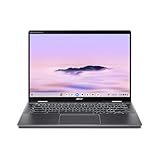
- Intel Core Ultra 5 115U processor with integrated Intel Graphics and AI acceleration
What you get for the money
The Spin 714’s appeal is its combination of laptop performance, a touchscreen, and a 360-degree hinge. The 14-inch IPS display has a 1920×1200 resolution and a 16:10 aspect ratio, which gives documents and web pages more vertical room than a conventional 16:9 screen. Acer lists 100% sRGB color coverage. It is glossy, however, so reflections may be noticeable near windows or under bright lights.
Fold the screen all the way back to use it in tablet mode, or prop it in tent or stand mode for video calls and streaming. At about 3.21 pounds, it is portable enough for a backpack but heavier than many clamshell ultraportables. Acer lists a backlit keyboard and a 2560×1440 webcam; the model family also has a webcam privacy shutter.
Connectivity is unusually generous for a Chromebook: two USB-C ports with Thunderbolt 4, one USB-A port, and HDMI, plus Wi-Fi 6E and Bluetooth 5.3 or later according to the listed specification. The USB-C ports support charging. There is no built-in Ethernet port, so a wired network connection requires a compatible adapter or dock. Confirm the ports on the exact retailer SKU before ordering.
Rank #2

- ✔【Screen】 14-inch WUXGA (1920 x 1200) IPS touch screen with a 16:10 aspect ratio and 340 nits brightness, 2-in-1 convertible with a 360-degree hinge and a durable aluminum chassis;
- ✔【Memory & Storage】 8GB LPDDR5 megahertz and 256GB PCIe NVMe SSD;
- ✔【Processor】 Intel Core Ultra 5 115U 1.5GHz Processor (upto 4.2 GHz, 8-Cores, 10-Threads);
- ✔【Graphics】 Intel Graphics;
- ✔【Connectivity】 2x Thunderbolt 4 (USB-C), 1x USB 3.2 Gen 1 Type-A, 1x HDMI 2.0, 1x headphone/microphone combo jack, Wi-Fi 6E (IEEE 802.11ax) and Bluetooth 5.3;
Acer claims up to 10 hours of battery life. That is a manufacturer maximum, not a promise of a full workday for every person. Screen brightness, video meetings, wireless conditions, Android or Linux apps, and battery age all affect runtime; no independent result for this exact configuration is established here.
Is 8GB RAM and 256GB storage enough?
For typical ChromeOS use—many browser tabs, Google Workspace, Microsoft 365 web apps, video calls, streaming, and moderate multitasking—the deal configuration’s 8GB of memory and 256GB SSD should be a sensible starting point. It also has room for downloaded files and some Android apps, though ChromeOS and installed apps consume part of the advertised storage.
Choose a larger configuration if you regularly keep many demanding apps open, work with large local files, or need substantial offline media. Acer lists versions of the family with up to 16GB RAM and 512GB storage, but do not assume those upgrades apply to this sale model. Check whether components are replaceable for the exact SKU; the 8GB listing should not be treated as expandable. If your workload makes 16GB or 512GB essential, compare the cost of a higher configuration before purchasing.
Rank #3

- Powerful 14" Display: Features a 14" WUXGA (1920x1200) IPS touchscreen with 100% sRGB color coverage, powered by integrated Intel Graphics for vibrant visuals.
- High-Performance Intel Core Ultra 5: Runs on an Intel 8-core Ultra 5 115U processor, achieving boost clocks up to 4.2GHz with 10 threads and 10MB Smart Cache for fast, responsive multitasking.
- Versatile Connectivity: Includes 2x USB-C Thunderbolt 4 ports, 1x USB-A 3.2, and 1x HDMI 1.4b for easy connection to peripherals, displays, and accessories.
- Modern Video & Audio: Equipped with an QHD webcam, DTS Audio, and Wi-Fi 6, making it ideal for clear video calls, online entertainment, and stable wireless connectivity.
- Streamlined Chrome OS Experience: Utilizes the efficient Chrome OS, offering a secure, fast, and easy-to-use environment for productivity, learning, and everyday computing.
ChromeOS is the deciding factor
Chromebook Plus is Google’s higher-spec Chromebook category, with productivity and AI-oriented features alongside support for web apps and Android apps. It does not turn ChromeOS into Windows. Microsoft 365 is available through web apps, but buyers who specifically need the traditional desktop Office applications should verify that the web versions meet their requirements.
The Spin 714 is a good match for schoolwork, browser-based office tasks, research, video calls, streaming, light photo editing, and users who work mainly in cloud services. Linux development tools may also be an option for compatible workflows, but require setup and do not guarantee support for every developer tool or peripheral.
Look elsewhere if you depend on full desktop Adobe applications, Windows-only business or engineering software, specialized drivers, or PC games that require Windows and particular anti-cheat systems. Web, Android, Linux, remote-desktop, and cloud-gaming alternatives can help in some cases, but they are not automatic equivalents to native software. If you need important files offline, download them and confirm the relevant apps work without a connection before travel; a Chromebook’s offline capability depends on the app and how it is configured.
Rank #4
- ✔【Screen】 14-inch WUXGA (1920 x 1200) IPS touch screen with a 16:10 aspect ratio and 340 nits brightness, 2-in-1 convertible with a 360-degree hinge and a durable aluminum chassis;
- ✔【Memory & Storage】 8GB LPDDR5 megahertz and 256GB PCIe NVMe SSD;
- ✔【Processor】 Intel Core Ultra 5 115U 1.5GHz Processor (upto 4.2 GHz, 8-Cores, 10-Threads);
- ✔【Graphics】 Intel Graphics;
- ✔【Connectivity】 2x Thunderbolt 4 (USB-C), 1x USB 3.2 Gen 1 Type-A, 1x HDMI 2.0, 1x headphone/microphone combo jack, Wi-Fi 6E (IEEE 802.11ax) and Bluetooth 5.3;
Convertible, but check the pen bundle
The touchscreen and tablet mode are useful for browsing, reading, and touch-first apps. The product family supports optional USI stylus input, but Acer’s package listing does not establish that a pen is included with every configuration. Check the retailer’s box contents if handwritten notes or drawing are central to your plans, and budget for a compatible stylus if needed.
Durability and promotional extras
Acer says the Spin 714 is tested to meet MIL-STD 810H standards. That is a durability-testing claim, not a guarantee that the laptop is damage-proof or safe from drops and spills. Acer also lists an H1 security chip. Chromebook Plus software features and promotional perks, including possible AI or app offers, can vary by account, date, region, and terms; do not assign lasting value to a trial or discount without checking its current conditions.
Who should buy it—and who should pass?
- Buy around $500–$550 if you want a premium-feeling ChromeOS convertible, value the touchscreen and port selection, and are comfortable with 8GB RAM and 256GB storage. At the reported $529 price, it is compelling for those priorities if the unit is new and sold with a return policy you accept.
- At about $600, it can still make sense if tablet mode, HDMI, and Thunderbolt 4 matter to you. Compare other Chromebook Plus options if you would rarely use the hinge or ports.
- Near $700–$800 or above, compare newer models and Windows 2-in-1 laptops carefully. The Spin 714 is harder to justify at its reference-price level unless its specific convertible design and connections are exactly what you need.
- Skip it if you need Windows-only applications, high-end local gaming, upgradeable memory, extensive storage, or the lightest possible laptop. Also pass if you are not sure your essential work can be done in ChromeOS.
Alternatives to consider
Google lists the Lenovo Chromebook Plus 14 from $749, with a 14-inch 1920×1200 display, a 2.78-pound clamshell design, and up to 17 hours of claimed battery life. It is a better direction if battery life and lighter weight matter more than tablet mode; the battery figure is also a manufacturer claim, not a guaranteed result.
The Acer Chromebook Plus 516 GE targets users who want a larger screen and cloud-gaming orientation. It is a different, less compact proposition—not a 2-in-1 replacement. If you need native Windows software or broader game compatibility, compare a Windows convertible instead, using current prices and the exact configurations you would actually buy.
Quick Recap
Product prices and availability are accurate as of the date/time indicated and are subject to change. Any price and availability information displayed on Amazon at the time of purchase will apply.



