Recommended Free Tools
Solana’s design prioritizes extremely fast transaction processing and very low fees, but these advantages materially change how wallets operate compared to other blockchains. Wallet choice on Solana directly affects security assumptions, transaction reliability, and how safely users can interact with decentralized applications (dApps). For beginners especially, the wallet is not merely an interface but the primary line of defense protecting private keys, which are cryptographic secrets that control all funds.
Speed and Transaction Finality Create Different Risk Profiles
Solana processes transactions in seconds using a high-throughput architecture, meaning actions such as token swaps or NFT purchases occur almost instantly. This speed reduces waiting times but also leaves little room to detect or reverse mistakes, such as approving a malicious transaction. Wallets must therefore present transaction details clearly and warn users effectively, since human error becomes more costly when execution is immediate.
Fast finality also increases the importance of wallet reliability during network congestion. Some Solana wallets handle dropped or delayed transactions better than others by resubmitting them or clearly indicating status. Poor wallet design can lead users to unintentionally sign duplicate transactions or lose track of asset movements.
Ultra-Low Fees Change User Behavior and Security Assumptions
Solana’s transaction fees are typically a fraction of a cent, which encourages frequent on-chain activity. While low fees improve accessibility, they also reduce the natural friction that often makes users pause before approving transactions. This increases exposure to phishing attempts, malicious smart contracts, and deceptive approval requests embedded in dApps.
#1 Best Overall

- All your digital assets in one place. You can manage thousands of crypto including Bitcoin, Ethereum, Solana, Tether and more.
- Defend your identity against hackers: secure your online accounts with passwordless, hardware backed, 2FA logins for all your favorite apps and websites.
- Connectivity: USB-C cable connection only. No Bluetooth.Compatible with the Ledger Wallet crypto app, both desktop (Windows, macOS, Linux) and mobile (Android only). Not compatible with iOS.
- Protect your digital assets with the industry's best security: keep your private keys offline in your private signer, battle-tested by the Donjon's white hat hackers, CC EAL 6+ certified Secure Element, constantly updated Ledger OS.
- Effortlessly build your crypto portfolio via the all in one Ledger Wallet app: buy, sell, send, receive, swap, stake and more across popular blockchains. 15,000+ coins & tokens in a single dashboard. Keep a close eye on the market. Compare service providers. Track performance. Get timely alerts. Build your portfolio with confidence.
Wallets vary significantly in how they display permissions and signing requests. Some wallets surface detailed program information, while others abstract it away for simplicity. For beginners, overly simplified interfaces can obscure risk, while highly technical interfaces may overwhelm users and lead to blind approvals.
Unique Wallet Architecture and Private Key Management
Most Solana wallets are non-custodial, meaning users—not a company—control the private keys. A private key is a cryptographic credential that proves ownership of assets; losing it permanently removes access to funds. Wallets differ in how keys are generated, stored, and backed up, including browser-based storage, mobile secure enclaves, or external hardware devices.
Because Solana wallets often integrate deeply with browsers and mobile apps, the attack surface expands to malware, fake extensions, and compromised devices. Choosing a wallet with strong isolation, clear backup procedures, and compatibility with hardware wallets materially reduces these risks. The convenience of quick access must always be weighed against the security of long-term asset storage.
Mobile Usability Versus Security Trade-Offs
Mobile Solana wallets enable on-the-go access to tokens, NFTs, and dApps, which is appealing for everyday users. However, mobile environments introduce risks such as device theft, unauthorized app access, and insecure backups linked to cloud services. Wallets vary in how well they use device-level protections like biometric authentication and encrypted storage.
What’s actually slowing this PC down?
Pick the symptom - the matching free tool is one click away.
Beginner-friendly wallets often prioritize smooth onboarding and simple recovery processes, but this can come at the cost of advanced security controls. Understanding whether a wallet is optimized for frequent daily use or for long-term asset protection is essential. On Solana, speed and ease of use amplify both benefits and consequences, making wallet selection a foundational self-custody decision rather than a cosmetic preference.
Understanding Solana Wallet Types: Hot Wallets, Hardware Wallets, and Hybrid Setups
Building on the security and usability trade-offs discussed above, Solana wallets can be broadly categorized by how and where private keys are stored and accessed. These categories—hot wallets, hardware wallets, and hybrid setups—represent distinct security models rather than simple feature differences. Understanding these models is critical because the method of key storage directly determines exposure to theft, loss, and user error.
Each wallet type reflects a different balance between convenience, speed, and isolation from threats. On Solana, where transactions are fast and wallet interactions are frequent, these differences are amplified compared to slower blockchains. The following breakdown clarifies how each wallet type operates and which risks it is designed to manage.
Hot Wallets: Software-Based Convenience with Elevated Risk
Hot wallets are software wallets connected to the internet, typically operating as browser extensions or mobile applications. Examples include browser-based Solana wallets and mobile-first apps that store private keys on the user’s device. Because they are always online, hot wallets enable quick interaction with decentralized applications (dApps), token swaps, and NFT marketplaces.
The primary risk of hot wallets lies in their expanded attack surface. Malware, malicious browser extensions, phishing websites, and compromised mobile devices can all target locally stored private keys or trick users into approving harmful transactions. Even when keys are encrypted, a compromised operating system can undermine those protections.
For beginners, hot wallets are often the entry point into Solana due to simple onboarding and intuitive interfaces. However, ease of use can mask the seriousness of signing permissions, especially when transaction prompts are abstracted. Hot wallets are best understood as tools for active use, not as vaults for significant long-term holdings.
Hardware Wallets: Offline Key Storage and Strong Isolation
Hardware wallets are physical devices designed to store private keys offline, isolated from internet-connected environments. Transactions are prepared on a computer or mobile device but must be physically approved on the hardware wallet itself. This separation ensures that private keys never leave the device, even if the connected computer is compromised.
The security advantage of hardware wallets is rooted in isolation. By keeping keys offline, they significantly reduce the risk of remote theft from malware or phishing attacks. Even if a user interacts with a malicious Solana dApp, the hardware wallet displays transaction details and requires manual confirmation, creating an additional layer of defense.
The trade-off is reduced convenience. Hardware wallets introduce extra steps for signing transactions and are less practical for frequent, low-value interactions. They are best suited for long-term storage, high-value accounts, or users who prioritize capital preservation over speed and accessibility.
Hybrid Wallet Setups: Balancing Usability and Protection
Hybrid setups combine hot wallets with hardware wallets, allowing users to access Solana dApps through familiar interfaces while securing private keys on a hardware device. In this model, the software wallet acts as a transaction interface, while the hardware wallet remains the signing authority. This approach is widely considered a best practice for non-custodial security.
Hybrid setups reduce risk without fully sacrificing usability. Users can interact with DeFi platforms, NFT marketplaces, and staking protocols while maintaining strong key isolation. Importantly, even if the browser or mobile app is compromised, unauthorized transactions cannot be signed without physical access to the hardware wallet.
For beginners, hybrid setups introduce additional complexity but offer a clear security upgrade path. Starting with a hot wallet for learning and transitioning to hardware-backed signing as holdings grow aligns security practices with increasing financial exposure. On Solana, where transaction speed lowers friction, hybrid models help reintroduce deliberate approval into self-custody workflows.
The Tool Desk
Outbyte PC Repair FREERepair Windows errors before they cause bigger problemsFix Now →Outbyte Driver Updater FREEFix the driver behind crashes, sound loss and screen glitchesFind Drivers →Choosing a Wallet Type Based on Use Case, Not Popularity
No single wallet type is universally “best” across all scenarios. Hot wallets prioritize accessibility and speed, hardware wallets prioritize security and isolation, and hybrid setups aim to balance both. The appropriate choice depends on transaction frequency, asset value, and the user’s tolerance for operational complexity.
Understanding these distinctions reframes wallet selection as a risk management decision rather than a cosmetic or brand-driven one. On Solana, where user experience is streamlined by design, the underlying security model of a wallet matters more than its interface. Clear awareness of wallet types allows users to align their self-custody practices with realistic threat models and long-term asset protection goals.
Security Models Compared: Private Keys, Seed Phrases, Hardware Isolation, and Common Attack Vectors
Understanding wallet security requires moving beyond brand names and interfaces to examine how cryptographic control is actually enforced. Solana wallets differ primarily in how private keys are generated, stored, and used to authorize transactions. These design choices determine both the wallet’s usability and its exposure to real-world attack vectors.
At a foundational level, all non-custodial Solana wallets rely on asymmetric cryptography, where a private key authorizes transactions and a public key identifies the account. The security model of a wallet is defined by how that private key is protected from loss, theft, or unauthorized use.
Quick wins for a faster PC:
Fix the driver behind crashes, sound loss and screen glitchesFind Drivers →Repair Windows errors before they cause bigger problemsFix Now →Private Keys and Seed Phrases: Control and Responsibility
A private key is a cryptographic secret that grants full control over a Solana account. Possession of the private key is equivalent to ownership of the assets it controls, with no recovery mechanism enforced by the network itself. This makes private key management the central security responsibility in self-custody.
Rank #2

- All your digital assets in one place. You can manage thousands of crypto including Bitcoin, Ethereum, Solana, Tether and more.
- Connectivity: USB-C cable connection only. No Bluetooth.Compatible with the Ledger Wallet crypto app, both desktop (Windows, macOS, Linux) and mobile (Android only). Not compatible with iOS.
- Protect your digital assets with the industry's best security: keep your private keys offline in your private signer, battle-tested by the Donjon's white hat hackers, CC EAL 6+ certified Secure Element, constantly updated Ledger OS.
- Effortlessly build your crypto portfolio via the all in one Ledger Wallet app: buy, sell, send, receive, swap, stake and more across popular blockchains. 15,000+ coins & tokens in a single dashboard. Keep a close eye on the market. Compare service providers. Track performance. Get timely alerts. Build your portfolio with confidence.
- Choose the colors that match your style: express your personality and your crypto management mood, color code your signers, one for each use (trading, staking, HOLDing...).
Most wallets do not expose individual private keys directly to users. Instead, they use a seed phrase, also called a recovery phrase, which is a human-readable sequence of words that deterministically generates one or more private keys. If the seed phrase is compromised, every account derived from it is compromised simultaneously.
Seed phrases improve usability by allowing wallet recovery across devices, but they introduce a single point of failure. Secure storage of the seed phrase, offline and inaccessible to third parties, is more critical than protecting any individual device. Digital storage, screenshots, or cloud backups materially increase risk exposure.
Key Storage Models in Software Wallets
Software wallets, commonly referred to as hot wallets, store private keys or seed-derived keys on internet-connected devices. On desktop and mobile platforms, keys are typically encrypted and protected by a password or biometric lock. This model prioritizes convenience but assumes the operating system itself remains uncompromised.
On Solana, hot wallets are popular due to fast transaction finality and frequent dApp interaction. However, the security boundary is limited to the device environment, meaning malware, browser exploits, or malicious extensions can potentially access signing requests. Encryption mitigates risk but does not eliminate it if the device is fully compromised.
Mobile wallets benefit from hardware-backed secure enclaves on modern smartphones, which isolate cryptographic material from the main operating system. While this provides stronger protection than many desktop environments, it still relies on the integrity of the mobile OS and user behavior. Loss of the device combined with weak access controls remains a material threat.
Hardware Isolation and Offline Signing
Hardware wallets introduce a fundamentally different security model through physical isolation. Private keys are generated and stored within a secure element, a tamper-resistant chip designed to prevent extraction even under physical attack. The key never leaves the device, and transactions are signed internally.
In a Solana context, hardware wallets typically connect to software interfaces that construct transactions but cannot authorize them. The hardware device displays transaction details and requires physical confirmation before signing. This breaks the attack chain even if the connected computer or mobile device is compromised.
Hardware isolation significantly reduces the risk of remote theft but introduces operational trade-offs. Users must manage an additional device, maintain secure backups of the recovery phrase, and accept slower transaction workflows. These costs are deliberate and reflect the prioritization of asset protection over speed.
Common Attack Vectors in Solana Wallet Usage
Phishing remains the most prevalent attack vector across all wallet types. Attackers impersonate wallet providers, dApps, or NFT platforms to trick users into revealing seed phrases or approving malicious transactions. On Solana, where transaction fees are low, attackers can rapidly drain accounts once access is obtained.
Malicious transaction signing is a more subtle threat, particularly in DeFi and NFT interactions. Users may unknowingly approve instructions that grant token authority or transfer assets under misleading descriptions. Hardware wallets mitigate this risk by displaying transaction data, but clarity depends on the wallet’s ability to interpret Solana’s complex instructions.
Device-level compromises, including malware and clipboard hijacking, primarily affect software wallets. These attacks target the environment around the wallet rather than the wallet itself. Strong operating system hygiene, minimal browser extensions, and regular updates are essential defensive practices, regardless of wallet choice.
Do these 3 things before closing this tab:
1Fix the driver behind crashes, sound loss and screen glitches2Repair Windows errors before they cause bigger problems3Scan for outdated or missing drivers - takes under a minuteSecurity Trade-Offs for Beginners and Mobile Users
Beginner-friendly wallets often abstract security details to reduce friction, but abstraction does not eliminate risk. Simplified onboarding can lead users to underestimate the importance of seed phrase handling and transaction review. Education, not interface design, remains the primary defense against user error.
Mobile wallets strike a balance between accessibility and protection, making them suitable for daily interaction with the Solana ecosystem. However, they should be treated as spending wallets rather than long-term vaults for significant value. As holdings increase, transitioning to hardware-backed signing aligns security posture with asset exposure.
Across all models, the core principle remains consistent: control of private keys defines ownership, and every convenience feature introduces an implicit trust assumption. Evaluating Solana wallets through this lens allows users to make informed decisions grounded in risk management rather than popularity or aesthetics.
Best Solana Wallets for Beginners: Ease of Use, Setup Experience, and Built-In Safeguards
For new Solana users, wallet selection is primarily shaped by onboarding clarity, transaction transparency, and default security controls. Because beginners are most exposed to seed phrase mishandling and misleading transaction approvals, interface design and guardrails materially affect risk outcomes. The wallets discussed below are evaluated through usability, custody model, and how effectively they surface Solana-specific risks without overwhelming new users.
PC Slower Than It Used to Be?
A free scan shows the junk files, broken settings and background clutter dragging Windows down - then fixes them in one click.Free scan · Windows 10 & 11Outdated Drivers Are Slowing You Down
One free scan finds every outdated or missing driver and matches the right update for your exact hardware.Free scan · exact hardware matchPhantom Wallet: Simplified Onboarding with Broad Ecosystem Coverage
Phantom is one of the most widely adopted Solana wallets, largely due to its streamlined setup process and intuitive interface. Account creation follows a standard non-custodial model, meaning private keys and the recovery phrase are generated and stored locally on the user’s device rather than held by a third party. Clear prompts during setup emphasize the importance of safeguarding the seed phrase, though responsibility ultimately remains with the user.
From a usability perspective, Phantom integrates token balances, NFTs, and decentralized application connections into a single dashboard. Transaction previews are presented in human-readable form, reducing the likelihood of blind approvals. Built-in domain allowlists and scam NFT warnings provide baseline protection against common phishing vectors, though they do not replace careful transaction review.
Solflare Wallet: Educational Emphasis and Hardware Wallet Compatibility
Solflare positions itself as a beginner-accessible wallet with a stronger emphasis on explicit security education. During onboarding, users are guided through seed phrase backup steps with explanations of why each step matters, addressing a common knowledge gap for first-time self-custody users. Like other non-custodial wallets, Solflare never has access to private keys.
A distinguishing feature is its early and visible support for hardware wallets, which are physical devices that isolate private keys from internet-connected environments. Even for beginners who start with software-only signing, the upgrade path is clearly presented. Transaction details are typically more verbose than minimalist wallets, which can slow interactions but improves comprehension for new users.
Free tools Windows power users keep installed
One-click scans. No signup required.
Backpack Wallet: Structured Identity Model with Additional Safeguards
Backpack introduces a slightly different approach by incorporating an application-level identity system tied to the wallet. While it remains non-custodial, this structure allows for features such as session management and clearer dApp permission tracking. For beginners, this reduces confusion around which applications have ongoing access to wallet functions.
The interface prioritizes explicit transaction context, particularly for complex Solana instructions involving token authorities or program interactions. This design choice helps users understand when they are granting permissions rather than performing simple transfers. The trade-off is a steeper initial learning curve compared to minimalist wallets, though safeguards are more visible by default.
Rank #3

- All your digital assets in one place. You can manage thousands of crypto including Bitcoin, Ethereum, Solana, Tether and more.
- Connectivity: USB-C cable connection only. No Bluetooth.Compatible with the Ledger Wallet crypto app, both desktop (Windows, macOS, Linux) and mobile (Android only). Not compatible with iOS.
- Protect your digital assets with the industry's best security: keep your private keys offline in your private signer, battle-tested by the Donjon's white hat hackers, CC EAL 6+ certified Secure Element, constantly updated Ledger OS.
- Effortlessly build your crypto portfolio via the all in one Ledger Wallet app: buy, sell, send, receive, swap, stake and more across popular blockchains. 15,000+ coins & tokens in a single dashboard. Keep a close eye on the market. Compare service providers. Track performance. Get timely alerts. Build your portfolio with confidence.
- Choose the colors that match your style: express your personality and your crypto management mood, color code your signers, one for each use (trading, staking, HOLDing...).
Mobile Wallet Considerations: Convenience Versus Exposure
Mobile-first Solana wallets appeal to beginners due to accessibility and familiarity with smartphone security features such as biometric authentication. Biometrics, defined as fingerprint or facial recognition used to unlock the wallet interface, add a layer of local device protection but do not secure the recovery phrase itself. If the seed phrase is compromised, biometric locks offer no defense.
Push notifications and in-app transaction confirmations can improve situational awareness, especially when interacting with DeFi or NFT platforms. However, mobile environments are more exposed to device theft, malicious applications, and operating system vulnerabilities. As a result, mobile wallets are best understood as tools for active use rather than long-term storage of substantial value.
Built-In Safeguards That Matter for Beginners
Across beginner-friendly Solana wallets, several safeguards consistently reduce user error. These include clear seed phrase backup verification, readable transaction summaries, and warnings when interacting with unverified programs or tokens. Some wallets also simulate transactions, meaning they estimate the outcome before execution, helping users identify unexpected asset movements.
Despite these features, no wallet can fully prevent mistakes if transaction intent is misunderstood. Built-in protections function as risk-reduction mechanisms, not guarantees. Understanding that private key control equates to asset control remains the foundational concept beginners must internalize when selecting and using any Solana wallet.
Best Mobile Solana Wallets: iOS & Android UX, dApp Access, and On-the-Go Risk Management
Within this context of convenience versus exposure, mobile Solana wallets can be compared along three practical dimensions: user experience on iOS and Android, access to decentralized applications (dApps), and tools for managing risk while transacting away from a desktop environment. The wallets discussed below are widely used within the Solana ecosystem and illustrate distinct design priorities rather than universally “best” choices.
Phantom Mobile: Streamlined UX With Broad Ecosystem Coverage
Phantom’s mobile wallet emphasizes simplicity and speed, making it a common entry point for new Solana users. The interface prioritizes clear balances, recognizable token icons, and straightforward send and receive flows, which reduces cognitive load during routine transactions. dApp access is integrated through an in-app browser, allowing interaction with decentralized exchanges, NFT marketplaces, and staking platforms without leaving the wallet.
Do these 3 things before closing this tab:
1Clear out junk files and repair common Windows errors2Fix the driver behind crashes, sound loss and screen glitches3Repair Windows errors before they cause bigger problemsFrom a risk perspective, Phantom provides readable transaction previews and warnings when interacting with unknown tokens or programs. However, the ease of one-tap approvals can also increase the likelihood of inattentive confirmations, particularly during periods of high activity. This design favors usability over friction, which benefits beginners but requires deliberate attention when approving complex transactions.
Solflare Mobile: Feature-Rich Controls and Native Staking Support
Solflare’s mobile wallet adopts a slightly more technical interface, reflecting its closer alignment with Solana’s native features. Built-in staking functionality allows users to delegate SOL directly to validators, defined as network participants responsible for processing transactions and securing the blockchain. This reduces reliance on third-party staking dApps, lowering exposure to smart contract risk for basic staking use cases.
The mobile app provides more explicit transaction details than many minimalist wallets, which can help users better understand what they are signing. The trade-off is a denser interface that may feel less intuitive to first-time users. For beginners willing to engage with additional detail, this approach can improve informed decision-making on mobile.
Backpack Mobile: Security-Oriented Design and Program Awareness
Backpack’s mobile wallet extends its security-focused philosophy into the smartphone environment. Transaction prompts emphasize program-level interactions, making it clearer when a user is granting ongoing permissions rather than executing a one-time transfer. This is particularly relevant on Solana, where token authorities and program approvals can persist beyond a single transaction.
Recommended Free Tools
Mobile dApp access is supported, but with a stronger emphasis on explicit user consent and visibility into transaction intent. While this can slow down common workflows, it reduces the risk of accidentally authorizing malicious or overly broad permissions. Backpack’s mobile experience is therefore better suited to users who prioritize understanding over speed when transacting on the go.
dApp Browsers and the Risk of In-App Interaction
Most mobile Solana wallets rely on embedded dApp browsers to enable DeFi, NFT, and gaming interactions. An embedded browser is a web interface inside the wallet that allows users to connect their wallet directly to decentralized applications. This convenience removes the need for external browsers but concentrates risk within a single application environment.
Phishing sites and malicious clones can still appear legitimate within an in-app browser. Wallet warnings and domain verification help, but they are not foolproof. Beginners should treat every mobile dApp interaction as a potential risk event, especially when prompted to approve unfamiliar transactions or permissions.
On-the-Go Risk Management Best Practices
Effective mobile wallet use depends on behavioral discipline as much as software design. Limiting mobile wallets to smaller balances intended for active use reduces the impact of device loss or compromise. Larger holdings are better kept in wallets with stronger isolation, such as hardware-backed or desktop-based setups.
Additional precautions include disabling unnecessary app permissions, keeping the operating system up to date, and avoiding public or unsecured networks when signing transactions. Most critically, the recovery phrase should never be stored on the same device as the wallet application. Mobile wallets offer flexibility and immediacy, but they demand heightened awareness of operational security to be used safely.
Advanced and Power-User Wallets: Hardware Integration, Multisig, and DeFi/NFT Control
As wallet usage scales beyond basic transfers and occasional dApp interactions, security architecture becomes more important than interface simplicity. Advanced and power-user Solana wallets prioritize isolation of private keys, granular permission control, and compatibility with complex on-chain activity. These wallets are typically used by experienced individuals, teams, or entities managing higher-value assets or operational workflows.
Unlike beginner-oriented wallets, advanced wallets often trade convenience for explicit control. Transaction signing may require additional steps, external devices, or multi-party coordination. This friction is intentional, as it reduces the likelihood of accidental approvals, malicious transactions, or single points of failure.
Hardware Wallet Integration and Key Isolation
Hardware wallets store private keys on a dedicated physical device that never exposes them to an internet-connected environment. On Solana, popular hardware options integrate with software wallets that act as an interface while delegating signing authority to the hardware device. This model separates transaction construction from transaction approval.
Free tools Windows power users keep installed
One-click scans. No signup required.
When a transaction is initiated, the hardware wallet displays the transaction details on its own screen for verification. Only after explicit confirmation does the device sign the transaction. This reduces risks associated with malware, browser exploits, or compromised operating systems, as the private key never leaves the hardware wallet.
However, hardware integration introduces operational complexity. Users must manage physical device security, firmware updates, and backup recovery phrases. Hardware wallets are therefore better suited to long-term storage, treasury management, or high-value accounts rather than frequent, low-friction interactions.
Multisignature Wallets and Shared Control
Multisignature, or multisig, wallets require multiple independent approvals to authorize a transaction. Instead of a single private key controlling funds, a predefined number of signers must collectively approve actions. This structure reduces the risk of unilateral mistakes, coercion, or key compromise.
Rank #4

- All your digital assets in one place. You can manage thousands of crypto including Bitcoin, Ethereum, Solana, Tether and more.
- Connectivity: USB-C cable connection only. No Bluetooth.Compatible with the Ledger Wallet crypto app, both desktop (Windows, macOS, Linux) and mobile (Android only). Not compatible with iOS.
- Protect your digital assets with the industry's best security: keep your private keys offline in your private signer, battle-tested by the Donjon's white hat hackers, CC EAL 6+ certified Secure Element, constantly updated Ledger OS.
- Effortlessly build your crypto portfolio via the all in one Ledger Wallet app: buy, sell, send, receive, swap, stake and more across popular blockchains. 15,000+ coins & tokens in a single dashboard. Keep a close eye on the market. Compare service providers. Track performance. Get timely alerts. Build your portfolio with confidence.
- Choose the colors that match your style: express your personality and your crypto management mood, color code your signers, one for each use (trading, staking, HOLDing...).
On Solana, multisig wallets are commonly used by teams, decentralized organizations, and NFT project treasuries. They can enforce spending limits, approval thresholds, and role-based permissions. For example, operational wallets may have limited authority, while higher-value transfers require broader consensus.
Outdated Drivers Are Slowing You Down
One free scan finds every outdated or missing driver and matches the right update for your exact hardware.Free scan · exact hardware matchPC Slower Than It Used to Be?
A free scan shows the junk files, broken settings and background clutter dragging Windows down - then fixes them in one click.Free scan · Windows 10 & 11The trade-off is coordination overhead. Multisig transactions take longer to execute and require reliable signer availability. For individual users, multisig setups are typically unnecessary unless managing significant funds or acting in a fiduciary role on behalf of others.
Advanced DeFi Permission Management
Power-user wallets provide greater visibility into smart contract interactions and permission scopes. In Solana DeFi, users often grant token approvals that allow programs to move assets on their behalf. These approvals can persist beyond a single transaction if not explicitly revoked.
Advanced wallets expose these permissions more clearly and may offer tools to review or revoke them. This is critical for risk management, as compromised or malicious programs can exploit lingering approvals. Understanding which programs have ongoing authority is essential for maintaining asset control.
These wallets also tend to display more detailed transaction data, including program IDs and instruction summaries. While this information can appear technical, it allows experienced users to detect anomalies that simpler interfaces may obscure.
NFT Management and Authority Separation
NFT activity on Solana introduces additional authority types beyond simple ownership. Update authority, freeze authority, and delegated authority define who can modify metadata, restrict transfers, or act on behalf of the owner. Advanced wallets expose these distinctions rather than abstracting them away.
For creators and collectors managing high-value NFTs, this visibility matters. Accidentally retaining or granting excessive authority can lead to unauthorized changes or asset loss. Power-user wallets help users confirm exactly which rights are being transferred during minting, listing, or marketplace interactions.
Segregating NFT activity into dedicated wallets is also a common practice at this level. Operational wallets handle marketplace interactions, while vault wallets retain long-term custody. This compartmentalization limits exposure if a single wallet becomes compromised.
Who Should Use Advanced Wallet Setups
Advanced and power-user wallets are not inherently safer for all users. Their security benefits depend on correct configuration, disciplined operational behavior, and a clear understanding of Solana’s account model. Misconfiguration can negate the advantages they offer.
These wallets are most appropriate for users managing larger balances, participating deeply in DeFi or NFT ecosystems, or operating in collaborative environments. For beginners, the complexity may introduce more risk than protection. Progressing to advanced setups is best approached gradually, as experience and asset exposure increase.
Independent reader supportYour contribution helps us test, update, and keep practical guides available for everyone.Side-by-Side Comparison: Security, Mobile Experience, Supported Features, and Ideal User Profiles
Transitioning from advanced wallet mechanics to practical selection requires comparing how common Solana wallets implement security, usability, and feature access. Differences are not merely cosmetic. They reflect trade-offs between abstraction and control, convenience and transparency, and speed versus risk exposure.
Rather than ranking wallets as universally “better,” this comparison clarifies which design choices align with specific user needs and threat models. Understanding these distinctions helps users select tools appropriate for their experience level and asset sensitivity.
Security Architecture and Key Management
Most beginner-focused Solana wallets, such as Phantom and Solflare, use software-based key storage. Private keys are generated locally and encrypted on the device, typically protected by a password or biometric lock. This model prioritizes accessibility but remains exposed to malware, phishing, and device compromise.
Quick wins for a faster PC:
Fix the driver behind crashes, sound loss and screen glitchesFind Drivers →Repair Windows errors before they cause bigger problemsFix Now →More advanced wallets, including Backpack and hardware wallets like Ledger, emphasize isolation of private keys. Hardware wallets store keys in a secure element, a tamper-resistant chip designed to prevent extraction even if the connected computer is compromised. This materially reduces attack surface but adds operational complexity.
Wallets also differ in how transparently they display transaction details. Simpler wallets summarize actions at a high level, while advanced interfaces expose program calls, account changes, and authority transfers. Visibility improves security only when users understand what they are approving.
Mobile Experience and Day-to-Day Usability
Mobile usability varies significantly across Solana wallets. Phantom and Solflare offer polished mobile applications with integrated browsers, QR code support, and quick access to swaps and NFTs. These designs reduce friction for everyday interactions and on-the-go use.
Advanced setups often deprioritize mobile convenience. Hardware wallets require physical confirmation and may rely on companion apps, slowing transaction flow. While less convenient, this friction functions as a safeguard against impulsive or malicious transactions.
What’s actually slowing this PC down?
Pick the symptom - the matching free tool is one click away.
Some wallets attempt to bridge this gap by supporting mobile interfaces while still enabling hardware wallet connections. These hybrid approaches improve usability without fully sacrificing key isolation, though setup complexity increases.
Supported Features and Ecosystem Access
Feature breadth is a key differentiator. Beginner wallets typically bundle swaps, staking, NFT galleries, and DeFi access into a single interface. This integration lowers learning barriers but can obscure which third-party programs are being authorized.
Advanced wallets focus on granular control. They expose token approvals, delegated authorities, and detailed account relationships. While they may lack built-in conveniences, they provide clearer insight into how assets interact with Solana programs.
Hardware wallets support core transaction signing but rely on external software for advanced features. This modular approach separates custody from application logic, reducing risk but requiring users to manage multiple tools.
Best Value
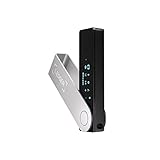
- Effortlessly build your crypto portfolio via the all in one Ledger Wallet app: buy, sell, send, receive, swap, stake and more across popular blockchains. 15,000+ coins & tokens in a single dashboard. Keep a close eye on the market. Compare service providers. Track performance. Get timely alerts. Build your portfolio with confidence.
- Effortlessly build your crypto portfolio via the all in one Ledger Wallet app: buy, sell, send, receive, swap, stake and more across popular blockchains. 15,000+ coins & tokens in a single dashboard. Keep a close eye on the market. Compare service providers. Track performance. Get timely alerts. Build your portfolio with confidence.
- Enjoy Bluetooth connectivity, iOS access, and hours of battery use with this mobile-first, secure backup signer. Freedom you can depend on.
- Genuine Check: confirm your signer is authentic during setup with the Ledger Wallet app.
- Protect your signer: keep it in mint condition at all times with a bespoke Pod or Case to avoid scratches and everyday wear and tear.
Ideal User Profiles and Risk Alignment
Beginner wallets are best suited for users with smaller balances, infrequent transactions, or limited exposure to DeFi and NFTs. Their primary advantage is ease of use, though this comes with greater reliance on interface trust and user vigilance against phishing.
Intermediate users participating regularly in staking, swaps, or NFT marketplaces benefit from wallets that balance usability with increased transparency. These users typically gain value from clearer transaction data without fully committing to complex custody setups.
Advanced wallets and hardware-based custody align with users managing larger balances, engaging in complex smart contract interactions, or operating across multiple wallets. For these profiles, reduced convenience is an acceptable trade-off for stronger isolation and control.
How to Choose the Right Solana Wallet for You: Practical Recommendations, Risk Scenarios, and Self-Custody Best Practices
Selecting a Solana wallet is ultimately a risk management decision rather than a feature comparison exercise. Each wallet type embeds assumptions about user behavior, threat exposure, and acceptable trade-offs between convenience and control. Understanding these assumptions allows users to align wallet choice with actual usage patterns, rather than aspirational ones.
The Tool Desk
Outbyte Driver Updater FREEScan for outdated or missing drivers - takes under a minuteDriver Scan →Outbyte PC Repair FREERepair Windows errors before they cause bigger problemsFix Now →This section translates the earlier distinctions between beginner, intermediate, and advanced wallets into concrete decision criteria. It also outlines common failure scenarios and the self-custody practices that mitigate them, regardless of wallet brand.
Aligning Wallet Choice With Transaction Behavior and Asset Exposure
The most important variable is how frequently transactions are signed. Wallets optimized for daily interaction prioritize speed and interface simplicity, increasing exposure to phishing, malicious approvals, and interface-layer exploits. This risk compounds as transaction volume increases.
Asset concentration is the second critical factor. Holding a larger balance in a single hot wallet (a wallet connected to the internet) amplifies the impact of a single failure. Users managing higher-value positions benefit from separating spending wallets from long-term storage wallets, even if both operate within the Solana ecosystem.
A practical framework is to treat wallets as purpose-specific tools. One wallet may handle swaps and NFTs, another may be reserved for staking, and a hardware-backed wallet may store assets intended to remain inactive for extended periods.
Quick wins for a faster PC:
Clear out junk files and repair common Windows errorsFree Scan →Scan for outdated or missing drivers - takes under a minuteDriver Scan →Repair Windows errors before they cause bigger problemsFix Now →Common Risk Scenarios and How Wallet Design Influences Outcomes
Phishing remains the dominant threat vector for Solana users. Malicious websites imitate legitimate applications and prompt users to sign transactions that drain assets. Wallets that clearly display program IDs (unique identifiers for Solana smart contracts) and transaction intent reduce, but do not eliminate, this risk.
Smart contract risk arises when interacting with DeFi protocols or NFT minting programs. Once a transaction is signed, execution is irreversible. Wallets that expose detailed transaction data and account permissions help users recognize unexpected behavior, while abstracted interfaces may conceal critical details.
Device compromise represents a separate category of risk. Malware, clipboard hijackers, and browser extensions can intercept or manipulate wallet interactions. Hardware wallets mitigate this by isolating private keys, ensuring that transaction approval occurs on a trusted physical device rather than the host system.
Mobile Convenience Versus Security Boundaries
Mobile wallets increase accessibility but collapse multiple trust assumptions into a single device. The smartphone becomes the wallet, authenticator, and transaction signer simultaneously. This concentration increases risk if the device is lost, compromised, or backed up insecurely.
Biometric authentication improves usability but does not replace cryptographic security. Fingerprints and facial recognition control access to the device, not ownership of the private key itself. If recovery phrases are stored insecurely or synced to cloud backups, biometric protection becomes irrelevant.
Users relying on mobile wallets should limit stored balances and avoid using the same device for untrusted applications. Treating mobile wallets as operational tools rather than vaults materially reduces downside risk.
Private Keys, Recovery Phrases, and the Reality of Self-Custody
A private key is the cryptographic secret that proves ownership of assets on Solana. Wallet software merely manages this key; it does not replace it. Control over the private key equals control over the funds, without recourse.
Recovery phrases, also known as seed phrases, are human-readable representations of private keys. Anyone with access to the phrase can recreate the wallet on another device. This makes secure offline storage non-negotiable.
What’s actually slowing this PC down?
Pick the symptom - the matching free tool is one click away.
Best practice is to store recovery phrases offline, written or engraved, and geographically separated from primary devices. Digital storage, screenshots, email drafts, or cloud notes introduce silent but severe risk.
Practical Wallet Selection Recommendations by Risk Profile
For beginners with limited balances, a reputable software wallet with a strong track record and clear transaction prompts is appropriate. The emphasis should be on learning transaction mechanics and recognizing legitimate program interactions, not maximizing features.
Users regularly engaging with DeFi, staking, or NFT platforms benefit from wallets that expose transaction details and allow easy connection to hardware devices. This combination preserves usability while adding a layer of key isolation.
For users holding significant value or operating across multiple accounts, hardware-backed wallets are the logical foundation. Software wallets then function as interfaces rather than custodians, reducing reliance on any single application’s security model.
Final Considerations: Wallets as Security Systems, Not Products
No Solana wallet is inherently “best” across all contexts. Each represents a security system with defined strengths, weaknesses, and assumptions about user behavior. Misalignment between wallet design and actual usage is the root cause of most losses.
Effective self-custody requires deliberate friction, intentional asset segregation, and disciplined key management. Convenience should be treated as a variable to be minimized where risk is highest.
By selecting wallets based on realistic behavior, understanding common failure modes, and respecting the finality of on-chain transactions, Solana users can significantly reduce preventable losses while maintaining full control over their assets.
Quick Recap
Product prices and availability are accurate as of the date/time indicated and are subject to change. Any price and availability information displayed on Amazon at the time of purchase will apply.
Free tools Windows power users keep installed
One-click scans. No signup required.